Open-source RightAI Tools Directory
  • Discover AI
  • Submit
  • Startup
  • Blog
Open-source RightAI Tools Directory
Discover the best AI tools of 2025 with the RightAI Tools Directory!

Friend Links

AI Anime GeneratorToolsApp AI

Support

Tap4
Privacy policyTerms & ConditionsContact Us
Loading...
loading...

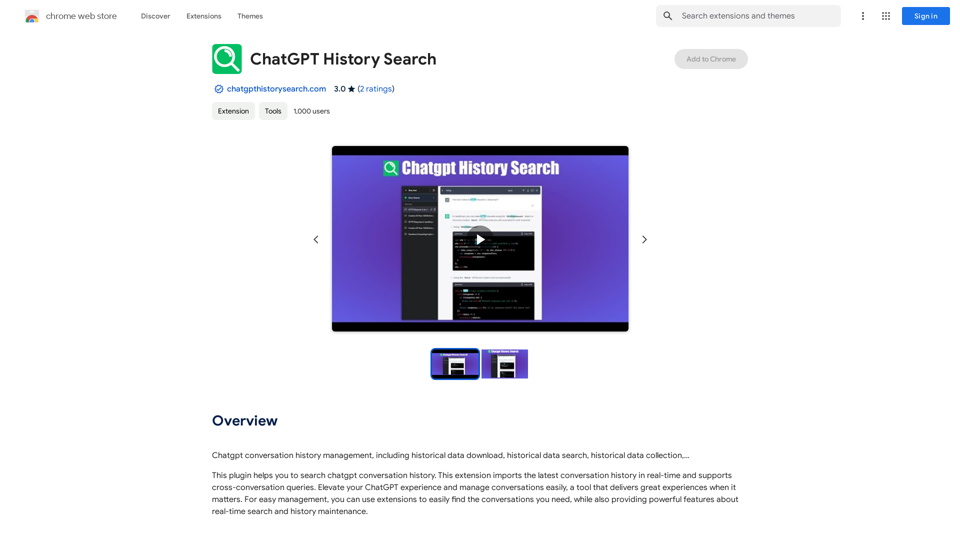
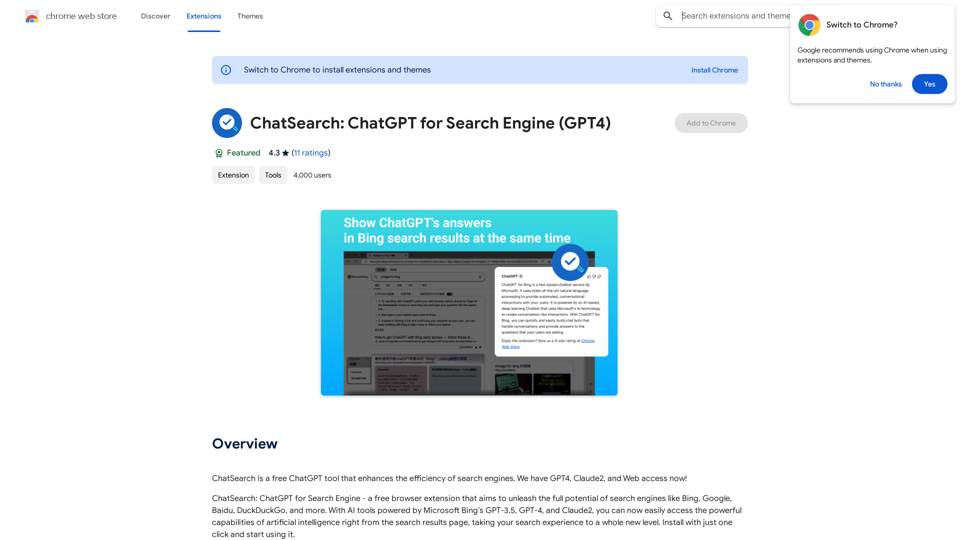
ChatSearch: ChatGPT for Search Engine (GPT-4)

ChatSearch is a free ChatGPT tool that makes search engines more efficient. It now has GPT4, Claude2, and access to the web!
Visit Website
ChatSearch: ChatGPT for Search Engine (GPT-4)
Visit Website

Introduction

ChatSearch is a free ChatGPT tool that enhances search engine efficiency by integrating AI-powered answers directly into search results. It leverages Microsoft Bing's GPT-3.5, GPT-4, and Claude2 models to provide users with advanced artificial intelligence capabilities, elevating the search experience to new heights.

Feature

Enhanced Search Results

Integrates ChatGPT's answers into any search engine, improving the quality and relevance of search results.

Free and Unrestricted Access

Available for use without any cost, restrictions, or account registration requirements.

Instant AI Interaction

Users can immediately start chatting with ChatGPT by clicking the plugin button within search results.

Expanded Model Support

In addition to GPT-3.5, ChatSearch offers access to GPT-4 and Claude2, enhancing information accuracy and diversity.

Advanced Content Summarization

Utilizes ChatGPT or Claude2's powerful summarization capabilities for efficient web content analysis.

Improved Internet Connectivity

Eliminates information gaps by providing real-time, accurate web information.

User-Friendly Interface

Simple three-step process to start using ChatSearch:

  1. Choose an API type (Developer API recommended)
  2. Search questions on various engines
  3. View ChatGPT-generated answers or start chatting directly

FAQ

Is ChatSearch really free?

Yes, ChatSearch is completely free to use, with no hidden costs or registration requirements.

What is the relationship between ChatSearch and ChatGPT?

ChatSearch is an AI tool developed based on the ChatGPT model, leveraging its powerful capabilities to enhance search experiences.

Which AI models does ChatSearch support?

ChatSearch currently supports GPT-3.5, GPT-4, and Claude2 models, with plans to integrate more large language models in the future.

Related Websites

Overcome Copilot AI Message Limit, Export Chats to JSON File: TopicsGPT

This is a tool to help you work around the message limit in Copilot AI and export your conversations to a JSON file. 

Here's how it works:

* Extend Your Conversations: TopicsGPT allows you to continue your conversations with Copilot AI beyond the usual message limit. 

* Save Your History: Export your entire chat history with Copilot AI as a structured JSON file. This makes it easy to review past interactions, analyze your conversations, or even use the data for other purposes.

Benefits:

* No More Interruptions: Keep your creative flow going without worrying about hitting the message limit.
* Organized Data:  Have a clear and organized record of your conversations with Copilot AI.
* Flexibility: Use the exported JSON data for your own projects or analysis. 


Let me know if you have any questions!
View Detail

Overcome Copilot AI Message Limit, Export Chats to JSON File: TopicsGPT This is a tool to help you work around the message limit in Copilot AI and export your conversations to a JSON file. Here's how it works: * Extend Your Conversations: TopicsGPT allows you to continue your conversations with Copilot AI beyond the usual message limit. * Save Your History: Export your entire chat history with Copilot AI as a structured JSON file. This makes it easy to review past interactions, analyze your conversations, or even use the data for other purposes. Benefits: * No More Interruptions: Keep your creative flow going without worrying about hitting the message limit. * Organized Data: Have a clear and organized record of your conversations with Copilot AI. * Flexibility: Use the exported JSON data for your own projects or analysis. Let me know if you have any questions!

Overcome Copilot AI Message Limit, Export Chats to JSON File: TopicsGPT This is a tool to help you work around the message limit in Copilot AI and export your conversations to a JSON file. Here's how it works: * Extend Your Conversations: TopicsGPT allows you to continue your conversations with Copilot AI beyond the usual message limit. * Save Your History: Export your entire chat history with Copilot AI as a structured JSON file. This makes it easy to review past interactions, analyze your conversations, or even use the data for other purposes. Benefits: * No More Interruptions: Keep your creative flow going without worrying about hitting the message limit. * Organized Data: Have a clear and organized record of your conversations with Copilot AI. * Flexibility: Use the exported JSON data for your own projects or analysis. Let me know if you have any questions!

Bypass Copilot's Message Limit and Move Conversations * Get around the message limit in Microsoft's Copilot: Find ways to exceed the character or message count restrictions within Copilot. * Transfer conversations to new chats: Move existing conversations from one chat space to another. Export AI Chat Histories * Download chat history from any AI platform: Save your conversations with various AI systems as JSON files.

193.90 M
AiJobster - Job Search in AI Companies and Remote AI Jobs
View Detail

AiJobster - Job Search in AI Companies and Remote AI Jobs

AiJobster - Job Search in AI Companies and Remote AI Jobs

AiJobster - Your premier platform for job search in AI companies and remote jobs across top AI-driven organizations. Discover your future in tech today!

694
Get ChatGPT for Free with Google

You can now access ChatGPT, a powerful language model, for free with Google. Here's how:

Method 1: Google Colab

* Open Google Colab ([colab.research.google.com](http://colab.research.google.com))
* Create a new notebook
* Install the `transformers` library by running `!pip install transformers`
* Import the `transformers` library and load the ChatGPT model using `from transformers import AutoModelForCausalLM, AutoTokenizer; model = AutoModelForCausalLM.from_pretrained('chatgpt'); tokenizer = AutoTokenizer.from_pretrained('chatgpt')`
* Use the model to generate text using `input_text = "Your input here"; inputs = tokenizer.encode_plus(input_text, return_tensors='pt', max_length=1024, padding='max_length', truncation=True); output = model(inputs['input_ids'], attention_mask=inputs['attention_mask']); print(tokenizer.decode(output.logits[0], skip_special_tokens=True))`

Method 2: Google Apps Script

* Open Google Apps Script ([script.google.com](http://script.google.com))
* Create a new project
* Install the `transformers` library by running `npm install transformers`
* Import the `transformers` library and load the ChatGPT model using `const { AutoModelForCausalLM, AutoTokenizer } = require('transformers'); const model = new AutoModelForCausalLM('chatgpt'); const tokenizer = new AutoTokenizer('chatgpt');`
* Use the model to generate text using `const inputText = "Your input here"; const inputs = tokenizer.encodePlus(inputText, { return_tensors: 'pt', max_length: 1024, padding: 'max_length', truncation: true }); const output = model(inputs.inputIds, inputs.attentionMask); console.log(tokenizer.decode(output.logits[0], { skipSpecialTokens: true }));`

Note: These methods require some technical knowledge and may have limitations compared to the original ChatGPT model.
View Detail

Get ChatGPT for Free with Google You can now access ChatGPT, a powerful language model, for free with Google. Here's how: Method 1: Google Colab * Open Google Colab ([colab.research.google.com](http://colab.research.google.com)) * Create a new notebook * Install the `transformers` library by running `!pip install transformers` * Import the `transformers` library and load the ChatGPT model using `from transformers import AutoModelForCausalLM, AutoTokenizer; model = AutoModelForCausalLM.from_pretrained('chatgpt'); tokenizer = AutoTokenizer.from_pretrained('chatgpt')` * Use the model to generate text using `input_text = "Your input here"; inputs = tokenizer.encode_plus(input_text, return_tensors='pt', max_length=1024, padding='max_length', truncation=True); output = model(inputs['input_ids'], attention_mask=inputs['attention_mask']); print(tokenizer.decode(output.logits[0], skip_special_tokens=True))` Method 2: Google Apps Script * Open Google Apps Script ([script.google.com](http://script.google.com)) * Create a new project * Install the `transformers` library by running `npm install transformers` * Import the `transformers` library and load the ChatGPT model using `const { AutoModelForCausalLM, AutoTokenizer } = require('transformers'); const model = new AutoModelForCausalLM('chatgpt'); const tokenizer = new AutoTokenizer('chatgpt');` * Use the model to generate text using `const inputText = "Your input here"; const inputs = tokenizer.encodePlus(inputText, { return_tensors: 'pt', max_length: 1024, padding: 'max_length', truncation: true }); const output = model(inputs.inputIds, inputs.attentionMask); console.log(tokenizer.decode(output.logits[0], { skipSpecialTokens: true }));` Note: These methods require some technical knowledge and may have limitations compared to the original ChatGPT model.

Get ChatGPT for Free with Google You can now access ChatGPT, a powerful language model, for free with Google. Here's how: Method 1: Google Colab * Open Google Colab ([colab.research.google.com](http://colab.research.google.com)) * Create a new notebook * Install the `transformers` library by running `!pip install transformers` * Import the `transformers` library and load the ChatGPT model using `from transformers import AutoModelForCausalLM, AutoTokenizer; model = AutoModelForCausalLM.from_pretrained('chatgpt'); tokenizer = AutoTokenizer.from_pretrained('chatgpt')` * Use the model to generate text using `input_text = "Your input here"; inputs = tokenizer.encode_plus(input_text, return_tensors='pt', max_length=1024, padding='max_length', truncation=True); output = model(inputs['input_ids'], attention_mask=inputs['attention_mask']); print(tokenizer.decode(output.logits[0], skip_special_tokens=True))` Method 2: Google Apps Script * Open Google Apps Script ([script.google.com](http://script.google.com)) * Create a new project * Install the `transformers` library by running `npm install transformers` * Import the `transformers` library and load the ChatGPT model using `const { AutoModelForCausalLM, AutoTokenizer } = require('transformers'); const model = new AutoModelForCausalLM('chatgpt'); const tokenizer = new AutoTokenizer('chatgpt');` * Use the model to generate text using `const inputText = "Your input here"; const inputs = tokenizer.encodePlus(inputText, { return_tensors: 'pt', max_length: 1024, padding: 'max_length', truncation: true }); const output = model(inputs.inputIds, inputs.attentionMask); console.log(tokenizer.decode(output.logits[0], { skipSpecialTokens: true }));` Note: These methods require some technical knowledge and may have limitations compared to the original ChatGPT model.

How to Add ChatGPT to All Google Searches ===================================================== Step 1: Create a Custom Search Engine -------------------------------------- * Go to the [Google Custom Search Engine](https://cse.google.com/) website and sign in with your Google account. * Click on the "New Search Engine" button. * Fill in the required information, such as the name and description of your search engine. * Click on the "Create" button. Step 2: Add ChatGPT to the Search Engine ----------------------------------------- * In the "Setup" tab, click on the "Add" button next to "Sites to search". * Enter the following URL: `https://chat.openai.com/` * Click on the "Add" button. Step 3: Configure the Search Engine -------------------------------------- * In the "Setup" tab, click on the "Edit" button next to "Search engine keywords". * Add the following keywords: `ChatGPT` * Click on the "Save" button. Step 4: Get the Search Engine Code ------------------------------------- * In the "Setup" tab, click on the "Get code" button. * Copy the HTML code provided. Step 5: Add the Search Engine to Your Browser ------------------------------------------------ * Open your browser and go to the "Settings" or "Options" page. * Look for the "Search engine" or "Default search engine" option. * Click on the "Add" or "Manage search engines" button. * Paste the HTML code you copied earlier. * Click on the "Add" or "Save" button. You're Done! =============== Now, whenever you search on Google, ChatGPT will be included in the search results. You can also use the custom search engine URL provided by Google to search directly.

193.90 M
Essence - Read Smarter
View Detail

Essence - Read Smarter

Essence - Read Smarter

Brilliant summaries in a single click. Well written AI summaries in both text and audio. Summarize articles in any language.

193.90 M
SearchAISearchAI
View Detail

SearchAISearchAI

SearchAISearchAI

Adds a search function to the start page that incorporates a text-based AI, allowing for instant dialogue and intelligent responses.

193.90 M
Grow Your OnlyFans Agency - Supercreator Tools for OnlyFans
View Detail

Grow Your OnlyFans Agency - Supercreator Tools for OnlyFans

Grow Your OnlyFans Agency - Supercreator Tools for OnlyFans

CRM tools and automation bots for OnlyFans management agencies. Improve your chat interactions and promotions, and upsell more pay-per-view (PPV) content with the OnlyFans extension.

248.97 K
Automate Job Applications | JobCopilot
View Detail

Automate Job Applications | JobCopilot

Automate Job Applications | JobCopilot

Get 10X more Job Interviews with JobCopilot. Automatically apply to jobs from 50,000+ companies worldwide. Try it today!

576.84 K
AMISSU
View Detail

AMISSU

AMISSU

AMIS Schedule Unitizer: Automatic Schedule Planner for University Class Enrollment

193.90 M