Open-source RightAI Tools Directory
  • Discover AI
  • Submit
  • Startup
  • Blog
Open-source RightAI Tools Directory
Discover the best AI tools of 2025 with the RightAI Tools Directory!

Friend Links

AI Anime GeneratorToolsApp AI

Support

Tap4
Privacy policyTerms & ConditionsContact Us
Loading...
loading...

YGPT: YouTube GPT

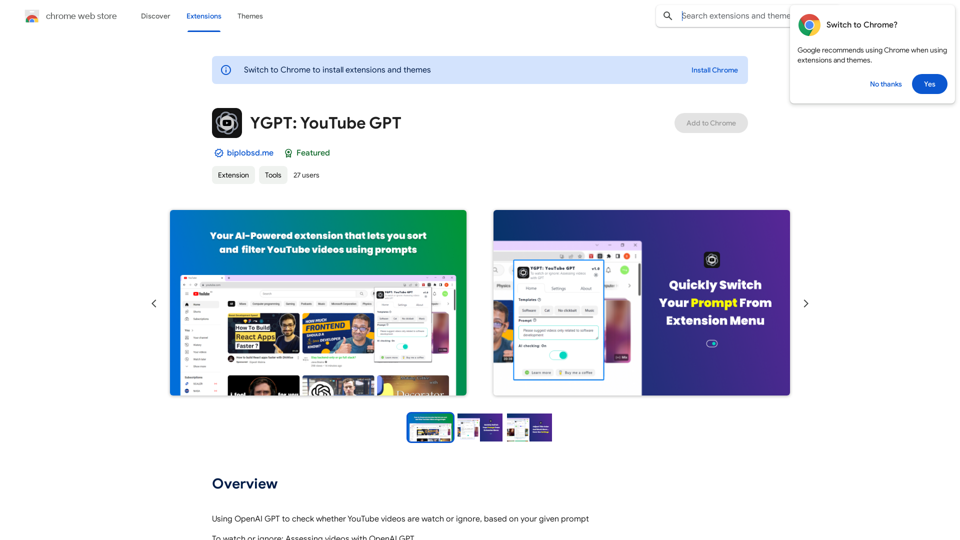
Using OpenAI's GPT to determine if YouTube videos have been watched or ignored, based on your instructions.
Visit Website
YGPT: YouTube GPT
Visit Website

Introduction

YGPT is an innovative Chrome extension that leverages OpenAI's GPT technology to enhance your YouTube browsing experience. It analyzes video titles based on user-defined prompts, helping you quickly identify content that matches your interests. This AI-driven tool streamlines the process of finding relevant videos, saving time and improving your overall YouTube experience.

Feature

AI-Powered Video Assessment

YGPT utilizes the OpenAI API to evaluate video titles based on user-provided prompts, offering intelligent recommendations on which videos to watch or ignore.

Customizable Visual Cues

  • 🌈 Video titles are color-coded based on your prompt
  • 🎨 Option to modify title colors for personalized visual feedback

Flexible Prompt Management

  • 📋 20 templates for saving, editing, and quickly switching prompts
  • Easily adapt your content filtering criteria

User-Friendly Interface

  • ⚙️ One-click AI toggle button for turning the feature on/off
  • 🌗 Dark/light theme mode for comfortable viewing

Advanced Customization

  • 🛠️ Manually update XPaths for future fixes
  • 🧹 AI Tune feature to remove uninteresting videos from your homepage

Easy Setup Process

  1. Obtain OpenAI API key from https://platform.openai.com/api-keys
  2. Set up usage limits
  3. Open YGPT extension and input API key in settings
  4. Activate AI checking on the Home tab

FAQ

How do I set up my OpenAI API key?

  1. Visit https://platform.openai.com/api-keys
  2. Generate your API key
  3. Set up usage limits
  4. Open YGPT extension
  5. Navigate to settings > OpenAI API key box
  6. Input your API key

What are the main benefits of using YGPT?

  • Intelligent content filtering based on personal preferences
  • Time-saving video assessment
  • Customizable visual cues for easy content identification
  • Flexible prompt management for varied interests
  • Improved overall YouTube browsing experience

How can I report bugs or issues with YGPT?

  • Provide a detailed description and screenshots of the problem
  • Report issues on the GitHub issue tab: https://github.com/biplobsd/ygpt/issues
  • For more information, visit: https://biplobsd.me/apps/view/ygpt.md

Latest Traffic Insights

  • Monthly Visits

    193.90 M

  • Bounce Rate

    56.27%

  • Pages Per Visit

    2.71

  • Time on Site(s)

    115.91

  • Global Rank

    -

  • Country Rank

    -

Recent Visits

Traffic Sources

  • Social Media:
    0.48%
  • Paid Referrals:
    0.55%
  • Email:
    0.15%
  • Referrals:
    12.81%
  • Search Engines:
    16.21%
  • Direct:
    69.81%
More Data

Related Websites

BrainBuddy: AI Assistant with ChatGPT & Bard
View Detail

BrainBuddy: AI Assistant with ChatGPT & Bard

BrainBuddy: AI Assistant with ChatGPT & Bard

BrainBuddy is an All-in-one AI-powered Sidebar Assistant, with ChatGPT, Bard, & more! ⚡

193.90 M
Ready - Author Tool Hub
View Detail

Ready - Author Tool Hub

Ready - Author Tool Hub

Tá Pronto - Author Tool Hub is a collection of tools for digital content creators.

193.90 M
Liner | AI Copilot on Your Workspace, Powered by ChatGPT
View Detail

Liner | AI Copilot on Your Workspace, Powered by ChatGPT

Liner | AI Copilot on Your Workspace, Powered by ChatGPT

Try Liner. Boost productivity and optimize your workflow with AI Copilot by summarizing articles, generating code, and composing emails.

6.20 M
Suki Assistant
View Detail

Suki Assistant

Suki Assistant

Suki: An AI-powered clinical documentation app for your Chrome browser.

193.90 M
Hints Playbook AI

This playbook provides guidance on how to effectively use hints to improve the performance of AI models.

Understanding Hints

Hints are additional pieces of information provided to an AI model to guide its output. They can take various forms, such as:

* Textual prompts: Direct instructions or suggestions.
* Examples: Demonstrating the desired output format or style.
* Constraints: Specifying limitations or boundaries for the response.

Types of Hints

* Zero-shot: Hints are provided without any examples.
* Few-shot: A small number of examples are given to illustrate the desired output.
* Fine-tuning: Hints are incorporated into the training data to adjust the model's behavior.

Best Practices for Using Hints

* Be specific: Clearly articulate what you want the AI to do.
* Provide context: Give the model enough background information to understand the task.
* Use examples: Demonstrate the desired output format or style.
* Iterate and refine: Experiment with different types and formats of hints to find what works best.
* Evaluate results: Assess the quality of the AI's output and adjust hints accordingly.
View Detail

Hints Playbook AI This playbook provides guidance on how to effectively use hints to improve the performance of AI models. Understanding Hints Hints are additional pieces of information provided to an AI model to guide its output. They can take various forms, such as: * Textual prompts: Direct instructions or suggestions. * Examples: Demonstrating the desired output format or style. * Constraints: Specifying limitations or boundaries for the response. Types of Hints * Zero-shot: Hints are provided without any examples. * Few-shot: A small number of examples are given to illustrate the desired output. * Fine-tuning: Hints are incorporated into the training data to adjust the model's behavior. Best Practices for Using Hints * Be specific: Clearly articulate what you want the AI to do. * Provide context: Give the model enough background information to understand the task. * Use examples: Demonstrate the desired output format or style. * Iterate and refine: Experiment with different types and formats of hints to find what works best. * Evaluate results: Assess the quality of the AI's output and adjust hints accordingly.

Hints Playbook AI This playbook provides guidance on how to effectively use hints to improve the performance of AI models. Understanding Hints Hints are additional pieces of information provided to an AI model to guide its output. They can take various forms, such as: * Textual prompts: Direct instructions or suggestions. * Examples: Demonstrating the desired output format or style. * Constraints: Specifying limitations or boundaries for the response. Types of Hints * Zero-shot: Hints are provided without any examples. * Few-shot: A small number of examples are given to illustrate the desired output. * Fine-tuning: Hints are incorporated into the training data to adjust the model's behavior. Best Practices for Using Hints * Be specific: Clearly articulate what you want the AI to do. * Provide context: Give the model enough background information to understand the task. * Use examples: Demonstrate the desired output format or style. * Iterate and refine: Experiment with different types and formats of hints to find what works best. * Evaluate results: Assess the quality of the AI's output and adjust hints accordingly.

Hints automatically updates CRM fields from video calls. Keep your CRM up-to-date.

193.90 M
Plainly - Automate video creation
View Detail

Plainly - Automate video creation

Plainly - Automate video creation

Plainly is a simple-to-use video automation software. Create automated video creation workflows and generate 1000s of videos in clicks

81.82 K
ChatGPT - Google, Bing, Baidu, More
View Detail

ChatGPT - Google, Bing, Baidu, More

ChatGPT - Google, Bing, Baidu, More

ChatGPT-powered search results

193.90 M
Please provide the text you want to translate into English.
View Detail

Please provide the text you want to translate into English.

Please provide the text you want to translate into English.

This extension empowers users with AI, swiftly producing answers, replies, and essays on any topic.

193.90 M