Open-source RightAI Tools Directory
  • Discover AI
  • Submit
  • Startup
  • Blog
Open-source RightAI Tools Directory
Discover the best AI tools of 2025 with the RightAI Tools Directory!

Friend Links

AI Anime GeneratorToolsApp AI

Support

Tap4
Privacy policyTerms & ConditionsContact Us
Loading...
loading...

Reviewer Recommender

Reviewer Recommender
Visit Website
Reviewer Recommender
Visit Website

Introduction

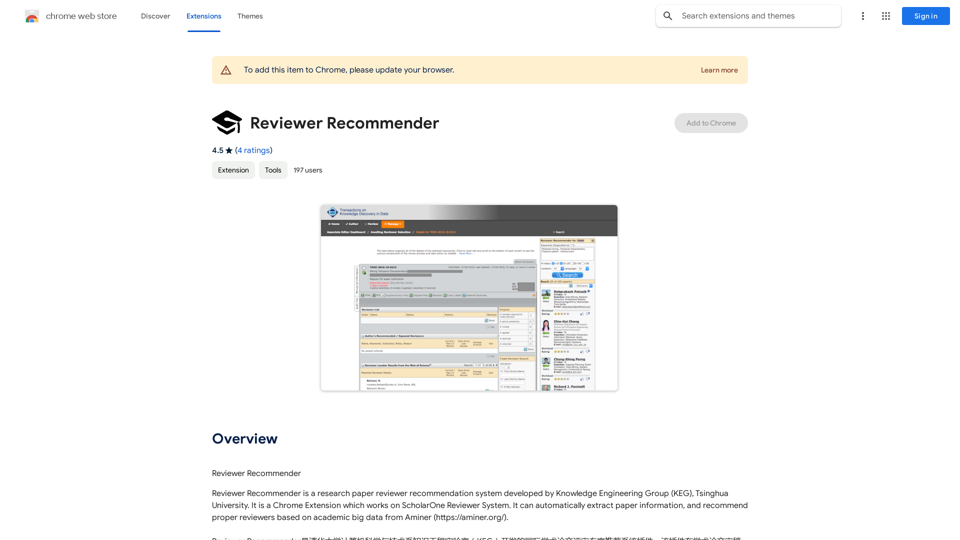
Reviewer Recommender is a Chrome Extension developed by the Knowledge Engineering Group (KEG) at Tsinghua University. It integrates with the ScholarOne Reviewer System to automate the process of recommending reviewers for research papers. By leveraging academic big data from Aminer, this tool streamlines the reviewer selection process for journal editors and academic institutions.

Feature

Automatic Paper Information Extraction

The extension seamlessly extracts paper information, including author details, directly from the ScholarOne Reviewer System. This feature eliminates manual data entry and reduces the potential for errors.

Intelligent Reviewer Recommendation

Utilizing Aminer's extensive academic database, Reviewer Recommender suggests the most appropriate reviewers for each paper. This data-driven approach ensures a more efficient and accurate reviewer selection process.

ScholarOne Integration

Designed specifically for the ScholarOne Reviewer System, this extension seamlessly integrates into existing workflows, enhancing productivity without disrupting established processes.

User-Friendly Interface

As a Chrome Extension, Reviewer Recommender offers a simple and intuitive user experience. It can be easily installed from the Chrome Web Store and used immediately with minimal setup.

Cost-Effective Solution

Reviewer Recommender is available as a free extension, making it an accessible tool for academic institutions and journal editors of all sizes.

FAQ

Is Reviewer Recommender a paid extension?

No, Reviewer Recommender is completely free to use. There are no subscription fees or hidden costs associated with the extension.

How does Reviewer Recommender work?

Reviewer Recommender utilizes academic big data from Aminer to analyze paper information and recommend suitable reviewers. It automatically extracts paper details from ScholarOne and uses this information to suggest the most appropriate reviewers based on their expertise and research areas.

Can I use Reviewer Recommender with other reviewer systems?

No, Reviewer Recommender is specifically designed to work with the ScholarOne Reviewer System. It is not compatible with other reviewer systems at this time.

Related Websites
ChatBot AI - ChatGPT & Claude & Bard & BingOverviewChatBot AI
View Detail

ChatBot AI - ChatGPT & Claude & Bard & BingOverviewChatBot AI

ChatBot AI - ChatGPT & Claude & Bard & BingOverviewChatBot AI

ChatBot is a copilot that uses ChatGPT, Bing, Claude, Bard, and more to answer questions like translations, emails, Q&As, and more.

193.90 M
Print Perfect AI Text Editor
View Detail

Print Perfect AI Text Editor

Print Perfect AI Text Editor

Print Perfect helps you correct and edit your text to make it sound like it was written by a native English speaker.

193.90 M
ScribeMD - AI Medical Scribe
View Detail

ScribeMD - AI Medical Scribe

ScribeMD - AI Medical Scribe

A Chrome extension powered by artificial intelligence, designed for healthcare professionals to make note-taking easier and more efficient.

193.90 M
GPT Netherlands Assistant
View Detail

GPT Netherlands Assistant

GPT Netherlands Assistant

A free, ad-free, fast add-on for ChatGPT on the German community page with links to top websites.

193.90 M
WebBites - Browser Extension
View Detail

WebBites - Browser Extension

WebBites - Browser Extension

WebBites - Save and manage all your bookmarks with AI.

193.90 M
UniGPT
UniGPT is a type of artificial intelligence (AI) model that combines the capabilities of both Unified and Generative models.
View Detail

UniGPT UniGPT is a type of artificial intelligence (AI) model that combines the capabilities of both Unified and Generative models.

UniGPT UniGPT is a type of artificial intelligence (AI) model that combines the capabilities of both Unified and Generative models.

UniGPT is a platform that unites all GPTs in one place, providing access to advanced AI technologies

0
Coursera Summary with ChatGPT and Take Notes
=====================================================

What is Coursera?

Coursera is an online learning platform that partners with top universities and organizations to offer courses and degree programs in a wide range of fields.

What is ChatGPT?

ChatGPT is a conversational AI tool that can understand and respond to human input in a human-like way. It can be used to generate text, answer questions, and even create content.

How to Use ChatGPT for Coursera Summary?

You can use ChatGPT to summarize Coursera courses by:

* Providing the course material or lecture notes to ChatGPT
* Asking ChatGPT to summarize the key points or main ideas
* Reviewing and editing the summary generated by ChatGPT

Benefits of Using ChatGPT for Coursera Summary

Using ChatGPT for Coursera summary can help you:

* Save time by automating the summarization process
* Improve understanding and retention of course material
* Focus on key concepts and ideas
* Enhance learning experience

How to Take Notes with ChatGPT?

You can use ChatGPT to take notes by:

* Providing the course material or lecture notes to ChatGPT
* Asking ChatGPT to generate notes or key points
* Reviewing and editing the notes generated by ChatGPT
* Organizing and structuring the notes for easy reference

Benefits of Using ChatGPT for Taking Notes

Using ChatGPT for taking notes can help you:

* Save time by automating the note-taking process
* Improve organization and structure of notes
* Enhance understanding and retention of course material
* Focus on key concepts and ideas
View Detail

Coursera Summary with ChatGPT and Take Notes ===================================================== What is Coursera? Coursera is an online learning platform that partners with top universities and organizations to offer courses and degree programs in a wide range of fields. What is ChatGPT? ChatGPT is a conversational AI tool that can understand and respond to human input in a human-like way. It can be used to generate text, answer questions, and even create content. How to Use ChatGPT for Coursera Summary? You can use ChatGPT to summarize Coursera courses by: * Providing the course material or lecture notes to ChatGPT * Asking ChatGPT to summarize the key points or main ideas * Reviewing and editing the summary generated by ChatGPT Benefits of Using ChatGPT for Coursera Summary Using ChatGPT for Coursera summary can help you: * Save time by automating the summarization process * Improve understanding and retention of course material * Focus on key concepts and ideas * Enhance learning experience How to Take Notes with ChatGPT? You can use ChatGPT to take notes by: * Providing the course material or lecture notes to ChatGPT * Asking ChatGPT to generate notes or key points * Reviewing and editing the notes generated by ChatGPT * Organizing and structuring the notes for easy reference Benefits of Using ChatGPT for Taking Notes Using ChatGPT for taking notes can help you: * Save time by automating the note-taking process * Improve organization and structure of notes * Enhance understanding and retention of course material * Focus on key concepts and ideas

Coursera Summary with ChatGPT and Take Notes ===================================================== What is Coursera? Coursera is an online learning platform that partners with top universities and organizations to offer courses and degree programs in a wide range of fields. What is ChatGPT? ChatGPT is a conversational AI tool that can understand and respond to human input in a human-like way. It can be used to generate text, answer questions, and even create content. How to Use ChatGPT for Coursera Summary? You can use ChatGPT to summarize Coursera courses by: * Providing the course material or lecture notes to ChatGPT * Asking ChatGPT to summarize the key points or main ideas * Reviewing and editing the summary generated by ChatGPT Benefits of Using ChatGPT for Coursera Summary Using ChatGPT for Coursera summary can help you: * Save time by automating the summarization process * Improve understanding and retention of course material * Focus on key concepts and ideas * Enhance learning experience How to Take Notes with ChatGPT? You can use ChatGPT to take notes by: * Providing the course material or lecture notes to ChatGPT * Asking ChatGPT to generate notes or key points * Reviewing and editing the notes generated by ChatGPT * Organizing and structuring the notes for easy reference Benefits of Using ChatGPT for Taking Notes Using ChatGPT for taking notes can help you: * Save time by automating the note-taking process * Improve organization and structure of notes * Enhance understanding and retention of course material * Focus on key concepts and ideas

Automate Your Learning: Coursera Videos Transcript and Summary with ChatGPT ============================================================ Are you tired of manually taking notes while watching Coursera videos? Do you wish you had a summary of the video to review later? Look no further! With the power of ChatGPT, you can now generate transcripts and summaries of Coursera videos with ease. How it Works --------------- 1. Transcribe the Video: Use a transcription tool to convert the audio from the Coursera video into text. 2. Feed it to ChatGPT: Input the transcript into ChatGPT, and it will generate a concise summary of the video. 3. Review and Refine: Review the summary, refine it as needed, and you're good to go! Benefits ------------ * Save Time: No more manual note-taking or re-watching videos to understand the content. * Improve Retention: A summary of the video helps you retain information better and review it quickly. * Enhance Learning: Focus on understanding the concepts rather than taking notes. Get Started -------------- Try it out today and take your learning to the next level!

193.90 M
Integrating Copilot (Bing Chat)
View Detail

Integrating Copilot (Bing Chat)

Integrating Copilot (Bing Chat)

🗨️ Microsoft Copilot provides answers alongside Google search results.

193.90 M