Open-source RightAI Tools Directory
  • Discover AI
  • Submit
  • Startup
  • Blog
Open-source RightAI Tools Directory
Discover the best AI tools of 2025 with the RightAI Tools Directory!

Friend Links

AI Anime GeneratorToolsApp AI

Support

Tap4
Privacy policyTerms & ConditionsContact Us
Loading...
loading...

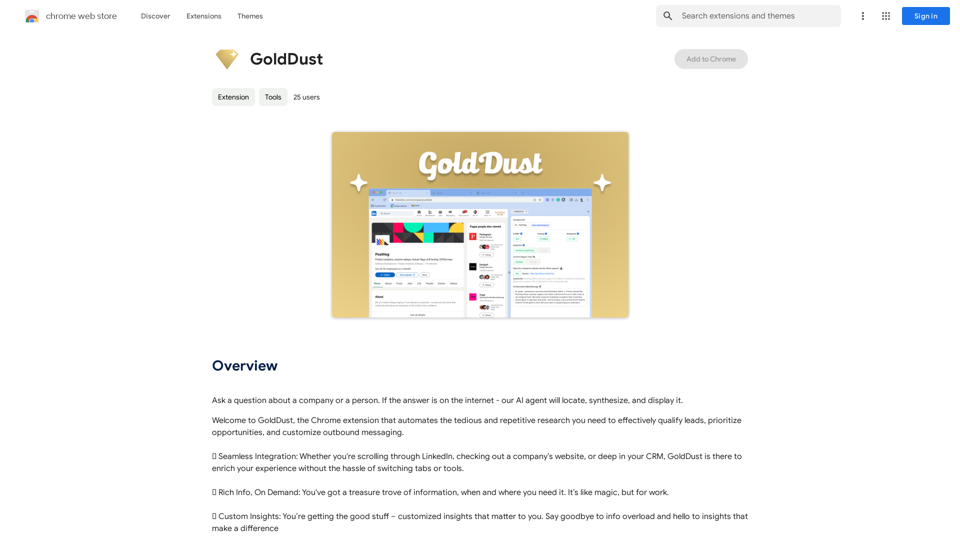
GoldDust

What is the founding date of Google?
Visit Website
GoldDust
Visit Website

Introduction

GoldDust is a Chrome extension designed to streamline and automate research processes. It helps users efficiently qualify leads, prioritize opportunities, and tailor outbound messaging. By offering seamless integration, on-demand rich information, and custom insights, GoldDust simplifies research tasks and provides users with essential information when they need it most.

Feature

Seamless Integration

GoldDust integrates effortlessly with various platforms such as LinkedIn, websites, and CRM systems. This integration enhances user experience by eliminating the need to switch between different tabs or tools.

Rich Information On Demand

Users can access a wealth of information instantly with GoldDust. The extension provides rich insights and data whenever and wherever needed, making research more efficient and comprehensive.

Custom Insights

GoldDust offers personalized insights tailored to individual user needs. This feature helps eliminate information overload by focusing on valuable data that makes a real difference in decision-making processes.

Easy Installation and Use

Installing and using GoldDust is straightforward. Once installed, the extension automatically enhances the research experience, providing users with necessary information for lead qualification, opportunity prioritization, and customized outbound messaging.

Free to Use

GoldDust is a free Chrome extension with no subscription fees or hidden costs. Users can enjoy all its features without any limitations, making it a valuable addition to their research toolkit.

FAQ

Is GoldDust free to use?

Yes, GoldDust is a completely free Chrome extension. There are no subscription fees or hidden costs associated with its use.

How does GoldDust work?

GoldDust works by seamlessly integrating with various platforms such as LinkedIn, websites, and CRM systems. It automatically provides rich information and custom insights to simplify the research process for users.

Can I customize the insights I receive from GoldDust?

Yes, GoldDust allows users to customize their insights. This feature enables you to focus on the information that is most relevant and valuable to your specific needs and goals.

What platforms does GoldDust integrate with?

GoldDust integrates with various platforms, including LinkedIn, websites, and CRM systems. This wide integration allows for a seamless research experience across different tools and platforms.

How can GoldDust benefit my research process?

GoldDust can significantly streamline your research process by automating tedious tasks, providing rich information on demand, and offering custom insights. This can save time and improve the efficiency of lead qualification, opportunity prioritization, and outbound messaging customization.

Related Websites
Coursnap - Summarizer for Long YouTube Videos
View Detail

Coursnap - Summarizer for Long YouTube Videos

Coursnap - Summarizer for Long YouTube Videos

Premier Summarizer for Courses, Lectures, and Long YouTube Videos.

193.90 M
Coursera Summary with ChatGPT and Take Notes
=====================================================

What is Coursera?

Coursera is an online learning platform that partners with top universities and organizations to offer courses and degree programs in a wide range of fields.

What is ChatGPT?

ChatGPT is a conversational AI tool that can understand and respond to human input in a human-like way. It can be used to generate text, answer questions, and even create content.

How to Use ChatGPT for Coursera Summary?

You can use ChatGPT to summarize Coursera courses by:

* Providing the course material or lecture notes to ChatGPT
* Asking ChatGPT to summarize the key points or main ideas
* Reviewing and editing the summary generated by ChatGPT

Benefits of Using ChatGPT for Coursera Summary

Using ChatGPT for Coursera summary can help you:

* Save time by automating the summarization process
* Improve understanding and retention of course material
* Focus on key concepts and ideas
* Enhance learning experience

How to Take Notes with ChatGPT?

You can use ChatGPT to take notes by:

* Providing the course material or lecture notes to ChatGPT
* Asking ChatGPT to generate notes or key points
* Reviewing and editing the notes generated by ChatGPT
* Organizing and structuring the notes for easy reference

Benefits of Using ChatGPT for Taking Notes

Using ChatGPT for taking notes can help you:

* Save time by automating the note-taking process
* Improve organization and structure of notes
* Enhance understanding and retention of course material
* Focus on key concepts and ideas
View Detail

Coursera Summary with ChatGPT and Take Notes ===================================================== What is Coursera? Coursera is an online learning platform that partners with top universities and organizations to offer courses and degree programs in a wide range of fields. What is ChatGPT? ChatGPT is a conversational AI tool that can understand and respond to human input in a human-like way. It can be used to generate text, answer questions, and even create content. How to Use ChatGPT for Coursera Summary? You can use ChatGPT to summarize Coursera courses by: * Providing the course material or lecture notes to ChatGPT * Asking ChatGPT to summarize the key points or main ideas * Reviewing and editing the summary generated by ChatGPT Benefits of Using ChatGPT for Coursera Summary Using ChatGPT for Coursera summary can help you: * Save time by automating the summarization process * Improve understanding and retention of course material * Focus on key concepts and ideas * Enhance learning experience How to Take Notes with ChatGPT? You can use ChatGPT to take notes by: * Providing the course material or lecture notes to ChatGPT * Asking ChatGPT to generate notes or key points * Reviewing and editing the notes generated by ChatGPT * Organizing and structuring the notes for easy reference Benefits of Using ChatGPT for Taking Notes Using ChatGPT for taking notes can help you: * Save time by automating the note-taking process * Improve organization and structure of notes * Enhance understanding and retention of course material * Focus on key concepts and ideas

Coursera Summary with ChatGPT and Take Notes ===================================================== What is Coursera? Coursera is an online learning platform that partners with top universities and organizations to offer courses and degree programs in a wide range of fields. What is ChatGPT? ChatGPT is a conversational AI tool that can understand and respond to human input in a human-like way. It can be used to generate text, answer questions, and even create content. How to Use ChatGPT for Coursera Summary? You can use ChatGPT to summarize Coursera courses by: * Providing the course material or lecture notes to ChatGPT * Asking ChatGPT to summarize the key points or main ideas * Reviewing and editing the summary generated by ChatGPT Benefits of Using ChatGPT for Coursera Summary Using ChatGPT for Coursera summary can help you: * Save time by automating the summarization process * Improve understanding and retention of course material * Focus on key concepts and ideas * Enhance learning experience How to Take Notes with ChatGPT? You can use ChatGPT to take notes by: * Providing the course material or lecture notes to ChatGPT * Asking ChatGPT to generate notes or key points * Reviewing and editing the notes generated by ChatGPT * Organizing and structuring the notes for easy reference Benefits of Using ChatGPT for Taking Notes Using ChatGPT for taking notes can help you: * Save time by automating the note-taking process * Improve organization and structure of notes * Enhance understanding and retention of course material * Focus on key concepts and ideas

Automate Your Learning: Coursera Videos Transcript and Summary with ChatGPT ============================================================ Are you tired of manually taking notes while watching Coursera videos? Do you wish you had a summary of the video to review later? Look no further! With the power of ChatGPT, you can now generate transcripts and summaries of Coursera videos with ease. How it Works --------------- 1. Transcribe the Video: Use a transcription tool to convert the audio from the Coursera video into text. 2. Feed it to ChatGPT: Input the transcript into ChatGPT, and it will generate a concise summary of the video. 3. Review and Refine: Review the summary, refine it as needed, and you're good to go! Benefits ------------ * Save Time: No more manual note-taking or re-watching videos to understand the content. * Improve Retention: A summary of the video helps you retain information better and review it quickly. * Enhance Learning: Focus on understanding the concepts rather than taking notes. Get Started -------------- Try it out today and take your learning to the next level!

193.90 M
Maika AI - Your Intelligent Assistant with GPT-4
View Detail

Maika AI - Your Intelligent Assistant with GPT-4

Maika AI - Your Intelligent Assistant with GPT-4

Maika AI - Your Second Brain with GPT-4. Work faster. Learn better

193.90 M
Free ChatGPT Sidebar (GPT-4, Vision)
View Detail

Free ChatGPT Sidebar (GPT-4, Vision)

Free ChatGPT Sidebar (GPT-4, Vision)

Free ChatGPT Sideba, an artificial intelligence assistant developed using GPT-3.5 and GPT-4 technologies from OpenAI.

193.90 M
Huzzle Quick Apply - Apply to jobs in 1 click
View Detail

Huzzle Quick Apply - Apply to jobs in 1 click

Huzzle Quick Apply - Apply to jobs in 1 click

Apply to millions of jobs with 1 click! Find jobs, apply in seconds & track applications. Save 90% time by autofilling applications.

193.90 M
Lai画 - Link-Generated AI Video Tool
View Detail

Lai画 - Link-Generated AI Video Tool

Lai画 - Link-Generated AI Video Tool

With just one URL link, you can quickly generate videos in multiple styles using AI. It supports secondary editing and ensures controllable results.

193.90 M
Free Transcription Tool | Deepgram
View Detail

Free Transcription Tool | Deepgram

Free Transcription Tool | Deepgram

Easily convert your conversations, audio files, or YouTube videos into text for free with our advanced transcription tool.

835.16 K
NotionAI Plugin
View Detail

NotionAI Plugin

NotionAI Plugin

The best alternative to a Notion AI subscription.

193.90 M