Open-source RightAI Tools Directory
  • Discover AI
  • Submit
  • Startup
  • Blog
Open-source RightAI Tools Directory
Discover the best AI tools of 2025 with the RightAI Tools Directory!

Friend Links

AI Anime GeneratorToolsApp AI

Support

Tap4
Privacy policyTerms & ConditionsContact Us
Loading...
loading...

AI Text Shortener | Precise Text Adjuster | WordLimiter

WordLimit helps you to shorten your text precisely without losing key information and your unique writing style. Feel free to use it because it will never make your Human-Written content become AI-Written!
Visit Website
AI Text Shortener | Precise Text Adjuster | WordLimiter
Visit Website

Introduction

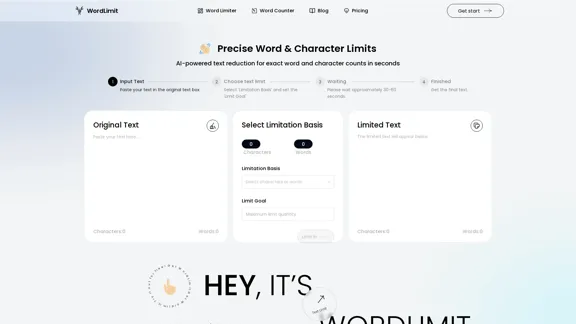
WordLimit is an AI-powered text reduction tool designed to help users achieve precise word and character counts quickly and efficiently. By allowing users to input their text and set specific limitations, WordLimit intelligently condenses content while preserving essential information and the author's unique voice. This tool is particularly beneficial for academic, professional, and creative writing where concise expression is crucial.

Feature

  1. Input Text

    Users can easily paste their original text into the designated input box for processing.

  2. Choose Text Limit

    The tool allows users to select a limitation basis (characters or words) and set a specific limit goal for their text.

  3. Processing Time

    After inputting the text and setting the limits, users need to wait approximately 30-60 seconds for the tool to process their request.

  4. Core Information Preservation

    WordLimit focuses on retaining key facts, names, citations, and central arguments while reducing word count, ensuring that the essential meaning of the text remains intact.

  5. Preserve Your Unique Voice

    The tool maintains the author's distinctive writing style, ensuring that personal flair and tone are preserved even when the text is condensed or expanded.

  6. Maintain Human Authenticity

    WordLimit adjusts text length without introducing AI-generated content, ensuring that the writing remains authentic and undetectable by AI content detectors.

How to Use?

  1. Start by pasting your original text into the input box.
  2. Select the limitation basis (characters or words) that suits your needs.
  3. Set your desired limit goal for the text.
  4. Wait for approximately 30-60 seconds for the tool to process your request.
  5. Review the limited text that appears below the input box.

FAQ

What is WordLimit?

WordLimit is an AI-powered tool designed to reduce text to precise word and character counts while preserving the core information and unique voice of the author.

How does WordLimit work?

Users paste their text, select a limitation basis (characters or words), and set a limit goal. The tool processes the input and generates a condensed version of the text while maintaining essential elements.

Can I trust that my text will remain authentic?

Yes, WordLimit ensures that the adjusted text remains human-written and authentic, without introducing AI-generated content.

What types of writing can benefit from WordLimit?

WordLimit is ideal for academic papers, professional documents, creative writing, and any situation where concise yet accurate content is essential.

Price

  • Free plan: $0/month
  • Basic plan: $9.99/month
  • Standard plan: $19.99/month
  • Professional plan: $49.99/month
The price is for reference only, please refer to the latest official data for actual information.

Evaluation

  1. WordLimit effectively balances text reduction with the preservation of essential information, making it a valuable tool for writers facing strict word limits.

  2. The user-friendly interface simplifies the process of inputting text and setting limits, catering to both novice and experienced users.

  3. While the tool excels in maintaining the author's voice, there may be instances where the compression could lead to the loss of nuanced expressions or complex ideas.

  4. Overall, WordLimit is a practical solution for anyone needing to condense their writing without sacrificing authenticity, though users should be mindful of potential limitations in conveying intricate thoughts.

Latest Traffic Insights

  • Monthly Visits

    834

  • Bounce Rate

    38.46%

  • Pages Per Visit

    1.27

  • Time on Site(s)

    28.18

  • Global Rank

    10563099

  • Country Rank

    -

Recent Visits

Traffic Sources

  • Social Media:
    7.07%
  • Paid Referrals:
    0.84%
  • Email:
    0.04%
  • Referrals:
    4.70%
  • Search Engines:
    80.28%
  • Direct:
    7.07%
More Data

Related Websites

Searchable ChatGPT: Search GPT Conversation History

With the rapid development of artificial intelligence technology, ChatGPT has become an essential tool for people to communicate and interact with AI. However, as the conversation history grows, it becomes increasingly difficult to find specific conversations or topics. To address this issue, we propose the concept of Searchable ChatGPT, which enables users to search their GPT conversation history efficiently.

Key Features

1. Keyword Search

Users can input specific keywords or phrases to search for relevant conversations in their chat history. The system will then display a list of conversations that match the search criteria, allowing users to quickly find the information they need.

2. Contextual Search

In addition to keyword search, users can also search for conversations based on context. For example, they can search for conversations related to a specific topic, such as "travel" or "cooking." The system will then display a list of conversations that are relevant to the specified context.

3. Conversation Filtering

To further refine the search results, users can apply filters to narrow down the list of conversations. For instance, they can filter conversations by date, time, or even the emotions expressed during the conversation.

4. Conversation Analytics

Searchable ChatGPT also provides users with conversation analytics, which offer insights into their conversation patterns and preferences. This feature can help users identify areas for improvement and optimize their communication with ChatGPT.

Benefits

1. Improved Productivity

Searchable ChatGPT saves users time and effort by allowing them to quickly find specific conversations or topics in their chat history.

2. Enhanced User Experience

By providing users with a more efficient way to search and analyze their conversations, Searchable ChatGPT enhances the overall user experience and encourages more effective communication with ChatGPT.

3. Better Decision Making

With access to conversation analytics, users can make more informed decisions by identifying patterns and trends in their conversations with ChatGPT.

Conclusion

Searchable ChatGPT is a powerful tool that revolutionizes the way users interact with ChatGPT. By providing a robust search function, contextual search, conversation filtering, and conversation analytics, Searchable ChatGPT improves productivity, enhances the user experience, and enables better decision making.
View Detail

Searchable ChatGPT: Search GPT Conversation History With the rapid development of artificial intelligence technology, ChatGPT has become an essential tool for people to communicate and interact with AI. However, as the conversation history grows, it becomes increasingly difficult to find specific conversations or topics. To address this issue, we propose the concept of Searchable ChatGPT, which enables users to search their GPT conversation history efficiently. Key Features 1. Keyword Search Users can input specific keywords or phrases to search for relevant conversations in their chat history. The system will then display a list of conversations that match the search criteria, allowing users to quickly find the information they need. 2. Contextual Search In addition to keyword search, users can also search for conversations based on context. For example, they can search for conversations related to a specific topic, such as "travel" or "cooking." The system will then display a list of conversations that are relevant to the specified context. 3. Conversation Filtering To further refine the search results, users can apply filters to narrow down the list of conversations. For instance, they can filter conversations by date, time, or even the emotions expressed during the conversation. 4. Conversation Analytics Searchable ChatGPT also provides users with conversation analytics, which offer insights into their conversation patterns and preferences. This feature can help users identify areas for improvement and optimize their communication with ChatGPT. Benefits 1. Improved Productivity Searchable ChatGPT saves users time and effort by allowing them to quickly find specific conversations or topics in their chat history. 2. Enhanced User Experience By providing users with a more efficient way to search and analyze their conversations, Searchable ChatGPT enhances the overall user experience and encourages more effective communication with ChatGPT. 3. Better Decision Making With access to conversation analytics, users can make more informed decisions by identifying patterns and trends in their conversations with ChatGPT. Conclusion Searchable ChatGPT is a powerful tool that revolutionizes the way users interact with ChatGPT. By providing a robust search function, contextual search, conversation filtering, and conversation analytics, Searchable ChatGPT improves productivity, enhances the user experience, and enables better decision making.

Searchable ChatGPT: Search GPT Conversation History With the rapid development of artificial intelligence technology, ChatGPT has become an essential tool for people to communicate and interact with AI. However, as the conversation history grows, it becomes increasingly difficult to find specific conversations or topics. To address this issue, we propose the concept of Searchable ChatGPT, which enables users to search their GPT conversation history efficiently. Key Features 1. Keyword Search Users can input specific keywords or phrases to search for relevant conversations in their chat history. The system will then display a list of conversations that match the search criteria, allowing users to quickly find the information they need. 2. Contextual Search In addition to keyword search, users can also search for conversations based on context. For example, they can search for conversations related to a specific topic, such as "travel" or "cooking." The system will then display a list of conversations that are relevant to the specified context. 3. Conversation Filtering To further refine the search results, users can apply filters to narrow down the list of conversations. For instance, they can filter conversations by date, time, or even the emotions expressed during the conversation. 4. Conversation Analytics Searchable ChatGPT also provides users with conversation analytics, which offer insights into their conversation patterns and preferences. This feature can help users identify areas for improvement and optimize their communication with ChatGPT. Benefits 1. Improved Productivity Searchable ChatGPT saves users time and effort by allowing them to quickly find specific conversations or topics in their chat history. 2. Enhanced User Experience By providing users with a more efficient way to search and analyze their conversations, Searchable ChatGPT enhances the overall user experience and encourages more effective communication with ChatGPT. 3. Better Decision Making With access to conversation analytics, users can make more informed decisions by identifying patterns and trends in their conversations with ChatGPT. Conclusion Searchable ChatGPT is a powerful tool that revolutionizes the way users interact with ChatGPT. By providing a robust search function, contextual search, conversation filtering, and conversation analytics, Searchable ChatGPT improves productivity, enhances the user experience, and enables better decision making.

Search ChatGPT conversation history instantly. Fully local and private. Press sidebar button or hotkey

193.90 M
AutoMOT - Quick Access to MOT History
View Detail

AutoMOT - Quick Access to MOT History

AutoMOT - Quick Access to MOT History

This extension saves you time by automatically loading information about a vehicle's MOT history on autotrader.co.uk.

193.90 M
Huzzle Quick Apply - Apply to jobs in 1 click
View Detail

Huzzle Quick Apply - Apply to jobs in 1 click

Huzzle Quick Apply - Apply to jobs in 1 click

Apply to millions of jobs with 1 click! Find jobs, apply in seconds & track applications. Save 90% time by autofilling applications.

193.90 M
AI Gift For You
View Detail

AI Gift For You

AI Gift For You

Find the perfect gift for any occasion with AI-powered gift suggestions. Get personalized recommendations for easy and stress-free gift giving.

193.90 M
ScanGPT
View Detail

ScanGPT

ScanGPT

Our extension makes it simple to find GPT-generated text on any website or any text given to it.

193.90 M
TableSherpa: Web to Sheets Exporter
View Detail

TableSherpa: Web to Sheets Exporter

TableSherpa: Web to Sheets Exporter

Export tables from websites to Google Sheets with one click.

193.90 M
Circle to Search - Circle it, Find it
View Detail

Circle to Search - Circle it, Find it

Circle to Search - Circle it, Find it

Enhance your search experience with AI, from curiosity to insight, just one drag away!

193.90 M
Gmail Bot
View Detail

Gmail Bot

Gmail Bot

Ask ChatGPT about your Gmail messages

193.90 M