Open-source RightAI Tools Directory
  • Discover AI
  • Submit
  • Startup
  • Blog
Open-source RightAI Tools Directory
Discover the best AI tools of 2025 with the RightAI Tools Directory!

Friend Links

AI Anime GeneratorToolsApp AI

Support

Tap4
Privacy policyTerms & ConditionsContact Us
Loading...
loading...

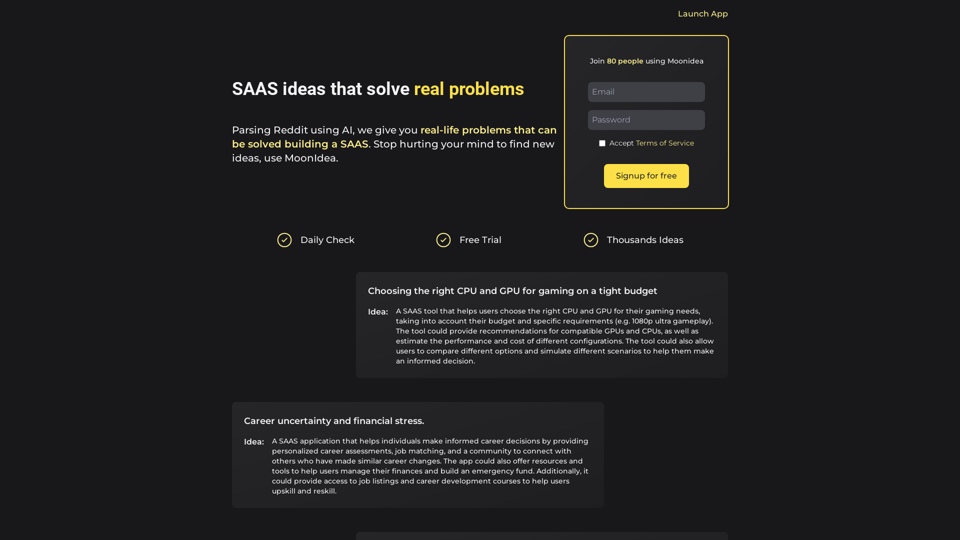
Moonidea AI-powered SaaS idea generation using Reddit threads.

Moonidea is an AI-powered software-as-a-service (SaaS) idea generation platform. It uses Reddit discussions to find real-world problems that could be solved by creating a new SaaS product.
Visit Website
Moonidea 

AI-powered SaaS idea generation using Reddit threads.
Visit Website

Introduction

Moonidea is an AI-powered SAAS idea generation platform that leverages Reddit threads to identify real-world problems solvable through SAAS solutions. It aims to simplify the process of finding new ideas, enabling users to focus on building successful SAAS businesses.

Feature

AI-Powered Reddit Analysis

Moonidea analyzes over 1000 subreddits daily, identifying user issues that can be addressed by building a SAAS. This feature ensures a constant stream of fresh, relevant ideas.

Idea Filtering and Grouping

The platform groups similar SAAS ideas together and filters out the most valuable ones, helping users focus on high-potential concepts.

Flexible Pricing Plans

Moonidea offers a free trial and three pricing tiers to accommodate different needs and budgets:

PlanPriceFeatures
Free$0/month10 subreddits, monthly update
Standard$5/month100 subreddits, monthly update, search and filter
Pro$12/month500 subreddits, weekly update, search and filter
EnterpriseCustomContact for custom pricing and features

Search and Filter Functionality

Users can quickly find relevant ideas using Moonidea's search and filter features, available in the Standard and Pro plans.

Easy Sign-Up Process

Getting started with Moonidea is simple: sign up for a free trial, choose a pricing plan, and begin generating SAAS ideas using the AI-powered platform.

FAQ

How does Moonidea work?

Moonidea utilizes AI-powered technology to analyze Reddit threads and identify real-life problems that can be solved by building a SAAS. It processes this information to generate valuable SAAS ideas for users.

What are the pricing plans available?

Moonidea offers three main pricing plans:

  1. Free: $0/month
  2. Standard: $5/month
  3. Pro: $12/month Additionally, there's an Enterprise option with custom pricing and features for larger organizations or specific needs.

How do I get started with Moonidea?

To begin using Moonidea, simply sign up for a free trial on their website. This allows you to explore the platform's features and start generating SAAS ideas using their AI-powered system.
Latest Traffic Insights

  • Monthly Visits

    0

  • Bounce Rate

    0.00%

  • Pages Per Visit

    0.00

  • Time on Site(s)

    0.00

  • Global Rank

    -

  • Country Rank

    -

Recent Visits

Traffic Sources

  • Social Media:
    0.00%
  • Paid Referrals:
    0.00%
  • Email:
    0.00%
  • Referrals:
    0.00%
  • Search Engines:
    0.00%
  • Direct:
    0.00%
More Data

Related Websites

ChatTTS - Natural, Expressive Text-to-Speech
View Detail

ChatTTS - Natural, Expressive Text-to-Speech

ChatTTS - Natural, Expressive Text-to-Speech

Discover the power of ChatTTS for your creative projects with natural and expressive text-to-speech capabilities.

0
STAIRAZ 

Job Application Tracker, Resume Builder, Job Analysis
View Detail

STAIRAZ Job Application Tracker, Resume Builder, Job Analysis

STAIRAZ Job Application Tracker, Resume Builder, Job Analysis

STAIRAZ Job Application Tracker: A professional tool that simplifies your job search and increases your chances of getting hired.

193.90 M
Homie.AI on the App Store
View Detail

Homie.AI on the App Store

Homie.AI on the App Store

Homie.AI is your go-to academic assistant powered by AI with the unique ability to answer all your questions, summarize books, and fact-check information, Homie is always here to help you with your academic needs.

124.77 M
Chatgpt PDF
===============

Ask your PDF
----------------
View Detail

Chatgpt PDF =============== Ask your PDF ----------------

Chatgpt PDF =============== Ask your PDF ----------------

Ask Your PDF AI Chapdf: Best AI Summarizer Plugin Powered by GPT Summarize Text and Have a Chat with Any PDF Pro Summary Generator

193.90 M
GPTs Store Search and Favorite GPTs
View Detail

GPTs Store Search and Favorite GPTs

GPTs Store Search and Favorite GPTs

Share and Discover the Best Custom GPTs in the GPT Store by OpenAI

193.90 M
Token Counter for ChatGPT 

This tool helps you count the number of tokens in your text input.

How to Use:

1. Paste your text into the input box.
2. Click the "Count Tokens" button.
3. The number of tokens will be displayed below the input box.

What is a Token?

A token is the basic unit of text that ChatGPT processes. 

It can be a word, part of a word, or a punctuation mark.


Example:

Input Text: Hello, world!

Token Count: 4
View Detail

Token Counter for ChatGPT This tool helps you count the number of tokens in your text input. How to Use: 1. Paste your text into the input box. 2. Click the "Count Tokens" button. 3. The number of tokens will be displayed below the input box. What is a Token? A token is the basic unit of text that ChatGPT processes. It can be a word, part of a word, or a punctuation mark. Example: Input Text: Hello, world! Token Count: 4

Token Counter for ChatGPT This tool helps you count the number of tokens in your text input. How to Use: 1. Paste your text into the input box. 2. Click the "Count Tokens" button. 3. The number of tokens will be displayed below the input box. What is a Token? A token is the basic unit of text that ChatGPT processes. It can be a word, part of a word, or a punctuation mark. Example: Input Text: Hello, world! Token Count: 4

110

193.90 M
ChatGPT Context Menu

* Copy: Copies the selected text.
* Paste: Pastes the copied text.
* Delete: Deletes the selected text.
* Edit: Opens a text editor to modify the selected text.
* Generate: Uses ChatGPT to generate new text based on the selected context.
* Summarize: Creates a concise summary of the selected text.
* Translate: Translates the selected text into another language.
* Translate to English: Translates the selected text into English.
* Code: Attempts to identify and format the selected text as code.
* Help: Provides information about the context menu options.
View Detail

ChatGPT Context Menu * Copy: Copies the selected text. * Paste: Pastes the copied text. * Delete: Deletes the selected text. * Edit: Opens a text editor to modify the selected text. * Generate: Uses ChatGPT to generate new text based on the selected context. * Summarize: Creates a concise summary of the selected text. * Translate: Translates the selected text into another language. * Translate to English: Translates the selected text into English. * Code: Attempts to identify and format the selected text as code. * Help: Provides information about the context menu options.

ChatGPT Context Menu * Copy: Copies the selected text. * Paste: Pastes the copied text. * Delete: Deletes the selected text. * Edit: Opens a text editor to modify the selected text. * Generate: Uses ChatGPT to generate new text based on the selected context. * Summarize: Creates a concise summary of the selected text. * Translate: Translates the selected text into another language. * Translate to English: Translates the selected text into English. * Code: Attempts to identify and format the selected text as code. * Help: Provides information about the context menu options.

Please provide the text you would like to send to ChatGPT.

193.90 M
Paraphrasing Tool - Free AI Paraphraser
View Detail

Paraphrasing Tool - Free AI Paraphraser

Paraphrasing Tool - Free AI Paraphraser

Paraphraser is a complimentary rephrasing tool that utilizes AI algorithms to assist you in rewording text, sentences, and paragraphs, enabling you to convey ideas using your own language.

1.18 M