Open-source RightAI Tools Directory
  • Discover AI
  • Submit
  • Startup
  • Blog
Open-source RightAI Tools Directory
Discover the best AI tools of 2025 with the RightAI Tools Directory!

Friend Links

AI Anime GeneratorToolsApp AI

Support

Tap4
Privacy policyTerms & ConditionsContact Us
Loading...
loading...

XOR Extension RU

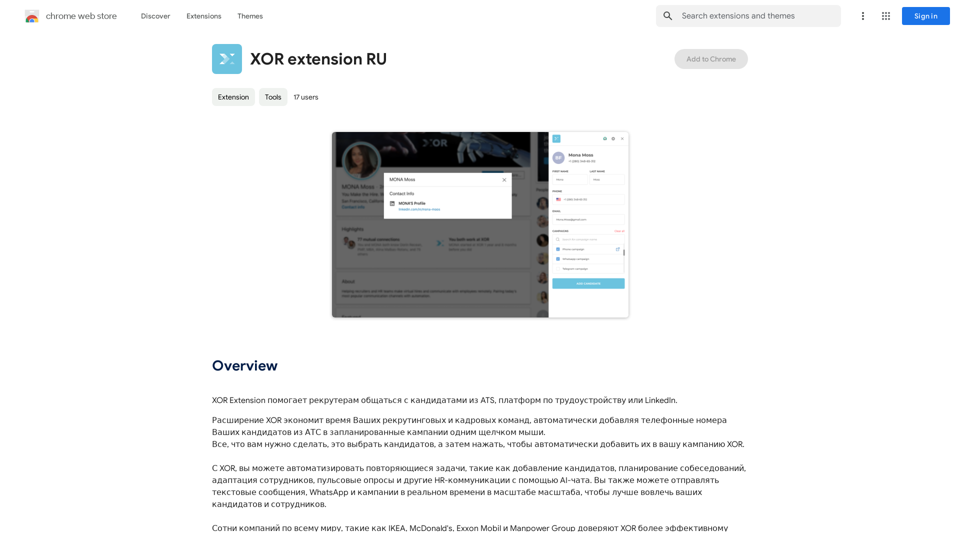
XOR Extension helps recruiters communicate with candidates from ATS, job boards, or LinkedIn.
Visit Website
XOR Extension RU
Visit Website

Introduction

XOR Extension is a powerful recruitment tool designed to streamline communication between recruiters and candidates. It integrates with various platforms such as ATS, job boards, and LinkedIn, enabling recruiters to efficiently manage their recruitment processes. The extension's key feature is its ability to automatically add candidates' phone numbers from ATS to planned campaigns with a single click, significantly saving time for recruitment and HR teams.

Feature

Automatic Candidate Addition

With just one click, recruiters can select candidates and automatically add them to XOR campaigns, streamlining the recruitment process.

AI-Powered Chat

XOR Extension utilizes AI technology to automate repetitive tasks, including:

  • Adding candidates
  • Scheduling interviews
  • Adapting employees
  • Conducting pulse surveys
  • Managing other HR communications

Real-Time Messaging

The extension enables real-time communication through:

  • Text messages
  • WhatsApp
  • Campaigns

This feature enhances engagement with both candidates and employees.

Free Daily Usage

Users can access XOR Extension for free up to 20 times per day, allowing them to explore its AI-powered tools for various tasks.

Subscription Benefits

Subscribing to the platform offers additional advantages and extended access beyond the free usage limits.

Privacy Protection

XOR Extension prioritizes user privacy:

  • User information is not used for training data
  • Users can delete their accounts at any time
  • All user data is removed upon account deletion

FAQ

What is the daily usage limit for XOR Extension?

Every user can utilize the XOR Extension for free up to 20 times a day.

Does XOR Extension have image generation capabilities?

No, the XOR Extension does not offer image generation features.

Are there GPT models available on XOR Extension?

The XOR Extension does not have GPT models available.

How can I make the most of XOR Extension?

Users can maximize their use of XOR Extension by leveraging the daily free uses to explore its range of AI-powered tools for various tasks.

Will my data be used for training purposes?

No, XOR Extension highly values user privacy, and your data will not be used for any training purposes.

When should I consider a XOR Extension subscription?

If the 20 free daily conversations do not meet your needs and you heavily rely on the XOR Extension, subscribing to their affordable products would be beneficial.

Latest Traffic Insights

  • Monthly Visits

    193.90 M

  • Bounce Rate

    56.27%

  • Pages Per Visit

    2.71

  • Time on Site(s)

    115.91

  • Global Rank

    -

  • Country Rank

    -

Recent Visits

Traffic Sources

  • Social Media:
    0.48%
  • Paid Referrals:
    0.55%
  • Email:
    0.15%
  • Referrals:
    12.81%
  • Search Engines:
    16.21%
  • Direct:
    69.81%
More Data

Related Websites

Pangeanic
View Detail

Pangeanic

Pangeanic

Hyper-automate linguistic services: AI assistants with your data, privacy, automatic translation with automatic post-editing, no hallucinations, human fluency

45.58 K
Chrome Web Store
View Detail

Chrome Web Store

Chrome Web Store

Enhance your browser with new features and customize your browsing experience.

193.90 M
JourneyTracker
View Detail

JourneyTracker

JourneyTracker

Make your research easier by collecting, organizing, and summarizing information from many different sources with no hassle.

193.90 M
GPT-4 Vision Screenshot
View Detail

GPT-4 Vision Screenshot

GPT-4 Vision Screenshot

✨ Unleash the Power of Instant Knowledge with GPT-4 Vision Screenshot ✨ Dive into the future of on-screen search with GPT-4...

193.90 M
Ask AI Browser
View Detail

Ask AI Browser

Ask AI Browser

Ask AI Browser Extension ========================== Description The Ask AI browser extension is a cutting-edge tool that revolutionizes the way you interact with the internet. This innovative extension harnesses the power of artificial intelligence to provide you with instant answers, suggestions, and insights as you browse the web. Features * Instant Answers: Get quick answers to your questions without leaving the current webpage. * Smart Suggestions: Receive relevant suggestions based on your browsing history and preferences. * AI-driven Insights: Uncover hidden gems and interesting facts about the topics you're interested in. * Personalized Experience: Enjoy a tailored browsing experience that adapts to your needs and preferences. How it Works 1. Install the Extension: Add the Ask AI browser extension to your favorite browser. 2. Ask Your Question: Type your question in the search bar or highlight a phrase on a webpage. 3. Get Instant Answers: Receive accurate and relevant answers, suggestions, and insights in real-time. Benefits * Save Time: Get instant answers and reduce your search time. * Enhance Productivity: Stay focused on your tasks with relevant suggestions and insights. * Improve Knowledge: Expand your knowledge with interesting facts and hidden gems. Get Started Download the Ask AI browser extension today and experience the future of browsing!

193.90 M
Adinspiration | Discover your Competitors' Winning Ads from Facebook Ad Library
View Detail

Adinspiration | Discover your Competitors' Winning Ads from Facebook Ad Library

Adinspiration | Discover your Competitors' Winning Ads from Facebook Ad Library

Boost your Return on Ad Spend (ROAS) with proven Ad Inspiration and winning Facebook & Instagram ad creatives from top brands and your Competitors. Meta Ad library with superpowers

0
Versabot.Co
View Detail

Versabot.Co

Versabot.Co

Automate outreach, content, customer service, and more with AI!

1.52 K
Discord Translator
View Detail

Discord Translator

Discord Translator

Translate Messages in Discord ============================= What is the "Translate" feature in Discord? The "Translate" feature in Discord allows users to translate messages in real-time, making it easier for people who speak different languages to communicate with each other. How to use the "Translate" feature in Discord? #1. Enable the "Translate" feature To enable the "Translate" feature, you need to go to the "User Settings" and click on the "Language" tab. Then, toggle the switch next to "Translator" to the "On" position. #2. Set your preferred language After enabling the "Translate" feature, you need to set your preferred language. You can do this by clicking on the "Language" dropdown menu and selecting your preferred language from the list. #3. Translate messages Once you've set your preferred language, you can start translating messages. To translate a message, simply hover over the message and click on the "Translate" button that appears. #4. View translated messages After clicking the "Translate" button, the message will be translated into your preferred language. You can view the translated message below the original message. Benefits of the "Translate" feature in Discord The "Translate" feature in Discord has several benefits, including: * Improved communication: The "Translate" feature helps to break down language barriers, making it easier for people who speak different languages to communicate with each other. * Increased accessibility: The "Translate" feature makes Discord more accessible to people who may not speak the dominant language of a server or community. * Enhanced collaboration: The "Translate" feature enables people to collaborate more effectively, even if they speak different languages.

193.90 M