Open-source RightAI Tools Directory
  • Discover AI
  • Submit
  • Startup
  • Blog
Open-source RightAI Tools Directory
Discover the best AI tools of 2025 with the RightAI Tools Directory!

Friend Links

AI Anime GeneratorToolsApp AI

Support

Tap4
Privacy policyTerms & ConditionsContact Us
Loading...
loading...

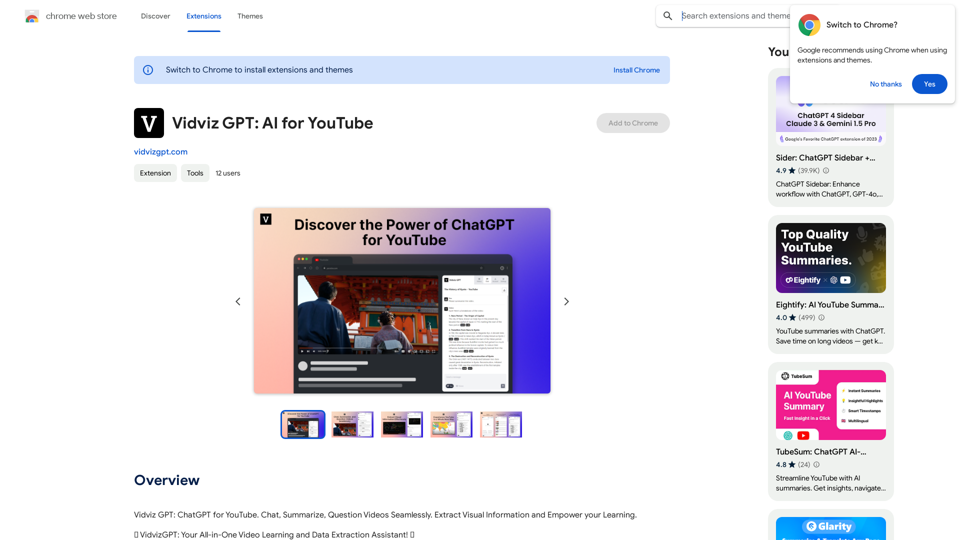
Vidviz GPT: AI for YouTube Vidviz GPT is an AI-powered tool designed to help you create amazing YouTube videos.

Vidviz GPT: ChatGPT for YouTube. Chat, Summarize, Question Videos Seamlessly. Extract Visual Information and Empower Your Learning.
Visit Website
Vidviz GPT: AI for YouTube 

Vidviz GPT is an AI-powered tool designed to help you create amazing YouTube videos.
Visit Website

Introduction

Vidviz GPT is an AI-powered Chrome extension designed to enhance video experiences and boost productivity. It caters to students, data enthusiasts, and anyone seeking to learn from, extract information from, and engage with video content more effectively. The extension leverages advanced AI models to provide features such as video summarization, real-time chat with videos, and visual information extraction.

Feature

Chat with Videos

Engage in real-time conversations with YouTube videos using AI. Ask questions, share insights, and interact with video content in a novel way.

Powered by Leading AI Models

Utilizes state-of-the-art AI models including ChatGPT 3.5, GPT-4, Claude Instant, Claude 2, and Google Bard for cutting-edge features and insights.

Summarize Videos Automatically

Save time and enhance comprehension by generating quick summaries of lengthy video content.

Question Videos

Dive deeper into video content with targeted questions, extracting valuable insights for better understanding.

Extract Visual Information

Capture and analyze visual information from video screen captures for deeper content understanding.

Track Recent Conversations

Keep a record of recent interactions and conversations with videos for easy reference.

Export Conversation to PDF

Save and share conversations with videos by exporting them to PDF format.

Text-to-Speech Integration

Convert extracted text into audio narration, enhancing accessibility for users.

FAQ

Who can benefit from Vidviz GPT?

Students can enhance their learning experience by interacting with video content more effectively. Data enthusiasts can extract valuable insights and data from videos for research and analysis purposes.

How do I get started with Vidviz GPT?

  1. Click "Add to Chrome" and pin Vidviz GPT to your toolbar
  2. Create a new account
  3. Press the Vidviz Chrome Icon to open the Sidepanel
  4. Begin using AI-enhanced video learning and data extraction features

What platforms does Vidviz GPT support?

Vidviz GPT works seamlessly with YouTube.

How does Vidviz GPT handle user privacy?

The company prioritizes user privacy and is committed to achieving SOC, GDPR, and ISO compliance.

Is Vidviz GPT free to use?

Yes, Vidviz GPT is free to download and use, with options for premium features available.

Is Vidviz GPT available globally?

Yes, Vidviz GPT is accessible to users worldwide in all countries.

Related Websites
Mirror AI - Emoji Maker and Free AI Avatar Creator
View Detail

Mirror AI - Emoji Maker and Free AI Avatar Creator

Mirror AI - Emoji Maker and Free AI Avatar Creator

Mirror is your personal sticker creator! Take a single selfie and receive thousands of personalized emojis and stickers featuring you and your friends. Use them in WhatsApp, Facebook, iMessage, Telegram, and other messaging apps!

33.59 K
AI Product Shot - Create Beautiful Product Images with AI
View Detail

AI Product Shot - Create Beautiful Product Images with AI

AI Product Shot - Create Beautiful Product Images with AI

AI Product Shot - Create stunning and professional AI-generated product images that boost your sales. Achieve expert-level product photos using AI technology. Begin your journey for free.

1.69 K
PhotoFuse AI - Your personal AI photographer always with you.
View Detail

PhotoFuse AI - Your personal AI photographer always with you.

PhotoFuse AI - Your personal AI photographer always with you.

Your personal AI photographer in your pocket

1.81 K
ICLight Studio - Free and Easy AI Photo Relighting
View Detail

ICLight Studio - Free and Easy AI Photo Relighting

ICLight Studio - Free and Easy AI Photo Relighting

Transform your photos with ICLight's free AI-powered relighting technology. Create professional studio lighting effects with simple text prompts.

0
NovelAI Auto Button Clicker 

This is a tool designed to automate button clicks within the NovelAI web application. 

It can be used to:

* Speed up repetitive tasks:  Such as generating multiple story continuations or iterating through different story options.
* Free up your time:  Allow you to focus on other aspects of your writing process while the tool handles the clicking.
* Improve efficiency:  Reduce the amount of time and effort required to complete certain tasks in NovelAI.


Disclaimer:

This tool is intended for personal use only and should not be used to violate NovelAI's terms of service.
View Detail

NovelAI Auto Button Clicker This is a tool designed to automate button clicks within the NovelAI web application. It can be used to: * Speed up repetitive tasks: Such as generating multiple story continuations or iterating through different story options. * Free up your time: Allow you to focus on other aspects of your writing process while the tool handles the clicking. * Improve efficiency: Reduce the amount of time and effort required to complete certain tasks in NovelAI. Disclaimer: This tool is intended for personal use only and should not be used to violate NovelAI's terms of service.

NovelAI Auto Button Clicker This is a tool designed to automate button clicks within the NovelAI web application. It can be used to: * Speed up repetitive tasks: Such as generating multiple story continuations or iterating through different story options. * Free up your time: Allow you to focus on other aspects of your writing process while the tool handles the clicking. * Improve efficiency: Reduce the amount of time and effort required to complete certain tasks in NovelAI. Disclaimer: This tool is intended for personal use only and should not be used to violate NovelAI's terms of service.

This is an extension that automatically clicks the generate button when creating images in NovelAI. This feature allows you to generate a specified number of images in the background, allowing you to work on other tasks while the images are being created. 【Target Users】 ・NovelAI…

193.90 M
Leading Platform for Autonomous Automation & Artificial Intelligence Agents
View Detail

Leading Platform for Autonomous Automation & Artificial Intelligence Agents

Leading Platform for Autonomous Automation & Artificial Intelligence Agents

Autonomous AI Agents to automate processes. Used by Fortune 500 companies and startups, our AI agent platform helps organizations build and deploy agents in minutes.

164.60 K
Prisma Labs
View Detail

Prisma Labs

Prisma Labs

Shaping the future of photo and video editing.

74.21 K
Midjourney API - Automate Midjourney AI Image Generation 

This document outlines how to use the Midjourney API to automate the generation of AI images. 

What is the Midjourney API?

The Midjourney API allows developers to programmatically interact with the powerful Midjourney AI model. This means you can generate images, control various parameters, and integrate Midjourney into your own applications and workflows.

Why Use the Midjourney API?

* Automation: Automate the creation of images for various purposes, such as marketing materials, website content, or research projects.
* Customization: Fine-tune image generation by controlling parameters like aspect ratio, style, and seed values.
* Integration: Seamlessly integrate Midjourney's capabilities into your existing tools and platforms.

Getting Started

1. Sign Up for a Midjourney Account: You'll need a Midjourney account to access the API.

2. Obtain an API Key: Once you have an account, you can generate an API key from your account settings.

3. Choose a Programming Language: The Midjourney API supports various programming languages, including Python, JavaScript, and Go.

4. Install the API Client: Install the appropriate API client library for your chosen language.

5. Start Generating Images: Use the API client to send image generation requests to the Midjourney server.

Example (Python):

```python
import midjourney

Replace with your actual API key
api_key = "YOUR_API_KEY"

Create a Midjourney client
client = midjourney.Client(api_key=api_key)

Generate an image
response = client.create_image(prompt="A cat wearing a hat", num_images=1)

Print the image URL
print(response.images[0].url)
```

Documentation and Resources

For detailed information about the Midjourney API, including available endpoints, parameters, and examples, please refer to the official documentation: [https://docs.midjourney.com/](https://docs.midjourney.com/)
View Detail

Midjourney API - Automate Midjourney AI Image Generation This document outlines how to use the Midjourney API to automate the generation of AI images. What is the Midjourney API? The Midjourney API allows developers to programmatically interact with the powerful Midjourney AI model. This means you can generate images, control various parameters, and integrate Midjourney into your own applications and workflows. Why Use the Midjourney API? * Automation: Automate the creation of images for various purposes, such as marketing materials, website content, or research projects. * Customization: Fine-tune image generation by controlling parameters like aspect ratio, style, and seed values. * Integration: Seamlessly integrate Midjourney's capabilities into your existing tools and platforms. Getting Started 1. Sign Up for a Midjourney Account: You'll need a Midjourney account to access the API. 2. Obtain an API Key: Once you have an account, you can generate an API key from your account settings. 3. Choose a Programming Language: The Midjourney API supports various programming languages, including Python, JavaScript, and Go. 4. Install the API Client: Install the appropriate API client library for your chosen language. 5. Start Generating Images: Use the API client to send image generation requests to the Midjourney server. Example (Python): ```python import midjourney Replace with your actual API key api_key = "YOUR_API_KEY" Create a Midjourney client client = midjourney.Client(api_key=api_key) Generate an image response = client.create_image(prompt="A cat wearing a hat", num_images=1) Print the image URL print(response.images[0].url) ``` Documentation and Resources For detailed information about the Midjourney API, including available endpoints, parameters, and examples, please refer to the official documentation: [https://docs.midjourney.com/](https://docs.midjourney.com/)

Midjourney API - Automate Midjourney AI Image Generation This document outlines how to use the Midjourney API to automate the generation of AI images. What is the Midjourney API? The Midjourney API allows developers to programmatically interact with the powerful Midjourney AI model. This means you can generate images, control various parameters, and integrate Midjourney into your own applications and workflows. Why Use the Midjourney API? * Automation: Automate the creation of images for various purposes, such as marketing materials, website content, or research projects. * Customization: Fine-tune image generation by controlling parameters like aspect ratio, style, and seed values. * Integration: Seamlessly integrate Midjourney's capabilities into your existing tools and platforms. Getting Started 1. Sign Up for a Midjourney Account: You'll need a Midjourney account to access the API. 2. Obtain an API Key: Once you have an account, you can generate an API key from your account settings. 3. Choose a Programming Language: The Midjourney API supports various programming languages, including Python, JavaScript, and Go. 4. Install the API Client: Install the appropriate API client library for your chosen language. 5. Start Generating Images: Use the API client to send image generation requests to the Midjourney server. Example (Python): ```python import midjourney Replace with your actual API key api_key = "YOUR_API_KEY" Create a Midjourney client client = midjourney.Client(api_key=api_key) Generate an image response = client.create_image(prompt="A cat wearing a hat", num_images=1) Print the image URL print(response.images[0].url) ``` Documentation and Resources For detailed information about the Midjourney API, including available endpoints, parameters, and examples, please refer to the official documentation: [https://docs.midjourney.com/](https://docs.midjourney.com/)

Easily integrate Midjourney AI into your apps using the Midjourney API. Start creating AI images automatically today!

0