Open-source RightAI Tools Directory
  • Discover AI
  • Submit
  • Startup
  • Blog
Open-source RightAI Tools Directory
Discover the best AI tools of 2025 with the RightAI Tools Directory!

Friend Links

AI Anime GeneratorToolsApp AI

Support

Tap4
Privacy policyTerms & ConditionsContact Us
Loading...
loading...

U-Text

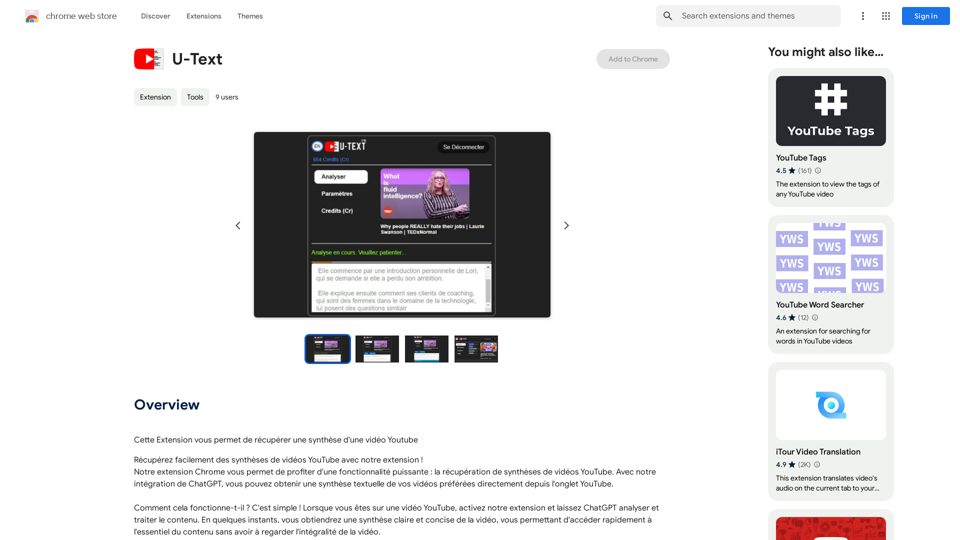
This extension allows you to retrieve a summary of a YouTube video.
Visit Website
U-Text
Visit Website

Introduction

U-Text is a Chrome extension that revolutionizes the way users interact with YouTube videos. By leveraging ChatGPT's capabilities, it provides concise summaries of video content directly within the YouTube interface. This tool is designed to save time and enhance the viewing experience for various users, from learners and professionals to casual video enthusiasts.

Feature

Video Summary Retrieval

U-Text seamlessly integrates with YouTube, allowing users to obtain textual summaries of videos without leaving the platform. This feature utilizes ChatGPT to analyze and condense video content into easily digestible summaries.

Time-Saving Functionality

The extension is engineered to help users quickly grasp the essential points of multiple YouTube videos. This is particularly beneficial for:

  • Learners seeking tutorial summaries
  • Professionals staying updated with conference content
  • Video enthusiasts exploring diverse content efficiently

User-Friendly Interface

U-Text boasts a simple activation process:

  1. Navigate to a YouTube video
  2. Activate the U-Text extension
  3. Allow ChatGPT to analyze the content
  4. Receive a clear, concise summary within moments

Free Access

U-Text is offered as a free Chrome extension, requiring no subscription or payment for use.

Privacy-Focused

The extension is committed to user privacy and does not modify or replace original YouTube content. It solely provides summaries to enhance the viewing experience.

FAQ

How does U-Text work?

U-Text operates by activating the extension on a YouTube video page. ChatGPT then analyzes and processes the content, delivering a clear and concise summary within moments.

Is U-Text free to use?

Yes, U-Text is a completely free Chrome extension. Users can utilize its features without any subscription or payment requirements.

Does U-Text alter YouTube videos?

No, U-Text does not modify the original YouTube videos or replace any content. It only provides summaries to enhance the user's viewing experience.

Is my data safe when using U-Text?

Yes, U-Text is committed to respecting user privacy and providing a secure user experience. The extension focuses solely on summarizing video content without compromising personal data.

Latest Traffic Insights

  • Monthly Visits

    193.90 M

  • Bounce Rate

    56.27%

  • Pages Per Visit

    2.71

  • Time on Site(s)

    115.91

  • Global Rank

    -

  • Country Rank

    -

Recent Visits

Traffic Sources

  • Social Media:
    0.48%
  • Paid Referrals:
    0.55%
  • Email:
    0.15%
  • Referrals:
    12.81%
  • Search Engines:
    16.21%
  • Direct:
    69.81%
More Data

Related Websites

Suggesty

Suggesty is a cutting-edge AI-powered tool designed to assist users in generating high-quality content quickly and efficiently.
View Detail

Suggesty Suggesty is a cutting-edge AI-powered tool designed to assist users in generating high-quality content quickly and efficiently.

Suggesty Suggesty is a cutting-edge AI-powered tool designed to assist users in generating high-quality content quickly and efficiently.

Get human-like answers powered by GPT-3 to your Google searches

193.90 M
Get ChatGPT for Free with Google

You can now access ChatGPT, a powerful language model, for free with Google. Here's how:

Method 1: Google Colab

* Open Google Colab ([colab.research.google.com](http://colab.research.google.com))
* Create a new notebook
* Install the `transformers` library by running `!pip install transformers`
* Import the `transformers` library and load the ChatGPT model using `from transformers import AutoModelForCausalLM, AutoTokenizer; model = AutoModelForCausalLM.from_pretrained('chatgpt'); tokenizer = AutoTokenizer.from_pretrained('chatgpt')`
* Use the model to generate text using `input_text = "Your input here"; inputs = tokenizer.encode_plus(input_text, return_tensors='pt', max_length=1024, padding='max_length', truncation=True); output = model(inputs['input_ids'], attention_mask=inputs['attention_mask']); print(tokenizer.decode(output.logits[0], skip_special_tokens=True))`

Method 2: Google Apps Script

* Open Google Apps Script ([script.google.com](http://script.google.com))
* Create a new project
* Install the `transformers` library by running `npm install transformers`
* Import the `transformers` library and load the ChatGPT model using `const { AutoModelForCausalLM, AutoTokenizer } = require('transformers'); const model = new AutoModelForCausalLM('chatgpt'); const tokenizer = new AutoTokenizer('chatgpt');`
* Use the model to generate text using `const inputText = "Your input here"; const inputs = tokenizer.encodePlus(inputText, { return_tensors: 'pt', max_length: 1024, padding: 'max_length', truncation: true }); const output = model(inputs.inputIds, inputs.attentionMask); console.log(tokenizer.decode(output.logits[0], { skipSpecialTokens: true }));`

Note: These methods require some technical knowledge and may have limitations compared to the original ChatGPT model.
View Detail

Get ChatGPT for Free with Google You can now access ChatGPT, a powerful language model, for free with Google. Here's how: Method 1: Google Colab * Open Google Colab ([colab.research.google.com](http://colab.research.google.com)) * Create a new notebook * Install the `transformers` library by running `!pip install transformers` * Import the `transformers` library and load the ChatGPT model using `from transformers import AutoModelForCausalLM, AutoTokenizer; model = AutoModelForCausalLM.from_pretrained('chatgpt'); tokenizer = AutoTokenizer.from_pretrained('chatgpt')` * Use the model to generate text using `input_text = "Your input here"; inputs = tokenizer.encode_plus(input_text, return_tensors='pt', max_length=1024, padding='max_length', truncation=True); output = model(inputs['input_ids'], attention_mask=inputs['attention_mask']); print(tokenizer.decode(output.logits[0], skip_special_tokens=True))` Method 2: Google Apps Script * Open Google Apps Script ([script.google.com](http://script.google.com)) * Create a new project * Install the `transformers` library by running `npm install transformers` * Import the `transformers` library and load the ChatGPT model using `const { AutoModelForCausalLM, AutoTokenizer } = require('transformers'); const model = new AutoModelForCausalLM('chatgpt'); const tokenizer = new AutoTokenizer('chatgpt');` * Use the model to generate text using `const inputText = "Your input here"; const inputs = tokenizer.encodePlus(inputText, { return_tensors: 'pt', max_length: 1024, padding: 'max_length', truncation: true }); const output = model(inputs.inputIds, inputs.attentionMask); console.log(tokenizer.decode(output.logits[0], { skipSpecialTokens: true }));` Note: These methods require some technical knowledge and may have limitations compared to the original ChatGPT model.

Get ChatGPT for Free with Google You can now access ChatGPT, a powerful language model, for free with Google. Here's how: Method 1: Google Colab * Open Google Colab ([colab.research.google.com](http://colab.research.google.com)) * Create a new notebook * Install the `transformers` library by running `!pip install transformers` * Import the `transformers` library and load the ChatGPT model using `from transformers import AutoModelForCausalLM, AutoTokenizer; model = AutoModelForCausalLM.from_pretrained('chatgpt'); tokenizer = AutoTokenizer.from_pretrained('chatgpt')` * Use the model to generate text using `input_text = "Your input here"; inputs = tokenizer.encode_plus(input_text, return_tensors='pt', max_length=1024, padding='max_length', truncation=True); output = model(inputs['input_ids'], attention_mask=inputs['attention_mask']); print(tokenizer.decode(output.logits[0], skip_special_tokens=True))` Method 2: Google Apps Script * Open Google Apps Script ([script.google.com](http://script.google.com)) * Create a new project * Install the `transformers` library by running `npm install transformers` * Import the `transformers` library and load the ChatGPT model using `const { AutoModelForCausalLM, AutoTokenizer } = require('transformers'); const model = new AutoModelForCausalLM('chatgpt'); const tokenizer = new AutoTokenizer('chatgpt');` * Use the model to generate text using `const inputText = "Your input here"; const inputs = tokenizer.encodePlus(inputText, { return_tensors: 'pt', max_length: 1024, padding: 'max_length', truncation: true }); const output = model(inputs.inputIds, inputs.attentionMask); console.log(tokenizer.decode(output.logits[0], { skipSpecialTokens: true }));` Note: These methods require some technical knowledge and may have limitations compared to the original ChatGPT model.

How to Add ChatGPT to All Google Searches ===================================================== Step 1: Create a Custom Search Engine -------------------------------------- * Go to the [Google Custom Search Engine](https://cse.google.com/) website and sign in with your Google account. * Click on the "New Search Engine" button. * Fill in the required information, such as the name and description of your search engine. * Click on the "Create" button. Step 2: Add ChatGPT to the Search Engine ----------------------------------------- * In the "Setup" tab, click on the "Add" button next to "Sites to search". * Enter the following URL: `https://chat.openai.com/` * Click on the "Add" button. Step 3: Configure the Search Engine -------------------------------------- * In the "Setup" tab, click on the "Edit" button next to "Search engine keywords". * Add the following keywords: `ChatGPT` * Click on the "Save" button. Step 4: Get the Search Engine Code ------------------------------------- * In the "Setup" tab, click on the "Get code" button. * Copy the HTML code provided. Step 5: Add the Search Engine to Your Browser ------------------------------------------------ * Open your browser and go to the "Settings" or "Options" page. * Look for the "Search engine" or "Default search engine" option. * Click on the "Add" or "Manage search engines" button. * Paste the HTML code you copied earlier. * Click on the "Add" or "Save" button. You're Done! =============== Now, whenever you search on Google, ChatGPT will be included in the search results. You can also use the custom search engine URL provided by Google to search directly.

193.90 M
SF Explorer
View Detail

SF Explorer

SF Explorer

Productivity tool for Salesforce admins and developers

193.90 M
VidAU - AI Video Generator
View Detail

VidAU - AI Video Generator

VidAU - AI Video Generator

VidAu AI video generator creates high-quality videos for you with features such as avatar spokesperson, face swap, multi-language translation, subtitles, and watermarks removal, as well as video mixing and editing capabilities—get started for free.

684
Linkster.ai
View Detail

Linkster.ai

Linkster.ai

Transform your video experience: AI summaries, mood insights, & trending highlights in one plugin!

193.90 M
AiJobster - Job Search in AI Companies and Remote AI Jobs
View Detail

AiJobster - Job Search in AI Companies and Remote AI Jobs

AiJobster - Job Search in AI Companies and Remote AI Jobs

AiJobster - Your premier platform for job search in AI companies and remote jobs across top AI-driven organizations. Discover your future in tech today!

694
Mellow - DALL-E Image and Prompts Bulk Download 

This is a tool to download images and prompts from Mellow, a platform for creating and sharing DALL-E images.
View Detail

Mellow - DALL-E Image and Prompts Bulk Download This is a tool to download images and prompts from Mellow, a platform for creating and sharing DALL-E images.

Mellow - DALL-E Image and Prompts Bulk Download This is a tool to download images and prompts from Mellow, a platform for creating and sharing DALL-E images.

🐱 Mellow is a Chrome extension designed for users of ChatGPT who use GPTs or DALL·E to create AI images.

193.90 M
AI Video API 

This is a general term and could refer to many different things. To give you a helpful answer, I need more context. 

For example, are you interested in:

* APIs that allow you to generate videos using AI?
* APIs that analyze video content using AI?
* APIs that edit or enhance videos using AI?


Please tell me more about what you'd like to know about AI Video APIs.
View Detail

AI Video API This is a general term and could refer to many different things. To give you a helpful answer, I need more context. For example, are you interested in: * APIs that allow you to generate videos using AI? * APIs that analyze video content using AI? * APIs that edit or enhance videos using AI? Please tell me more about what you'd like to know about AI Video APIs.

AI Video API This is a general term and could refer to many different things. To give you a helpful answer, I need more context. For example, are you interested in: * APIs that allow you to generate videos using AI? * APIs that analyze video content using AI? * APIs that edit or enhance videos using AI? Please tell me more about what you'd like to know about AI Video APIs.

All-in-one API Hub for AI Generated Video This is a platform that brings together all the tools you need to create videos using artificial intelligence.

16.01 K