Open-source RightAI Tools Directory
  • Discover AI
  • Submit
  • Startup
  • Blog
Open-source RightAI Tools Directory
Discover the best AI tools of 2025 with the RightAI Tools Directory!

Friend Links

AI Anime GeneratorToolsApp AI

Support

Tap4
Privacy policyTerms & ConditionsContact Us
Loading...
loading...

Reva - Review Management for Hotels & Rentals

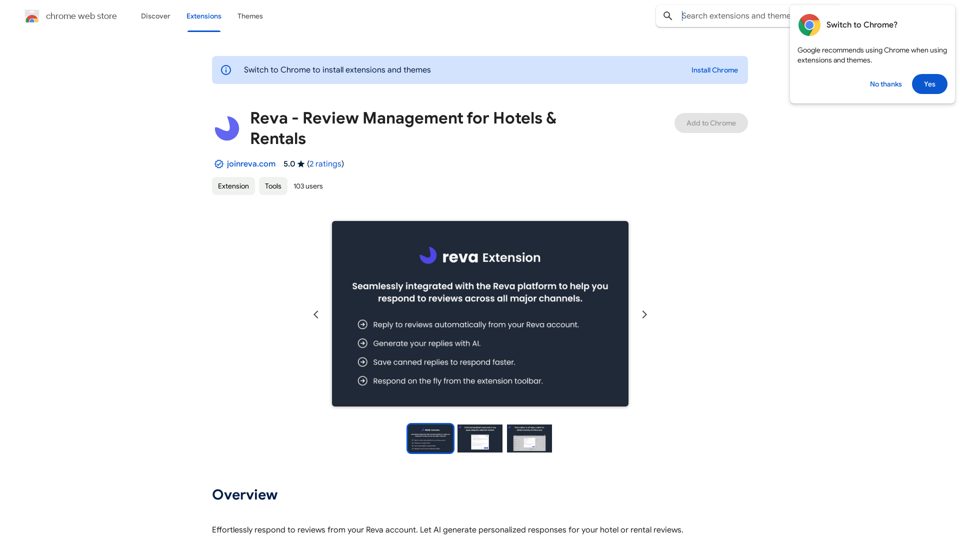
Easily reply to reviews from your Reva account. Let AI create custom responses for your hotel or rental reviews.
Visit Website
Reva - Review Management for Hotels & Rentals
Visit Website

Introduction

Reva is a comprehensive review management platform designed for hotel and rental owners. It leverages AI technology to generate personalized responses to guest reviews, streamlining the process of managing feedback across multiple online travel agencies (OTAs). The platform offers a centralized system for review management, coupled with a browser extension that enhances functionality and ease of use.

Feature

AI-Powered Review Responses

Reva utilizes artificial intelligence to craft personalized responses to hotel or rental reviews. This feature saves time for property owners while maintaining authenticity in their communications with guests.

Centralized Review Management

The platform aggregates reviews from various channels, providing a consolidated view of guest feedback. This centralization allows for more efficient management and response to reviews across different platforms.

One-Click Publishing

With the Reva Extension, users can reply to reviews within the Reva platform and automatically publish them to popular OTAs such as Airbnb, VRBO, and Booking.com.

Automatic Account Updates

Once a review is replied to, the Reva account is automatically updated, ensuring that all information is current and synchronized across platforms.

On-the-Fly Review Generation

For less common channels, the Reva Extension allows users to generate review replies instantly and copy them with ease, streamlining the review management process.

Multi-Channel Support

Reva supports multiple online travel agencies, making it a versatile tool for property owners who list their accommodations on various platforms.

FAQ

How does Reva's AI-powered review response work?

Reva's AI utilizes natural language processing to generate personalized responses for hotel or rental reviews. This technology analyzes the content of the review and creates a tailored response that maintains authenticity while saving time for property owners.

Can I use Reva's review management platform without the extension?

Yes, you can use Reva's review management platform without the extension. However, the extension provides additional features and functionality, such as one-click publishing to OTAs and on-the-fly review generation, which enhance the overall user experience.

How do I get started with Reva's review management platform?

To begin using Reva's review management platform, you need to sign up for a Reva account and follow the onboarding process. Once your account is set up, you can start managing your reviews and utilizing the AI-powered response generation features.

Latest Traffic Insights

  • Monthly Visits

    193.90 M

  • Bounce Rate

    56.27%

  • Pages Per Visit

    2.71

  • Time on Site(s)

    115.91

  • Global Rank

    -

  • Country Rank

    -

Recent Visits

Traffic Sources

  • Social Media:
    0.48%
  • Paid Referrals:
    0.55%
  • Email:
    0.15%
  • Referrals:
    12.81%
  • Search Engines:
    16.21%
  • Direct:
    69.81%
More Data

Related Websites

Get ChatGPT for Free with Google

You can now access ChatGPT, a powerful language model, for free with Google. Here's how:

Method 1: Google Colab

* Open Google Colab ([colab.research.google.com](http://colab.research.google.com))
* Create a new notebook
* Install the `transformers` library by running `!pip install transformers`
* Import the `transformers` library and load the ChatGPT model using `from transformers import AutoModelForCausalLM, AutoTokenizer; model = AutoModelForCausalLM.from_pretrained('chatgpt'); tokenizer = AutoTokenizer.from_pretrained('chatgpt')`
* Use the model to generate text using `input_text = "Your input here"; inputs = tokenizer.encode_plus(input_text, return_tensors='pt', max_length=1024, padding='max_length', truncation=True); output = model(inputs['input_ids'], attention_mask=inputs['attention_mask']); print(tokenizer.decode(output.logits[0], skip_special_tokens=True))`

Method 2: Google Apps Script

* Open Google Apps Script ([script.google.com](http://script.google.com))
* Create a new project
* Install the `transformers` library by running `npm install transformers`
* Import the `transformers` library and load the ChatGPT model using `const { AutoModelForCausalLM, AutoTokenizer } = require('transformers'); const model = new AutoModelForCausalLM('chatgpt'); const tokenizer = new AutoTokenizer('chatgpt');`
* Use the model to generate text using `const inputText = "Your input here"; const inputs = tokenizer.encodePlus(inputText, { return_tensors: 'pt', max_length: 1024, padding: 'max_length', truncation: true }); const output = model(inputs.inputIds, inputs.attentionMask); console.log(tokenizer.decode(output.logits[0], { skipSpecialTokens: true }));`

Note: These methods require some technical knowledge and may have limitations compared to the original ChatGPT model.
View Detail

Get ChatGPT for Free with Google You can now access ChatGPT, a powerful language model, for free with Google. Here's how: Method 1: Google Colab * Open Google Colab ([colab.research.google.com](http://colab.research.google.com)) * Create a new notebook * Install the `transformers` library by running `!pip install transformers` * Import the `transformers` library and load the ChatGPT model using `from transformers import AutoModelForCausalLM, AutoTokenizer; model = AutoModelForCausalLM.from_pretrained('chatgpt'); tokenizer = AutoTokenizer.from_pretrained('chatgpt')` * Use the model to generate text using `input_text = "Your input here"; inputs = tokenizer.encode_plus(input_text, return_tensors='pt', max_length=1024, padding='max_length', truncation=True); output = model(inputs['input_ids'], attention_mask=inputs['attention_mask']); print(tokenizer.decode(output.logits[0], skip_special_tokens=True))` Method 2: Google Apps Script * Open Google Apps Script ([script.google.com](http://script.google.com)) * Create a new project * Install the `transformers` library by running `npm install transformers` * Import the `transformers` library and load the ChatGPT model using `const { AutoModelForCausalLM, AutoTokenizer } = require('transformers'); const model = new AutoModelForCausalLM('chatgpt'); const tokenizer = new AutoTokenizer('chatgpt');` * Use the model to generate text using `const inputText = "Your input here"; const inputs = tokenizer.encodePlus(inputText, { return_tensors: 'pt', max_length: 1024, padding: 'max_length', truncation: true }); const output = model(inputs.inputIds, inputs.attentionMask); console.log(tokenizer.decode(output.logits[0], { skipSpecialTokens: true }));` Note: These methods require some technical knowledge and may have limitations compared to the original ChatGPT model.

Get ChatGPT for Free with Google You can now access ChatGPT, a powerful language model, for free with Google. Here's how: Method 1: Google Colab * Open Google Colab ([colab.research.google.com](http://colab.research.google.com)) * Create a new notebook * Install the `transformers` library by running `!pip install transformers` * Import the `transformers` library and load the ChatGPT model using `from transformers import AutoModelForCausalLM, AutoTokenizer; model = AutoModelForCausalLM.from_pretrained('chatgpt'); tokenizer = AutoTokenizer.from_pretrained('chatgpt')` * Use the model to generate text using `input_text = "Your input here"; inputs = tokenizer.encode_plus(input_text, return_tensors='pt', max_length=1024, padding='max_length', truncation=True); output = model(inputs['input_ids'], attention_mask=inputs['attention_mask']); print(tokenizer.decode(output.logits[0], skip_special_tokens=True))` Method 2: Google Apps Script * Open Google Apps Script ([script.google.com](http://script.google.com)) * Create a new project * Install the `transformers` library by running `npm install transformers` * Import the `transformers` library and load the ChatGPT model using `const { AutoModelForCausalLM, AutoTokenizer } = require('transformers'); const model = new AutoModelForCausalLM('chatgpt'); const tokenizer = new AutoTokenizer('chatgpt');` * Use the model to generate text using `const inputText = "Your input here"; const inputs = tokenizer.encodePlus(inputText, { return_tensors: 'pt', max_length: 1024, padding: 'max_length', truncation: true }); const output = model(inputs.inputIds, inputs.attentionMask); console.log(tokenizer.decode(output.logits[0], { skipSpecialTokens: true }));` Note: These methods require some technical knowledge and may have limitations compared to the original ChatGPT model.

How to Add ChatGPT to All Google Searches ===================================================== Step 1: Create a Custom Search Engine -------------------------------------- * Go to the [Google Custom Search Engine](https://cse.google.com/) website and sign in with your Google account. * Click on the "New Search Engine" button. * Fill in the required information, such as the name and description of your search engine. * Click on the "Create" button. Step 2: Add ChatGPT to the Search Engine ----------------------------------------- * In the "Setup" tab, click on the "Add" button next to "Sites to search". * Enter the following URL: `https://chat.openai.com/` * Click on the "Add" button. Step 3: Configure the Search Engine -------------------------------------- * In the "Setup" tab, click on the "Edit" button next to "Search engine keywords". * Add the following keywords: `ChatGPT` * Click on the "Save" button. Step 4: Get the Search Engine Code ------------------------------------- * In the "Setup" tab, click on the "Get code" button. * Copy the HTML code provided. Step 5: Add the Search Engine to Your Browser ------------------------------------------------ * Open your browser and go to the "Settings" or "Options" page. * Look for the "Search engine" or "Default search engine" option. * Click on the "Add" or "Manage search engines" button. * Paste the HTML code you copied earlier. * Click on the "Add" or "Save" button. You're Done! =============== Now, whenever you search on Google, ChatGPT will be included in the search results. You can also use the custom search engine URL provided by Google to search directly.

193.90 M
Echooo Wallet
View Detail

Echooo Wallet

Echooo Wallet

The top Web3 Wallet preferred by millions of users.

193.90 M
AI Writer for Realtors 

This AI-powered writing tool is designed to help real estate agents save time and create compelling content. 

Here's what it can do:

* Generate property descriptions: Craft engaging and informative descriptions that highlight key features and benefits.
* Write listing headlines:  Create attention-grabbing headlines that attract potential buyers.
* Compose social media posts:  Share property updates, market insights, and client testimonials in a concise and engaging way.
* Draft email campaigns:  Automate email marketing efforts with personalized messages to potential clients.
* Summarize property reports:  Quickly understand key information from property reports and market analyses.

Benefits for Realtors:

* Save time and effort:  Automate repetitive writing tasks and focus on client interactions.
* Improve content quality:  Generate high-quality, engaging content that resonates with target audiences.
* Boost marketing effectiveness:  Create compelling content that drives leads and increases sales.
* Stay ahead of the competition:  Leverage AI technology to streamline your workflow and deliver exceptional service.
View Detail

AI Writer for Realtors This AI-powered writing tool is designed to help real estate agents save time and create compelling content. Here's what it can do: * Generate property descriptions: Craft engaging and informative descriptions that highlight key features and benefits. * Write listing headlines: Create attention-grabbing headlines that attract potential buyers. * Compose social media posts: Share property updates, market insights, and client testimonials in a concise and engaging way. * Draft email campaigns: Automate email marketing efforts with personalized messages to potential clients. * Summarize property reports: Quickly understand key information from property reports and market analyses. Benefits for Realtors: * Save time and effort: Automate repetitive writing tasks and focus on client interactions. * Improve content quality: Generate high-quality, engaging content that resonates with target audiences. * Boost marketing effectiveness: Create compelling content that drives leads and increases sales. * Stay ahead of the competition: Leverage AI technology to streamline your workflow and deliver exceptional service.

AI Writer for Realtors This AI-powered writing tool is designed to help real estate agents save time and create compelling content. Here's what it can do: * Generate property descriptions: Craft engaging and informative descriptions that highlight key features and benefits. * Write listing headlines: Create attention-grabbing headlines that attract potential buyers. * Compose social media posts: Share property updates, market insights, and client testimonials in a concise and engaging way. * Draft email campaigns: Automate email marketing efforts with personalized messages to potential clients. * Summarize property reports: Quickly understand key information from property reports and market analyses. Benefits for Realtors: * Save time and effort: Automate repetitive writing tasks and focus on client interactions. * Improve content quality: Generate high-quality, engaging content that resonates with target audiences. * Boost marketing effectiveness: Create compelling content that drives leads and increases sales. * Stay ahead of the competition: Leverage AI technology to streamline your workflow and deliver exceptional service.

Unlock the Power of AI for Captivating Real Estate Listings Tired of crafting bland, forgettable property descriptions? Let AI revolutionize your listings and attract more potential buyers! Here's how AI can elevate your real estate game: * Craft Compelling Narratives: AI can weave engaging stories around your properties, highlighting their unique features and benefits in a way that resonates with buyers. * Optimize for Search Engines: AI-powered tools can analyze market trends and keywords to ensure your listings rank higher in search results, boosting visibility and attracting more clicks. * Personalize the Experience: AI can tailor descriptions to specific buyer demographics, creating a more personalized and impactful connection. * Generate Stunning Visuals: From virtual tours to 3D floor plans, AI can enhance your listings with captivating visuals that showcase your properties in their best light. Stop settling for ordinary listings. Embrace the future of real estate with AI-powered descriptions that captivate, convert, and close deals.

193.90 M
Chrome Web Store
View Detail

Chrome Web Store

Chrome Web Store

Add new features to your browser and personalize your browsing experience.

193.90 M
FatfoxTab New Tab Page
View Detail

FatfoxTab New Tab Page

FatfoxTab New Tab Page

FatfoxTab, a new tab page, provides an all-around online experience covering gaming, office, and entertainment scenarios. With advanced language models, it's easy to get started and use, offering a vast array of websites, card-style apps, dynamic wallpapers, and a customizable user interface, all at your fingertips. It's a must-have browser plugin for building your personalized learning and working platform.

193.90 M
AI Content Detector for ChatGPT - Sapling.ai

Sapling.ai's AI Content Detector is a powerful tool designed to detect AI-generated content, including those produced by ChatGPT. This innovative solution helps you identify and flag suspicious content, ensuring the authenticity and credibility of the information you receive.

How it Works

Our AI Content Detector uses advanced machine learning algorithms to analyze the linguistic patterns, syntax, and semantics of the input text. This allows it to identify the subtle differences between human-written and AI-generated content.

Key Features

* High Accuracy: Our detector boasts an impressive accuracy rate, ensuring reliable results even with complex or nuanced content.
* Real-time Analysis: Get instant results with our real-time analysis feature, perfect for high-volume content screening.
* Customizable Thresholds: Set your own thresholds for detection, allowing you to fine-tune the sensitivity of the tool to your specific needs.
* Integration Ready: Seamlessly integrate our API with your existing workflows and platforms.

Use Cases

* Content Moderation: Ensure the quality and authenticity of user-generated content on your platform.
* Academic Integrity: Detect AI-generated essays and papers, promoting original work and academic honesty.
* Marketing and Advertising: Verify the authenticity of customer reviews and testimonials.

Try it Out

Experience the power of Sapling.ai's AI Content Detector for yourself. Sign up for a free trial and start detecting AI-generated content today!
View Detail

AI Content Detector for ChatGPT - Sapling.ai Sapling.ai's AI Content Detector is a powerful tool designed to detect AI-generated content, including those produced by ChatGPT. This innovative solution helps you identify and flag suspicious content, ensuring the authenticity and credibility of the information you receive. How it Works Our AI Content Detector uses advanced machine learning algorithms to analyze the linguistic patterns, syntax, and semantics of the input text. This allows it to identify the subtle differences between human-written and AI-generated content. Key Features * High Accuracy: Our detector boasts an impressive accuracy rate, ensuring reliable results even with complex or nuanced content. * Real-time Analysis: Get instant results with our real-time analysis feature, perfect for high-volume content screening. * Customizable Thresholds: Set your own thresholds for detection, allowing you to fine-tune the sensitivity of the tool to your specific needs. * Integration Ready: Seamlessly integrate our API with your existing workflows and platforms. Use Cases * Content Moderation: Ensure the quality and authenticity of user-generated content on your platform. * Academic Integrity: Detect AI-generated essays and papers, promoting original work and academic honesty. * Marketing and Advertising: Verify the authenticity of customer reviews and testimonials. Try it Out Experience the power of Sapling.ai's AI Content Detector for yourself. Sign up for a free trial and start detecting AI-generated content today!

AI Content Detector for ChatGPT - Sapling.ai Sapling.ai's AI Content Detector is a powerful tool designed to detect AI-generated content, including those produced by ChatGPT. This innovative solution helps you identify and flag suspicious content, ensuring the authenticity and credibility of the information you receive. How it Works Our AI Content Detector uses advanced machine learning algorithms to analyze the linguistic patterns, syntax, and semantics of the input text. This allows it to identify the subtle differences between human-written and AI-generated content. Key Features * High Accuracy: Our detector boasts an impressive accuracy rate, ensuring reliable results even with complex or nuanced content. * Real-time Analysis: Get instant results with our real-time analysis feature, perfect for high-volume content screening. * Customizable Thresholds: Set your own thresholds for detection, allowing you to fine-tune the sensitivity of the tool to your specific needs. * Integration Ready: Seamlessly integrate our API with your existing workflows and platforms. Use Cases * Content Moderation: Ensure the quality and authenticity of user-generated content on your platform. * Academic Integrity: Detect AI-generated essays and papers, promoting original work and academic honesty. * Marketing and Advertising: Verify the authenticity of customer reviews and testimonials. Try it Out Experience the power of Sapling.ai's AI Content Detector for yourself. Sign up for a free trial and start detecting AI-generated content today!

Quickly Check if Any Content was AI Generated, and Make Sure Your Writing Isn't! With the rapid development of artificial intelligence (AI) technology, AI-generated content has become increasingly prevalent. As a result, it's essential to verify the authenticity of content and ensure that your writing is original. Here are some tips to help you quickly check if any content was AI generated and make sure your writing isn't: #1. Check for Overly Formal Language AI-generated content often uses overly formal language, which may sound unnatural or even awkward. Be wary of sentences that are too structured or contain overly complex vocabulary. #2. Look for Repetitive Phrases or Sentences AI algorithms may reuse phrases or sentences to fill content gaps. If you notice repetitive language or sentences that seem out of place, it could be a sign of AI-generated content. #3. Verify Facts and Statistics AI-generated content may contain inaccurate or outdated information. Always fact-check statistics, quotes, and other data to ensure they are reliable and up-to-date. #4. Evaluate the Writing Style AI-generated content often lacks the personal touch and emotional depth of human writing. Look for writing that seems too perfect, lacks humor, or feels overly generic. #5. Use AI Detection Tools There are various AI detection tools available online that can help identify AI-generated content. These tools analyze language patterns, syntax, and other factors to determine the likelihood of AI involvement. #6. Read Beyond the Headlines AI-generated content may have attention-grabbing headlines, but the actual content may be lacking in substance. Always read beyond the headlines to ensure the content is well-researched and informative. #7. Check for Human Touch Human writing often includes personal anecdotes, experiences, and emotions. Look for content that includes these elements, as they are more difficult for AI algorithms to replicate. By following these tips, you can quickly check if any content was AI generated and ensure that your writing is original and authentic. Remember, AI-generated content may be convenient, but it can never replace the creativity, empathy, and nuance of human writing.

193.90 M
Horus
View Detail

Horus

Horus

Horus is your AI assistant for creating summaries, insights, and expanding knowledge.

193.90 M
Owl AI - Logo Generator Powered by GPT-4
View Detail

Owl AI - Logo Generator Powered by GPT-4

Owl AI - Logo Generator Powered by GPT-4

Save time and money with our logo generator

0