Open-source RightAI Tools Directory
  • Discover AI
  • Submit
  • Startup
  • Blog
Open-source RightAI Tools Directory
Discover the best AI tools of 2025 with the RightAI Tools Directory!

Friend Links

AI Anime GeneratorToolsApp AI

Support

Tap4
Privacy policyTerms & ConditionsContact Us
Loading...
loading...

IntelliMark

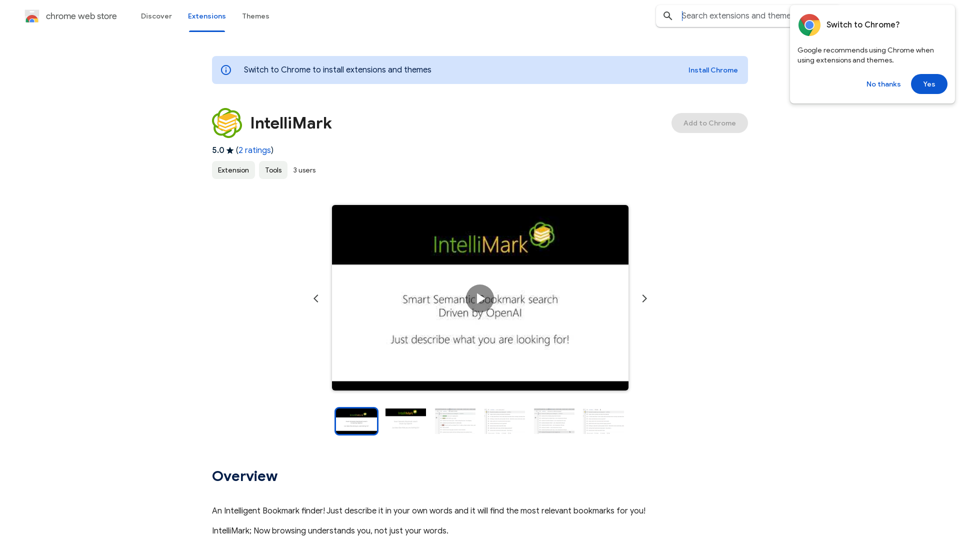
An intelligent bookmark finder! Just tell it what you're looking for in your own words, and it will find the most useful bookmarks for you!
Visit Website
IntelliMark
Visit Website

Introduction

IntelliMark is an intelligent bookmark finder that leverages AI technology to search and retrieve relevant bookmarks based on user descriptions. It offers multilingual support, allowing users to search in any language, even with typos. The extension provides a clean, intuitive interface and can be used with personal OpenAI API keys or Azure deployments for advanced features.

Feature

AI-Powered Bookmark Search

IntelliMark utilizes artificial intelligence to search and retrieve relevant bookmarks based on user descriptions, enabling quick and accurate results.

Multilingual Support

Users can search for bookmarks in any language, making it a versatile tool for international users or those working with multilingual content.

Typo-Tolerant Search

The AI-powered search engine can understand and process search queries even with typos or misspellings, ensuring accurate results regardless of input errors.

Omnibox Integration

By typing "aim" in the address bar, users can quickly access IntelliMark's search functionality, finding bookmarks within seconds.

Clean and Intuitive Interface

IntelliMark offers a user-friendly interface, making it easy for users to navigate and utilize its features effectively.

Customizable API Integration

Users have the option to use their own OpenAI API key or Azure deployment for access to more advanced features, providing flexibility and customization.

Free Basic Version

IntelliMark is available as a free extension, making it accessible to a wide range of users.

FAQ

How does IntelliMark work?

IntelliMark uses an AI-powered search engine to analyze user descriptions and retrieve relevant bookmarks. It processes queries in any language and can understand searches even with typos or misspellings.

Is IntelliMark free to use?

Yes, IntelliMark is available as a free extension. However, users can opt to use their own OpenAI API key or Azure deployment for access to more advanced features.

Can I use IntelliMark with my personal API key?

Yes, IntelliMark supports the use of personal OpenAI API keys or Azure deployments, allowing for more advanced functionality and customization.

How do I start a search with IntelliMark?

To use IntelliMark, simply type "aim" in the address bar of your browser, followed by a description of what you're looking for. The AI-powered search engine will then retrieve relevant bookmarks based on your input.

Related Websites
No Language
View Detail

No Language

No Language

AI for Generating Real-Time Commentary Videos

193.90 M
Homes Like This
View Detail

Homes Like This

Homes Like This

Find Homes Visually

193.90 M
Songmeaning - Uncovering the Hidden Story Behind Your Favorite Song Lyrics
View Detail

Songmeaning - Uncovering the Hidden Story Behind Your Favorite Song Lyrics

Songmeaning - Uncovering the Hidden Story Behind Your Favorite Song Lyrics

Let's unlock the hidden depths of your favorite song with the power of AI. With Songmeaning, let's uncover the true meaning behind your favorite lyrics.

84.13 K
I Listen AI
View Detail

I Listen AI

I Listen AI

I Listen AI

193.90 M
Magic Cal
View Detail

Magic Cal

Magic Cal

Make events with AI -- ChatGPT in Google Calendar This is a guide on how to use ChatGPT to create events in your Google Calendar. 1. Open ChatGPT and Google Calendar: * Start a new conversation in ChatGPT. * Open your Google Calendar in a separate tab or window. 2. Tell ChatGPT what you want to schedule: * Be specific about the event details, including: * Event name: (e.g., "Team Meeting") * Date and time: (e.g., "Next Tuesday at 2:00 PM") * Duration: (e.g., "1 hour") * Location: (e.g., "Conference Room") * Description: (optional, add any relevant details) 3. ChatGPT will generate a calendar event string: * ChatGPT will provide you with a text string that includes all the event details in a format suitable for Google Calendar. 4. Copy and paste the event string into Google Calendar: * Click on the "Create" button in Google Calendar. * Paste the event string generated by ChatGPT into the event details field. * Adjust any details if needed. 5. Save the event: * Click "Save" to add the event to your Google Calendar. Let me know if you have any other questions.

193.90 M
Searchable ChatGPT: Search GPT Conversation History

With the rapid development of artificial intelligence technology, ChatGPT has become an essential tool for people to communicate and interact with AI. However, as the conversation history grows, it becomes increasingly difficult to find specific conversations or topics. To address this issue, we propose the concept of Searchable ChatGPT, which enables users to search their GPT conversation history efficiently.

Key Features

1. Keyword Search

Users can input specific keywords or phrases to search for relevant conversations in their chat history. The system will then display a list of conversations that match the search criteria, allowing users to quickly find the information they need.

2. Contextual Search

In addition to keyword search, users can also search for conversations based on context. For example, they can search for conversations related to a specific topic, such as "travel" or "cooking." The system will then display a list of conversations that are relevant to the specified context.

3. Conversation Filtering

To further refine the search results, users can apply filters to narrow down the list of conversations. For instance, they can filter conversations by date, time, or even the emotions expressed during the conversation.

4. Conversation Analytics

Searchable ChatGPT also provides users with conversation analytics, which offer insights into their conversation patterns and preferences. This feature can help users identify areas for improvement and optimize their communication with ChatGPT.

Benefits

1. Improved Productivity

Searchable ChatGPT saves users time and effort by allowing them to quickly find specific conversations or topics in their chat history.

2. Enhanced User Experience

By providing users with a more efficient way to search and analyze their conversations, Searchable ChatGPT enhances the overall user experience and encourages more effective communication with ChatGPT.

3. Better Decision Making

With access to conversation analytics, users can make more informed decisions by identifying patterns and trends in their conversations with ChatGPT.

Conclusion

Searchable ChatGPT is a powerful tool that revolutionizes the way users interact with ChatGPT. By providing a robust search function, contextual search, conversation filtering, and conversation analytics, Searchable ChatGPT improves productivity, enhances the user experience, and enables better decision making.
View Detail

Searchable ChatGPT: Search GPT Conversation History With the rapid development of artificial intelligence technology, ChatGPT has become an essential tool for people to communicate and interact with AI. However, as the conversation history grows, it becomes increasingly difficult to find specific conversations or topics. To address this issue, we propose the concept of Searchable ChatGPT, which enables users to search their GPT conversation history efficiently. Key Features 1. Keyword Search Users can input specific keywords or phrases to search for relevant conversations in their chat history. The system will then display a list of conversations that match the search criteria, allowing users to quickly find the information they need. 2. Contextual Search In addition to keyword search, users can also search for conversations based on context. For example, they can search for conversations related to a specific topic, such as "travel" or "cooking." The system will then display a list of conversations that are relevant to the specified context. 3. Conversation Filtering To further refine the search results, users can apply filters to narrow down the list of conversations. For instance, they can filter conversations by date, time, or even the emotions expressed during the conversation. 4. Conversation Analytics Searchable ChatGPT also provides users with conversation analytics, which offer insights into their conversation patterns and preferences. This feature can help users identify areas for improvement and optimize their communication with ChatGPT. Benefits 1. Improved Productivity Searchable ChatGPT saves users time and effort by allowing them to quickly find specific conversations or topics in their chat history. 2. Enhanced User Experience By providing users with a more efficient way to search and analyze their conversations, Searchable ChatGPT enhances the overall user experience and encourages more effective communication with ChatGPT. 3. Better Decision Making With access to conversation analytics, users can make more informed decisions by identifying patterns and trends in their conversations with ChatGPT. Conclusion Searchable ChatGPT is a powerful tool that revolutionizes the way users interact with ChatGPT. By providing a robust search function, contextual search, conversation filtering, and conversation analytics, Searchable ChatGPT improves productivity, enhances the user experience, and enables better decision making.

Searchable ChatGPT: Search GPT Conversation History With the rapid development of artificial intelligence technology, ChatGPT has become an essential tool for people to communicate and interact with AI. However, as the conversation history grows, it becomes increasingly difficult to find specific conversations or topics. To address this issue, we propose the concept of Searchable ChatGPT, which enables users to search their GPT conversation history efficiently. Key Features 1. Keyword Search Users can input specific keywords or phrases to search for relevant conversations in their chat history. The system will then display a list of conversations that match the search criteria, allowing users to quickly find the information they need. 2. Contextual Search In addition to keyword search, users can also search for conversations based on context. For example, they can search for conversations related to a specific topic, such as "travel" or "cooking." The system will then display a list of conversations that are relevant to the specified context. 3. Conversation Filtering To further refine the search results, users can apply filters to narrow down the list of conversations. For instance, they can filter conversations by date, time, or even the emotions expressed during the conversation. 4. Conversation Analytics Searchable ChatGPT also provides users with conversation analytics, which offer insights into their conversation patterns and preferences. This feature can help users identify areas for improvement and optimize their communication with ChatGPT. Benefits 1. Improved Productivity Searchable ChatGPT saves users time and effort by allowing them to quickly find specific conversations or topics in their chat history. 2. Enhanced User Experience By providing users with a more efficient way to search and analyze their conversations, Searchable ChatGPT enhances the overall user experience and encourages more effective communication with ChatGPT. 3. Better Decision Making With access to conversation analytics, users can make more informed decisions by identifying patterns and trends in their conversations with ChatGPT. Conclusion Searchable ChatGPT is a powerful tool that revolutionizes the way users interact with ChatGPT. By providing a robust search function, contextual search, conversation filtering, and conversation analytics, Searchable ChatGPT improves productivity, enhances the user experience, and enables better decision making.

Search ChatGPT conversation history instantly. Fully local and private. Press sidebar button or hotkey

193.90 M
QuickReadAI
View Detail

QuickReadAI

QuickReadAI

Please provide me with the text you'd like me to summarize. 😊

193.90 M
Fast and Affordable Logo Generator for Small Businesses
View Detail

Fast and Affordable Logo Generator for Small Businesses

Fast and Affordable Logo Generator for Small Businesses

Generate unique logos quickly and affordably with Aikiu Studio. Create professional designs for small businesses and solopreneurs in minutes. Get high-quality, hassle-free logo creation.

0