Open-source RightAI Tools Directory
  • Discover AI
  • Submit
  • Startup
  • Blog
Open-source RightAI Tools Directory
Discover the best AI tools of 2025 with the RightAI Tools Directory!

Friend Links

AI Anime GeneratorToolsApp AI

Support

Tap4
Privacy policyTerms & ConditionsContact Us
Loading...
loading...

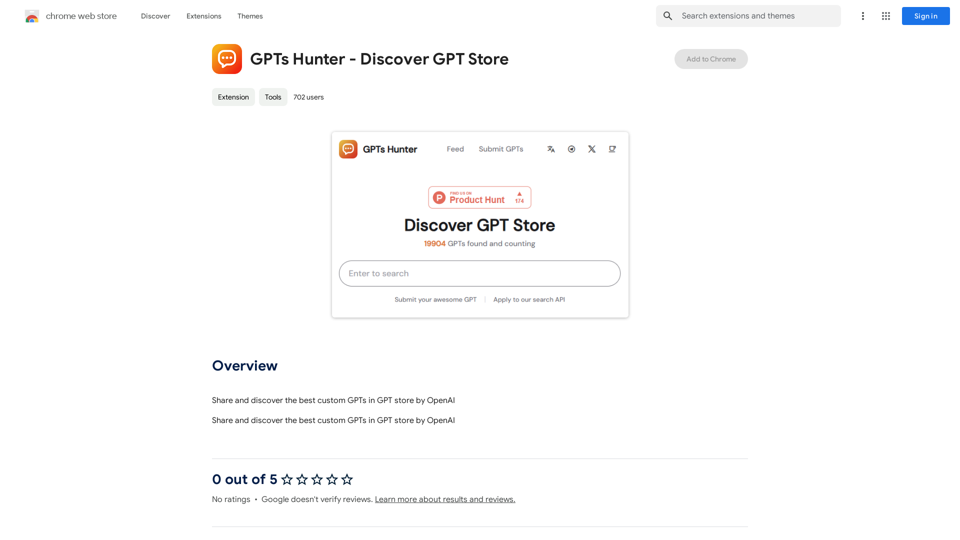
GPTs Hunter - Explore the GPT Marketplace

Share and Discover the Best Custom GPTs in the GPT Store by OpenAI
Visit Website
GPTs Hunter - Explore the GPT Marketplace
Visit Website

Introduction

GPTs Hunter is a Chrome extension designed to enhance the experience of discovering and exploring custom GPTs in OpenAI's GPT store. It provides users with a platform to share and find the most effective custom GPTs, streamlining the process of locating AI models tailored to specific needs. The extension is free to use, with an optional subscription available for extended access.

Feature

Discover Top Custom GPTs

GPTs Hunter allows users to browse and identify the best custom GPTs available in OpenAI's GPT store, making it easier to find AI models suited for various tasks and requirements.

Share and Explore

Users can share their favorite custom GPTs and discover those recommended by others, fostering a community-driven approach to AI model discovery.

Easy Access to AI Technologies

The extension provides seamless access to a wide range of AI technologies, simplifying the process of leveraging advanced AI capabilities.

Free Usage with Premium Option

While the basic features are free, users can opt for a subscription to gain extended access and additional functionalities.

Chrome Web Store Integration

GPTs Hunter can be easily installed from the Chrome Web Store, ensuring a straightforward setup process for users.

Generate Endless Answers

The extension enables users to generate unlimited responses from ChatGPT, enhancing the utility of the AI model.

FAQ

What is GPTs Hunter?

GPTs Hunter is a Chrome extension that facilitates the discovery and exploration of the best custom GPTs in OpenAI's GPT store. It allows users to share and find custom GPTs, making it easier to locate the right AI model for specific needs.

How do I use GPTs Hunter?

To use GPTs Hunter:

  1. Install the extension from the Chrome Web Store
  2. Browse the GPT store to discover top custom GPTs
  3. Share and explore custom GPTs recommended by other users
  4. Utilize the extension to generate responses from ChatGPT

Is GPTs Hunter free to use?

Yes, GPTs Hunter is free to use. However, there is an optional subscription available for users who want extended access and additional features.

Latest Traffic Insights

  • Monthly Visits

    193.90 M

  • Bounce Rate

    56.27%

  • Pages Per Visit

    2.71

  • Time on Site(s)

    115.91

  • Global Rank

    -

  • Country Rank

    -

Recent Visits

Traffic Sources

  • Social Media:
    0.48%
  • Paid Referrals:
    0.55%
  • Email:
    0.15%
  • Referrals:
    12.81%
  • Search Engines:
    16.21%
  • Direct:
    69.81%
More Data

Related Websites

Job Clerk Co-pilot
View Detail

Job Clerk Co-pilot

Job Clerk Co-pilot

Your AI assistant for job applications. Visit jobclerk.com for more.

193.90 M
CrackerJack Resume 

Objective: To obtain a challenging and rewarding position in a fast-paced environment where I can utilize my skills and experience to contribute to the success of a dynamic team.

Summary of Qualifications:

* Highly motivated and results-oriented individual with a proven track record of success in [mention your field].
* Excellent communication, interpersonal, and problem-solving skills.
* Strong analytical and critical thinking abilities.
* Proficient in [list your relevant skills].
* Adaptable and eager to learn new technologies and processes.

Experience:

* [Job Title], [Company Name], [City, State] - [Dates of Employment]
    * [List your responsibilities and achievements using action verbs]
* [Job Title], [Company Name], [City, State] - [Dates of Employment]
    * [List your responsibilities and achievements using action verbs]

Education:

* [Degree Name], [Major], [University Name], [City, State] - [Year of Graduation]
    * [List any relevant coursework, honors, or awards]

Skills:

* [List your hard and soft skills]

Projects:

* [List any relevant projects you have worked on, including a brief description and your role]

Awards and Recognition:

* [List any awards or recognition you have received]

Volunteer Experience:

* [List any volunteer experience you have]

References:

* Available upon request.
View Detail

CrackerJack Resume Objective: To obtain a challenging and rewarding position in a fast-paced environment where I can utilize my skills and experience to contribute to the success of a dynamic team. Summary of Qualifications: * Highly motivated and results-oriented individual with a proven track record of success in [mention your field]. * Excellent communication, interpersonal, and problem-solving skills. * Strong analytical and critical thinking abilities. * Proficient in [list your relevant skills]. * Adaptable and eager to learn new technologies and processes. Experience: * [Job Title], [Company Name], [City, State] - [Dates of Employment] * [List your responsibilities and achievements using action verbs] * [Job Title], [Company Name], [City, State] - [Dates of Employment] * [List your responsibilities and achievements using action verbs] Education: * [Degree Name], [Major], [University Name], [City, State] - [Year of Graduation] * [List any relevant coursework, honors, or awards] Skills: * [List your hard and soft skills] Projects: * [List any relevant projects you have worked on, including a brief description and your role] Awards and Recognition: * [List any awards or recognition you have received] Volunteer Experience: * [List any volunteer experience you have] References: * Available upon request.

CrackerJack Resume Objective: To obtain a challenging and rewarding position in a fast-paced environment where I can utilize my skills and experience to contribute to the success of a dynamic team. Summary of Qualifications: * Highly motivated and results-oriented individual with a proven track record of success in [mention your field]. * Excellent communication, interpersonal, and problem-solving skills. * Strong analytical and critical thinking abilities. * Proficient in [list your relevant skills]. * Adaptable and eager to learn new technologies and processes. Experience: * [Job Title], [Company Name], [City, State] - [Dates of Employment] * [List your responsibilities and achievements using action verbs] * [Job Title], [Company Name], [City, State] - [Dates of Employment] * [List your responsibilities and achievements using action verbs] Education: * [Degree Name], [Major], [University Name], [City, State] - [Year of Graduation] * [List any relevant coursework, honors, or awards] Skills: * [List your hard and soft skills] Projects: * [List any relevant projects you have worked on, including a brief description and your role] Awards and Recognition: * [List any awards or recognition you have received] Volunteer Experience: * [List any volunteer experience you have] References: * Available upon request.

Are you frustrated by the lack of response to your job applications? The secret may lie within your resume. Stop getting rejected…

193.90 M
Chat AI
View Detail

Chat AI

Chat AI

Talk to AI whenever you want with Chat AI: an AI-powered friend, featuring ChatGPT, Bard, Bing, and more! ⚡

193.90 M
Get ChatGPT for Free with Google

You can now access ChatGPT, a powerful language model, for free with Google. Here's how:

Method 1: Google Colab

* Open Google Colab ([colab.research.google.com](http://colab.research.google.com))
* Create a new notebook
* Install the `transformers` library by running `!pip install transformers`
* Import the `transformers` library and load the ChatGPT model using `from transformers import AutoModelForCausalLM, AutoTokenizer; model = AutoModelForCausalLM.from_pretrained('chatgpt'); tokenizer = AutoTokenizer.from_pretrained('chatgpt')`
* Use the model to generate text using `input_text = "Your input here"; inputs = tokenizer.encode_plus(input_text, return_tensors='pt', max_length=1024, padding='max_length', truncation=True); output = model(inputs['input_ids'], attention_mask=inputs['attention_mask']); print(tokenizer.decode(output.logits[0], skip_special_tokens=True))`

Method 2: Google Apps Script

* Open Google Apps Script ([script.google.com](http://script.google.com))
* Create a new project
* Install the `transformers` library by running `npm install transformers`
* Import the `transformers` library and load the ChatGPT model using `const { AutoModelForCausalLM, AutoTokenizer } = require('transformers'); const model = new AutoModelForCausalLM('chatgpt'); const tokenizer = new AutoTokenizer('chatgpt');`
* Use the model to generate text using `const inputText = "Your input here"; const inputs = tokenizer.encodePlus(inputText, { return_tensors: 'pt', max_length: 1024, padding: 'max_length', truncation: true }); const output = model(inputs.inputIds, inputs.attentionMask); console.log(tokenizer.decode(output.logits[0], { skipSpecialTokens: true }));`

Note: These methods require some technical knowledge and may have limitations compared to the original ChatGPT model.
View Detail

Get ChatGPT for Free with Google You can now access ChatGPT, a powerful language model, for free with Google. Here's how: Method 1: Google Colab * Open Google Colab ([colab.research.google.com](http://colab.research.google.com)) * Create a new notebook * Install the `transformers` library by running `!pip install transformers` * Import the `transformers` library and load the ChatGPT model using `from transformers import AutoModelForCausalLM, AutoTokenizer; model = AutoModelForCausalLM.from_pretrained('chatgpt'); tokenizer = AutoTokenizer.from_pretrained('chatgpt')` * Use the model to generate text using `input_text = "Your input here"; inputs = tokenizer.encode_plus(input_text, return_tensors='pt', max_length=1024, padding='max_length', truncation=True); output = model(inputs['input_ids'], attention_mask=inputs['attention_mask']); print(tokenizer.decode(output.logits[0], skip_special_tokens=True))` Method 2: Google Apps Script * Open Google Apps Script ([script.google.com](http://script.google.com)) * Create a new project * Install the `transformers` library by running `npm install transformers` * Import the `transformers` library and load the ChatGPT model using `const { AutoModelForCausalLM, AutoTokenizer } = require('transformers'); const model = new AutoModelForCausalLM('chatgpt'); const tokenizer = new AutoTokenizer('chatgpt');` * Use the model to generate text using `const inputText = "Your input here"; const inputs = tokenizer.encodePlus(inputText, { return_tensors: 'pt', max_length: 1024, padding: 'max_length', truncation: true }); const output = model(inputs.inputIds, inputs.attentionMask); console.log(tokenizer.decode(output.logits[0], { skipSpecialTokens: true }));` Note: These methods require some technical knowledge and may have limitations compared to the original ChatGPT model.

Get ChatGPT for Free with Google You can now access ChatGPT, a powerful language model, for free with Google. Here's how: Method 1: Google Colab * Open Google Colab ([colab.research.google.com](http://colab.research.google.com)) * Create a new notebook * Install the `transformers` library by running `!pip install transformers` * Import the `transformers` library and load the ChatGPT model using `from transformers import AutoModelForCausalLM, AutoTokenizer; model = AutoModelForCausalLM.from_pretrained('chatgpt'); tokenizer = AutoTokenizer.from_pretrained('chatgpt')` * Use the model to generate text using `input_text = "Your input here"; inputs = tokenizer.encode_plus(input_text, return_tensors='pt', max_length=1024, padding='max_length', truncation=True); output = model(inputs['input_ids'], attention_mask=inputs['attention_mask']); print(tokenizer.decode(output.logits[0], skip_special_tokens=True))` Method 2: Google Apps Script * Open Google Apps Script ([script.google.com](http://script.google.com)) * Create a new project * Install the `transformers` library by running `npm install transformers` * Import the `transformers` library and load the ChatGPT model using `const { AutoModelForCausalLM, AutoTokenizer } = require('transformers'); const model = new AutoModelForCausalLM('chatgpt'); const tokenizer = new AutoTokenizer('chatgpt');` * Use the model to generate text using `const inputText = "Your input here"; const inputs = tokenizer.encodePlus(inputText, { return_tensors: 'pt', max_length: 1024, padding: 'max_length', truncation: true }); const output = model(inputs.inputIds, inputs.attentionMask); console.log(tokenizer.decode(output.logits[0], { skipSpecialTokens: true }));` Note: These methods require some technical knowledge and may have limitations compared to the original ChatGPT model.

How to Add ChatGPT to All Google Searches ===================================================== Step 1: Create a Custom Search Engine -------------------------------------- * Go to the [Google Custom Search Engine](https://cse.google.com/) website and sign in with your Google account. * Click on the "New Search Engine" button. * Fill in the required information, such as the name and description of your search engine. * Click on the "Create" button. Step 2: Add ChatGPT to the Search Engine ----------------------------------------- * In the "Setup" tab, click on the "Add" button next to "Sites to search". * Enter the following URL: `https://chat.openai.com/` * Click on the "Add" button. Step 3: Configure the Search Engine -------------------------------------- * In the "Setup" tab, click on the "Edit" button next to "Search engine keywords". * Add the following keywords: `ChatGPT` * Click on the "Save" button. Step 4: Get the Search Engine Code ------------------------------------- * In the "Setup" tab, click on the "Get code" button. * Copy the HTML code provided. Step 5: Add the Search Engine to Your Browser ------------------------------------------------ * Open your browser and go to the "Settings" or "Options" page. * Look for the "Search engine" or "Default search engine" option. * Click on the "Add" or "Manage search engines" button. * Paste the HTML code you copied earlier. * Click on the "Add" or "Save" button. You're Done! =============== Now, whenever you search on Google, ChatGPT will be included in the search results. You can also use the custom search engine URL provided by Google to search directly.

193.90 M
Sentence Rewriter
View Detail

Sentence Rewriter

Sentence Rewriter

AI sentence and paragraph rewriter. Supports 50+ languages including English, Spanish, French, German, Hindi, Chinese, and more.

193.90 M
Rent GPUs | Vast.ai
View Detail

Rent GPUs | Vast.ai

Rent GPUs | Vast.ai

Reduce your cloud compute costs by 3-5 times with the best cloud GPU rentals. Vast.ai's simple search interface allows for fair comparison of GPU rentals from all providers.

869.48 K
Pangeanic
View Detail

Pangeanic

Pangeanic

Hyper-automate linguistic services: AI assistants with your data, privacy, automatic translation with automatic post-editing, no hallucinations, human fluency

45.58 K
Hello Seller
View Detail

Hello Seller

Hello Seller

Earn more with OpenInfoSeller. Find SPP for your products and maximize your profits with the OiSeller extension...

193.90 M