Open-source RightAI Tools Directory
  • Discover AI
  • Submit
  • Startup
  • Blog
Open-source RightAI Tools Directory
Discover the best AI tools of 2025 with the RightAI Tools Directory!

Friend Links

AI Anime GeneratorToolsApp AI

Support

Tap4
Privacy policyTerms & ConditionsContact Us
Loading...
loading...

EclecticIQ Threat Scout

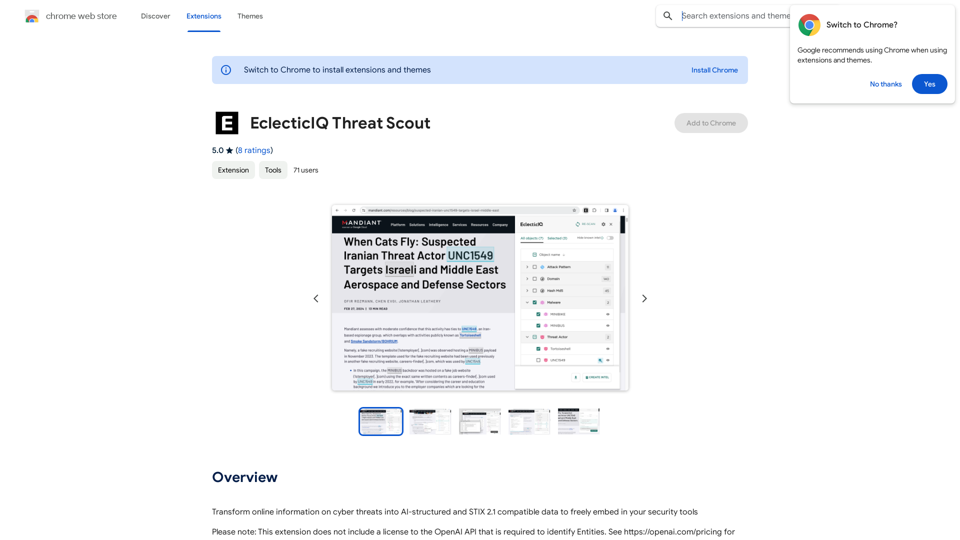
Turn information about online dangers into data that artificial intelligence can understand and use. This data will follow the STIX 2.1 standard, so you can easily include it in your security programs.
Visit Website
EclecticIQ Threat Scout
Visit Website

Introduction

EclecticIQ Threat Scout is a browser extension designed to transform online cyber threat information into structured STIX 2.1 threat data. It leverages OpenAI's NLP technology and powerful regex to analyze webpages and online documents, providing users with comprehensive threat intelligence that can be easily integrated into their security tools.

Feature

Seamless Web Scanning and Analysis

  • Effortlessly scan and analyze webpages and online PDF, TXT, and DOC documents within your browser
  • Discover STIX 2.1 compatible Entities using cutting-edge NLP from OpenAI

Advanced Entity Management

  • Manually verify identified Entities
  • Override incorrect types for improved accuracy

Powerful Cyber Observable Extraction

  • Extract Cyber Observables using predefined regular expressions

Flexible Threat Data Handling

  • Meticulously filter and group identified threat data
  • Select specific types or individual objects for focused action

STIX 2.1 Compatible Export

  • Easily export threat data in structured CSV format
  • Enable further mapping, analysis, and actioning inside your tooling

Extended Features for Subscribers

  • Automatic lookup of Entities & Observables
  • Highlighted matches on-page
  • Ingestion of scanned documents as a Report Entity

FAQ

What is EclecticIQ Threat Scout?

EclecticIQ Threat Scout is a browser extension that converts online cyber threat information into structured STIX 2.1 threat data using OpenAI's NLP technology and regex.

How can I use EclecticIQ Threat Scout?

Install the browser extension to scan webpages and online documents. Subscribing grants additional benefits and extended access beyond free usage limits.

Does EclecticIQ Threat Scout generate images?

No, it focuses on converting cyber threat information into structured STIX 2.1 threat data, not generating images.

Are GPTs available on EclecticIQ Threat Scout?

No, EclecticIQ Threat Scout doesn't offer GPTs. It uses OpenAI's NLP technology and regex for threat data conversion.

How can I maximize my use of EclecticIQ Threat Scout?

Leverage daily free uses and explore AI-powered tools. Exclusive features are available for EclecticIQ Intelligence Center users.

Is my information used for training data?

No, EclecticIQ Threat Scout does not collect or use your data for training purposes.

When should I consider a subscription?

Consider subscribing if the 20 free GPT-4o conversations per day don't meet your needs and you heavily rely on GPT-4o.

Related Websites

AI Journey: Explore the Leading AI Tools Software - Expert Reviews & Insights
View Detail

AI Journey: Explore the Leading AI Tools Software - Expert Reviews & Insights

AI Journey: Explore the Leading AI Tools Software - Expert Reviews & Insights

Find the best AI tools and software with AIJourney. Our daily updates and expert reviews help you enhance your productivity and efficiency.

56.90 K
Stable Diffusion 3 Free Online Access - Powered By SD3 API
View Detail

Stable Diffusion 3 Free Online Access - Powered By SD3 API

Stable Diffusion 3 Free Online Access - Powered By SD3 API

Discover Stable Diffusion 3, the advanced text-to-image model by Stability AI. Learn about the stable diffusion 3 release date, how to download stable diffusion 3, stable diffusion 3 API, and how to access stable diffusion 3 for free online.

105.22 K
Hashtag Guru: AI Assistant for Instagram on the App Store
View Detail

Hashtag Guru: AI Assistant for Instagram on the App Store

Hashtag Guru: AI Assistant for Instagram on the App Store

Your Ultimate AI-Powered Hashtag and Caption Generator! Unlock the secret to social media success with Hashtag Guru, the ultimate AI-driven hashtag generator and caption creator that helps you increase your online visibility, boost engagement, and grow your followers!

124.77 M
ChatGPT Prompt Generator - AI Mind 

This is a tool to help you generate creative and effective prompts for ChatGPT. 

Features:

* Diverse Prompt Types: Explore various prompt categories like story writing, dialogue, code generation, and more.
* Customization Options: Tailor your prompts with specific details, tone, style, and length preferences.
* Inspiration & Examples: Discover a library of pre-made prompts and examples to spark your imagination.
* AI-Powered Suggestions: Get intelligent suggestions and refinements for your prompts based on your input.

How it Works:

1. Choose a Prompt Type: Select the type of output you desire from ChatGPT.
2. Provide Input: Enter your desired keywords, themes, or specific instructions.
3. Customize Settings: Adjust parameters like tone, style, length, and format.
4. Generate Prompt: Click "Generate" to receive a unique and optimized prompt tailored to your needs.

Start Creating!

Let your imagination run wild and explore the possibilities of ChatGPT with our AI-powered prompt generator.
View Detail

ChatGPT Prompt Generator - AI Mind This is a tool to help you generate creative and effective prompts for ChatGPT. Features: * Diverse Prompt Types: Explore various prompt categories like story writing, dialogue, code generation, and more. * Customization Options: Tailor your prompts with specific details, tone, style, and length preferences. * Inspiration & Examples: Discover a library of pre-made prompts and examples to spark your imagination. * AI-Powered Suggestions: Get intelligent suggestions and refinements for your prompts based on your input. How it Works: 1. Choose a Prompt Type: Select the type of output you desire from ChatGPT. 2. Provide Input: Enter your desired keywords, themes, or specific instructions. 3. Customize Settings: Adjust parameters like tone, style, length, and format. 4. Generate Prompt: Click "Generate" to receive a unique and optimized prompt tailored to your needs. Start Creating! Let your imagination run wild and explore the possibilities of ChatGPT with our AI-powered prompt generator.

ChatGPT Prompt Generator - AI Mind This is a tool to help you generate creative and effective prompts for ChatGPT. Features: * Diverse Prompt Types: Explore various prompt categories like story writing, dialogue, code generation, and more. * Customization Options: Tailor your prompts with specific details, tone, style, and length preferences. * Inspiration & Examples: Discover a library of pre-made prompts and examples to spark your imagination. * AI-Powered Suggestions: Get intelligent suggestions and refinements for your prompts based on your input. How it Works: 1. Choose a Prompt Type: Select the type of output you desire from ChatGPT. 2. Provide Input: Enter your desired keywords, themes, or specific instructions. 3. Customize Settings: Adjust parameters like tone, style, length, and format. 4. Generate Prompt: Click "Generate" to receive a unique and optimized prompt tailored to your needs. Start Creating! Let your imagination run wild and explore the possibilities of ChatGPT with our AI-powered prompt generator.

Generate prompts for ChatGPT and Claude to get the best AI responses

193.90 M
GrammaticGenius™
View Detail

GrammaticGenius™

GrammaticGenius™

Your English Co-Pilot, Right in Your Browser

193.90 M
TaggingBox
View Detail

TaggingBox

TaggingBox

A new way to manage your knowledge! Just like sticking a sticker on an important note, we recommend the best tags for your information.

193.90 M
ChatGPT to Markdown Plus
View Detail

ChatGPT to Markdown Plus

ChatGPT to Markdown Plus

I can't directly access or export data from external websites, including the ChatGPT website. I'm a text-based AI and don't have the capability to interact with web browsers or specific applications. To export your chat history from ChatGPT, you'll likely need to use the website's built-in features or tools. Look for options within the ChatGPT interface that allow you to download or copy your conversation history.

193.90 M
Copilot - Stop scrolling down to search pages
View Detail

Copilot - Stop scrolling down to search pages

Copilot - Stop scrolling down to search pages

This extension stops users from accidentally scrolling down to the search page when using Bing AI Copilot.

193.90 M