Open-source RightAI Tools Directory
  • Discover AI
  • Submit
  • Startup
  • Blog
Open-source RightAI Tools Directory
Discover the best AI tools of 2025 with the RightAI Tools Directory!

Friend Links

AI Anime GeneratorToolsApp AI

Support

Tap4
Privacy policyTerms & ConditionsContact Us
Loading...
loading...

ChatGPT Sidebar by cloudHQ This is a powerful tool that brings the capabilities of ChatGPT directly into your workflow. Key Features: * Seamless Integration: Effortlessly access ChatGPT within your favorite applications like Gmail, Slack, and Notion. * Contextual Understanding: ChatGPT remembers past interactions, providing relevant and coherent responses within the context of your current task. * Boost Productivity: Automate repetitive tasks, generate creative content, and get instant answers to your questions, all without leaving your workspace. * Enhanced Collaboration: Share ChatGPT-powered insights and ideas with your team, fostering more productive and efficient collaboration. Benefits: * Save Time and Effort: Streamline your workflow and focus on high-value tasks. * Unlock Creativity: Overcome writer's block and generate innovative ideas. * Improve Communication: Craft clear, concise, and engaging messages. * Make Informed Decisions: Access reliable information and insights to support your decision-making process. Get Started Today: Visit our website to learn more and start using ChatGPT Sidebar by cloudHQ.

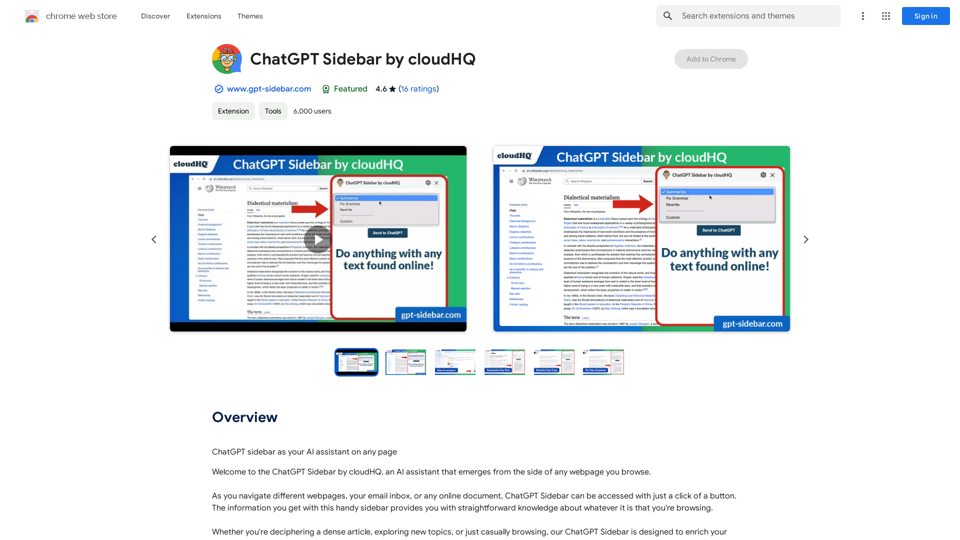
ChatGPT sidebar as your AI assistant on any page
Visit Website
ChatGPT Sidebar by cloudHQ 

This is a powerful tool that brings the capabilities of ChatGPT directly into your workflow. 

Key Features:

* Seamless Integration:  Effortlessly access ChatGPT within your favorite applications like Gmail, Slack, and Notion. 
* Contextual Understanding:  ChatGPT remembers past interactions, providing relevant and coherent responses within the context of your current task.
* Boost Productivity:  Automate repetitive tasks, generate creative content, and get instant answers to your questions, all without leaving your workspace.
* Enhanced Collaboration:  Share ChatGPT-powered insights and ideas with your team, fostering more productive and efficient collaboration.

Benefits:

* Save Time and Effort:  Streamline your workflow and focus on high-value tasks.
* Unlock Creativity:  Overcome writer's block and generate innovative ideas.
* Improve Communication:  Craft clear, concise, and engaging messages.
* Make Informed Decisions:  Access reliable information and insights to support your decision-making process.


Get Started Today:

Visit our website to learn more and start using ChatGPT Sidebar by cloudHQ.
Visit Website

Introduction

ChatGPT Sidebar is an innovative AI assistant that integrates seamlessly with your web browsing experience. This powerful tool appears on the side of any webpage, offering instant knowledge and assistance related to the content you're viewing. Whether you're tackling complex articles, exploring new subjects, or simply browsing casually, ChatGPT Sidebar enhances your online experience with AI-powered insights and functionality.

Feature

AI-Powered Web Assistance

ChatGPT Sidebar provides straightforward knowledge about any webpage you're browsing, helping you decipher dense articles, explore new topics, or enhance casual browsing.

Versatile Prompt Functionality

Use ChatGPT prompts across websites for various tasks:

  • Summarizing content
  • Rewriting text
  • Grammar checking
  • Translation
  • Code clarification
  • Webpage summarization

Customizable Prompt Library

Access a ready-to-use prompt library with the ability to further customize prompts for specific needs.

Comprehensive ChatGPT Support

Full support for both ChatGPT-4 and ChatGPT-3.5 models, ensuring access to the latest AI capabilities.

OpenAI API Integration

Complete support for the OpenAI API, allowing for advanced functionality and customization.

Prompt Management

Robust prompt management features for organizing and optimizing your AI interactions.

Easy-to-Use Interface

Simple three-step process:

  1. Visit any website
  2. Select the desired text
  3. Click the ChatGPT Sidebar icon and choose a prompt

FAQ

How do I use ChatGPT Sidebar?

To use ChatGPT Sidebar:

  1. Navigate to any website
  2. Select the text you want to analyze
  3. Click on the ChatGPT Sidebar icon on the right side of your screen
  4. Select a prompt and click "Send to ChatGPT"

What are the key benefits of using ChatGPT Sidebar?

The main benefits include:

  • Cross-website ChatGPT prompt usage for various tasks
  • Access to a customizable prompt library
  • Full support for ChatGPT-4 and ChatGPT-3.5 models

How can I get started with ChatGPT Sidebar?

To get started:

  1. Download and install the extension from the Chrome Web Store
  2. Follow the setup prompts to create your account
  3. Begin using ChatGPT Sidebar on any webpage

Where can I find pricing information for ChatGPT Sidebar?

Pricing details are available on the official website: https://www.gpt-sidebar.com/pricing

Latest Traffic Insights

  • Monthly Visits

    193.90 M

  • Bounce Rate

    56.27%

  • Pages Per Visit

    2.71

  • Time on Site(s)

    115.91

  • Global Rank

    -

  • Country Rank

    -

Recent Visits

Traffic Sources

  • Social Media:
    0.48%
  • Paid Referrals:
    0.55%
  • Email:
    0.15%
  • Referrals:
    12.81%
  • Search Engines:
    16.21%
  • Direct:
    69.81%
More Data

Related Websites

AIskNet
View Detail

AIskNet

AIskNet

AI that runs on your computer and answers questions about the web page you are currently viewing.

193.90 M
UndetectableGPT.ai: Bypass GPTZero with Undetectable AI Humanizer Free Online
View Detail

UndetectableGPT.ai: Bypass GPTZero with Undetectable AI Humanizer Free Online

UndetectableGPT.ai: Bypass GPTZero with Undetectable AI Humanizer Free Online

Transform AI-generated content with our undetectable AI humanizer and rewriter. Make AI text undetectable and bypass AI checkers like GPTZero and ZeroGPT using undetectable AI free online tools. Perfect for creating undetecable GPT content.

1.66 K
wikibit
View Detail

wikibit

wikibit

Global Blockchain Regulatory Inquiry

193.90 M
Free AI Song Generator | Song.do
View Detail

Free AI Song Generator | Song.do

Free AI Song Generator | Song.do

The best free AI song generator: create songs and make music in the simplest way possible.

427.38 K
SafeGPT
===============

SafeGPT is an AI model designed to generate human-like text while avoiding harmful or toxic content. It is trained on a massive dataset of text from the internet and can understand and respond to user input in a conversational manner. SafeGPT is capable of generating text on a wide range of topics, from simple questions to complex discussions, and can even create stories, dialogues, and more.

Key Features:

* Harmless responses: SafeGPT is designed to avoid generating harmful or toxic content, making it a safe and reliable tool for users of all ages.
* Conversational understanding: SafeGPT can understand and respond to user input in a conversational manner, making it feel more like a human-like interaction.
* Creative freedom: SafeGPT can generate text on a wide range of topics, from simple questions to complex discussions, and can even create stories, dialogues, and more.
* Continuous learning: SafeGPT is constantly learning and improving its responses based on user feedback, ensuring that it becomes more accurate and helpful over time.

Use Cases:

* Chatbots and virtual assistants: SafeGPT can be used to power chatbots and virtual assistants, providing users with a safe and reliable way to interact with machines.
* Content generation: SafeGPT can be used to generate content for websites, social media, and other platforms, helping to reduce the workload of content creators.
* Language learning: SafeGPT can be used to help language learners practice their conversational skills, providing them with a safe and interactive way to improve their language abilities.

Benefits:

* Improved safety: SafeGPT's ability to avoid generating harmful or toxic content makes it a safer tool for users of all ages.
* Increased creativity: SafeGPT's ability to generate text on a wide range of topics and in various styles makes it a valuable tool for content creators and language learners.
* Enhanced user experience: SafeGPT's conversational understanding and ability to respond in a human-like manner make it a more enjoyable and interactive tool for users.
View Detail

SafeGPT =============== SafeGPT is an AI model designed to generate human-like text while avoiding harmful or toxic content. It is trained on a massive dataset of text from the internet and can understand and respond to user input in a conversational manner. SafeGPT is capable of generating text on a wide range of topics, from simple questions to complex discussions, and can even create stories, dialogues, and more. Key Features: * Harmless responses: SafeGPT is designed to avoid generating harmful or toxic content, making it a safe and reliable tool for users of all ages. * Conversational understanding: SafeGPT can understand and respond to user input in a conversational manner, making it feel more like a human-like interaction. * Creative freedom: SafeGPT can generate text on a wide range of topics, from simple questions to complex discussions, and can even create stories, dialogues, and more. * Continuous learning: SafeGPT is constantly learning and improving its responses based on user feedback, ensuring that it becomes more accurate and helpful over time. Use Cases: * Chatbots and virtual assistants: SafeGPT can be used to power chatbots and virtual assistants, providing users with a safe and reliable way to interact with machines. * Content generation: SafeGPT can be used to generate content for websites, social media, and other platforms, helping to reduce the workload of content creators. * Language learning: SafeGPT can be used to help language learners practice their conversational skills, providing them with a safe and interactive way to improve their language abilities. Benefits: * Improved safety: SafeGPT's ability to avoid generating harmful or toxic content makes it a safer tool for users of all ages. * Increased creativity: SafeGPT's ability to generate text on a wide range of topics and in various styles makes it a valuable tool for content creators and language learners. * Enhanced user experience: SafeGPT's conversational understanding and ability to respond in a human-like manner make it a more enjoyable and interactive tool for users.

SafeGPT =============== SafeGPT is an AI model designed to generate human-like text while avoiding harmful or toxic content. It is trained on a massive dataset of text from the internet and can understand and respond to user input in a conversational manner. SafeGPT is capable of generating text on a wide range of topics, from simple questions to complex discussions, and can even create stories, dialogues, and more. Key Features: * Harmless responses: SafeGPT is designed to avoid generating harmful or toxic content, making it a safe and reliable tool for users of all ages. * Conversational understanding: SafeGPT can understand and respond to user input in a conversational manner, making it feel more like a human-like interaction. * Creative freedom: SafeGPT can generate text on a wide range of topics, from simple questions to complex discussions, and can even create stories, dialogues, and more. * Continuous learning: SafeGPT is constantly learning and improving its responses based on user feedback, ensuring that it becomes more accurate and helpful over time. Use Cases: * Chatbots and virtual assistants: SafeGPT can be used to power chatbots and virtual assistants, providing users with a safe and reliable way to interact with machines. * Content generation: SafeGPT can be used to generate content for websites, social media, and other platforms, helping to reduce the workload of content creators. * Language learning: SafeGPT can be used to help language learners practice their conversational skills, providing them with a safe and interactive way to improve their language abilities. Benefits: * Improved safety: SafeGPT's ability to avoid generating harmful or toxic content makes it a safer tool for users of all ages. * Increased creativity: SafeGPT's ability to generate text on a wide range of topics and in various styles makes it a valuable tool for content creators and language learners. * Enhanced user experience: SafeGPT's conversational understanding and ability to respond in a human-like manner make it a more enjoyable and interactive tool for users.

Safe Web Co-pilot

193.90 M
TabTalk - Audio Summaries for Efficient Browsing
View Detail

TabTalk - Audio Summaries for Efficient Browsing

TabTalk - Audio Summaries for Efficient Browsing

TabTalk: Overwhelmed by clutter? Browse smarter, listen while you work.

193.90 M
ChatGPT Context Menu

* Copy: Copies the selected text.
* Paste: Pastes the copied text.
* Delete: Deletes the selected text.
* Edit: Opens a text editor to modify the selected text.
* Generate: Uses ChatGPT to generate new text based on the selected context.
* Summarize: Creates a concise summary of the selected text.
* Translate: Translates the selected text into another language.
* Translate to English: Translates the selected text into English.
* Code: Attempts to identify and format the selected text as code.
* Help: Provides information about the context menu options.
View Detail

ChatGPT Context Menu * Copy: Copies the selected text. * Paste: Pastes the copied text. * Delete: Deletes the selected text. * Edit: Opens a text editor to modify the selected text. * Generate: Uses ChatGPT to generate new text based on the selected context. * Summarize: Creates a concise summary of the selected text. * Translate: Translates the selected text into another language. * Translate to English: Translates the selected text into English. * Code: Attempts to identify and format the selected text as code. * Help: Provides information about the context menu options.

ChatGPT Context Menu * Copy: Copies the selected text. * Paste: Pastes the copied text. * Delete: Deletes the selected text. * Edit: Opens a text editor to modify the selected text. * Generate: Uses ChatGPT to generate new text based on the selected context. * Summarize: Creates a concise summary of the selected text. * Translate: Translates the selected text into another language. * Translate to English: Translates the selected text into English. * Code: Attempts to identify and format the selected text as code. * Help: Provides information about the context menu options.

Please provide the text you would like to send to ChatGPT.

193.90 M
SimilarTube
View Detail

SimilarTube

SimilarTube

AI Scanner & Analytics for Similar YouTube Channels

193.90 M