Open-source RightAI Tools Directory
  • Discover AI
  • Submit
  • Startup
  • Blog
Open-source RightAI Tools Directory
Discover the best AI tools of 2025 with the RightAI Tools Directory!

Friend Links

AI Anime GeneratorToolsApp AI

Support

Tap4
Privacy policyTerms & ConditionsContact Us
Loading...
loading...

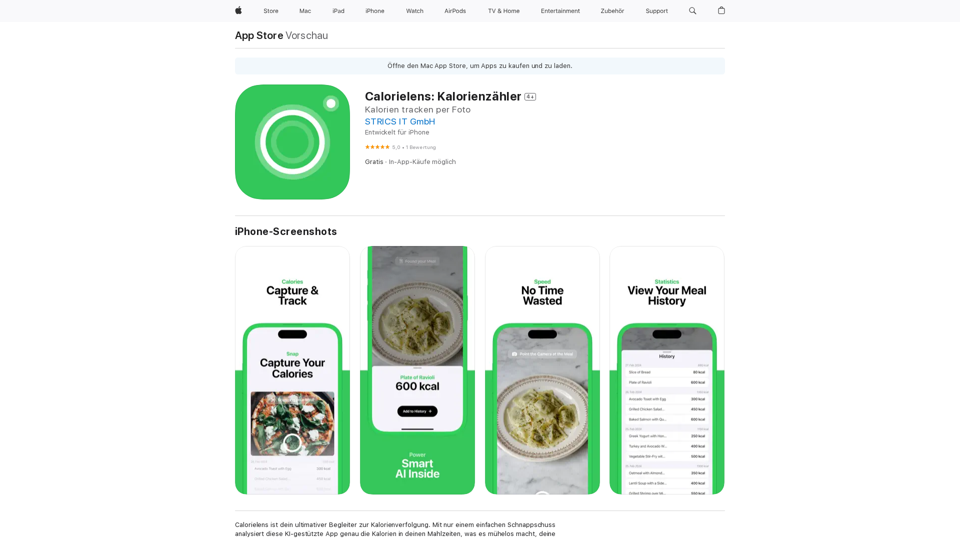
Calorielens: Calorie Counter in the App Store

CalorieLens is your ultimate companion for calorie tracking. With just a simple snapshot, this AI-powered app accurately analyzes the calories in…
Visit Website
Calorielens: Calorie Counter in the App Store
Visit Website

Introduction

Calorielens is an innovative AI-powered app designed to simplify calorie tracking. By utilizing advanced image recognition technology, it allows users to effortlessly monitor their calorie intake through simple meal snapshots. This app eliminates the need for manual input, revolutionizing the way people track their dietary habits and supporting their health and fitness goals.

Feature

Instant Calorie Analysis

Take a photo of your meal, and Calorielens will quickly provide an approximate calorie count, making tracking your food intake effortless and efficient.

AI-Driven Accuracy

Leveraging advanced artificial intelligence technology, Calorielens ensures precise calorie estimates, giving users confidence in their dietary tracking.

Meal Tracking and History

Easily log your meals and monitor your calorie intake over time, allowing for better understanding and management of your dietary habits.

User-Friendly Interface

With a simple 4-step process, Calorielens makes calorie tracking accessible to everyone:

  1. Download and install the app
  2. Take a photo of your meal
  3. Receive instant calorie analysis
  4. Track and monitor your intake over time

Cross-Platform Compatibility

Available for iPhone, iPad, and Mac devices running macOS 14.0 or later, ensuring flexibility and convenience for users across different Apple devices.

Flexible Pricing Options

PlanPrice
Free Version$0 (with optional in-app purchases)
PRO Subscription (Monthly)€5.99
PRO Subscription (Yearly)€49.99

FAQ

How does Calorielens work?

Calorielens utilizes AI technology to analyze photos of your meals and provide an approximate calorie count, simplifying the process of tracking your food intake.

Is Calorielens accurate?

Yes, Calorielens is designed to provide precise calorie estimates using advanced AI technology, ensuring reliable results for users.

Can I use Calorielens on different Apple devices?

Yes, Calorielens is compatible with iPhone, iPad, and Mac devices running macOS 14.0 or later, offering flexibility across the Apple ecosystem.

Is Calorielens available in multiple languages?

Currently, Calorielens is available in English. Future updates may include support for additional languages.

Related Websites
MOJi Dictionary Plugin
View Detail

MOJi Dictionary Plugin

MOJi Dictionary Plugin

MOJi Dictionary is an official Japanese learning dictionary browser extension that makes it easy and fast to look up and save Japanese words.

193.90 M
Meet the Meeting
View Detail

Meet the Meeting

Meet the Meeting

Identifying People Expressions in Google Meets Calls This is a complex task with several challenges: * Technical Limitations: Google Meets doesn't currently offer an API to directly access facial expressions of participants. * Privacy Concerns: Analyzing facial expressions raises significant privacy issues. Users should have control over whether their expressions are being tracked and used. * Accuracy: Even with access to facial data, accurately interpreting expressions can be difficult due to variations in lighting, angles, and individual differences. Possible Approaches (with limitations): * User-Submitted Data: Participants could manually indicate their emotions during the call, which could be collected and analyzed. This relies on user honesty and may not capture subtle expressions. * Third-Party Tools: Some external tools might analyze video feeds and attempt to detect expressions. However, their accuracy and privacy practices should be carefully evaluated. * Future Developments: Google or other companies might develop features that allow for more ethical and accurate expression analysis in the future. It's important to remember that facial expressions are just one aspect of communication, and relying solely on them can be misleading.

193.90 M
Get ChatGPT for Free with Google

You can now access ChatGPT, a powerful language model, for free with Google. Here's how:

Method 1: Google Colab

* Open Google Colab ([colab.research.google.com](http://colab.research.google.com))
* Create a new notebook
* Install the `transformers` library by running `!pip install transformers`
* Import the `transformers` library and load the ChatGPT model using `from transformers import AutoModelForCausalLM, AutoTokenizer; model = AutoModelForCausalLM.from_pretrained('chatgpt'); tokenizer = AutoTokenizer.from_pretrained('chatgpt')`
* Use the model to generate text using `input_text = "Your input here"; inputs = tokenizer.encode_plus(input_text, return_tensors='pt', max_length=1024, padding='max_length', truncation=True); output = model(inputs['input_ids'], attention_mask=inputs['attention_mask']); print(tokenizer.decode(output.logits[0], skip_special_tokens=True))`

Method 2: Google Apps Script

* Open Google Apps Script ([script.google.com](http://script.google.com))
* Create a new project
* Install the `transformers` library by running `npm install transformers`
* Import the `transformers` library and load the ChatGPT model using `const { AutoModelForCausalLM, AutoTokenizer } = require('transformers'); const model = new AutoModelForCausalLM('chatgpt'); const tokenizer = new AutoTokenizer('chatgpt');`
* Use the model to generate text using `const inputText = "Your input here"; const inputs = tokenizer.encodePlus(inputText, { return_tensors: 'pt', max_length: 1024, padding: 'max_length', truncation: true }); const output = model(inputs.inputIds, inputs.attentionMask); console.log(tokenizer.decode(output.logits[0], { skipSpecialTokens: true }));`

Note: These methods require some technical knowledge and may have limitations compared to the original ChatGPT model.
View Detail

Get ChatGPT for Free with Google You can now access ChatGPT, a powerful language model, for free with Google. Here's how: Method 1: Google Colab * Open Google Colab ([colab.research.google.com](http://colab.research.google.com)) * Create a new notebook * Install the `transformers` library by running `!pip install transformers` * Import the `transformers` library and load the ChatGPT model using `from transformers import AutoModelForCausalLM, AutoTokenizer; model = AutoModelForCausalLM.from_pretrained('chatgpt'); tokenizer = AutoTokenizer.from_pretrained('chatgpt')` * Use the model to generate text using `input_text = "Your input here"; inputs = tokenizer.encode_plus(input_text, return_tensors='pt', max_length=1024, padding='max_length', truncation=True); output = model(inputs['input_ids'], attention_mask=inputs['attention_mask']); print(tokenizer.decode(output.logits[0], skip_special_tokens=True))` Method 2: Google Apps Script * Open Google Apps Script ([script.google.com](http://script.google.com)) * Create a new project * Install the `transformers` library by running `npm install transformers` * Import the `transformers` library and load the ChatGPT model using `const { AutoModelForCausalLM, AutoTokenizer } = require('transformers'); const model = new AutoModelForCausalLM('chatgpt'); const tokenizer = new AutoTokenizer('chatgpt');` * Use the model to generate text using `const inputText = "Your input here"; const inputs = tokenizer.encodePlus(inputText, { return_tensors: 'pt', max_length: 1024, padding: 'max_length', truncation: true }); const output = model(inputs.inputIds, inputs.attentionMask); console.log(tokenizer.decode(output.logits[0], { skipSpecialTokens: true }));` Note: These methods require some technical knowledge and may have limitations compared to the original ChatGPT model.

Get ChatGPT for Free with Google You can now access ChatGPT, a powerful language model, for free with Google. Here's how: Method 1: Google Colab * Open Google Colab ([colab.research.google.com](http://colab.research.google.com)) * Create a new notebook * Install the `transformers` library by running `!pip install transformers` * Import the `transformers` library and load the ChatGPT model using `from transformers import AutoModelForCausalLM, AutoTokenizer; model = AutoModelForCausalLM.from_pretrained('chatgpt'); tokenizer = AutoTokenizer.from_pretrained('chatgpt')` * Use the model to generate text using `input_text = "Your input here"; inputs = tokenizer.encode_plus(input_text, return_tensors='pt', max_length=1024, padding='max_length', truncation=True); output = model(inputs['input_ids'], attention_mask=inputs['attention_mask']); print(tokenizer.decode(output.logits[0], skip_special_tokens=True))` Method 2: Google Apps Script * Open Google Apps Script ([script.google.com](http://script.google.com)) * Create a new project * Install the `transformers` library by running `npm install transformers` * Import the `transformers` library and load the ChatGPT model using `const { AutoModelForCausalLM, AutoTokenizer } = require('transformers'); const model = new AutoModelForCausalLM('chatgpt'); const tokenizer = new AutoTokenizer('chatgpt');` * Use the model to generate text using `const inputText = "Your input here"; const inputs = tokenizer.encodePlus(inputText, { return_tensors: 'pt', max_length: 1024, padding: 'max_length', truncation: true }); const output = model(inputs.inputIds, inputs.attentionMask); console.log(tokenizer.decode(output.logits[0], { skipSpecialTokens: true }));` Note: These methods require some technical knowledge and may have limitations compared to the original ChatGPT model.

How to Add ChatGPT to All Google Searches ===================================================== Step 1: Create a Custom Search Engine -------------------------------------- * Go to the [Google Custom Search Engine](https://cse.google.com/) website and sign in with your Google account. * Click on the "New Search Engine" button. * Fill in the required information, such as the name and description of your search engine. * Click on the "Create" button. Step 2: Add ChatGPT to the Search Engine ----------------------------------------- * In the "Setup" tab, click on the "Add" button next to "Sites to search". * Enter the following URL: `https://chat.openai.com/` * Click on the "Add" button. Step 3: Configure the Search Engine -------------------------------------- * In the "Setup" tab, click on the "Edit" button next to "Search engine keywords". * Add the following keywords: `ChatGPT` * Click on the "Save" button. Step 4: Get the Search Engine Code ------------------------------------- * In the "Setup" tab, click on the "Get code" button. * Copy the HTML code provided. Step 5: Add the Search Engine to Your Browser ------------------------------------------------ * Open your browser and go to the "Settings" or "Options" page. * Look for the "Search engine" or "Default search engine" option. * Click on the "Add" or "Manage search engines" button. * Paste the HTML code you copied earlier. * Click on the "Add" or "Save" button. You're Done! =============== Now, whenever you search on Google, ChatGPT will be included in the search results. You can also use the custom search engine URL provided by Google to search directly.

193.90 M
ChatCraft - ChatGPT Prompts

What is ChatCraft?

ChatCraft is a tool that helps you generate creative and effective prompts for ChatGPT. 

Why Use ChatCraft?

* Unlock ChatGPT's Potential: Get more insightful, engaging, and surprising responses from ChatGPT.
* Save Time and Effort:  Quickly brainstorm and refine prompts without getting stuck.
* Explore New Ideas: Discover unique angles and perspectives for your ChatGPT interactions.

How to Use ChatCraft:

1. Choose a Category: Select from a range of categories like storytelling, code generation, dialogue writing, and more.
2. Provide Input:  Give ChatCraft some context or keywords related to your desired outcome.
3. Generate Prompts: ChatCraft will generate a variety of tailored prompts for you to use with ChatGPT.
4. Experiment and Refine:  Try out different prompts and see what works best for your needs.


Let ChatCraft be your guide to unlocking the full potential of ChatGPT!
View Detail

ChatCraft - ChatGPT Prompts What is ChatCraft? ChatCraft is a tool that helps you generate creative and effective prompts for ChatGPT. Why Use ChatCraft? * Unlock ChatGPT's Potential: Get more insightful, engaging, and surprising responses from ChatGPT. * Save Time and Effort: Quickly brainstorm and refine prompts without getting stuck. * Explore New Ideas: Discover unique angles and perspectives for your ChatGPT interactions. How to Use ChatCraft: 1. Choose a Category: Select from a range of categories like storytelling, code generation, dialogue writing, and more. 2. Provide Input: Give ChatCraft some context or keywords related to your desired outcome. 3. Generate Prompts: ChatCraft will generate a variety of tailored prompts for you to use with ChatGPT. 4. Experiment and Refine: Try out different prompts and see what works best for your needs. Let ChatCraft be your guide to unlocking the full potential of ChatGPT!

ChatCraft - ChatGPT Prompts What is ChatCraft? ChatCraft is a tool that helps you generate creative and effective prompts for ChatGPT. Why Use ChatCraft? * Unlock ChatGPT's Potential: Get more insightful, engaging, and surprising responses from ChatGPT. * Save Time and Effort: Quickly brainstorm and refine prompts without getting stuck. * Explore New Ideas: Discover unique angles and perspectives for your ChatGPT interactions. How to Use ChatCraft: 1. Choose a Category: Select from a range of categories like storytelling, code generation, dialogue writing, and more. 2. Provide Input: Give ChatCraft some context or keywords related to your desired outcome. 3. Generate Prompts: ChatCraft will generate a variety of tailored prompts for you to use with ChatGPT. 4. Experiment and Refine: Try out different prompts and see what works best for your needs. Let ChatCraft be your guide to unlocking the full potential of ChatGPT!

Helping users of generative AI get the most out of ChatGPT by giving them easy-to-use, advanced prompts.

193.90 M
Knowz AI Search Engine: A New Era of Online Searching Experience
View Detail

Knowz AI Search Engine: A New Era of Online Searching Experience

Knowz AI Search Engine: A New Era of Online Searching Experience

Discover the power of Knowz, a free AI search designed to deliver fast, accurate, and clutter-free answers, revolutionizing your online searches.

270
ChatGPT Conversations Search
View Detail

ChatGPT Conversations Search

ChatGPT Conversations Search

Save, search, and organize your ChatGPT conversation history.

193.90 M
Empler AI | AI Workflows with GPT & More
View Detail

Empler AI | AI Workflows with GPT & More

Empler AI | AI Workflows with GPT & More

Next-Generation AI Tool For Better Outcomes.

193.90 M
Yes or No Tarot
View Detail

Yes or No Tarot

Yes or No Tarot

Yes or No Tarot offers quick answers to your everyday questions. Just ask, draw a card, and get a simple yes, no, or maybe to help guide your choices.

0