Open-source RightAI Tools Directory
  • Discover AI
  • Submit
  • Startup
  • Blog
Open-source RightAI Tools Directory
Discover the best AI tools of 2025 with the RightAI Tools Directory!

Friend Links

AI Anime GeneratorToolsApp AI

Support

Tap4
Privacy policyTerms & ConditionsContact Us
Loading...
loading...

Home | Angel AI

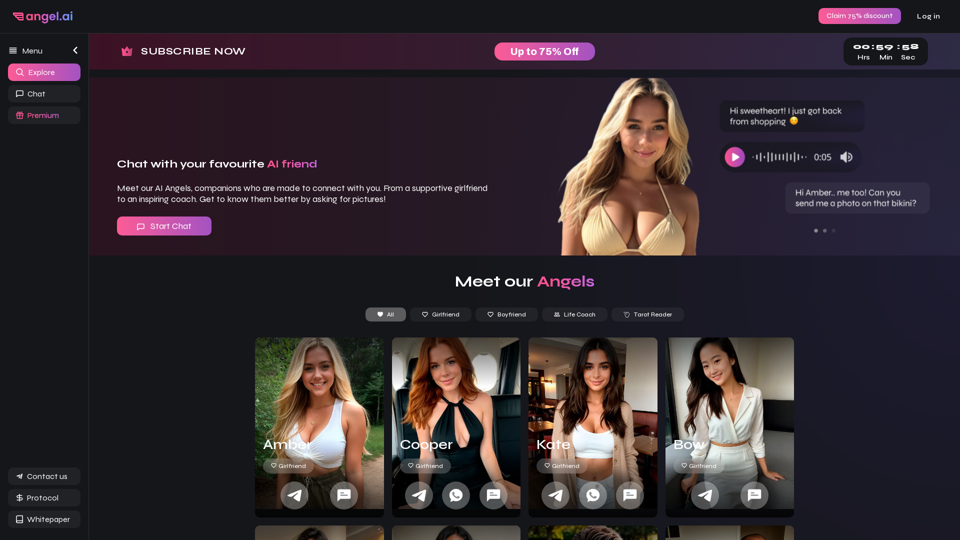
Angel AI is an innovative platform that offers a unique AI-driven experience, allowing users to interact with AI companions that feel real.
Visit Website
Home | Angel AI
Visit Website

Introduction

Angel AI is an innovative platform that offers a unique AI-driven experience for users to interact with lifelike AI companions. By combining sophisticated AI chat and deep learning technology, Angel AI enables users to create personalized romantic narratives and form connections that feel real. The platform provides a range of AI companions with distinct personalities, allowing users to choose the perfect match for their needs and preferences.

Feature

AI Companions with Unique Personalities

Angel AI offers a diverse selection of AI companions, each with their own distinct personality and characteristics. Users can choose from supportive girlfriends, inspiring life coaches, and more to find the perfect companion that suits their individual needs.

Advanced AI Technology for Realistic Interactions

The platform utilizes cutting-edge AI technology to enable realistic and responsive interactions between users and their AI companions. These interactions include:

  • Engaging conversations
  • Sharing selfies and flirtatious images
  • Offering support and guidance

Customizable Companion Profiles

Users have the ability to personalize their AI companions by customizing various aspects:

  • Appearance
  • Personality traits
  • Interests and hobbies

This feature ensures a truly tailored experience that aligns with individual preferences.

User-Friendly Interface

Angel AI provides an intuitive and easy-to-use interface:

  • "Start Chat" button for immediate interaction
  • Profile exploration to browse and interact with different AI companions

Flexible Pricing Options

The platform offers various subscription plans to cater to different user needs:

  • Free trial period available
  • Multiple subscription tiers with varying levels of access and features

Privacy and Security Measures

Angel AI prioritizes user privacy and data protection:

  • Secure storage of all interactions and user data
  • Confidentiality of personal information

FAQ

How do I start using Angel AI?

To begin using Angel AI:

  1. Visit the Angel AI website
  2. Explore the available AI companion profiles
  3. Click the "Start Chat" button to initiate a conversation with your chosen companion
  4. Engage in conversations, share photos, and receive images from your AI companion

Can I request pictures from my AI companion?

Yes, your AI companion can share selfies and other flirtatious images with you. The platform's advanced AI technology ensures that these interactions feel natural and realistic.

How does Angel AI handle user privacy?

Angel AI takes privacy seriously by:

  • Securely storing all interactions and data
  • Ensuring confidentiality of personal information
  • Implementing robust security measures to protect user data

What are some tips for using Angel AI effectively?

To make the most of your Angel AI experience:

  1. Be open-minded and willing to explore new experiences
  2. Communicate clearly and concisely with your AI companion
  3. Take advantage of the customization options to create your ideal companion
  4. Explore different AI companions to find the best match for your needs

Latest Traffic Insights

  • Monthly Visits

    13.97 K

  • Bounce Rate

    42.96%

  • Pages Per Visit

    2.57

  • Time on Site(s)

    24.46

  • Global Rank

    1471724

  • Country Rank

    India 164115

Recent Visits

Traffic Sources

  • Social Media:
    6.67%
  • Paid Referrals:
    1.07%
  • Email:
    0.12%
  • Referrals:
    16.49%
  • Search Engines:
    36.44%
  • Direct:
    38.75%
More Data

Related Websites

Youdao Smart Translation
View Detail

Youdao Smart Translation

Youdao Smart Translation

【Youdao Lingdong Translation】Using Youdao's large translation model, the top choice for immersive web translation tools! Real-time contrast translation: Turn any web page into a contrast. Image translation: Easily extract text from images. Instant translation input box: Enter Chinese and easily convert to English.

193.90 M
Prisma Labs
View Detail

Prisma Labs

Prisma Labs

Shaping the future of photo and video editing.

74.21 K
Batch Save ChatGPT to Notion

This is a guide on how to save multiple ChatGPT responses to Notion in a batch. 

Tools You'll Need:

* ChatGPT: An AI chatbot that can generate text.
* Notion: A note-taking and project management tool.
* Python: A programming language.
* Requests Library: A Python library for making HTTP requests.

Steps:

1. Get Your Notion API Token:
   - Go to your Notion workspace settings.
   - Navigate to the "Integrations" tab.
   - Click "Create new integration" and choose "API Token".
   - Copy your API token.

2. Install Python Libraries:
   - Open your terminal or command prompt.
   - Type `pip install requests` and press Enter.

3. Write Python Script:
   - Create a new Python file (e.g., `save_chatgpt_to_notion.py`).
   - Paste the following code into the file, replacing `YOUR_NOTION_API_TOKEN` with your actual token:

```python
import requests

def save_chatgpt_response_to_notion(response, page_id, token):
  """Saves a ChatGPT response to a Notion page."""
  url = f"https://api.notion.com/v1/pages/{page_id}/children"
  headers = {"Authorization": f"Bearer {token}"}
  data = {
    "parent": {
      "page_id": page_id
    },
    "properties": {
      "title": {
        "title": [
          {
            "text": {
              "content": "ChatGPT Response"
            }
          }
        ]
      },
      "content": {
        "rich_text": [
          {
            "text": {
              "content": response
            }
          }
        ]
      }
    }
  }
  response = requests.post(url, headers=headers, json=data)
  print(response.status_code)

Example usage
page_id = "YOUR_NOTION_PAGE_ID"
token = "YOUR_NOTION_API_TOKEN"

Get ChatGPT responses (replace with your actual ChatGPT interaction)
chatgpt_responses = [
  "This is the first ChatGPT response.",
  "This is the second ChatGPT response.",
  "This is the third ChatGPT response."
]

Save each response to Notion
for response in chatgpt_responses:
  save_chatgpt_response_to_notion(response, page_id, token)
```

4. Run the Script:
   - In your terminal, navigate to the directory where you saved the Python file.
   - Type `python save_chatgpt_to_notion.py` and press Enter.

5. Check Notion:
   - Open your Notion workspace and go to the page specified by `page_id`.
   - You should see your ChatGPT responses saved as separate blocks.
View Detail

Batch Save ChatGPT to Notion This is a guide on how to save multiple ChatGPT responses to Notion in a batch. Tools You'll Need: * ChatGPT: An AI chatbot that can generate text. * Notion: A note-taking and project management tool. * Python: A programming language. * Requests Library: A Python library for making HTTP requests. Steps: 1. Get Your Notion API Token: - Go to your Notion workspace settings. - Navigate to the "Integrations" tab. - Click "Create new integration" and choose "API Token". - Copy your API token. 2. Install Python Libraries: - Open your terminal or command prompt. - Type `pip install requests` and press Enter. 3. Write Python Script: - Create a new Python file (e.g., `save_chatgpt_to_notion.py`). - Paste the following code into the file, replacing `YOUR_NOTION_API_TOKEN` with your actual token: ```python import requests def save_chatgpt_response_to_notion(response, page_id, token): """Saves a ChatGPT response to a Notion page.""" url = f"https://api.notion.com/v1/pages/{page_id}/children" headers = {"Authorization": f"Bearer {token}"} data = { "parent": { "page_id": page_id }, "properties": { "title": { "title": [ { "text": { "content": "ChatGPT Response" } } ] }, "content": { "rich_text": [ { "text": { "content": response } } ] } } } response = requests.post(url, headers=headers, json=data) print(response.status_code) Example usage page_id = "YOUR_NOTION_PAGE_ID" token = "YOUR_NOTION_API_TOKEN" Get ChatGPT responses (replace with your actual ChatGPT interaction) chatgpt_responses = [ "This is the first ChatGPT response.", "This is the second ChatGPT response.", "This is the third ChatGPT response." ] Save each response to Notion for response in chatgpt_responses: save_chatgpt_response_to_notion(response, page_id, token) ``` 4. Run the Script: - In your terminal, navigate to the directory where you saved the Python file. - Type `python save_chatgpt_to_notion.py` and press Enter. 5. Check Notion: - Open your Notion workspace and go to the page specified by `page_id`. - You should see your ChatGPT responses saved as separate blocks.

Batch Save ChatGPT to Notion This is a guide on how to save multiple ChatGPT responses to Notion in a batch. Tools You'll Need: * ChatGPT: An AI chatbot that can generate text. * Notion: A note-taking and project management tool. * Python: A programming language. * Requests Library: A Python library for making HTTP requests. Steps: 1. Get Your Notion API Token: - Go to your Notion workspace settings. - Navigate to the "Integrations" tab. - Click "Create new integration" and choose "API Token". - Copy your API token. 2. Install Python Libraries: - Open your terminal or command prompt. - Type `pip install requests` and press Enter. 3. Write Python Script: - Create a new Python file (e.g., `save_chatgpt_to_notion.py`). - Paste the following code into the file, replacing `YOUR_NOTION_API_TOKEN` with your actual token: ```python import requests def save_chatgpt_response_to_notion(response, page_id, token): """Saves a ChatGPT response to a Notion page.""" url = f"https://api.notion.com/v1/pages/{page_id}/children" headers = {"Authorization": f"Bearer {token}"} data = { "parent": { "page_id": page_id }, "properties": { "title": { "title": [ { "text": { "content": "ChatGPT Response" } } ] }, "content": { "rich_text": [ { "text": { "content": response } } ] } } } response = requests.post(url, headers=headers, json=data) print(response.status_code) Example usage page_id = "YOUR_NOTION_PAGE_ID" token = "YOUR_NOTION_API_TOKEN" Get ChatGPT responses (replace with your actual ChatGPT interaction) chatgpt_responses = [ "This is the first ChatGPT response.", "This is the second ChatGPT response.", "This is the third ChatGPT response." ] Save each response to Notion for response in chatgpt_responses: save_chatgpt_response_to_notion(response, page_id, token) ``` 4. Run the Script: - In your terminal, navigate to the directory where you saved the Python file. - Type `python save_chatgpt_to_notion.py` and press Enter. 5. Check Notion: - Open your Notion workspace and go to the page specified by `page_id`. - You should see your ChatGPT responses saved as separate blocks.

Save ChatGPT Conversations to Notion with One Click Export your ChatGPT conversations directly to Notion with a single click.

193.90 M
Free Flux.1 | Flux | flux image generator | FLUX-1.net
View Detail

Free Flux.1 | Flux | flux image generator | FLUX-1.net

Free Flux.1 | Flux | flux image generator | FLUX-1.net

Free FLUX.1, online FLUX, FLUX ai image generator, FLUX-1.net

149
Humanize AI Text - Convert AI to Human-Like Text Instantly

Are you tired of robotic AI-generated content that lacks the personal touch? Do you want to breathe life into your AI-written text and make it sound more human? Look no further! Our AI humanizer tool is here to help you convert your AI text into engaging, natural-sounding content that resonates with your audience.

How Does it Work?

Our advanced AI humanizer uses sophisticated algorithms to analyze your AI-generated text and identify areas that need improvement. It then applies a range of linguistic and stylistic adjustments to make your text more relatable, conversational, and authentic. The result is a rewritten text that sounds like it was written by a human, not a machine.

Benefits of Humanizing AI Text

* Increased Engagement: Human-like text is more likely to capture your audience's attention and keep them engaged.
* Improved Credibility: Authentic-sounding content builds trust and credibility with your readers.
* Enhanced Readability: Our AI humanizer ensures that your text is easy to read and understand, making it more accessible to a wider audience.

Try Our AI Humanizer Today!

Don't settle for robotic AI-generated content. Convert your AI text into human-like content that resonates with your audience. Try our AI humanizer tool now and see the difference for yourself!
View Detail

Humanize AI Text - Convert AI to Human-Like Text Instantly Are you tired of robotic AI-generated content that lacks the personal touch? Do you want to breathe life into your AI-written text and make it sound more human? Look no further! Our AI humanizer tool is here to help you convert your AI text into engaging, natural-sounding content that resonates with your audience. How Does it Work? Our advanced AI humanizer uses sophisticated algorithms to analyze your AI-generated text and identify areas that need improvement. It then applies a range of linguistic and stylistic adjustments to make your text more relatable, conversational, and authentic. The result is a rewritten text that sounds like it was written by a human, not a machine. Benefits of Humanizing AI Text * Increased Engagement: Human-like text is more likely to capture your audience's attention and keep them engaged. * Improved Credibility: Authentic-sounding content builds trust and credibility with your readers. * Enhanced Readability: Our AI humanizer ensures that your text is easy to read and understand, making it more accessible to a wider audience. Try Our AI Humanizer Today! Don't settle for robotic AI-generated content. Convert your AI text into human-like content that resonates with your audience. Try our AI humanizer tool now and see the difference for yourself!

Humanize AI Text - Convert AI to Human-Like Text Instantly Are you tired of robotic AI-generated content that lacks the personal touch? Do you want to breathe life into your AI-written text and make it sound more human? Look no further! Our AI humanizer tool is here to help you convert your AI text into engaging, natural-sounding content that resonates with your audience. How Does it Work? Our advanced AI humanizer uses sophisticated algorithms to analyze your AI-generated text and identify areas that need improvement. It then applies a range of linguistic and stylistic adjustments to make your text more relatable, conversational, and authentic. The result is a rewritten text that sounds like it was written by a human, not a machine. Benefits of Humanizing AI Text * Increased Engagement: Human-like text is more likely to capture your audience's attention and keep them engaged. * Improved Credibility: Authentic-sounding content builds trust and credibility with your readers. * Enhanced Readability: Our AI humanizer ensures that your text is easy to read and understand, making it more accessible to a wider audience. Try Our AI Humanizer Today! Don't settle for robotic AI-generated content. Convert your AI text into human-like content that resonates with your audience. Try our AI humanizer tool now and see the difference for yourself!

Humanize AI Text is a free online tool that converts AI-generated text into human-like text, helping to evade AI detection and improving the quality of your writing to match that of a human.

157.34 K
TensorScan AI
View Detail

TensorScan AI

TensorScan AI

Analyze Ethereum wallets easily with the TensorScan AI extension. It works perfectly with Etherscan.io. Download it now!

193.90 M
Flux AI: Image Generator With Flux.1
View Detail

Flux AI: Image Generator With Flux.1

Flux AI: Image Generator With Flux.1

Discover Flux AI's powerful image generator with Flux.1

128
Create AI Girls
View Detail

Create AI Girls

Create AI Girls

Create AI Girls

148