Open-source RightAI Tools Directory
  • Discover AI
  • Submit
  • Startup
  • Blog
Open-source RightAI Tools Directory
Discover the best AI tools of 2025 with the RightAI Tools Directory!

Friend Links

AI Anime GeneratorToolsApp AI

Support

Tap4
Privacy policyTerms & ConditionsContact Us
Loading...
loading...

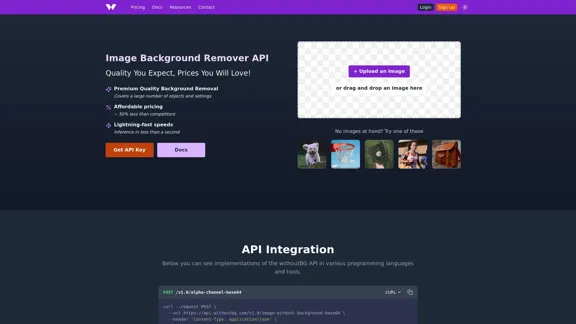
Image Background Remover API

Remove image backgrounds automatically with our powerful API. High-quality cutouts with affordable credit-based pricing. Start with 50 free credits today.
Visit Website
Image Background Remover API
Visit Website

Introduction

The Image Background Remover API offers a premium quality solution for background removal at competitive prices. It utilizes advanced AI technology to deliver fast and accurate results, making it suitable for various applications, from e-commerce to personal projects. The service is designed to be user-friendly, with a straightforward API integration process and a commitment to quality and security.

Feature

  1. Premium Quality Background Removal

    The API provides high-quality background removal that covers a wide range of objects and settings.

  2. Affordable Pricing

    Pricing starts at just €0.05 per image, significantly lower than competitors, with no hidden fees.

  3. Lightning-Fast Speeds

    The API processes images in less than a second, ensuring quick turnaround times for users.

  4. Comprehensive API Integration

    The API can be easily integrated into various programming languages, with ready-to-use examples provided for popular languages like Python, Java, and PHP.

  5. High-Performance Infrastructure

    The API runs on specialized AWS Inferentia hardware, maintaining sub-second processing speeds even under high-volume requests.

  6. Quality-First Approach

    Users receive full-resolution output without quality reduction, ensuring professional-grade results.

  7. Free Trial Credits

    New users receive 50 free credits upon signing up, allowing them to test the service without any initial investment.

How to Use?

  1. Sign up for an account to receive your API key and 50 free credits.
  2. Review the API documentation for integration examples in your preferred programming language.
  3. Test the API with images that have smooth backgrounds for optimal results.
  4. Monitor your credit balance using the provided endpoint to manage usage effectively.
  5. Contact support for enterprise-level options if you require higher rate limits.

FAQ

Do you offer any free trials or demos of your service?

Yes, when you sign up, you get 50 free credits to test the service.

What programming languages do you provide examples or SDKs for?

The API can be used with any programming language, and we provide examples for cURL, Python, Java, PHP, Node.js, Go, Ruby, and JavaScript.

What are the API rate limits and how do they affect my usage?

The API has a rate limit of 7 requests per minute per API key to ensure fair usage. Exceeding this limit results in a 429 (Too Many Requests) response.

How do you handle images with complex backgrounds?

The model is designed to handle complex backgrounds, but for best results, images with smooth and solid backgrounds are recommended.

How do you ensure the privacy and security of the images users upload?

Images are processed in server memory and discarded immediately after processing to ensure privacy and security.

Price

PackageCreditsPricePrice per CreditValiditySavings
Free Trial50 credits€0€0.00330 days-
Package XS100 credits€10€0.1030 days-
Package S500 credits€40€0.0830 days20% off
Package M1,000 credits€70€0.0790 days30% off
Package L5,000 credits€300€0.06180 days40% off
Package XL10,000 credits€500€0.05360 days50% off
The price is for reference only, please refer to the latest official data for actual information.

Evaluation

  1. The Image Background Remover API excels in delivering high-quality background removal quickly and affordably, making it a strong choice for businesses and individuals alike.

  2. The API's integration process is straightforward, with ample documentation and examples, which is beneficial for developers.

  3. However, users may encounter limitations with complex backgrounds, where results may vary. It is advisable to use images with simpler backgrounds for optimal performance.

  4. While the pricing is competitive, users with high-volume needs should consider their credit usage carefully to avoid unexpected costs.

  5. Overall, the API is a valuable tool for anyone needing reliable background removal, but users should be aware of its limitations and plan their usage accordingly.

Related Websites

Simplified Chrome Extension

This is a basic Chrome extension designed to be easy to understand and modify. 

Manifest File (manifest.json):

```json
{
  "manifest_version": 3,
  "name": "Simplified Extension",
  "version": "1.0",
  "description": "A simple Chrome extension example.",
  "permissions": [
    "activeTab"
  ],
  "action": {
    "default_popup": "popup.html"
  }
}
```

Popup HTML (popup.html):

```html
<!DOCTYPE html>
<html>
<head>
  <title>Simplified Extension</title>
</head>
<body>
  <h1>Hello from the extension!</h1>
  <p>This is a simple popup.</p>
</body>
</html>
```

Explanation:

* manifest.json: This file tells Chrome what your extension does.
    * `manifest_version`: Specifies the version of the manifest file format.
    * `name`: The name of your extension.
    * `version`: The current version of your extension.
    * `description`: A brief description of your extension.
    * `permissions`: Lists the permissions your extension needs to function. Here, it needs access to the active tab.
    * `action`: Defines the popup that appears when the extension icon is clicked.

* popup.html: This file contains the HTML code for the popup window.

How it works:

1. When you install the extension, Chrome reads the `manifest.json` file.
2. When you click the extension icon, Chrome opens the `popup.html` file in a new window.
3. The popup displays the "Hello from the extension!" message.
View Detail

Simplified Chrome Extension This is a basic Chrome extension designed to be easy to understand and modify. Manifest File (manifest.json): ```json { "manifest_version": 3, "name": "Simplified Extension", "version": "1.0", "description": "A simple Chrome extension example.", "permissions": [ "activeTab" ], "action": { "default_popup": "popup.html" } } ``` Popup HTML (popup.html): ```html <!DOCTYPE html> <html> <head> <title>Simplified Extension</title> </head> <body> <h1>Hello from the extension!</h1> <p>This is a simple popup.</p> </body> </html> ``` Explanation: * manifest.json: This file tells Chrome what your extension does. * `manifest_version`: Specifies the version of the manifest file format. * `name`: The name of your extension. * `version`: The current version of your extension. * `description`: A brief description of your extension. * `permissions`: Lists the permissions your extension needs to function. Here, it needs access to the active tab. * `action`: Defines the popup that appears when the extension icon is clicked. * popup.html: This file contains the HTML code for the popup window. How it works: 1. When you install the extension, Chrome reads the `manifest.json` file. 2. When you click the extension icon, Chrome opens the `popup.html` file in a new window. 3. The popup displays the "Hello from the extension!" message.

Simplified Chrome Extension This is a basic Chrome extension designed to be easy to understand and modify. Manifest File (manifest.json): ```json { "manifest_version": 3, "name": "Simplified Extension", "version": "1.0", "description": "A simple Chrome extension example.", "permissions": [ "activeTab" ], "action": { "default_popup": "popup.html" } } ``` Popup HTML (popup.html): ```html <!DOCTYPE html> <html> <head> <title>Simplified Extension</title> </head> <body> <h1>Hello from the extension!</h1> <p>This is a simple popup.</p> </body> </html> ``` Explanation: * manifest.json: This file tells Chrome what your extension does. * `manifest_version`: Specifies the version of the manifest file format. * `name`: The name of your extension. * `version`: The current version of your extension. * `description`: A brief description of your extension. * `permissions`: Lists the permissions your extension needs to function. Here, it needs access to the active tab. * `action`: Defines the popup that appears when the extension icon is clicked. * popup.html: This file contains the HTML code for the popup window. How it works: 1. When you install the extension, Chrome reads the `manifest.json` file. 2. When you click the extension icon, Chrome opens the `popup.html` file in a new window. 3. The popup displays the "Hello from the extension!" message.

Design & Collaborate Marketing made easy #Simplified

193.90 M
ilikeimg - AI-Powered Image Tools | Free Online Photo Editor
View Detail

ilikeimg - AI-Powered Image Tools | Free Online Photo Editor

ilikeimg - AI-Powered Image Tools | Free Online Photo Editor

Free online tools to convert, crop, compress, resize, and enhance your images. No registration required for basic features.

0
Image Enhancer
View Detail

Image Enhancer

Image Enhancer

Enhance photos effortlessly with AI photo enhancer. Increase image resolution, improve colors, and make photo clear with just a click!

193.90 M
TensorScan AI
View Detail

TensorScan AI

TensorScan AI

Analyze Ethereum wallets easily with the TensorScan AI extension. It works perfectly with Etherscan.io. Download it now!

193.90 M
Ziko.ai Extension
View Detail

Ziko.ai Extension

Ziko.ai Extension

Here are some examples of auto-replies you can use for Google Business reviews: For Positive Reviews: * "Thank you so much for the wonderful review! We're thrilled you had a positive experience. We appreciate your business and look forward to seeing you again soon." * "We're so happy to hear you enjoyed your time with us! Your feedback means a lot to us. Thanks for taking the time to leave a review." * "Wow, thank you for the kind words! We strive to provide excellent service and we're glad we met your expectations. We appreciate your support!" For Negative Reviews: * "We're sorry to hear that you had a negative experience. We value your feedback and would like to learn more about what happened. Please contact us directly at [phone number] or [email address] so we can address your concerns." * "Thank you for your honest feedback. We apologize that we didn't meet your expectations. We're always working to improve our services and we appreciate you bringing this to our attention." * "We understand your frustration and sincerely apologize for any inconvenience caused. We'd like to make things right. Please contact us at [phone number] or [email address] so we can discuss this further." Tips: * Be prompt: Respond to reviews as quickly as possible. * Be genuine: Your responses should sound sincere and authentic. * Be professional: Avoid getting defensive or argumentative. * Keep it concise: Get to the point and avoid writing lengthy responses. * Offer solutions: If possible, offer a way to resolve the issue.

193.90 M
Change Clothes AI - AI Clothes Changer Online, Free Trial To Change Clothes With AI
View Detail

Change Clothes AI - AI Clothes Changer Online, Free Trial To Change Clothes With AI

Change Clothes AI - AI Clothes Changer Online, Free Trial To Change Clothes With AI

Change Clothes AI is an online outfit changer powered by AI technology. Easily swap clothes in your photos by uploading a portrait and garment image. Our AI algorithm generates a new image in seconds, letting you experiment with different looks and find the perfect outfit.

19.55 K
GPT Israel Assistant - Personal GPT Assistant Israel
View Detail

GPT Israel Assistant - Personal GPT Assistant Israel

GPT Israel Assistant - Personal GPT Assistant Israel

Unique add-on that enables managing conversations in chat for free, quickly, and without ads, on the Israeli community website of ChatGPT. Take advantage of shortcuts to leading websites.

193.90 M
Drawbert - A Portrait Artist AI
View Detail

Drawbert - A Portrait Artist AI

Drawbert - A Portrait Artist AI

Drawbert creates beautiful paintings for you within seconds and at low cost. You can choose from watercolor, sketch, oil painting, comic, cartoon, caricature and more styles, plus the option to customize the painting to your liking.

0