Open-source RightAI Tools Directory
  • Discover AI
  • Submit
  • Startup
  • Blog
Open-source RightAI Tools Directory
Discover the best AI tools of 2025 with the RightAI Tools Directory!

Friend Links

AI Anime GeneratorToolsApp AI

Support

Tap4
Privacy policyTerms & ConditionsContact Us
Loading...
loading...

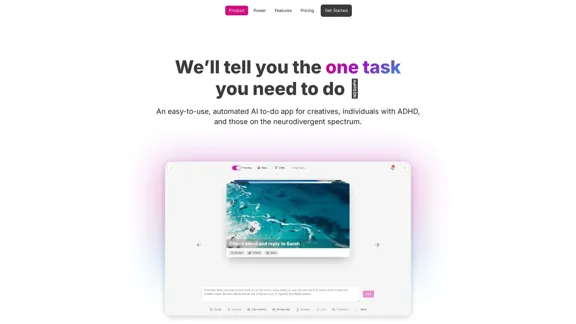
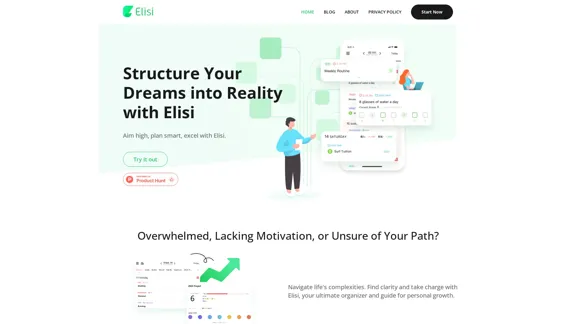
Digital All-in-One Planner for Productivity & Time Management | Elisi

Elisi is a user-friendly, cross-device All-in-one Planner to help you improve personal productivity and manage your time effectively. Features include pre-templated modules in a bullet journal along with task planning, habit tracking, project management and note taking. Try Elisi on your iPhone or Android device today!
Visit Website
Digital All-in-One Planner for Productivity & Time Management | Elisi
Visit Website

Introduction

Elisi is a digital all-in-one planner designed to boost productivity and enhance time management. This innovative tool aims to help users structure their dreams into reality by providing a comprehensive platform for goal setting, task management, and personal growth. With its intuitive design and AI-powered assistance, Elisi offers a seamless experience for individuals looking to navigate life's complexities and take charge of their personal and professional development.

Feature

  1. Actionable Goals

    • Transform dreams into clear outcomes
    • Progress with purpose
    • Helps users set and achieve meaningful objectives
  2. Achievable Milestones

    • Break down dreams into manageable steps
    • Make seemingly impossible tasks achievable
    • Encourages steady progress towards larger goals
  3. Adjustable Steps

    • Enhance efficiency in every endeavor
    • Provide precision in progress tracking
    • Allows for flexibility in goal pursuit
  4. Intuitive Design

    • Available for free on Apple and Google app stores
    • User-friendly interface for effortless start
    • Accessible to users of all tech-savvy levels
  5. Cross-Device Synchronization

    • Syncs across all devices
    • Easier to track progress and maintain momentum
    • Ensures seamless user experience across platforms
  6. AI-Powered Assistance

    • Adapts to personal needs
    • Helps streamline daily life
    • Enhances organization and productivity
  7. Comprehensive Planning Tools

    • Notes feature for capturing ideas
    • Goal-setting functionality
    • Planner for scheduling and time management
    • Habit tracker for building positive routines

How to Use?

  1. Start by downloading Elisi from your device's app store (Apple or Google Play).

  2. Set up your account and take a moment to familiarize yourself with the intuitive interface.

  3. Begin by setting a few actionable goals. Break these down into achievable milestones and adjustable steps.

  4. Utilize the planner feature to schedule your tasks and allocate time for working on your goals.

  5. Take advantage of the notes feature to jot down ideas or reflections related to your progress.

  6. Use the habit tracker to build positive routines that support your goals.

  7. Regularly review your progress and adjust your plans as needed, leveraging Elisi's AI-powered assistance for insights.

  8. Sync Elisi across all your devices to ensure you can access and update your plans anytime, anywhere.

FAQ

Does Elisi Protect My Data?

Yes, Elisi prioritizes user privacy and data protection. The company assures users that they never share personal data with third parties, allowing you to use the app with full confidence.

How Does Elisi AI Help Streamline My Life?

Elisi's AI adapts to your personal needs, ensuring each day is more organized and productive. It provides personalized insights and suggestions to help you optimize your time management and goal achievement strategies.

How Much Does Elisi Cost?

Elisi is committed to accessibility, offering its major suite of features completely free of charge. This allows users to explore and benefit from the app's core functionalities without any financial barrier.

Price

Elisi offers its major suite of features completely free of charge. Specific pricing for potential premium features or plans is not provided in the given information.

The price is for reference only, please refer to the latest official data for actual information.

Evaluation

  1. Elisi's comprehensive approach to personal productivity and goal achievement is commendable. The integration of actionable goals, achievable milestones, and adjustable steps provides a solid framework for users to make tangible progress.

  2. The AI-powered assistance is a standout feature, offering personalized support that can significantly enhance user experience and productivity. However, the extent and effectiveness of this AI integration would need to be tested in real-world scenarios.

  3. The cross-device synchronization is a crucial feature in today's multi-device environment, ensuring users can seamlessly transition between devices without losing track of their goals and tasks.

  4. While the app offers a wide range of features, there's a risk of overwhelming new users. A well-structured onboarding process would be essential to help users navigate and fully utilize all functionalities.

  5. The commitment to data privacy is praiseworthy, especially in an era where data protection is a growing concern. However, more detailed information about their data handling practices would further boost user confidence.

  6. The free availability of major features is a significant advantage, making the tool accessible to a wide range of users. However, the lack of information about any premium features or pricing tiers leaves questions about the app's long-term sustainability and potential for advanced functionalities.

Related Websites

Copilot for Microsoft 365 – Microsoft Adoption

Copilot for Microsoft 365 is a powerful AI assistant that helps you work smarter and faster across Microsoft 365 apps and services. It combines the power of large language models (LLMs) with your organization's data in the Microsoft Graph and Microsoft 365 apps to turn your words into the most powerful productivity tool on the planet.

Copilot is designed to help you:

β€’ Unleash creativity
β€’ Unlock productivity
β€’ Uplevel skills

Copilot is built on Microsoft's comprehensive approach to security, compliance, and privacy. Copilot in Microsoft 365 apps and services:

β€’ Does not use your data to train the underlying LLM
β€’ Does not replace human ingenuity and judgment
β€’ Is designed to keep humans in the loop

Copilot is currently available in Word, Excel, PowerPoint, Outlook, Teams, and more.

Getting Started with Copilot

To get started with Copilot, follow these steps:

1. Check availability: Ensure your organization has access to Copilot.
2. Learn the basics: Familiarize yourself with Copilot's capabilities and how to use it effectively.
3. Explore use cases: Discover how Copilot can help you in your specific role and tasks.
4. Practice and refine: Use Copilot regularly and refine your prompts for better results.
5. Share and collaborate: Collaborate with colleagues using Copilot and share best practices.

Best Practices for Using Copilot

1. Be specific in your prompts
2. Provide context for better results
3. Review and edit Copilot's output
4. Use Copilot as a starting point, not a final product
5. Experiment with different approaches
6. Stay informed about new features and updates

Copilot in Different Microsoft 365 Apps

β€’ Word: Draft, edit, summarize, and rewrite content
β€’ Excel: Analyze data, create formulas, and generate insights
β€’ PowerPoint: Create presentations, design slides, and generate content
β€’ Outlook: Compose emails, summarize threads, and manage your inbox
β€’ Teams: Summarize meetings, generate action items, and create meeting notes

Responsible AI and Copilot

Microsoft is committed to developing AI systems responsibly. When using Copilot, keep in mind:

β€’ AI-generated content may contain biases or inaccuracies
β€’ Always review and verify Copilot's output
β€’ Use your judgment and expertise alongside Copilot's suggestions
β€’ Be aware of your organization's policies regarding AI use

Conclusion

Copilot for Microsoft 365 is a powerful tool that can significantly enhance your productivity and creativity. By understanding its capabilities, following best practices, and using it responsibly, you can make the most of this AI assistant in your daily work.
View Detail

Copilot for Microsoft 365 – Microsoft Adoption Copilot for Microsoft 365 is a powerful AI assistant that helps you work smarter and faster across Microsoft 365 apps and services. It combines the power of large language models (LLMs) with your organization's data in the Microsoft Graph and Microsoft 365 apps to turn your words into the most powerful productivity tool on the planet. Copilot is designed to help you: β€’ Unleash creativity β€’ Unlock productivity β€’ Uplevel skills Copilot is built on Microsoft's comprehensive approach to security, compliance, and privacy. Copilot in Microsoft 365 apps and services: β€’ Does not use your data to train the underlying LLM β€’ Does not replace human ingenuity and judgment β€’ Is designed to keep humans in the loop Copilot is currently available in Word, Excel, PowerPoint, Outlook, Teams, and more. Getting Started with Copilot To get started with Copilot, follow these steps: 1. Check availability: Ensure your organization has access to Copilot. 2. Learn the basics: Familiarize yourself with Copilot's capabilities and how to use it effectively. 3. Explore use cases: Discover how Copilot can help you in your specific role and tasks. 4. Practice and refine: Use Copilot regularly and refine your prompts for better results. 5. Share and collaborate: Collaborate with colleagues using Copilot and share best practices. Best Practices for Using Copilot 1. Be specific in your prompts 2. Provide context for better results 3. Review and edit Copilot's output 4. Use Copilot as a starting point, not a final product 5. Experiment with different approaches 6. Stay informed about new features and updates Copilot in Different Microsoft 365 Apps β€’ Word: Draft, edit, summarize, and rewrite content β€’ Excel: Analyze data, create formulas, and generate insights β€’ PowerPoint: Create presentations, design slides, and generate content β€’ Outlook: Compose emails, summarize threads, and manage your inbox β€’ Teams: Summarize meetings, generate action items, and create meeting notes Responsible AI and Copilot Microsoft is committed to developing AI systems responsibly. When using Copilot, keep in mind: β€’ AI-generated content may contain biases or inaccuracies β€’ Always review and verify Copilot's output β€’ Use your judgment and expertise alongside Copilot's suggestions β€’ Be aware of your organization's policies regarding AI use Conclusion Copilot for Microsoft 365 is a powerful tool that can significantly enhance your productivity and creativity. By understanding its capabilities, following best practices, and using it responsibly, you can make the most of this AI assistant in your daily work.

Copilot for Microsoft 365 – Microsoft Adoption Copilot for Microsoft 365 is a powerful AI assistant that helps you work smarter and faster across Microsoft 365 apps and services. It combines the power of large language models (LLMs) with your organization's data in the Microsoft Graph and Microsoft 365 apps to turn your words into the most powerful productivity tool on the planet. Copilot is designed to help you: β€’ Unleash creativity β€’ Unlock productivity β€’ Uplevel skills Copilot is built on Microsoft's comprehensive approach to security, compliance, and privacy. Copilot in Microsoft 365 apps and services: β€’ Does not use your data to train the underlying LLM β€’ Does not replace human ingenuity and judgment β€’ Is designed to keep humans in the loop Copilot is currently available in Word, Excel, PowerPoint, Outlook, Teams, and more. Getting Started with Copilot To get started with Copilot, follow these steps: 1. Check availability: Ensure your organization has access to Copilot. 2. Learn the basics: Familiarize yourself with Copilot's capabilities and how to use it effectively. 3. Explore use cases: Discover how Copilot can help you in your specific role and tasks. 4. Practice and refine: Use Copilot regularly and refine your prompts for better results. 5. Share and collaborate: Collaborate with colleagues using Copilot and share best practices. Best Practices for Using Copilot 1. Be specific in your prompts 2. Provide context for better results 3. Review and edit Copilot's output 4. Use Copilot as a starting point, not a final product 5. Experiment with different approaches 6. Stay informed about new features and updates Copilot in Different Microsoft 365 Apps β€’ Word: Draft, edit, summarize, and rewrite content β€’ Excel: Analyze data, create formulas, and generate insights β€’ PowerPoint: Create presentations, design slides, and generate content β€’ Outlook: Compose emails, summarize threads, and manage your inbox β€’ Teams: Summarize meetings, generate action items, and create meeting notes Responsible AI and Copilot Microsoft is committed to developing AI systems responsibly. When using Copilot, keep in mind: β€’ AI-generated content may contain biases or inaccuracies β€’ Always review and verify Copilot's output β€’ Use your judgment and expertise alongside Copilot's suggestions β€’ Be aware of your organization's policies regarding AI use Conclusion Copilot for Microsoft 365 is a powerful tool that can significantly enhance your productivity and creativity. By understanding its capabilities, following best practices, and using it responsibly, you can make the most of this AI assistant in your daily work.

Microsoft Copilot combines the power of large language models (LLMs) with your organization's data to turn your words into one of the most powerful productivity tools on the planet.

608.60 K
Pygma – Personal AI social media manager
View Detail

Pygma – Personal AI social media manager

Pygma – Personal AI social media manager

Smart Instagram assistant – create, schedule, engage – all you need to grow on social media

5.70 K
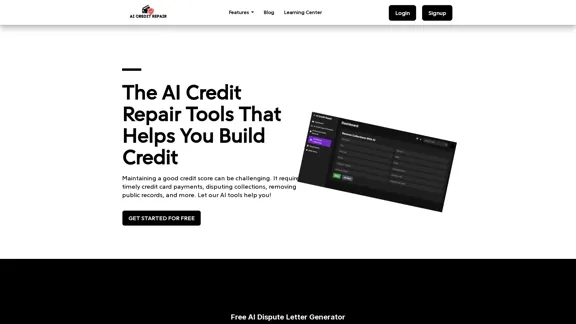
AI Credit Repair | Use AI To Fix Credit
View Detail

AI Credit Repair | Use AI To Fix Credit

AI Credit Repair | Use AI To Fix Credit

Our technology identifies and assists you in removing accounts that are negatively impacting your credit. We utilize AI to help you achieve an optimal credit score.

1.26 K
AI to PDF
View Detail

AI to PDF

AI to PDF

AI to PDF Converter is a free and fast online file conversion service.

0
Tila: Multi-Agent AI Platform for Automating Workflows and Creating Content
View Detail

Tila: Multi-Agent AI Platform for Automating Workflows and Creating Content

Tila: Multi-Agent AI Platform for Automating Workflows and Creating Content

Boost productivity with Tila, an AI canvas for workflow automation and multimodal content creation using generative AI across text, images, and video.

2.35 K
Relay.app: AI-powered automations with a human in the loop
View Detail

Relay.app: AI-powered automations with a human in the loop

Relay.app: AI-powered automations with a human in the loop

An automation platform you'll love. Relay.app provides deep integrations, AI-powered automations, and human-in-the-loop control.

257.86 K
FolderPilot - AI-Driven Document Intelligence Platform
View Detail

FolderPilot - AI-Driven Document Intelligence Platform

FolderPilot - AI-Driven Document Intelligence Platform

Experience intelligent document interaction with FolderPilot. Chat naturally with your PDFs, documents, files, and videos. Get instant insights, answers, and analysis through AI-powered conversations with your content. Smart document management made simple.

0
QuickSearchPlus
View Detail

QuickSearchPlus

QuickSearchPlus

Browse effortlessly

287