Open-source RightAI Tools Directory
  • Discover AI
  • Submit
  • Startup
  • Blog
Open-source RightAI Tools Directory
Discover the best AI tools of 2025 with the RightAI Tools Directory!

Friend Links

AI Anime GeneratorToolsApp AI

Support

Tap4
Privacy policyTerms & ConditionsContact Us
Loading...
loading...

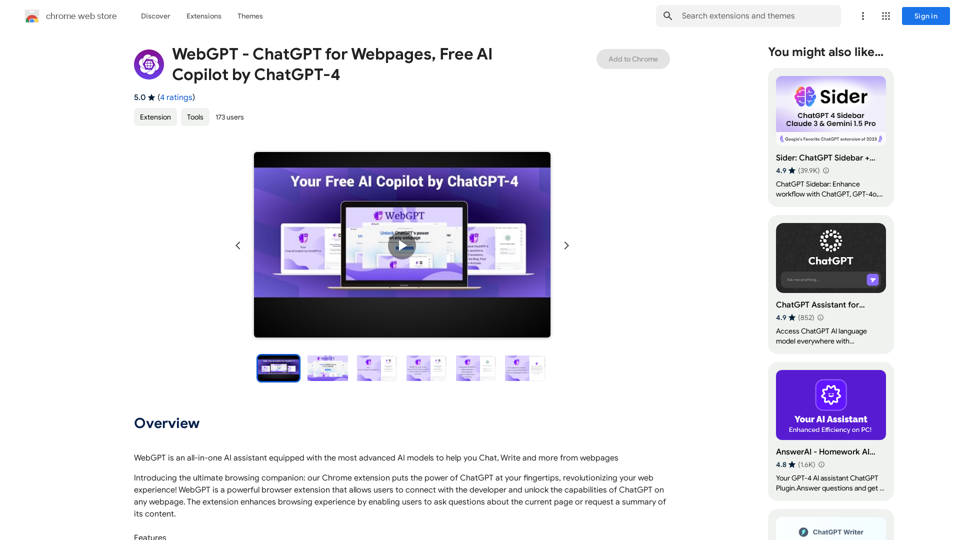
WebGPT - ChatGPT for Webpages, Free AI Copilot by ChatGPT-4

WebGPT is an all-in-one AI assistant with the most advanced AI models to help you chat, write, and more, all from webpages.
Visit Website
WebGPT - ChatGPT for Webpages, Free AI Copilot by ChatGPT-4
Visit Website

Introduction

WebGPT is an all-in-one AI assistant that enhances your web browsing experience. It integrates advanced AI models to provide features like chatting, writing, and more directly from webpages. This powerful browser extension brings the capabilities of ChatGPT to your fingertips, transforming how you interact with online content.

Feature

Chat with Website

Users can engage in conversations with blogs, articles, or news content using WebGPT, allowing for interactive exploration of web content.

Summarize Content

WebGPT can generate concise summaries of various file types, including webpages, PDFs, documents, and DOCX files.

Rewrite Post with WebGPT

This feature enables users to rephrase or restructure existing content using AI assistance.

Translate with WebGPT

WebGPT offers translation capabilities, helping users overcome language barriers while browsing.

Fix Grammar with WebGPT

The extension can identify and correct grammatical errors in text, improving writing quality.

Generate Social Media Posts

WebGPT can create tailored posts for Twitter, Facebook, and LinkedIn based on webpage content, streamlining social media sharing.

Free AI Copilot

WebGPT is available as a free AI copilot powered by ChatGPT-4, accessible through the Chrome Web Store.

FAQ

What is WebGPT?

WebGPT is an all-in-one AI assistant that integrates advanced AI models to enhance web browsing. It allows users to chat, write, and perform various tasks directly from webpages, bringing ChatGPT's capabilities to any website.

What are the main features of WebGPT?

WebGPT offers several key features:

  1. Chat with Website
  2. Summarize Content
  3. Rewrite Post
  4. Translate Content
  5. Fix Grammar
  6. Generate Social Media Posts (Twitter, Facebook, LinkedIn)

How do I use WebGPT?

WebGPT is a browser extension that connects users with the developer and unlocks ChatGPT capabilities on any webpage. Users can ask questions about the current page or request content summaries, enhancing their browsing experience.

Is WebGPT free?

Yes, WebGPT is a free AI copilot powered by ChatGPT-4, available for download on the Chrome Web Store.

Latest Traffic Insights

  • Monthly Visits

    193.90 M

  • Bounce Rate

    56.27%

  • Pages Per Visit

    2.71

  • Time on Site(s)

    115.91

  • Global Rank

    -

  • Country Rank

    -

Recent Visits

Traffic Sources

  • Social Media:
    0.48%
  • Paid Referrals:
    0.55%
  • Email:
    0.15%
  • Referrals:
    12.81%
  • Search Engines:
    16.21%
  • Direct:
    69.81%
More Data

Related Websites

NLMatics Motif Plugin
View Detail

NLMatics Motif Plugin

NLMatics Motif Plugin

Intelligent Search for the Inquisitive Mind

193.90 M
ChatGPT Keyboard Shortcuts

#Navigation

* Ctrl + β†’: Move to the next message
* Ctrl + ←: Move to the previous message
* Home: Move to the beginning of the conversation
* End: Move to the end of the conversation

#Editing

* Ctrl + A: Select all text
* Ctrl + C: Copy selected text
* Ctrl + X: Cut selected text
* Ctrl + V: Paste copied or cut text
* Ctrl + Z: Undo
* Ctrl + Y: Redo
* Ctrl + Shift + F: Format text as code

#Actions

* Enter: Send the message
* Shift + Enter: Insert a new line
* Ctrl + Shift + Enter: Send the message and insert a new line
* Esc: Cancel editing and close the message input field
* Ctrl + Shift + Space: Open the emoji picker
* Ctrl + Shift + /: Open the help menu

#Accessibility

* Ctrl + +: Increase font size
* Ctrl + -: Decrease font size
* Ctrl + 0: Reset font size to default
View Detail

ChatGPT Keyboard Shortcuts #Navigation * Ctrl + β†’: Move to the next message * Ctrl + ←: Move to the previous message * Home: Move to the beginning of the conversation * End: Move to the end of the conversation #Editing * Ctrl + A: Select all text * Ctrl + C: Copy selected text * Ctrl + X: Cut selected text * Ctrl + V: Paste copied or cut text * Ctrl + Z: Undo * Ctrl + Y: Redo * Ctrl + Shift + F: Format text as code #Actions * Enter: Send the message * Shift + Enter: Insert a new line * Ctrl + Shift + Enter: Send the message and insert a new line * Esc: Cancel editing and close the message input field * Ctrl + Shift + Space: Open the emoji picker * Ctrl + Shift + /: Open the help menu #Accessibility * Ctrl + +: Increase font size * Ctrl + -: Decrease font size * Ctrl + 0: Reset font size to default

ChatGPT Keyboard Shortcuts #Navigation * Ctrl + β†’: Move to the next message * Ctrl + ←: Move to the previous message * Home: Move to the beginning of the conversation * End: Move to the end of the conversation #Editing * Ctrl + A: Select all text * Ctrl + C: Copy selected text * Ctrl + X: Cut selected text * Ctrl + V: Paste copied or cut text * Ctrl + Z: Undo * Ctrl + Y: Redo * Ctrl + Shift + F: Format text as code #Actions * Enter: Send the message * Shift + Enter: Insert a new line * Ctrl + Shift + Enter: Send the message and insert a new line * Esc: Cancel editing and close the message input field * Ctrl + Shift + Space: Open the emoji picker * Ctrl + Shift + /: Open the help menu #Accessibility * Ctrl + +: Increase font size * Ctrl + -: Decrease font size * Ctrl + 0: Reset font size to default

Enhance your ChatGPT experience with easy-to-use keyboard shortcuts.

193.90 M
AI Short Video Generator
View Detail

AI Short Video Generator

AI Short Video Generator

Revolutionize video creation with AI Short Video Generator - quick, easy, and tailored for engaging content!

193.90 M
Meetingtor: Record online meetings
View Detail

Meetingtor: Record online meetings

Meetingtor: Record online meetings

Automatically record, transcribe, and summarize online meetings.

193.90 M
XOR Extension RU
View Detail

XOR Extension RU

XOR Extension RU

XOR Extension helps recruiters communicate with candidates from ATS, job boards, or LinkedIn.

193.90 M
SimilarTube
View Detail

SimilarTube

SimilarTube

AI Scanner & Analytics for Similar YouTube Channels

193.90 M
Potis.AI | Your Hiring Copilot
View Detail

Potis.AI | Your Hiring Copilot

Potis.AI | Your Hiring Copilot

Hiring Copilot for Clean and Fast Bulk Candidates Screening with Behavioral Interview and Real Cases

6.63 K
Smart Template - DocumentAI 


This is a placeholder for content about Smart Templates in DocumentAI. 

Please provide me with the content you'd like me to translate.
View Detail

Smart Template - DocumentAI This is a placeholder for content about Smart Templates in DocumentAI. Please provide me with the content you'd like me to translate.

Smart Template - DocumentAI This is a placeholder for content about Smart Templates in DocumentAI. Please provide me with the content you'd like me to translate.

Boost your productivity with the best tool around, making it easy to create and edit documents and saving you precious time.

193.90 M