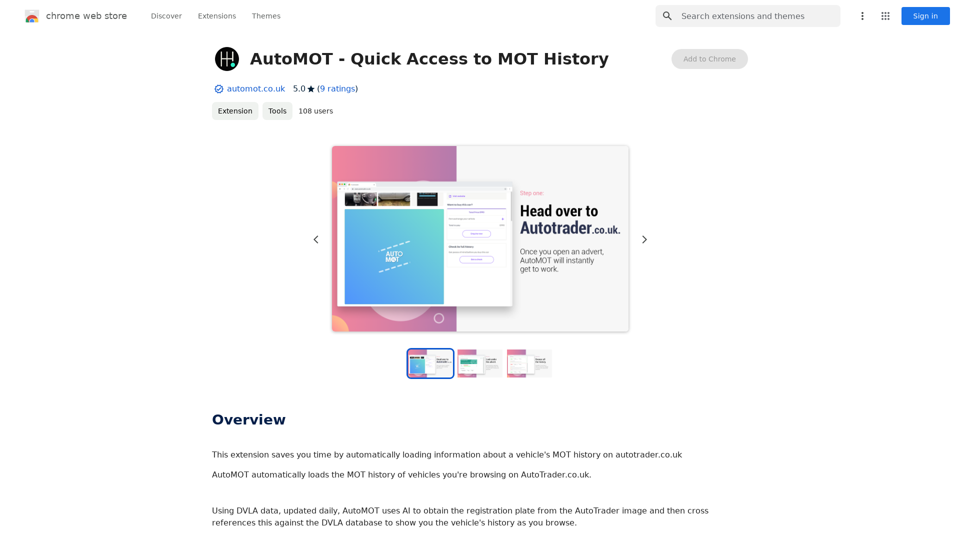
AutoMOT is a Chrome extension designed to streamline the process of checking a vehicle's MOT history on autotrader.co.uk. By leveraging AI technology and DVLA data, AutoMOT automatically extracts registration plates from AutoTrader images and cross-references them with the DVLA database. This free tool provides users with instant access to a vehicle's history, saving time and enhancing the car browsing experience.
AutoMOT - Quick Access to MOT History
This extension saves you time by automatically loading information about a vehicle's MOT history on autotrader.co.uk.
Introduction
Feature
AI-Powered Registration Plate Recognition
AutoMOT utilizes advanced AI technology to accurately extract registration plates from AutoTrader images, eliminating the need for manual input.
Automatic DVLA Database Cross-Referencing
The extension seamlessly cross-references the extracted registration plate with the DVLA database, providing up-to-date vehicle history information.
Seamless Integration with AutoTrader
Once installed and logged in, AutoMOT works automatically when browsing vehicle advertisements on AutoTrader.co.uk, enhancing the user experience.
Free and Accessible
AutoMOT is offered as a free Chrome extension, with no hidden costs or subscription fees, making it accessible to all users.
Daily Updated DVLA Data
The extension uses DVLA data that is updated daily, ensuring users have access to the most current vehicle information.
Time-Saving Functionality
By automating the MOT history lookup process, AutoMOT saves users valuable time and eliminates the need to switch between tabs or memorize registration plates.
FAQ
How does AutoMOT work?
AutoMOT uses AI to extract the registration plate from AutoTrader images. It then cross-references this information with the DVLA database to display the vehicle's MOT history directly on the AutoTrader page.
Is AutoMOT free to use?
Yes, AutoMOT is completely free to use. There are no hidden costs or subscription fees associated with the extension.
How accurate is the information provided by AutoMOT?
AutoMOT uses daily updated DVLA data, ensuring that the information provided is accurate and up-to-date. However, it's always recommended to use AutoMOT in conjunction with other research tools for a comprehensive view of a vehicle's history.
Do I need to manually input registration plates when using AutoMOT?
No, AutoMOT automatically extracts registration plates from AutoTrader images using AI technology, eliminating the need for manual input.
How can I ensure I'm using the latest version of AutoMOT?
To access the latest features and bug fixes, make sure to keep your Chrome extensions updated. You can check for updates in the Chrome Web Store or enable automatic updates for all your extensions.
Related Websites
Iliad makes learning and remembering information intuitive. Transform Pages into a Personal Library of Knowledge: Discover the...
193.90 M
Chat-GPT PDF What is Chat-GPT PDF? Chat-GPT PDF is a tool that allows users to generate PDF files from Chat-GPT conversations. This innovative tool enables users to save and share their conversations in a more organized and visually appealing format. How does Chat-GPT PDF work? The process is simple and straightforward. Here's a step-by-step guide: 1. Copy the conversation: Copy the entire conversation from the Chat-GPT platform. 2. Paste the conversation: Paste the copied conversation into the Chat-GPT PDF tool. 3. Customize the layout: Customize the layout, font, and design of the PDF file according to your preferences. 4. Generate the PDF: Click the "Generate PDF" button to create a downloadable PDF file. Features of Chat-GPT PDF Chat-GPT PDF offers several features that make it an essential tool for users: * Customizable layout: Customize the layout, font, and design of the PDF file to suit your needs. * Easy sharing: Share the PDF file with others via email, social media, or messaging apps. * Offline access: Access your conversations offline, even without an internet connection. * Organization: Organize your conversations in a neat and tidy format, making it easier to review and reference. Benefits of Chat-GPT PDF The benefits of using Chat-GPT PDF are numerous: * Improved productivity: Save time and increase productivity by having all your conversations in one place. * Enhanced collaboration: Collaborate with others more effectively by sharing conversations in a clear and concise format. * Better organization: Keep your conversations organized, making it easier to review and reference them later. Conclusion Chat-GPT PDF is a game-changer for anyone who uses Chat-GPT regularly. With its ease of use, customization options, and benefits, it's an essential tool for anyone looking to get the most out of their conversations.
Chat-GPT PDF What is Chat-GPT PDF? Chat-GPT PDF is a tool that allows users to generate PDF files from Chat-GPT conversations. This innovative tool enables users to save and share their conversations in a more organized and visually appealing format. How does Chat-GPT PDF work? The process is simple and straightforward. Here's a step-by-step guide: 1. Copy the conversation: Copy the entire conversation from the Chat-GPT platform. 2. Paste the conversation: Paste the copied conversation into the Chat-GPT PDF tool. 3. Customize the layout: Customize the layout, font, and design of the PDF file according to your preferences. 4. Generate the PDF: Click the "Generate PDF" button to create a downloadable PDF file. Features of Chat-GPT PDF Chat-GPT PDF offers several features that make it an essential tool for users: * Customizable layout: Customize the layout, font, and design of the PDF file to suit your needs. * Easy sharing: Share the PDF file with others via email, social media, or messaging apps. * Offline access: Access your conversations offline, even without an internet connection. * Organization: Organize your conversations in a neat and tidy format, making it easier to review and reference. Benefits of Chat-GPT PDF The benefits of using Chat-GPT PDF are numerous: * Improved productivity: Save time and increase productivity by having all your conversations in one place. * Enhanced collaboration: Collaborate with others more effectively by sharing conversations in a clear and concise format. * Better organization: Keep your conversations organized, making it easier to review and reference them later. Conclusion Chat-GPT PDF is a game-changer for anyone who uses Chat-GPT regularly. With its ease of use, customization options, and benefits, it's an essential tool for anyone looking to get the most out of their conversations.Exporting Chat History to PDF You can export your chat history with Chat-GPT to a PDF file using the following methods: #Method 1: Browser Print Function 1. Open your chat conversation with Chat-GPT in a web browser. 2. Press `Ctrl + P` (Windows) or `Cmd + P` (Mac) to open the print dialog box. 3. Select "Save as PDF" as the printer destination. 4. Choose a location to save the PDF file and set the file name. 5. Click "Save" to export the chat history to a PDF file. #Method 2: Online PDF Conversion Tools 1. Copy the entire chat conversation by pressing `Ctrl + A` (Windows) or `Cmd + A` (Mac) and then `Ctrl + C` (Windows) or `Cmd + C` (Mac). 2. Go to an online PDF conversion tool, such as SmallPDF or Convertio. 3. Paste the chat conversation into the conversion tool's text box. 4. Select the PDF format and click "Convert" to generate the PDF file. 5. Download the PDF file to your computer. #Method 3: Browser Extensions 1. Install a browser extension, such as Print Friendly & PDF or FireShot, that allows you to save web pages as PDF files. 2. Open your chat conversation with Chat-GPT in a web browser. 3. Click the browser extension's icon in the toolbar. 4. Select the "Save as PDF" option and choose a location to save the file. 5. Click "Save" to export the chat history to a PDF file. By following these methods, you can easily export your chat history with Chat-GPT to a PDF file for future reference or sharing.
193.90 M
At enso, you can get AI-powered digital services for most of your essential needs at a much lower price.
0
This application helps users find and implement ideas based on advanced AI platforms with daily updated information...
193.90 M