Open-source RightAI Tools Directory
  • Discover AI
  • Submit
  • Startup
  • Blog
Open-source RightAI Tools Directory
Discover the best AI tools of 2025 with the RightAI Tools Directory!

Friend Links

AI Anime GeneratorToolsApp AI

Support

Tap4
Privacy policyTerms & ConditionsContact Us
Loading...
loading...

My AI

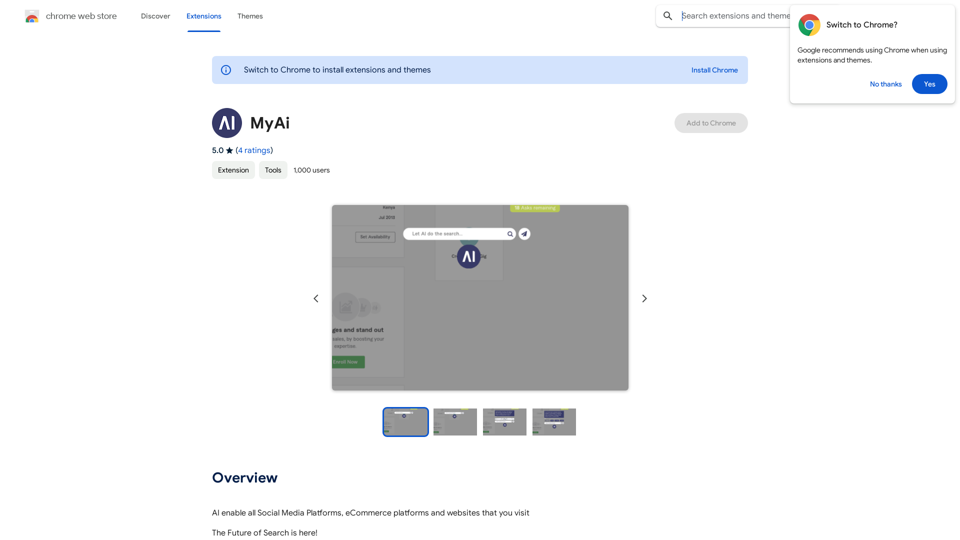
AI enables all social media platforms, e-commerce platforms, and websites that you visit.
Visit Website
My AI
Visit Website

Introduction

MyAi is an AI-powered browser extension that revolutionizes web searching. It allows users to perform searches and receive answers without leaving their current webpage, seamlessly integrating into their browsing experience. By leveraging natural language processing and personalized results, MyAi enhances productivity and streamlines information retrieval.

Feature

Seamless Integration

MyAi integrates smoothly with your current browser, enabling AI-powered search results without disrupting your browsing session. This feature maintains your focus and workflow while providing instant access to information.

Natural Language Processing

The extension utilizes advanced AI technology to understand and respond to queries conversationally. This feature makes it easy for users to ask questions and receive answers in a natural, intuitive manner.

Personalized Results

MyAi's AI technology provides tailored results based on your search history and preferences. This personalization enhances the relevance of search outcomes, making it easier to find desired information quickly.

Easy-to-Use Interface

Using MyAi is straightforward:

  1. Click the floating button in your browser to open the MyAi interface
  2. Type your question into the search bar
  3. Receive a range of answers and results
  4. Ask follow-up questions for more detailed information

Multi-Device Compatibility

MyAi is designed to work across multiple devices, including desktop computers, laptops, and mobile devices, ensuring a consistent experience across your digital ecosystem.

Free Access

MyAi is available as a free extension, allowing users to benefit from its core features without any subscription or payment.

FAQ

Is MyAi free to use?

Yes, MyAi is a free extension that can be used without any subscription or payment. However, additional features or premium support may require a paid subscription.

How do I install MyAi?

To install MyAi, simply click on the "Add to Chrome" button in the Chrome Web Store. The extension will then be added to your browser.

Can I use MyAi on different devices?

Yes, MyAi is designed to work on multiple devices, including desktop computers, laptops, and mobile devices, providing a consistent experience across your digital ecosystem.

What are some tips for getting the most out of MyAi?

  • Utilize the natural language processing feature for more conversational queries
  • Take advantage of personalized results to find relevant information quickly
  • Experiment with different search queries to explore the range of results
  • Use follow-up questions to delve deeper into topics and receive more detailed answers

Latest Traffic Insights

  • Monthly Visits

    193.90 M

  • Bounce Rate

    56.27%

  • Pages Per Visit

    2.71

  • Time on Site(s)

    115.91

  • Global Rank

    -

  • Country Rank

    -

Recent Visits

Traffic Sources

  • Social Media:
    0.48%
  • Paid Referrals:
    0.55%
  • Email:
    0.15%
  • Referrals:
    12.81%
  • Search Engines:
    16.21%
  • Direct:
    69.81%
More Data

Related Websites

AI Art Generator | AI Image Generator - Jasper Art
View Detail

AI Art Generator | AI Image Generator - Jasper Art

AI Art Generator | AI Image Generator - Jasper Art

Jasper Art is a new AI art generator that transforms your text prompt into stunning art and lifelike AI-generated images within seconds. Your AI artist produces the ideal picture to complement your message.

939.36 K
GPT-trainer - AI Chatbot over Your Own Data
View Detail

GPT-trainer - AI Chatbot over Your Own Data

GPT-trainer - AI Chatbot over Your Own Data

Create your own AI helper that gives you the information you need, whenever you need it. You don't need to know how to code!

193.90 M
Image Describer - Free AI Image Description Tool, Allowing Every Image to Communicate
View Detail

Image Describer - Free AI Image Description Tool, Allowing Every Image to Communicate

Image Describer - Free AI Image Description Tool, Allowing Every Image to Communicate

Image Descriptor is a free AI tool that identifies and describes the contents of images. Generate accurate, detailed image descriptions effortlessly.

5.16 K
Midjourney
View Detail

Midjourney

Midjourney

An independent research laboratory investigating novel modes of thinking and enhancing the creative capabilities of humanity.

17.37 M
eFiling.us
View Detail

eFiling.us

eFiling.us

eFiling.us

193.90 M
Midjourney API - Automate Midjourney AI Image Generation 

This document outlines how to use the Midjourney API to automate the generation of AI images. 

What is the Midjourney API?

The Midjourney API allows developers to programmatically interact with the powerful Midjourney AI model. This means you can generate images, control various parameters, and integrate Midjourney into your own applications and workflows.

Why Use the Midjourney API?

* Automation: Automate the creation of images for various purposes, such as marketing materials, website content, or research projects.
* Customization: Fine-tune image generation by controlling parameters like aspect ratio, style, and seed values.
* Integration: Seamlessly integrate Midjourney's capabilities into your existing tools and platforms.

Getting Started

1. Sign Up for a Midjourney Account: You'll need a Midjourney account to access the API.

2. Obtain an API Key: Once you have an account, you can generate an API key from your account settings.

3. Choose a Programming Language: The Midjourney API supports various programming languages, including Python, JavaScript, and Go.

4. Install the API Client: Install the appropriate API client library for your chosen language.

5. Start Generating Images: Use the API client to send image generation requests to the Midjourney server.

Example (Python):

```python
import midjourney

Replace with your actual API key
api_key = "YOUR_API_KEY"

Create a Midjourney client
client = midjourney.Client(api_key=api_key)

Generate an image
response = client.create_image(prompt="A cat wearing a hat", num_images=1)

Print the image URL
print(response.images[0].url)
```

Documentation and Resources

For detailed information about the Midjourney API, including available endpoints, parameters, and examples, please refer to the official documentation: [https://docs.midjourney.com/](https://docs.midjourney.com/)
View Detail

Midjourney API - Automate Midjourney AI Image Generation This document outlines how to use the Midjourney API to automate the generation of AI images. What is the Midjourney API? The Midjourney API allows developers to programmatically interact with the powerful Midjourney AI model. This means you can generate images, control various parameters, and integrate Midjourney into your own applications and workflows. Why Use the Midjourney API? * Automation: Automate the creation of images for various purposes, such as marketing materials, website content, or research projects. * Customization: Fine-tune image generation by controlling parameters like aspect ratio, style, and seed values. * Integration: Seamlessly integrate Midjourney's capabilities into your existing tools and platforms. Getting Started 1. Sign Up for a Midjourney Account: You'll need a Midjourney account to access the API. 2. Obtain an API Key: Once you have an account, you can generate an API key from your account settings. 3. Choose a Programming Language: The Midjourney API supports various programming languages, including Python, JavaScript, and Go. 4. Install the API Client: Install the appropriate API client library for your chosen language. 5. Start Generating Images: Use the API client to send image generation requests to the Midjourney server. Example (Python): ```python import midjourney Replace with your actual API key api_key = "YOUR_API_KEY" Create a Midjourney client client = midjourney.Client(api_key=api_key) Generate an image response = client.create_image(prompt="A cat wearing a hat", num_images=1) Print the image URL print(response.images[0].url) ``` Documentation and Resources For detailed information about the Midjourney API, including available endpoints, parameters, and examples, please refer to the official documentation: [https://docs.midjourney.com/](https://docs.midjourney.com/)

Midjourney API - Automate Midjourney AI Image Generation This document outlines how to use the Midjourney API to automate the generation of AI images. What is the Midjourney API? The Midjourney API allows developers to programmatically interact with the powerful Midjourney AI model. This means you can generate images, control various parameters, and integrate Midjourney into your own applications and workflows. Why Use the Midjourney API? * Automation: Automate the creation of images for various purposes, such as marketing materials, website content, or research projects. * Customization: Fine-tune image generation by controlling parameters like aspect ratio, style, and seed values. * Integration: Seamlessly integrate Midjourney's capabilities into your existing tools and platforms. Getting Started 1. Sign Up for a Midjourney Account: You'll need a Midjourney account to access the API. 2. Obtain an API Key: Once you have an account, you can generate an API key from your account settings. 3. Choose a Programming Language: The Midjourney API supports various programming languages, including Python, JavaScript, and Go. 4. Install the API Client: Install the appropriate API client library for your chosen language. 5. Start Generating Images: Use the API client to send image generation requests to the Midjourney server. Example (Python): ```python import midjourney Replace with your actual API key api_key = "YOUR_API_KEY" Create a Midjourney client client = midjourney.Client(api_key=api_key) Generate an image response = client.create_image(prompt="A cat wearing a hat", num_images=1) Print the image URL print(response.images[0].url) ``` Documentation and Resources For detailed information about the Midjourney API, including available endpoints, parameters, and examples, please refer to the official documentation: [https://docs.midjourney.com/](https://docs.midjourney.com/)

Easily integrate Midjourney AI into your apps using the Midjourney API. Start creating AI images automatically today!

0
Text Summarizer
View Detail

Text Summarizer

Text Summarizer

Summarizing texts is an application that creates short text from much longer text files.

193.90 M
Painnt - Art & Cartoon Filters on the App Store
View Detail

Painnt - Art & Cartoon Filters on the App Store

Painnt - Art & Cartoon Filters on the App Store

Painnt is the ultimate photo editor. Turn your photos into art masterpieces, or awesome cartoon photos. If you like digital art, you'll love Painnt! Choose fro...

124.77 M