Open-source RightAI Tools Directory
  • Discover AI
  • Submit
  • Startup
  • Blog
Open-source RightAI Tools Directory
Discover the best AI tools of 2025 with the RightAI Tools Directory!

Friend Links

AI Anime GeneratorToolsApp AI

Support

Tap4
Privacy policyTerms & ConditionsContact Us
Loading...
loading...

Biolytics

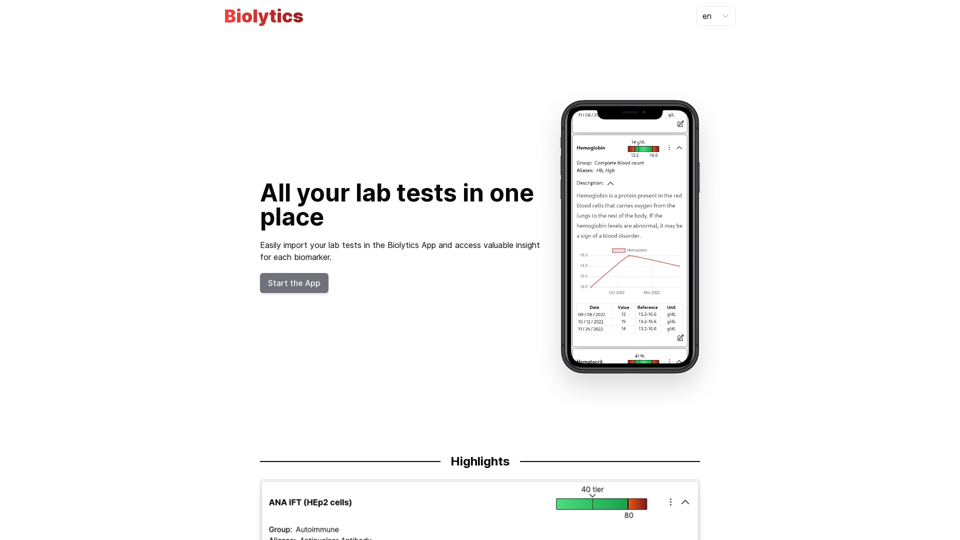
All your lab tests in one place.
Visit Website
Biolytics
Visit Website

Introduction

Biolytics is an innovative platform that simplifies the process of importing and visualizing lab test results. It offers users valuable insights for each biomarker, making it easier to track health and identify potential issues. The app prioritizes data ownership, user empowerment, and provides multiple import options, including AI-powered image recognition and QR code scanning.

Feature

Data Ownership and Security

  • User health data securely stored within the app
  • No external server transmission, ensuring complete user control

User Empowerment

  • Easy-to-understand descriptions for each biomarker
  • Enables proactive health management

Import Options

AI-Powered Image Recognition

  • Automatically recognizes biomarkers from paper lab reports
  • Simplifies data import and visualization

QR Code Scanning

  • Supports QR codes provided by laboratories
  • Allows automatic import of digital format reports

Health Tracking and Insights

  • Visualizes biomarker data
  • Provides valuable insights for each biomarker
  • Aids in early issue identification

Subscription Model

  • Free version with limited features
  • Premium subscription with additional features and benefits

FAQ

Is my data safe with Biolytics?

Your data is securely stored within the app and is never sent to an external server, ensuring complete control over your personal health information.

How do I import my lab test results into the Biolytics App?

You can import your lab test results using two methods:

  1. Take a picture of your paper lab report, and the AI will automatically recognize the biomarkers.
  2. Scan a QR code provided by laboratories that contains the report in digital format.

What are the benefits of using Biolytics?

Using Biolytics allows you to:

  • Easily track and understand your biomarkers
  • Take a proactive approach to your health
  • Gain valuable insights from lab test results
  • Maintain complete control over your personal data
  • Identify potential health issues early
  • Share health information with healthcare providers for better understanding

Latest Traffic Insights

  • Monthly Visits

    527

  • Bounce Rate

    41.43%

  • Pages Per Visit

    1.01

  • Time on Site(s)

    0.00

  • Global Rank

    12490492

  • Country Rank

    -

Recent Visits

Traffic Sources

  • Social Media:
    3.58%
  • Paid Referrals:
    1.11%
  • Email:
    0.17%
  • Referrals:
    36.96%
  • Search Engines:
    33.72%
  • Direct:
    23.64%
More Data

Related Websites

Introducing Bard
View Detail

Introducing Bard

Introducing Bard

See the ChatGPT responses right next to your search engine results.

193.90 M
Summify: Summarize YouTube and Web Content 

This is a tool that can summarize videos from YouTube and web pages.
View Detail

Summify: Summarize YouTube and Web Content This is a tool that can summarize videos from YouTube and web pages.

Summify: Summarize YouTube and Web Content This is a tool that can summarize videos from YouTube and web pages.

Quickly get the main points of websites and YouTube videos.

193.90 M
Ads Society
View Detail

Ads Society

Ads Society

Ads Society is the best way to save ads from TikTok and Facebook Ads libraries with one click.

193.90 M
Midjourney SREF Codes Library for Style Reference

What are SREF Codes?

SREF codes are special text strings used in Midjourney to quickly and easily apply specific artistic styles to your image generations. 

How to Use SREF Codes:

Simply add an SREF code to your Midjourney prompt. For example:

`/imagine a majestic dragon, SREF:cyberpunk`

SREF Code Library:

This library contains a collection of SREF codes categorized by style. 

* Art Styles:
    * `photorealistic`: Creates images with high levels of realism.
    * `impressionistic`:  Captures the essence of a scene with loose brushstrokes and vibrant colors.
    * `cubist`:  Breaks down objects into geometric shapes.
    * `surrealist`:  Creates dreamlike and fantastical images.
    * `abstract`:  Focuses on form, color, and composition rather than representational imagery.

* Visual Effects:
    * `cinematic`:  Gives images a cinematic look and feel.
    * `HDR`:  Creates images with high dynamic range, resulting in greater detail and contrast.
    * `neon`:  Adds vibrant neon lights to the image.
    * `pixel art`:  Generates images in a retro pixel art style.

* Other Styles:
    * `anime`:  Creates images in the style of Japanese animation.
    * `manga`:  Similar to anime, but with a more comic book aesthetic.
    * `sketch`:  Generates images that resemble pencil sketches.
    * `watercolor`:  Creates images with the look and feel of watercolor paintings.

Note: This is just a small sample of the many SREF codes available. 

Explore and Experiment:

The best way to learn about SREF codes is to experiment with them! Try combining different codes to create unique and interesting styles.
View Detail

Midjourney SREF Codes Library for Style Reference What are SREF Codes? SREF codes are special text strings used in Midjourney to quickly and easily apply specific artistic styles to your image generations. How to Use SREF Codes: Simply add an SREF code to your Midjourney prompt. For example: `/imagine a majestic dragon, SREF:cyberpunk` SREF Code Library: This library contains a collection of SREF codes categorized by style. * Art Styles: * `photorealistic`: Creates images with high levels of realism. * `impressionistic`: Captures the essence of a scene with loose brushstrokes and vibrant colors. * `cubist`: Breaks down objects into geometric shapes. * `surrealist`: Creates dreamlike and fantastical images. * `abstract`: Focuses on form, color, and composition rather than representational imagery. * Visual Effects: * `cinematic`: Gives images a cinematic look and feel. * `HDR`: Creates images with high dynamic range, resulting in greater detail and contrast. * `neon`: Adds vibrant neon lights to the image. * `pixel art`: Generates images in a retro pixel art style. * Other Styles: * `anime`: Creates images in the style of Japanese animation. * `manga`: Similar to anime, but with a more comic book aesthetic. * `sketch`: Generates images that resemble pencil sketches. * `watercolor`: Creates images with the look and feel of watercolor paintings. Note: This is just a small sample of the many SREF codes available. Explore and Experiment: The best way to learn about SREF codes is to experiment with them! Try combining different codes to create unique and interesting styles.

Midjourney SREF Codes Library for Style Reference What are SREF Codes? SREF codes are special text strings used in Midjourney to quickly and easily apply specific artistic styles to your image generations. How to Use SREF Codes: Simply add an SREF code to your Midjourney prompt. For example: `/imagine a majestic dragon, SREF:cyberpunk` SREF Code Library: This library contains a collection of SREF codes categorized by style. * Art Styles: * `photorealistic`: Creates images with high levels of realism. * `impressionistic`: Captures the essence of a scene with loose brushstrokes and vibrant colors. * `cubist`: Breaks down objects into geometric shapes. * `surrealist`: Creates dreamlike and fantastical images. * `abstract`: Focuses on form, color, and composition rather than representational imagery. * Visual Effects: * `cinematic`: Gives images a cinematic look and feel. * `HDR`: Creates images with high dynamic range, resulting in greater detail and contrast. * `neon`: Adds vibrant neon lights to the image. * `pixel art`: Generates images in a retro pixel art style. * Other Styles: * `anime`: Creates images in the style of Japanese animation. * `manga`: Similar to anime, but with a more comic book aesthetic. * `sketch`: Generates images that resemble pencil sketches. * `watercolor`: Creates images with the look and feel of watercolor paintings. Note: This is just a small sample of the many SREF codes available. Explore and Experiment: The best way to learn about SREF codes is to experiment with them! Try combining different codes to create unique and interesting styles.

Explore a list of 177 unique Midjourney sref codes and style references to find your perfect Midjourney sref code effect.

149.96 K
GPTx
View Detail

GPTx

GPTx

ChatGPT-powered Chrome Extension, Enhances Browsing and Productivity.

193.90 M
AI Assistant - ChatGPT and Gemini for Chrome
View Detail

AI Assistant - ChatGPT and Gemini for Chrome

AI Assistant - ChatGPT and Gemini for Chrome

Take your online search experience to new heights with this extension.

193.90 M
Integrito β€” Analyze Text, Check Plagiarism & AI
View Detail

Integrito β€” Analyze Text, Check Plagiarism & AI

Integrito β€” Analyze Text, Check Plagiarism & AI

This extension is a helpful all-in-one tool for education and working with texts.

193.90 M
Top 70 TikTok Cat Meme Template Videos for Download
View Detail

Top 70 TikTok Cat Meme Template Videos for Download

Top 70 TikTok Cat Meme Template Videos for Download

You can download the latest and most popular green screen cat meme template video featured on TikTok and YouTube. These materials are free.

11.93 K