Open-source RightAI Tools Directory
  • Discover AI
  • Submit
  • Startup
  • Blog
Open-source RightAI Tools Directory
Discover the best AI tools of 2025 with the RightAI Tools Directory!

Friend Links

AI Anime GeneratorToolsApp AI

Support

Tap4
Privacy policyTerms & ConditionsContact Us
Loading...
loading...

The Only Platform You Need to Excel in Your Studies | AllWriting

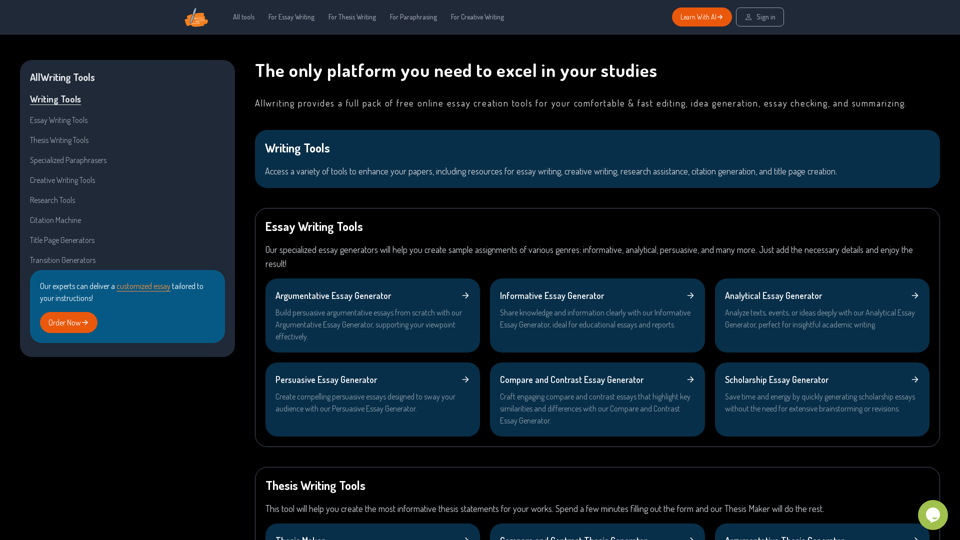
Allwriting provides a full pack of free online essay creation tools for your comfortable & fast editing, idea generation, essay checking, and summarizing.
Visit Website
The Only Platform You Need to Excel in Your Studies | AllWriting
Visit Website

Introduction

AllWriting is a comprehensive online platform offering a suite of free essay creation tools. It caters to various writing needs, including editing, idea generation, essay checking, and summarizing. The platform provides resources for essay writing, creative writing, research assistance, citation generation, and title page creation, making it a versatile tool for students, researchers, and writers.

Feature

Essay Writing Tools

Generate sample assignments across various genres, including informative, analytical, and persuasive essays. Simply input the necessary details to receive a tailored result.

Thesis Writing Tools

Create informative thesis statements efficiently. The Thesis Maker tool generates high-quality statements based on user-provided information.

Specialized Paraphrasers

Access tailored paraphrasing tools for various content types, ensuring originality and maintaining context.

Creative Writing Tools

Enhance creativity with free brainstorming tools designed to elevate writing quality and generate fresh ideas.

AI-Powered Assistance

Utilize a wide range of AI-driven tools for essay writing, creative writing, research assistance, citation generation, and title page creation.

Free and Premium Access

Enjoy free access to basic features, with the option to subscribe for additional benefits and extended tool access.

FAQ

What is AllWriting?

AllWriting is a comprehensive online platform offering free essay creation tools for editing, idea generation, essay checking, and summarizing. It provides resources for various writing needs, including essay writing, creative writing, research assistance, citation generation, and title page creation.

How much does AllWriting cost?

AllWriting offers a free version with limited access to its tools and features. For additional benefits and extended access, users can subscribe to affordable premium products.

Will my information be used for training data?

AllWriting prioritizes user privacy. Your data will not be used for any training purposes. Users can delete their accounts at any time, which will remove all associated data.

When would I need a subscription?

A subscription is recommended if the free tools do not meet your needs or if you heavily rely on AllWriting's tools. Subscriptions offer additional benefits and extended access beyond the free usage limits.

Latest Traffic Insights

  • Monthly Visits

    638

  • Bounce Rate

    74.29%

  • Pages Per Visit

    2.33

  • Time on Site(s)

    35.74

  • Global Rank

    -

  • Country Rank

    -

Recent Visits

Traffic Sources

  • Social Media:
    9.96%
  • Paid Referrals:
    1.15%
  • Email:
    0.07%
  • Referrals:
    4.80%
  • Search Engines:
    73.78%
  • Direct:
    10.24%
More Data

Related Websites

Chat-GPT PDF

What is Chat-GPT PDF?

Chat-GPT PDF is a tool that allows users to generate PDF files from Chat-GPT conversations. This innovative tool enables users to save and share their conversations in a more organized and visually appealing format.

How does Chat-GPT PDF work?

The process is simple and straightforward. Here's a step-by-step guide:

1. Copy the conversation: Copy the entire conversation from the Chat-GPT platform.
2. Paste the conversation: Paste the copied conversation into the Chat-GPT PDF tool.
3. Customize the layout: Customize the layout, font, and design of the PDF file according to your preferences.
4. Generate the PDF: Click the "Generate PDF" button to create a downloadable PDF file.

Features of Chat-GPT PDF

Chat-GPT PDF offers several features that make it an essential tool for users:

* Customizable layout: Customize the layout, font, and design of the PDF file to suit your needs.
* Easy sharing: Share the PDF file with others via email, social media, or messaging apps.
* Offline access: Access your conversations offline, even without an internet connection.
* Organization: Organize your conversations in a neat and tidy format, making it easier to review and reference.

Benefits of Chat-GPT PDF

The benefits of using Chat-GPT PDF are numerous:

* Improved productivity: Save time and increase productivity by having all your conversations in one place.
* Enhanced collaboration: Collaborate with others more effectively by sharing conversations in a clear and concise format.
* Better organization: Keep your conversations organized, making it easier to review and reference them later.

Conclusion

Chat-GPT PDF is a game-changer for anyone who uses Chat-GPT regularly. With its ease of use, customization options, and benefits, it's an essential tool for anyone looking to get the most out of their conversations.
View Detail

Chat-GPT PDF What is Chat-GPT PDF? Chat-GPT PDF is a tool that allows users to generate PDF files from Chat-GPT conversations. This innovative tool enables users to save and share their conversations in a more organized and visually appealing format. How does Chat-GPT PDF work? The process is simple and straightforward. Here's a step-by-step guide: 1. Copy the conversation: Copy the entire conversation from the Chat-GPT platform. 2. Paste the conversation: Paste the copied conversation into the Chat-GPT PDF tool. 3. Customize the layout: Customize the layout, font, and design of the PDF file according to your preferences. 4. Generate the PDF: Click the "Generate PDF" button to create a downloadable PDF file. Features of Chat-GPT PDF Chat-GPT PDF offers several features that make it an essential tool for users: * Customizable layout: Customize the layout, font, and design of the PDF file to suit your needs. * Easy sharing: Share the PDF file with others via email, social media, or messaging apps. * Offline access: Access your conversations offline, even without an internet connection. * Organization: Organize your conversations in a neat and tidy format, making it easier to review and reference. Benefits of Chat-GPT PDF The benefits of using Chat-GPT PDF are numerous: * Improved productivity: Save time and increase productivity by having all your conversations in one place. * Enhanced collaboration: Collaborate with others more effectively by sharing conversations in a clear and concise format. * Better organization: Keep your conversations organized, making it easier to review and reference them later. Conclusion Chat-GPT PDF is a game-changer for anyone who uses Chat-GPT regularly. With its ease of use, customization options, and benefits, it's an essential tool for anyone looking to get the most out of their conversations.

Chat-GPT PDF What is Chat-GPT PDF? Chat-GPT PDF is a tool that allows users to generate PDF files from Chat-GPT conversations. This innovative tool enables users to save and share their conversations in a more organized and visually appealing format. How does Chat-GPT PDF work? The process is simple and straightforward. Here's a step-by-step guide: 1. Copy the conversation: Copy the entire conversation from the Chat-GPT platform. 2. Paste the conversation: Paste the copied conversation into the Chat-GPT PDF tool. 3. Customize the layout: Customize the layout, font, and design of the PDF file according to your preferences. 4. Generate the PDF: Click the "Generate PDF" button to create a downloadable PDF file. Features of Chat-GPT PDF Chat-GPT PDF offers several features that make it an essential tool for users: * Customizable layout: Customize the layout, font, and design of the PDF file to suit your needs. * Easy sharing: Share the PDF file with others via email, social media, or messaging apps. * Offline access: Access your conversations offline, even without an internet connection. * Organization: Organize your conversations in a neat and tidy format, making it easier to review and reference. Benefits of Chat-GPT PDF The benefits of using Chat-GPT PDF are numerous: * Improved productivity: Save time and increase productivity by having all your conversations in one place. * Enhanced collaboration: Collaborate with others more effectively by sharing conversations in a clear and concise format. * Better organization: Keep your conversations organized, making it easier to review and reference them later. Conclusion Chat-GPT PDF is a game-changer for anyone who uses Chat-GPT regularly. With its ease of use, customization options, and benefits, it's an essential tool for anyone looking to get the most out of their conversations.

Exporting Chat History to PDF You can export your chat history with Chat-GPT to a PDF file using the following methods: #Method 1: Browser Print Function 1. Open your chat conversation with Chat-GPT in a web browser. 2. Press `Ctrl + P` (Windows) or `Cmd + P` (Mac) to open the print dialog box. 3. Select "Save as PDF" as the printer destination. 4. Choose a location to save the PDF file and set the file name. 5. Click "Save" to export the chat history to a PDF file. #Method 2: Online PDF Conversion Tools 1. Copy the entire chat conversation by pressing `Ctrl + A` (Windows) or `Cmd + A` (Mac) and then `Ctrl + C` (Windows) or `Cmd + C` (Mac). 2. Go to an online PDF conversion tool, such as SmallPDF or Convertio. 3. Paste the chat conversation into the conversion tool's text box. 4. Select the PDF format and click "Convert" to generate the PDF file. 5. Download the PDF file to your computer. #Method 3: Browser Extensions 1. Install a browser extension, such as Print Friendly & PDF or FireShot, that allows you to save web pages as PDF files. 2. Open your chat conversation with Chat-GPT in a web browser. 3. Click the browser extension's icon in the toolbar. 4. Select the "Save as PDF" option and choose a location to save the file. 5. Click "Save" to export the chat history to a PDF file. By following these methods, you can easily export your chat history with Chat-GPT to a PDF file for future reference or sharing.

193.90 M
pixeldraw007 & Stable Diffusion Sidebar
View Detail

pixeldraw007 & Stable Diffusion Sidebar

pixeldraw007 & Stable Diffusion Sidebar

pixeldraw007 & Stable Diffusion & Midjourney AI

193.90 M
Blinkist AI
View Detail

Blinkist AI

Blinkist AI

Extract the most important information from articles, PDFs, podcasts, and YouTube videos.

193.90 M
Empathy AI
View Detail

Empathy AI

Empathy AI

A medical assistant for primary care physicians, transcribes patient visits and automatically creates medical records, improving patient care and service.

193.90 M
AI Search
View Detail

AI Search

AI Search

Stop wasting time browsing ad-ridden, Search-Engine-Optimised sites and find what you are looking for

193.90 M
Ai5 - The AI Art Newsletter
View Detail

Ai5 - The AI Art Newsletter

Ai5 - The AI Art Newsletter

Ai5 is your go-to twice-weekly email outlining the most important events happening in generative AI. Stay informed, get smarter, and be entertained with Ai5.

0
Personal Vocabulary (Highlight/Read Aloud/Translate/Grammar)
View Detail

Personal Vocabulary (Highlight/Read Aloud/Translate/Grammar)

Personal Vocabulary (Highlight/Read Aloud/Translate/Grammar)

Highlight new words, read aloud | Translate, lexical dependency | Syntax analysis

193.90 M
Surveys, Forms & Quizzes with AI by Responsly
View Detail

Surveys, Forms & Quizzes with AI by Responsly

Surveys, Forms & Quizzes with AI by Responsly

Powerful survey and form maker powered by AI. Generate what you want in seconds.

193.90 M