Open-source RightAI Tools Directory
  • Discover AI
  • Submit
  • Startup
  • Blog
Open-source RightAI Tools Directory
Discover the best AI tools of 2025 with the RightAI Tools Directory!

Friend Links

AI Anime GeneratorToolsApp AI

Support

Tap4
Privacy policyTerms & ConditionsContact Us
Loading...
loading...

The #1 YouTube Thumbnails Generator for Viral Videos

The AI thumbnail generator used by the top YouTube content creators. Create viral thumbnails with ThumbnailPro. Ideal for YouTube thumbnails.
Visit Website
The #1 YouTube Thumbnails Generator for Viral Videos
Visit Website

Introduction

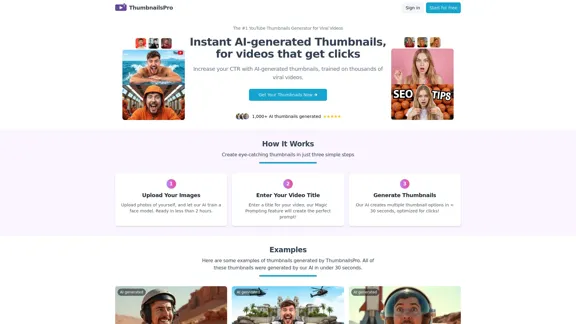
ThumbnailsPro is an AI-powered YouTube thumbnail generator designed to create eye-catching thumbnails that increase video click-through rates (CTR). The tool uses advanced AI technology trained on thousands of viral videos to generate high-quality thumbnails in under 30 seconds. It aims to help content creators boost their video views and grow their channels by providing instant, optimized thumbnails.

Feature

Upload Your Images

Users can upload photos of themselves to train a custom face model, which is ready in less than 2 hours. This personalized approach ensures that the generated thumbnails feature the content creator's likeness.

Enter Your Video Title

The Magic Prompting feature creates the perfect prompt based on the user's video title. This streamlines the thumbnail creation process and ensures relevance to the video content.

Generate Thumbnails

ThumbnailsPro's AI creates multiple thumbnail options in less than 30 seconds, all optimized for clicks. This quick turnaround allows creators to choose the best option for their video efficiently.

Customizable Plans

ThumbnailsPro offers different subscription plans to cater to various user needs:

PlanPriceFeatures
Monthly$19/month- Train custom Face model<br>- Generate 250 monthly thumbnails<br>- Magic Prompt from video title
Yearly$9/month ($108/year)- Train custom Face model<br>- Generate 250 monthly thumbnails<br>- Magic Prompt from video title<br>- 50% discount compared to monthly

Full Ownership Rights

Users have full commercial rights and ownership of the thumbnails generated using ThumbnailsPro. They can use them freely for YouTube videos or any other purpose.

Diverse Thumbnail Examples

The website showcases a variety of AI-generated thumbnail examples, demonstrating the tool's versatility and quality output across different video genres and styles.

FAQ

What is ThumbnailsPro?

ThumbnailsPro is an AI-powered YouTube thumbnail generator designed to create eye-catching thumbnails that increase your video's click-through rate (CTR). The AI is trained on thousands of viral videos to help users get more views and grow their channels.

How does ThumbnailsPro work?

ThumbnailsPro uses advanced AI to generate thumbnails based on your video title and any images you provide. Users enter their video title, upload relevant images, and the AI creates multiple thumbnail options optimized for clicks in under 30 seconds.

Can I customize the generated thumbnails?

While the AI generates high-quality thumbnails, users can make minor adjustments or use them as inspiration for their final design. ThumbnailsPro recommends trying different prompts to get a variety of options.

Why should I choose ThumbnailsPro over other thumbnail creators?

ThumbnailsPro is specifically designed for YouTube success. Its AI is trained on viral videos, ensuring that thumbnails are optimized for maximum CTR. The tool offers quick generation times, full ownership rights, and a user-friendly interface.

Is there a limit to how many thumbnails I can generate?

The number of thumbnails users can generate depends on their subscription plan. ThumbnailsPro offers plans with unlimited thumbnail generation to suit the needs of frequent uploaders.

Related Websites
AI Playground
View Detail

AI Playground

AI Playground

Gan AI Playground is a developer-focused platform offering advanced AI tools and technologies.

0
Free AI Baby Generator - See Your Future Baby's Face Instantly
View Detail

Free AI Baby Generator - See Your Future Baby's Face Instantly

Free AI Baby Generator - See Your Future Baby's Face Instantly

See your own future baby using our free AI baby face generator. Get ultra-realistic baby photo predictions in just seconds, with one click!

32.64 K
Kie.ai's 4o Image API: Cost-effective, Reliable, and Very Accurate AI Image Creation
View Detail

Kie.ai's 4o Image API: Cost-effective, Reliable, and Very Accurate AI Image Creation

Kie.ai's 4o Image API: Cost-effective, Reliable, and Very Accurate AI Image Creation

Kie.ai’s 4o Image API offers affordable, stable, and highly accurate AI image generation, enabling creators to easily produce high-quality visuals. It provides reliable and efficient solutions for various creative projects, including text-to-image and image-to-image transformations, as well as a range of visual styles.

356.51 K
Batch Save ChatGPT to Notion

This is a guide on how to save multiple ChatGPT responses to Notion in a batch. 

Tools You'll Need:

* ChatGPT: An AI chatbot that can generate text.
* Notion: A note-taking and project management tool.
* Python: A programming language.
* Requests Library: A Python library for making HTTP requests.

Steps:

1. Get Your Notion API Token:
   - Go to your Notion workspace settings.
   - Navigate to the "Integrations" tab.
   - Click "Create new integration" and choose "API Token".
   - Copy your API token.

2. Install Python Libraries:
   - Open your terminal or command prompt.
   - Type `pip install requests` and press Enter.

3. Write Python Script:
   - Create a new Python file (e.g., `save_chatgpt_to_notion.py`).
   - Paste the following code into the file, replacing `YOUR_NOTION_API_TOKEN` with your actual token:

```python
import requests

def save_chatgpt_response_to_notion(response, page_id, token):
  """Saves a ChatGPT response to a Notion page."""
  url = f"https://api.notion.com/v1/pages/{page_id}/children"
  headers = {"Authorization": f"Bearer {token}"}
  data = {
    "parent": {
      "page_id": page_id
    },
    "properties": {
      "title": {
        "title": [
          {
            "text": {
              "content": "ChatGPT Response"
            }
          }
        ]
      },
      "content": {
        "rich_text": [
          {
            "text": {
              "content": response
            }
          }
        ]
      }
    }
  }
  response = requests.post(url, headers=headers, json=data)
  print(response.status_code)

Example usage
page_id = "YOUR_NOTION_PAGE_ID"
token = "YOUR_NOTION_API_TOKEN"

Get ChatGPT responses (replace with your actual ChatGPT interaction)
chatgpt_responses = [
  "This is the first ChatGPT response.",
  "This is the second ChatGPT response.",
  "This is the third ChatGPT response."
]

Save each response to Notion
for response in chatgpt_responses:
  save_chatgpt_response_to_notion(response, page_id, token)
```

4. Run the Script:
   - In your terminal, navigate to the directory where you saved the Python file.
   - Type `python save_chatgpt_to_notion.py` and press Enter.

5. Check Notion:
   - Open your Notion workspace and go to the page specified by `page_id`.
   - You should see your ChatGPT responses saved as separate blocks.
View Detail

Batch Save ChatGPT to Notion This is a guide on how to save multiple ChatGPT responses to Notion in a batch. Tools You'll Need: * ChatGPT: An AI chatbot that can generate text. * Notion: A note-taking and project management tool. * Python: A programming language. * Requests Library: A Python library for making HTTP requests. Steps: 1. Get Your Notion API Token: - Go to your Notion workspace settings. - Navigate to the "Integrations" tab. - Click "Create new integration" and choose "API Token". - Copy your API token. 2. Install Python Libraries: - Open your terminal or command prompt. - Type `pip install requests` and press Enter. 3. Write Python Script: - Create a new Python file (e.g., `save_chatgpt_to_notion.py`). - Paste the following code into the file, replacing `YOUR_NOTION_API_TOKEN` with your actual token: ```python import requests def save_chatgpt_response_to_notion(response, page_id, token): """Saves a ChatGPT response to a Notion page.""" url = f"https://api.notion.com/v1/pages/{page_id}/children" headers = {"Authorization": f"Bearer {token}"} data = { "parent": { "page_id": page_id }, "properties": { "title": { "title": [ { "text": { "content": "ChatGPT Response" } } ] }, "content": { "rich_text": [ { "text": { "content": response } } ] } } } response = requests.post(url, headers=headers, json=data) print(response.status_code) Example usage page_id = "YOUR_NOTION_PAGE_ID" token = "YOUR_NOTION_API_TOKEN" Get ChatGPT responses (replace with your actual ChatGPT interaction) chatgpt_responses = [ "This is the first ChatGPT response.", "This is the second ChatGPT response.", "This is the third ChatGPT response." ] Save each response to Notion for response in chatgpt_responses: save_chatgpt_response_to_notion(response, page_id, token) ``` 4. Run the Script: - In your terminal, navigate to the directory where you saved the Python file. - Type `python save_chatgpt_to_notion.py` and press Enter. 5. Check Notion: - Open your Notion workspace and go to the page specified by `page_id`. - You should see your ChatGPT responses saved as separate blocks.

Batch Save ChatGPT to Notion This is a guide on how to save multiple ChatGPT responses to Notion in a batch. Tools You'll Need: * ChatGPT: An AI chatbot that can generate text. * Notion: A note-taking and project management tool. * Python: A programming language. * Requests Library: A Python library for making HTTP requests. Steps: 1. Get Your Notion API Token: - Go to your Notion workspace settings. - Navigate to the "Integrations" tab. - Click "Create new integration" and choose "API Token". - Copy your API token. 2. Install Python Libraries: - Open your terminal or command prompt. - Type `pip install requests` and press Enter. 3. Write Python Script: - Create a new Python file (e.g., `save_chatgpt_to_notion.py`). - Paste the following code into the file, replacing `YOUR_NOTION_API_TOKEN` with your actual token: ```python import requests def save_chatgpt_response_to_notion(response, page_id, token): """Saves a ChatGPT response to a Notion page.""" url = f"https://api.notion.com/v1/pages/{page_id}/children" headers = {"Authorization": f"Bearer {token}"} data = { "parent": { "page_id": page_id }, "properties": { "title": { "title": [ { "text": { "content": "ChatGPT Response" } } ] }, "content": { "rich_text": [ { "text": { "content": response } } ] } } } response = requests.post(url, headers=headers, json=data) print(response.status_code) Example usage page_id = "YOUR_NOTION_PAGE_ID" token = "YOUR_NOTION_API_TOKEN" Get ChatGPT responses (replace with your actual ChatGPT interaction) chatgpt_responses = [ "This is the first ChatGPT response.", "This is the second ChatGPT response.", "This is the third ChatGPT response." ] Save each response to Notion for response in chatgpt_responses: save_chatgpt_response_to_notion(response, page_id, token) ``` 4. Run the Script: - In your terminal, navigate to the directory where you saved the Python file. - Type `python save_chatgpt_to_notion.py` and press Enter. 5. Check Notion: - Open your Notion workspace and go to the page specified by `page_id`. - You should see your ChatGPT responses saved as separate blocks.

Save ChatGPT Conversations to Notion with One Click Export your ChatGPT conversations directly to Notion with a single click.

193.90 M
ilikeimg - AI-Powered Image Tools | Free Online Photo Editor
View Detail

ilikeimg - AI-Powered Image Tools | Free Online Photo Editor

ilikeimg - AI-Powered Image Tools | Free Online Photo Editor

Free online tools to convert, crop, compress, resize, and enhance your images. No registration required for basic features.

0
WriteText.ai
View Detail

WriteText.ai

WriteText.ai

WriteText.ai Page Review WriteText.ai is an AI-powered writing assistant that helps you generate different creative text formats, like poems, code, scripts, musical pieces, email, letters, etc. It's designed to be user-friendly and accessible to everyone, regardless of their writing experience. Here's a breakdown of its key features and benefits: * Multiple Text Formats: WriteText.ai can generate a variety of text formats, including poems, code, scripts, musical pieces, emails, letters, and more. This versatility makes it a valuable tool for writers, developers, and anyone who needs to create different types of content. * User-Friendly Interface: The platform boasts a clean and intuitive interface that is easy to navigate, even for beginners. * AI-Powered Generation: WriteText.ai leverages the power of artificial intelligence to generate high-quality text. The AI model is trained on a massive dataset of text and code, allowing it to produce creative and coherent outputs. * Customization Options: Users can customize their text generation by providing specific instructions, keywords, or examples. This level of control ensures that the generated text meets their exact needs. * Fast and Efficient: WriteText.ai is designed to be fast and efficient, generating text quickly and accurately. This saves users time and effort, allowing them to focus on other aspects of their work. Overall, WriteText.ai is a powerful and versatile AI writing assistant that can be a valuable tool for a wide range of users. Its user-friendly interface, multiple text format options, and AI-powered generation make it a compelling choice for anyone looking to enhance their writing process.

193.90 M
Lushair, AI-Powered Hair & Scalp Analysis | Personalized Care Solutions
View Detail

Lushair, AI-Powered Hair & Scalp Analysis | Personalized Care Solutions

Lushair, AI-Powered Hair & Scalp Analysis | Personalized Care Solutions

Unlock the secrets of healthy hair with our AI-powered hair and scalp analysis. Discover personalized insights, effective treatments, and embrace a vibrant, confident you. Elevate your hair care journey with cutting-edge technology and expert analysis.

0
JumboGPT - Bulk Prompts for ChatGPT

This is a collection of bulk prompts for ChatGPT, designed to help you explore its capabilities and generate diverse creative text formats. 

Instructions:

* Each prompt is designed to be used individually with ChatGPT.
* You can copy and paste the prompts directly into the ChatGPT interface.
* Feel free to modify the prompts to suit your specific needs and interests.

Categories:

* Story Starters:

>  A lone astronaut stumbles upon a derelict spaceship...
>  The old woman sat on the park bench, watching the children play...
>  A mysterious package arrived on her doorstep, addressed simply to "The Keeper"...

* Creative Writing:

> Write a short poem about the feeling of nostalgia.
> Compose a song about a robot who falls in love with a human.
> Describe a world where animals can talk.

* Dialogue Prompts:

> Two friends argue about the best way to spend a weekend.
> A detective interrogates a suspect in a murder case.
> A parent tries to explain a difficult concept to their child.

* Worldbuilding:

> Create a detailed description of a fantasy city.
> Design a new species of creature for a science fiction story.
> Develop a unique magic system for a medieval world.

* Code Generation:

> Write a Python function to calculate the factorial of a number.
> Generate HTML code for a simple webpage.
> Create a SQL query to retrieve data from a database.

* Humor:

> Write a joke about a programmer.
> Create a funny story about a talking cat.
> Generate a list of puns about food.

* Educational:

> Explain the concept of photosynthesis in simple terms.
> Summarize the main events of the American Revolution.
> Provide a brief history of the development of the internet.
View Detail

JumboGPT - Bulk Prompts for ChatGPT This is a collection of bulk prompts for ChatGPT, designed to help you explore its capabilities and generate diverse creative text formats. Instructions: * Each prompt is designed to be used individually with ChatGPT. * You can copy and paste the prompts directly into the ChatGPT interface. * Feel free to modify the prompts to suit your specific needs and interests. Categories: * Story Starters: > A lone astronaut stumbles upon a derelict spaceship... > The old woman sat on the park bench, watching the children play... > A mysterious package arrived on her doorstep, addressed simply to "The Keeper"... * Creative Writing: > Write a short poem about the feeling of nostalgia. > Compose a song about a robot who falls in love with a human. > Describe a world where animals can talk. * Dialogue Prompts: > Two friends argue about the best way to spend a weekend. > A detective interrogates a suspect in a murder case. > A parent tries to explain a difficult concept to their child. * Worldbuilding: > Create a detailed description of a fantasy city. > Design a new species of creature for a science fiction story. > Develop a unique magic system for a medieval world. * Code Generation: > Write a Python function to calculate the factorial of a number. > Generate HTML code for a simple webpage. > Create a SQL query to retrieve data from a database. * Humor: > Write a joke about a programmer. > Create a funny story about a talking cat. > Generate a list of puns about food. * Educational: > Explain the concept of photosynthesis in simple terms. > Summarize the main events of the American Revolution. > Provide a brief history of the development of the internet.

JumboGPT - Bulk Prompts for ChatGPT This is a collection of bulk prompts for ChatGPT, designed to help you explore its capabilities and generate diverse creative text formats. Instructions: * Each prompt is designed to be used individually with ChatGPT. * You can copy and paste the prompts directly into the ChatGPT interface. * Feel free to modify the prompts to suit your specific needs and interests. Categories: * Story Starters: > A lone astronaut stumbles upon a derelict spaceship... > The old woman sat on the park bench, watching the children play... > A mysterious package arrived on her doorstep, addressed simply to "The Keeper"... * Creative Writing: > Write a short poem about the feeling of nostalgia. > Compose a song about a robot who falls in love with a human. > Describe a world where animals can talk. * Dialogue Prompts: > Two friends argue about the best way to spend a weekend. > A detective interrogates a suspect in a murder case. > A parent tries to explain a difficult concept to their child. * Worldbuilding: > Create a detailed description of a fantasy city. > Design a new species of creature for a science fiction story. > Develop a unique magic system for a medieval world. * Code Generation: > Write a Python function to calculate the factorial of a number. > Generate HTML code for a simple webpage. > Create a SQL query to retrieve data from a database. * Humor: > Write a joke about a programmer. > Create a funny story about a talking cat. > Generate a list of puns about food. * Educational: > Explain the concept of photosynthesis in simple terms. > Summarize the main events of the American Revolution. > Provide a brief history of the development of the internet.

Use ChatGPT to process many different questions and save the responses in a spreadsheet format like CSV or Excel.

193.90 M