Open-source RightAI Tools Directory
  • Discover AI
  • Submit
  • Startup
  • Blog
Open-source RightAI Tools Directory
Discover the best AI tools of 2025 with the RightAI Tools Directory!

Friend Links

AI Anime GeneratorToolsApp AI

Support

Tap4
Privacy policyTerms & ConditionsContact Us
Loading...
loading...

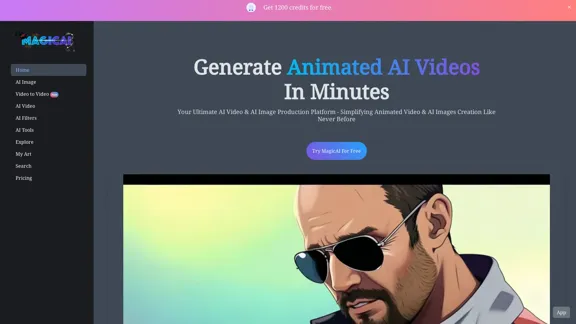
MagicAI - Free AI Image, AI Video, AI Tools, Anime Art

Magic AI is a free online AI image generator. Use it to create AI art, AI videos, posters, and more. It's easy to create anime art with our AI.
Visit Website
MagicAI - Free AI Image, AI Video, AI Tools, Anime Art
Visit Website

Introduction

MagicAI is a versatile AI-powered platform offering a wide range of creative tools for generating and manipulating images and videos. It enables users to create AI-generated art, apply AI filters, and produce animated AI videos effortlessly. The platform is accessible via website and mobile app, catering to creators in over 190 countries.

Feature

AI Image Generation

Create unique AI-generated art by inputting prompts and letting the AI produce stunning visuals.

Video-to-Video Transformation

Transform your original videos into different styles using AI technology in just a few minutes.

AI Video Creation

Produce animated AI videos with ease, expanding your creative possibilities.

AI Filters

Apply and adjust various AI-powered filters and effects to your images, enhancing their visual appeal.

Specialized AI Tools

Access unique features like AI Clay Filter for model try-ons, AI Sticker creation, AI Image Upscaler, and more.

Mobile App Availability

Enjoy flexible creative workflows on the go with the MagicAI mobile app.

User-Friendly Interface

Simplify the process of creating AI-generated content with an intuitive platform design.

Free Plan Option

Get started with 1200 free credits to explore MagicAI's features without initial cost.

FAQ

What types of AI tools does MagicAI offer?

MagicAI provides a variety of AI tools, including AI Image Generator, Video to Video transformation, AI Filters, AI Clay Filter, AI Sticker, AI Image Upscaler, and AI Big Boobs.

Is MagicAI available on mobile devices?

Yes, MagicAI offers a mobile app for flexible creative workflows on the go.

How many credits do I get with the free plan?

The free plan provides 1200 credits to get started with MagicAI's features.

How does the Video to Video feature work?

The Video to Video feature uses AI technology to transform your uploaded video into different styles in just a few minutes.

What is the AI Clay Filter?

The AI Clay Filter is a tool that allows users to customize model try-ons with one click, potentially for virtual clothing or accessory fitting.

Latest Traffic Insights

  • Monthly Visits

    1.64 K

  • Bounce Rate

    40.00%

  • Pages Per Visit

    1.77

  • Time on Site(s)

    22.92

  • Global Rank

    9030756

  • Country Rank

    United States 3357269

Recent Visits

Traffic Sources

  • Social Media:
    7.58%
  • Paid Referrals:
    1.31%
  • Email:
    0.16%
  • Referrals:
    9.87%
  • Search Engines:
    31.90%
  • Direct:
    48.69%
More Data

Related Websites

 Create a Consistent Character Across Different Looks!

Imagine this:

* Your character rocking a cool new outfit.
* Your character with a fresh hairstyle.
* Your character in a variety of exciting backgrounds.

But...

* They always look like *themselves*.
* Their personality shines through, no matter the change.

That's where a Consistent Character Generator comes in!

This powerful tool lets you:

* Generate variations of your character with different:
    * Poses
    * Clothing
    * Hairstyles
    * Backgrounds

* Maintain consistency in your character's appearance and essence.

Say goodbye to:

* Inconsistent character designs that break immersion.
* Spending hours tweaking details to keep your character recognizable.

Say hello to:

* A library of diverse character variations, all true to your vision.
* Effortless character customization for your projects.
View Detail

Create a Consistent Character Across Different Looks! Imagine this: * Your character rocking a cool new outfit. * Your character with a fresh hairstyle. * Your character in a variety of exciting backgrounds. But... * They always look like *themselves*. * Their personality shines through, no matter the change. That's where a Consistent Character Generator comes in! This powerful tool lets you: * Generate variations of your character with different: * Poses * Clothing * Hairstyles * Backgrounds * Maintain consistency in your character's appearance and essence. Say goodbye to: * Inconsistent character designs that break immersion. * Spending hours tweaking details to keep your character recognizable. Say hello to: * A library of diverse character variations, all true to your vision. * Effortless character customization for your projects.

Create a Consistent Character Across Different Looks! Imagine this: * Your character rocking a cool new outfit. * Your character with a fresh hairstyle. * Your character in a variety of exciting backgrounds. But... * They always look like *themselves*. * Their personality shines through, no matter the change. That's where a Consistent Character Generator comes in! This powerful tool lets you: * Generate variations of your character with different: * Poses * Clothing * Hairstyles * Backgrounds * Maintain consistency in your character's appearance and essence. Say goodbye to: * Inconsistent character designs that break immersion. * Spending hours tweaking details to keep your character recognizable. Say hello to: * A library of diverse character variations, all true to your vision. * Effortless character customization for your projects.

Unlock your creative potential with the AI Consistent Character Generator. Effortlessly generate, customize, and transform characters with consistent features for photography, gaming, art, and more. Start your creative journey today!

37.98 K
Batch Save ChatGPT to Notion

This is a guide on how to save multiple ChatGPT responses to Notion in a batch. 

Tools You'll Need:

* ChatGPT: An AI chatbot that can generate text.
* Notion: A note-taking and project management tool.
* Python: A programming language.
* Requests Library: A Python library for making HTTP requests.

Steps:

1. Get Your Notion API Token:
   - Go to your Notion workspace settings.
   - Navigate to the "Integrations" tab.
   - Click "Create new integration" and choose "API Token".
   - Copy your API token.

2. Install Python Libraries:
   - Open your terminal or command prompt.
   - Type `pip install requests` and press Enter.

3. Write Python Script:
   - Create a new Python file (e.g., `save_chatgpt_to_notion.py`).
   - Paste the following code into the file, replacing `YOUR_NOTION_API_TOKEN` with your actual token:

```python
import requests

def save_chatgpt_response_to_notion(response, page_id, token):
  """Saves a ChatGPT response to a Notion page."""
  url = f"https://api.notion.com/v1/pages/{page_id}/children"
  headers = {"Authorization": f"Bearer {token}"}
  data = {
    "parent": {
      "page_id": page_id
    },
    "properties": {
      "title": {
        "title": [
          {
            "text": {
              "content": "ChatGPT Response"
            }
          }
        ]
      },
      "content": {
        "rich_text": [
          {
            "text": {
              "content": response
            }
          }
        ]
      }
    }
  }
  response = requests.post(url, headers=headers, json=data)
  print(response.status_code)

Example usage
page_id = "YOUR_NOTION_PAGE_ID"
token = "YOUR_NOTION_API_TOKEN"

Get ChatGPT responses (replace with your actual ChatGPT interaction)
chatgpt_responses = [
  "This is the first ChatGPT response.",
  "This is the second ChatGPT response.",
  "This is the third ChatGPT response."
]

Save each response to Notion
for response in chatgpt_responses:
  save_chatgpt_response_to_notion(response, page_id, token)
```

4. Run the Script:
   - In your terminal, navigate to the directory where you saved the Python file.
   - Type `python save_chatgpt_to_notion.py` and press Enter.

5. Check Notion:
   - Open your Notion workspace and go to the page specified by `page_id`.
   - You should see your ChatGPT responses saved as separate blocks.
View Detail

Batch Save ChatGPT to Notion This is a guide on how to save multiple ChatGPT responses to Notion in a batch. Tools You'll Need: * ChatGPT: An AI chatbot that can generate text. * Notion: A note-taking and project management tool. * Python: A programming language. * Requests Library: A Python library for making HTTP requests. Steps: 1. Get Your Notion API Token: - Go to your Notion workspace settings. - Navigate to the "Integrations" tab. - Click "Create new integration" and choose "API Token". - Copy your API token. 2. Install Python Libraries: - Open your terminal or command prompt. - Type `pip install requests` and press Enter. 3. Write Python Script: - Create a new Python file (e.g., `save_chatgpt_to_notion.py`). - Paste the following code into the file, replacing `YOUR_NOTION_API_TOKEN` with your actual token: ```python import requests def save_chatgpt_response_to_notion(response, page_id, token): """Saves a ChatGPT response to a Notion page.""" url = f"https://api.notion.com/v1/pages/{page_id}/children" headers = {"Authorization": f"Bearer {token}"} data = { "parent": { "page_id": page_id }, "properties": { "title": { "title": [ { "text": { "content": "ChatGPT Response" } } ] }, "content": { "rich_text": [ { "text": { "content": response } } ] } } } response = requests.post(url, headers=headers, json=data) print(response.status_code) Example usage page_id = "YOUR_NOTION_PAGE_ID" token = "YOUR_NOTION_API_TOKEN" Get ChatGPT responses (replace with your actual ChatGPT interaction) chatgpt_responses = [ "This is the first ChatGPT response.", "This is the second ChatGPT response.", "This is the third ChatGPT response." ] Save each response to Notion for response in chatgpt_responses: save_chatgpt_response_to_notion(response, page_id, token) ``` 4. Run the Script: - In your terminal, navigate to the directory where you saved the Python file. - Type `python save_chatgpt_to_notion.py` and press Enter. 5. Check Notion: - Open your Notion workspace and go to the page specified by `page_id`. - You should see your ChatGPT responses saved as separate blocks.

Batch Save ChatGPT to Notion This is a guide on how to save multiple ChatGPT responses to Notion in a batch. Tools You'll Need: * ChatGPT: An AI chatbot that can generate text. * Notion: A note-taking and project management tool. * Python: A programming language. * Requests Library: A Python library for making HTTP requests. Steps: 1. Get Your Notion API Token: - Go to your Notion workspace settings. - Navigate to the "Integrations" tab. - Click "Create new integration" and choose "API Token". - Copy your API token. 2. Install Python Libraries: - Open your terminal or command prompt. - Type `pip install requests` and press Enter. 3. Write Python Script: - Create a new Python file (e.g., `save_chatgpt_to_notion.py`). - Paste the following code into the file, replacing `YOUR_NOTION_API_TOKEN` with your actual token: ```python import requests def save_chatgpt_response_to_notion(response, page_id, token): """Saves a ChatGPT response to a Notion page.""" url = f"https://api.notion.com/v1/pages/{page_id}/children" headers = {"Authorization": f"Bearer {token}"} data = { "parent": { "page_id": page_id }, "properties": { "title": { "title": [ { "text": { "content": "ChatGPT Response" } } ] }, "content": { "rich_text": [ { "text": { "content": response } } ] } } } response = requests.post(url, headers=headers, json=data) print(response.status_code) Example usage page_id = "YOUR_NOTION_PAGE_ID" token = "YOUR_NOTION_API_TOKEN" Get ChatGPT responses (replace with your actual ChatGPT interaction) chatgpt_responses = [ "This is the first ChatGPT response.", "This is the second ChatGPT response.", "This is the third ChatGPT response." ] Save each response to Notion for response in chatgpt_responses: save_chatgpt_response_to_notion(response, page_id, token) ``` 4. Run the Script: - In your terminal, navigate to the directory where you saved the Python file. - Type `python save_chatgpt_to_notion.py` and press Enter. 5. Check Notion: - Open your Notion workspace and go to the page specified by `page_id`. - You should see your ChatGPT responses saved as separate blocks.

Save ChatGPT Conversations to Notion with One Click Export your ChatGPT conversations directly to Notion with a single click.

193.90 M
Free Online AI Tool for Face Swapping
View Detail

Free Online AI Tool for Face Swapping

Free Online AI Tool for Face Swapping

100% Free AI Face Swap Online Tool No Limits, No signups. No watermarks. Swap faces in videos, photos, and GIFs.

84.55 K
Flux Tools: Comprehensive Guide to AI Image Creation and Editing
View Detail

Flux Tools: Comprehensive Guide to AI Image Creation and Editing

Flux Tools: Comprehensive Guide to AI Image Creation and Editing

Discover how Flux Tools transforms image generation and editing. Expert guide with hands-on experience, use cases, and best practices for creators.

0
ChatGPT Toolbar Companion
View Detail

ChatGPT Toolbar Companion

ChatGPT Toolbar Companion

The Ultimate ChatGPT Toolbar Companion with Prompts, Text-to-Speech, Speech-to-Text, and Auto Continue.

193.90 M
Nude AI Generator – Uncensored AI Image Generator
View Detail

Nude AI Generator – Uncensored AI Image Generator

Nude AI Generator – Uncensored AI Image Generator

Nude AI Generator is an advanced tool designed to create custom adult artwork using artificial intelligence.

11.06 K
Vmake AI - All-In-One E-commerce
Creative Solutions
View Detail

Vmake AI - All-In-One E-commerce Creative Solutions

Vmake AI - All-In-One E-commerce Creative Solutions

Vmake is an online image and video editing platform that simplifies the process of creating product photos and social media content.

2.22 M
Lushair, AI-Powered Hair & Scalp Analysis | Personalized Care Solutions
View Detail

Lushair, AI-Powered Hair & Scalp Analysis | Personalized Care Solutions

Lushair, AI-Powered Hair & Scalp Analysis | Personalized Care Solutions

Unlock the secrets of healthy hair with our AI-powered hair and scalp analysis. Discover personalized insights, effective treatments, and embrace a vibrant, confident you. Elevate your hair care journey with cutting-edge technology and expert analysis.

0