Open-source RightAI Tools Directory
  • Discover AI
  • Submit
  • Startup
  • Blog
Open-source RightAI Tools Directory
Discover the best AI tools of 2025 with the RightAI Tools Directory!

Friend Links

AI Anime GeneratorToolsApp AI

Support

Tap4
Privacy policyTerms & ConditionsContact Us
Loading...
loading...

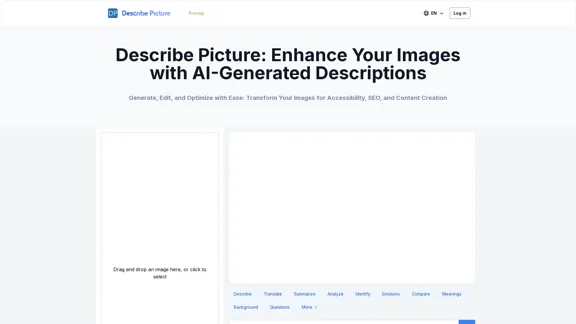
Describe Picture: AI-Generated Image Descriptions for Enhanced Accessibility and SEO

Describe Picture is an AI-driven platform that generates detailed descriptions of your images, enhancing accessibility, SEO, and content creation. Upload your images and let our AI provide accurate and editable descriptions to improve your digital content.
Visit Website
Describe Picture: AI-Generated Image Descriptions for Enhanced Accessibility and SEO
Visit Website

Introduction

Describe Picture is an AI-driven platform designed to generate detailed descriptions of images uploaded by users. It enhances accessibility, boosts SEO, and aids in content creation by providing accurate and engaging image descriptions. The platform caters to a variety of needs, from e-commerce to education, making it a versatile tool for users across different sectors.

Feature

  1. AI-Driven Image Analysis

    Describe Picture utilizes advanced AI technology to analyze images and generate comprehensive descriptions that include objects, colors, textures, emotions, and themes.

  2. Multi-Language Support

    The platform can produce descriptions in multiple languages, making it accessible for a global audience.

  3. User Editing and Refinement

    Users have the ability to edit and refine AI-generated descriptions to ensure accuracy and detail.

  4. Image Categorization

    Users can select categories (e.g., art, product, travel) when uploading images, allowing the AI to generate more relevant descriptions.

  5. Industry-Specific Prompts

    Describe Picture offers tailored prompts for various industries, enhancing the precision of generated descriptions.

  6. Community Interaction

    Users can share their descriptions and receive feedback, fostering engagement and quality improvement.

  7. Educational Resources

    The platform provides tips and guides on writing effective image descriptions, along with tutorials for different fields.

  8. API Services

    Describe Picture offers API services for integration into other websites and applications, broadening its usability.

  9. Free Trial and Subscription Model

    Users can access a free trial with limited uses, after which a subscription is required for continued access to full features.

  10. Performance Optimization and Security

    The platform is optimized for performance and prioritizes user data security and privacy.

How to Use?

  1. Visit the Describe Picture website to get started.
  2. Upload an image by clicking the "Upload" button.
  3. Select a category for your image to help the AI generate relevant descriptions.
  4. Choose from various preset prompts to guide the AI in generating descriptions.
  5. Click "Generate Description" to receive a detailed description of your image.
  6. Edit and refine the AI-generated description as needed.
  7. For developers, refer to the API documentation for integration options.

FAQ

What is Describe Picture?

Describe Picture is an AI-powered platform that generates detailed descriptions of uploaded images, enhancing accessibility, SEO, and content creation.

How accurate are Describe Picture's AI-generated descriptions?

The AI is highly accurate, but users can edit and refine the descriptions for perfect accuracy.

How many free uses does Describe Picture offer?

It offers 5 free uses for non-registered users and 20 monthly free uses for registered users.

Can I use Describe Picture for commercial purposes?

Yes, it can be used for commercial purposes, especially with a paid subscription.

Does Describe Picture support multiple languages?

Yes, it generates descriptions in various languages.

How can I integrate Describe Picture into my website or app?

Describe Picture provides an API for seamless integration into other platforms.

Can Describe Picture handle all types of images?

Yes, it can analyze and describe a wide range of image types.

How does Describe Picture enhance SEO?

By generating keyword-rich, detailed descriptions that improve image discoverability and overall site ranking.

Is my data safe with Describe Picture?

Yes, the platform prioritizes user privacy and data security.

Can I save and manage my descriptions on Describe Picture?

Yes, users can save, categorize, and tag their descriptions for easy management.

Price

Plan TypePrice
Free Trial5 uses (non-registered) / 20 uses (registered)
Subscription ModelVarious tiers available (details on pricing page)
The price is for reference only, please refer to the latest official data for actual information.

Evaluation

  1. Describe Picture effectively generates detailed and accurate image descriptions, enhancing accessibility and SEO for users.
  2. The multi-language support broadens its usability, making it suitable for a global audience.
  3. User editing capabilities allow for refinement, ensuring high-quality output.
  4. The community interaction feature fosters engagement and improves description quality through feedback.
  5. However, the reliance on AI means that users must still verify and refine descriptions to ensure they meet specific needs.
  6. The subscription model may deter some users, especially those who only need occasional access.
  7. Overall, Describe Picture is a valuable tool for enhancing digital content, but users should be aware of its limitations and the need for manual oversight.

Related Websites
Krea
View Detail

Krea

Krea

Krea makes generative AI intuitive. Generate, edit, and enhance images and videos using powerful AI for free.

5.34 M
RevenueEngine
View Detail

RevenueEngine

RevenueEngine

RevenueEngine.ai | Helping Creators Monetize Content Quickly & Easily - Access Thousands of Affiliate Programs In One Place

193.90 M
AI Professional Headshot Pro on the App Store
View Detail

AI Professional Headshot Pro on the App Store

AI Professional Headshot Pro on the App Store

Introducing AI Professional Headshot Pro, the ultimate AI headshot generator designed to create stunning AI headshots and business photos effortlessly.

124.77 M
AI Prompt Generator
View Detail

AI Prompt Generator

AI Prompt Generator

AI Prompt Generator: The Ultimate ChatGPT Instructions Toolkit for Art Verified, free, and awesome for business and coding. This toolkit is designed to boost your productivity!

193.90 M
Painnt - Art & Cartoon Filters on the App Store
View Detail

Painnt - Art & Cartoon Filters on the App Store

Painnt - Art & Cartoon Filters on the App Store

Painnt is the ultimate photo editor. Turn your photos into art masterpieces, or awesome cartoon photos. If you like digital art, you'll love Painnt! Choose fro...

124.77 M
Text to Voice Generator
==========================

A text-to-voice generator, also known as a text-to-speech (TTS) system, is a software that converts written text into a spoken voice output. This technology has been widely used in various applications, including virtual assistants, audiobooks, and language learning platforms.

How it Works
---------------

The process of generating voice from text involves several steps:

1. Text Analysis: The input text is analyzed to identify the language, syntax, and semantics.
2. Phonetic Transcription: The text is converted into a phonetic transcription, which represents the sounds of the spoken language.
3. Prosody Generation: The phonetic transcription is then used to generate the prosody, or rhythm and intonation, of the spoken voice.
4. Waveform Generation: The prosody and phonetic transcription are combined to generate the audio waveform, which is the final spoken voice output.

Types of Text-to-Voice Generators
-----------------------------------

There are two main types of text-to-voice generators:

Rule-Based Systems

These systems use a set of predefined rules to generate the spoken voice output. They are often limited in their ability to produce natural-sounding voices and may sound robotic.

Machine Learning-Based Systems

These systems use machine learning algorithms to learn from large datasets of spoken voices and generate more natural-sounding voices. They are often more advanced and can produce high-quality voice outputs.

Applications of Text-to-Voice Generators
-----------------------------------------

Text-to-voice generators have a wide range of applications, including:

Virtual Assistants

Virtual assistants, such as Siri and Alexa, use text-to-voice generators to respond to user queries.

Audiobooks

Text-to-voice generators can be used to create audiobooks from written texts, making it easier for people to access written content.

Language Learning

Language learning platforms use text-to-voice generators to provide pronunciation guidance and practice exercises for learners.

Accessibility

Text-to-voice generators can be used to assist people with disabilities, such as visual impairments, by providing an auditory interface to written content.
View Detail

Text to Voice Generator ========================== A text-to-voice generator, also known as a text-to-speech (TTS) system, is a software that converts written text into a spoken voice output. This technology has been widely used in various applications, including virtual assistants, audiobooks, and language learning platforms. How it Works --------------- The process of generating voice from text involves several steps: 1. Text Analysis: The input text is analyzed to identify the language, syntax, and semantics. 2. Phonetic Transcription: The text is converted into a phonetic transcription, which represents the sounds of the spoken language. 3. Prosody Generation: The phonetic transcription is then used to generate the prosody, or rhythm and intonation, of the spoken voice. 4. Waveform Generation: The prosody and phonetic transcription are combined to generate the audio waveform, which is the final spoken voice output. Types of Text-to-Voice Generators ----------------------------------- There are two main types of text-to-voice generators: Rule-Based Systems These systems use a set of predefined rules to generate the spoken voice output. They are often limited in their ability to produce natural-sounding voices and may sound robotic. Machine Learning-Based Systems These systems use machine learning algorithms to learn from large datasets of spoken voices and generate more natural-sounding voices. They are often more advanced and can produce high-quality voice outputs. Applications of Text-to-Voice Generators ----------------------------------------- Text-to-voice generators have a wide range of applications, including: Virtual Assistants Virtual assistants, such as Siri and Alexa, use text-to-voice generators to respond to user queries. Audiobooks Text-to-voice generators can be used to create audiobooks from written texts, making it easier for people to access written content. Language Learning Language learning platforms use text-to-voice generators to provide pronunciation guidance and practice exercises for learners. Accessibility Text-to-voice generators can be used to assist people with disabilities, such as visual impairments, by providing an auditory interface to written content.

Text to Voice Generator ========================== A text-to-voice generator, also known as a text-to-speech (TTS) system, is a software that converts written text into a spoken voice output. This technology has been widely used in various applications, including virtual assistants, audiobooks, and language learning platforms. How it Works --------------- The process of generating voice from text involves several steps: 1. Text Analysis: The input text is analyzed to identify the language, syntax, and semantics. 2. Phonetic Transcription: The text is converted into a phonetic transcription, which represents the sounds of the spoken language. 3. Prosody Generation: The phonetic transcription is then used to generate the prosody, or rhythm and intonation, of the spoken voice. 4. Waveform Generation: The prosody and phonetic transcription are combined to generate the audio waveform, which is the final spoken voice output. Types of Text-to-Voice Generators ----------------------------------- There are two main types of text-to-voice generators: Rule-Based Systems These systems use a set of predefined rules to generate the spoken voice output. They are often limited in their ability to produce natural-sounding voices and may sound robotic. Machine Learning-Based Systems These systems use machine learning algorithms to learn from large datasets of spoken voices and generate more natural-sounding voices. They are often more advanced and can produce high-quality voice outputs. Applications of Text-to-Voice Generators ----------------------------------------- Text-to-voice generators have a wide range of applications, including: Virtual Assistants Virtual assistants, such as Siri and Alexa, use text-to-voice generators to respond to user queries. Audiobooks Text-to-voice generators can be used to create audiobooks from written texts, making it easier for people to access written content. Language Learning Language learning platforms use text-to-voice generators to provide pronunciation guidance and practice exercises for learners. Accessibility Text-to-voice generators can be used to assist people with disabilities, such as visual impairments, by providing an auditory interface to written content.

Generate Voice from Text on Any Web Page With the advancement of technology, it is now possible to generate voice from text on any web page. This feature is particularly useful for people who prefer listening to content rather than reading it. Here's how you can do it: #Method 1: Using Browser Extension You can use a browser extension like Read Aloud or SpeakIt! to generate voice from text on any web page. These extensions are available for both Google Chrome and Mozilla Firefox browsers. #Method 2: Using Online Tools There are several online tools available that can convert text to speech. Some popular tools include NaturalReader, Voice Dream Reader, and Google Text-to-Speech. You can copy and paste the text from any web page into these tools to generate voice. #Method 3: Using Screen Reader If you are using a Windows operating system, you can use the built-in Narrator screen reader to generate voice from text on any web page. For Mac users, you can use VoiceOver. By using any of these methods, you can easily generate voice from text on any web page and enjoy a more convenient and accessible reading experience.

193.90 M
Audio to Text
View Detail

Audio to Text

Audio to Text

A Chrome extension for transcribing audio and video files.

193.90 M
PhotoFuse AI - Your personal AI photographer always with you.
View Detail

PhotoFuse AI - Your personal AI photographer always with you.

PhotoFuse AI - Your personal AI photographer always with you.

Your personal AI photographer in your pocket

1.81 K