Open-source RightAI Tools Directory
  • Discover AI
  • Submit
  • Startup
  • Blog
Open-source RightAI Tools Directory
Discover the best AI tools of 2025 with the RightAI Tools Directory!

Friend Links

AI Anime GeneratorToolsApp AI

Support

Tap4
Privacy policyTerms & ConditionsContact Us
Loading...
loading...

GPT-ChatDIY

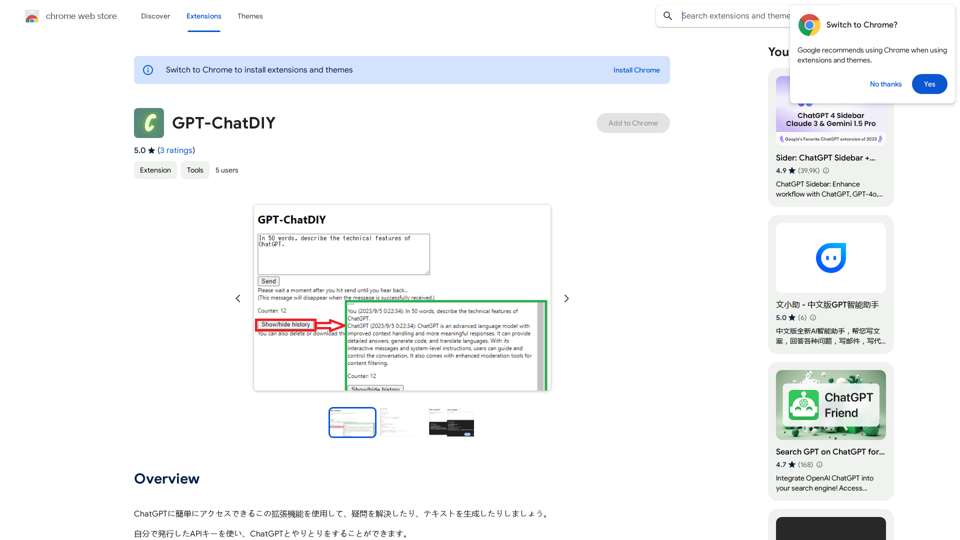
Use this extension to easily access ChatGPT and solve your questions or generate text.
Visit Website
GPT-ChatDIY
Visit Website

Introduction

GPT-Chat is an AI-powered platform offering a wide range of AI technologies for text generation, image understanding, and problem-solving. It provides easy access to ChatGPT and other AI models, catering to various needs in work, study, and daily life. With features like basic history saving, downloads, and cost calculation, GPT-Chat aims to make AI tools accessible and user-friendly.

Feature

Access to ChatGPT and Multiple AI Models

GPT-Chat provides access to ChatGPT for text generation and problem-solving, along with nearly 200,000 GPT models for diverse applications.

Free Daily Usage

Users can enjoy up to 20 free uses of GPT-Chat per day, with subscription options available for extended access.

Image Generation with Dalle3

GPT-Chat incorporates Dalle3's text-to-image generation capability, allowing users to create images seamlessly.

Basic History Saving

The platform offers a basic history saving feature to help users keep track of their conversations.

Download Functionality

Users can download their generated text or images for offline use or further editing.

Simple Cost Calculation

GPT-Chat includes a simple cost calculation feature to help users estimate the cost of AI services.

Personal Information Protection

The platform implements a personal information input suppression feature to prevent errors and protect user privacy.

Privacy-Focused

GPT-Chat prioritizes user privacy, ensuring that user data is not used for training purposes and can be deleted upon request.

FAQ

What is GPT-Chat?

GPT-Chat is an AI-driven platform providing access to various AI technologies, including ChatGPT, for text generation, image understanding, and problem-solving.

How many free uses does GPT-Chat offer daily?

Every user can utilize GPT-Chat for free up to 20 times a day.

Can I generate images using GPT-Chat?

Yes, GPT-Chat incorporates Dalle3's text-to-image generation capability, allowing users to create images.

How many GPT models are available on GPT-Chat?

GPT-Chat offers nearly 200,000 GPT models for a wide variety of applications in work, study, and everyday life.

Is my information used for training data?

No, GPT-Chat highly values user privacy, and your data will not be used for any training purposes. Users can delete their account and all associated data at any time.

Related Websites
UniGPT
UniGPT is a type of artificial intelligence (AI) model that combines the capabilities of both Unified and Generative models.
View Detail

UniGPT UniGPT is a type of artificial intelligence (AI) model that combines the capabilities of both Unified and Generative models.

UniGPT UniGPT is a type of artificial intelligence (AI) model that combines the capabilities of both Unified and Generative models.

UniGPT is a platform that unites all GPTs in one place, providing access to advanced AI technologies

0
Niro - AI Powered Email Assistant
View Detail

Niro - AI Powered Email Assistant

Niro - AI Powered Email Assistant

Niro: AI Powered Email Assistant - Write emails, messages, and more using AI (privacy-friendly). Works on all sites

193.90 M
ChatGPT for Google Search
View Detail

ChatGPT for Google Search

ChatGPT for Google Search

Show the ChatGPT response next to the search engine results.

193.90 M
Astra Vision
View Detail

Astra Vision

Astra Vision

Astra Vision is an AI-powered web extension that includes a set of powerful AI tools: Astra Guard and AI Snapper.

193.90 M
Article Summary with ChatGPT and Take Notes

This is a guide on how to use ChatGPT to summarize articles and take notes effectively. 

Step 1:  Provide ChatGPT with the Article

Copy and paste the full text of the article into the ChatGPT interface. 

Step 2:  Craft Your Prompt

Tell ChatGPT what you want it to do. Here are some examples:

* Summarize: "Please summarize this article in 200 words."
* Key Points: "What are the main points of this article?"
* Bullet Points: "Summarize the key findings of this article in bullet points."
* Notes: "Take notes on this article, focusing on the author's arguments and supporting evidence."

Step 3:  Review and Refine

ChatGPT will generate a summary, key points, bullet points, or notes based on your prompt. 

* Read carefully: Make sure the output accurately reflects the article's content.
* Edit as needed:  You can ask ChatGPT to rephrase sections or provide more detail.
* Add your own insights:  Don't just copy ChatGPT's output. Use it as a starting point and add your own thoughts, questions, and connections.

Tips for Effective Use:

* Be specific: The more specific your prompt, the better the output will be.
* Experiment with different prompts: Try various phrasing to see what works best.
* Use ChatGPT as a tool:  It's a powerful aid, but it's not a replacement for critical reading and thinking.
View Detail

Article Summary with ChatGPT and Take Notes This is a guide on how to use ChatGPT to summarize articles and take notes effectively. Step 1: Provide ChatGPT with the Article Copy and paste the full text of the article into the ChatGPT interface. Step 2: Craft Your Prompt Tell ChatGPT what you want it to do. Here are some examples: * Summarize: "Please summarize this article in 200 words." * Key Points: "What are the main points of this article?" * Bullet Points: "Summarize the key findings of this article in bullet points." * Notes: "Take notes on this article, focusing on the author's arguments and supporting evidence." Step 3: Review and Refine ChatGPT will generate a summary, key points, bullet points, or notes based on your prompt. * Read carefully: Make sure the output accurately reflects the article's content. * Edit as needed: You can ask ChatGPT to rephrase sections or provide more detail. * Add your own insights: Don't just copy ChatGPT's output. Use it as a starting point and add your own thoughts, questions, and connections. Tips for Effective Use: * Be specific: The more specific your prompt, the better the output will be. * Experiment with different prompts: Try various phrasing to see what works best. * Use ChatGPT as a tool: It's a powerful aid, but it's not a replacement for critical reading and thinking.

Article Summary with ChatGPT and Take Notes This is a guide on how to use ChatGPT to summarize articles and take notes effectively. Step 1: Provide ChatGPT with the Article Copy and paste the full text of the article into the ChatGPT interface. Step 2: Craft Your Prompt Tell ChatGPT what you want it to do. Here are some examples: * Summarize: "Please summarize this article in 200 words." * Key Points: "What are the main points of this article?" * Bullet Points: "Summarize the key findings of this article in bullet points." * Notes: "Take notes on this article, focusing on the author's arguments and supporting evidence." Step 3: Review and Refine ChatGPT will generate a summary, key points, bullet points, or notes based on your prompt. * Read carefully: Make sure the output accurately reflects the article's content. * Edit as needed: You can ask ChatGPT to rephrase sections or provide more detail. * Add your own insights: Don't just copy ChatGPT's output. Use it as a starting point and add your own thoughts, questions, and connections. Tips for Effective Use: * Be specific: The more specific your prompt, the better the output will be. * Experiment with different prompts: Try various phrasing to see what works best. * Use ChatGPT as a tool: It's a powerful aid, but it's not a replacement for critical reading and thinking.

I can do that! Please provide me with the URL of the webpage or article you'd like me to summarize. I'll do my best to create a concise and easy-to-understand summary for you.

193.90 M
A.I. Amazon Listing Optimizer
View Detail

A.I. Amazon Listing Optimizer

A.I. Amazon Listing Optimizer

Experience our AI-Powered Amazon Listing Optimizer for e-commerce success. Maximize sales potential with optimized product listings.

193.90 M
The Free Alternative to ChatGPT Powered by 4o | AIChatOnline.org
View Detail

The Free Alternative to ChatGPT Powered by 4o | AIChatOnline.org

The Free Alternative to ChatGPT Powered by 4o | AIChatOnline.org

Discover AIChatOnline.org, your ultimate platform for free online access to ChatGPT. Enjoy ChatGPT 3.5 online for free and ChatGPT 4 online for free, with no registration required. Take advantage of OpenAI's free online ChatGPT for advanced AI capabilities, including ChatGPT memory and ChatGPT API integration.

70.11 K
ChatGPT Sidebar by cloudHQ 

This is a powerful tool that brings the capabilities of ChatGPT directly into your workflow. 

Key Features:

* Seamless Integration:  Effortlessly access ChatGPT within your favorite applications like Gmail, Slack, and Notion. 
* Contextual Understanding:  ChatGPT remembers past interactions, providing relevant and coherent responses within the context of your current task.
* Boost Productivity:  Automate repetitive tasks, generate creative content, and get instant answers to your questions, all without leaving your workspace.
* Enhanced Collaboration:  Share ChatGPT-powered insights and ideas with your team, fostering more productive and efficient collaboration.

Benefits:

* Save Time and Effort:  Streamline your workflow and focus on high-value tasks.
* Unlock Creativity:  Overcome writer's block and generate innovative ideas.
* Improve Communication:  Craft clear, concise, and engaging messages.
* Make Informed Decisions:  Access reliable information and insights to support your decision-making process.


Get Started Today:

Visit our website to learn more and start using ChatGPT Sidebar by cloudHQ.
View Detail

ChatGPT Sidebar by cloudHQ This is a powerful tool that brings the capabilities of ChatGPT directly into your workflow. Key Features: * Seamless Integration: Effortlessly access ChatGPT within your favorite applications like Gmail, Slack, and Notion. * Contextual Understanding: ChatGPT remembers past interactions, providing relevant and coherent responses within the context of your current task. * Boost Productivity: Automate repetitive tasks, generate creative content, and get instant answers to your questions, all without leaving your workspace. * Enhanced Collaboration: Share ChatGPT-powered insights and ideas with your team, fostering more productive and efficient collaboration. Benefits: * Save Time and Effort: Streamline your workflow and focus on high-value tasks. * Unlock Creativity: Overcome writer's block and generate innovative ideas. * Improve Communication: Craft clear, concise, and engaging messages. * Make Informed Decisions: Access reliable information and insights to support your decision-making process. Get Started Today: Visit our website to learn more and start using ChatGPT Sidebar by cloudHQ.

ChatGPT Sidebar by cloudHQ This is a powerful tool that brings the capabilities of ChatGPT directly into your workflow. Key Features: * Seamless Integration: Effortlessly access ChatGPT within your favorite applications like Gmail, Slack, and Notion. * Contextual Understanding: ChatGPT remembers past interactions, providing relevant and coherent responses within the context of your current task. * Boost Productivity: Automate repetitive tasks, generate creative content, and get instant answers to your questions, all without leaving your workspace. * Enhanced Collaboration: Share ChatGPT-powered insights and ideas with your team, fostering more productive and efficient collaboration. Benefits: * Save Time and Effort: Streamline your workflow and focus on high-value tasks. * Unlock Creativity: Overcome writer's block and generate innovative ideas. * Improve Communication: Craft clear, concise, and engaging messages. * Make Informed Decisions: Access reliable information and insights to support your decision-making process. Get Started Today: Visit our website to learn more and start using ChatGPT Sidebar by cloudHQ.

ChatGPT sidebar as your AI assistant on any page

193.90 M