Open-source RightAI Tools Directory
  • Discover AI
  • Submit
  • Startup
  • Blog
Open-source RightAI Tools Directory
Discover the best AI tools of 2025 with the RightAI Tools Directory!

Friend Links

AI Anime GeneratorToolsApp AI

Support

Tap4
Privacy policyTerms & ConditionsContact Us
Loading...
loading...

FatfoxTab New Tab Page

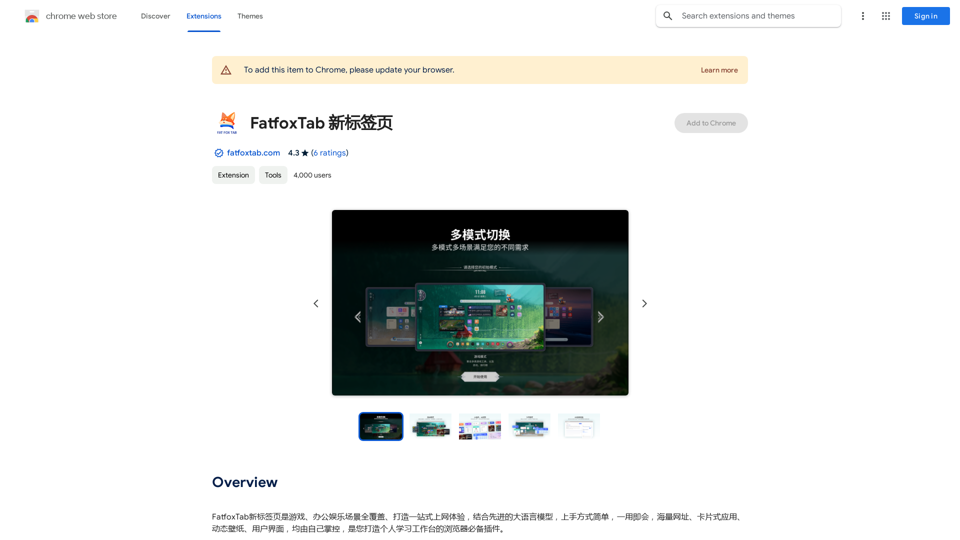
FatfoxTab, a new tab page, provides an all-around online experience covering gaming, office, and entertainment scenarios. With advanced language models, it's easy to get started and use, offering a vast array of websites, card-style apps, dynamic wallpapers, and a customizable user interface, all at your fingertips. It's a must-have browser plugin for building your personalized learning and working platform.
Visit Website
FatfoxTab New Tab Page
Visit Website

Introduction

FatfoxTab is a browser extension that enhances your new tab experience with customizable features. It offers a personalized interface with widgets, an AI assistant, and advanced search capabilities. Users can tailor their new tab page to match their preferences, improving productivity and browsing efficiency.

Feature

Customizable New Tab Page

FatfoxTab allows users to create a personalized new tab page with various widgets and layouts. Users can add their favorite websites, apps, and customize the background image and color to suit their style.

AI-Powered Assistant

The extension includes an AI-powered assistant that provides quick answers and suggestions, enhancing user productivity and information access.

Advanced Search Capabilities

FatfoxTab features a search bar with advanced search capabilities, allowing users to efficiently search the web or access their favorite websites directly from the new tab page.

Multiple Language Support

The extension supports multiple languages, making it accessible to a diverse user base across different regions.

Integration with Popular Services

FatfoxTab integrates with popular services such as bilibili and Pixiv, providing quick access to these platforms from the new tab page.

Free and Premium Options

While FatfoxTab is available for free, users have the option to upgrade to a premium version for additional features and ad removal.

FAQ

What is FatfoxTab?

FatfoxTab is a browser extension that provides a comprehensive and customizable new tab page experience, offering features like widgets, an AI assistant, and advanced search capabilities.

How do I use FatfoxTab?

To use FatfoxTab:

  1. Install the extension from the Chrome Web Store
  2. Click the FatfoxTab icon in your browser to access settings
  3. Customize your new tab page with widgets, layouts, and background preferences
  4. Use the search bar and AI assistant for enhanced browsing

Is FatfoxTab free?

Yes, FatfoxTab is free to use. However, a premium version is available for users who want additional features or ad removal.

How can I contact FatfoxTab support?

You can contact FatfoxTab support by visiting their website or sending an email to [email protected].

Related Websites
Soca
View Detail

Soca

Soca

Soca Chrome Extension

193.90 M
AI Voice Over for YouTube 

This is a guide to using AI voice over for your YouTube videos. 

Why Use AI Voice Over?

* Cost-Effective: AI voice over is much cheaper than hiring a professional voice actor.
* Time-Saving: You can generate voice over quickly and easily, without needing to schedule recording sessions.
* Variety of Voices: Choose from a wide range of AI voices, including male, female, and even robotic voices.
* Accessibility: Make your videos accessible to viewers who are deaf or hard of hearing by adding captions generated by AI.

How to Use AI Voice Over

1. Choose a Platform: There are many different platforms that offer AI voice over services, such as:
    * Google Cloud Text-to-Speech
    * Amazon Polly
    * Microsoft Azure Text to Speech
    * Murf.ai
    * NaturalReader
2. Write Your Script:  Write a clear and concise script for your video.
3. Upload Your Script:  Upload your script to the chosen platform.
4. Select a Voice: Choose the voice that best suits your video.
5. Adjust Settings:  Adjust settings such as speed, pitch, and volume.
6. Generate Voice Over:  Click the "Generate" button to create your voice over.
7. Download and Edit: Download the generated voice over file and edit it as needed.
8. Add to Your Video:  Add the voice over to your YouTube video.

Tips for Using AI Voice Over

* Use Natural Language:  Write your script as if you were speaking naturally.
* Vary Your Tone:  Use different tones of voice to keep your viewers engaged.
* Add Pauses:  Include pauses in your script to allow viewers to process information.
* Proofread Carefully:  Always proofread your script before generating the voice over.
* Experiment:  Try different voices, settings, and styles to find what works best for you.
View Detail

AI Voice Over for YouTube This is a guide to using AI voice over for your YouTube videos. Why Use AI Voice Over? * Cost-Effective: AI voice over is much cheaper than hiring a professional voice actor. * Time-Saving: You can generate voice over quickly and easily, without needing to schedule recording sessions. * Variety of Voices: Choose from a wide range of AI voices, including male, female, and even robotic voices. * Accessibility: Make your videos accessible to viewers who are deaf or hard of hearing by adding captions generated by AI. How to Use AI Voice Over 1. Choose a Platform: There are many different platforms that offer AI voice over services, such as: * Google Cloud Text-to-Speech * Amazon Polly * Microsoft Azure Text to Speech * Murf.ai * NaturalReader 2. Write Your Script: Write a clear and concise script for your video. 3. Upload Your Script: Upload your script to the chosen platform. 4. Select a Voice: Choose the voice that best suits your video. 5. Adjust Settings: Adjust settings such as speed, pitch, and volume. 6. Generate Voice Over: Click the "Generate" button to create your voice over. 7. Download and Edit: Download the generated voice over file and edit it as needed. 8. Add to Your Video: Add the voice over to your YouTube video. Tips for Using AI Voice Over * Use Natural Language: Write your script as if you were speaking naturally. * Vary Your Tone: Use different tones of voice to keep your viewers engaged. * Add Pauses: Include pauses in your script to allow viewers to process information. * Proofread Carefully: Always proofread your script before generating the voice over. * Experiment: Try different voices, settings, and styles to find what works best for you.

AI Voice Over for YouTube This is a guide to using AI voice over for your YouTube videos. Why Use AI Voice Over? * Cost-Effective: AI voice over is much cheaper than hiring a professional voice actor. * Time-Saving: You can generate voice over quickly and easily, without needing to schedule recording sessions. * Variety of Voices: Choose from a wide range of AI voices, including male, female, and even robotic voices. * Accessibility: Make your videos accessible to viewers who are deaf or hard of hearing by adding captions generated by AI. How to Use AI Voice Over 1. Choose a Platform: There are many different platforms that offer AI voice over services, such as: * Google Cloud Text-to-Speech * Amazon Polly * Microsoft Azure Text to Speech * Murf.ai * NaturalReader 2. Write Your Script: Write a clear and concise script for your video. 3. Upload Your Script: Upload your script to the chosen platform. 4. Select a Voice: Choose the voice that best suits your video. 5. Adjust Settings: Adjust settings such as speed, pitch, and volume. 6. Generate Voice Over: Click the "Generate" button to create your voice over. 7. Download and Edit: Download the generated voice over file and edit it as needed. 8. Add to Your Video: Add the voice over to your YouTube video. Tips for Using AI Voice Over * Use Natural Language: Write your script as if you were speaking naturally. * Vary Your Tone: Use different tones of voice to keep your viewers engaged. * Add Pauses: Include pauses in your script to allow viewers to process information. * Proofread Carefully: Always proofread your script before generating the voice over. * Experiment: Try different voices, settings, and styles to find what works best for you.

Watch foreign language YouTube videos in your own language.

193.90 M
Copilotly: Your Personal AI Copilot
View Detail

Copilotly: Your Personal AI Copilot

Copilotly: Your Personal AI Copilot

Unlock your mind's potential with Copilotly AI. Search better, write faster & be more productive with Copilotly by your side.

193.90 M
JourneyTracker
View Detail

JourneyTracker

JourneyTracker

Make your research easier by collecting, organizing, and summarizing information from many different sources with no hassle.

193.90 M
Japanese Name Generator
View Detail

Japanese Name Generator

Japanese Name Generator

Discover unique Japanese names with our Japanese name generator, offering AI-generated suggestions that respect traditional naming conventions and cultural diversity.

2.16 K
Difr | Career Growth for the People
View Detail

Difr | Career Growth for the People

Difr | Career Growth for the People

Easily extract job listing details for tracking in Diffr

193.90 M
PromptFolder - ChatGPT Prompt Manager
View Detail

PromptFolder - ChatGPT Prompt Manager

PromptFolder - ChatGPT Prompt Manager

Save, share, and discover prompts for ChatGPT, Midjourney, and other AI tools.

193.90 M
CaptainGPT
View Detail

CaptainGPT

CaptainGPT

Best AI Assistant for Cross-Border E-commerce Operations

193.90 M