Open-source RightAI Tools Directory
  • Discover AI
  • Submit
  • Startup
  • Blog
Open-source RightAI Tools Directory
Discover the best AI tools of 2025 with the RightAI Tools Directory!

Friend Links

AI Anime GeneratorToolsApp AI

Support

Tap4
Privacy policyTerms & ConditionsContact Us
Loading...
loading...

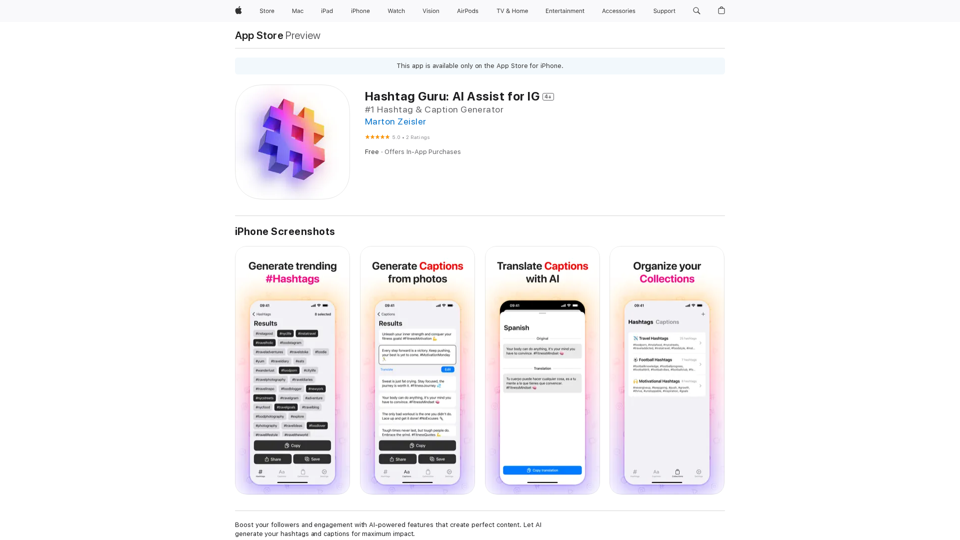
Hashtag Guru: AI Assistant for Instagram on the App Store

Your Ultimate AI-Powered Hashtag and Caption Generator! Unlock the secret to social media success with Hashtag Guru, the ultimate AI-driven hashtag generator and caption creator that helps you increase your online visibility, boost engagement, and grow your followers!
Visit Website
Hashtag Guru: AI Assistant for Instagram on the App Store
Visit Website

Introduction

Hashtag Guru is an AI-powered app designed to enhance social media content creation, particularly for Instagram. It utilizes advanced AI technology to generate tailored hashtags and captions, helping users' posts stand out in the competitive social media landscape. The app offers features like hashtag generation, caption creation, and content organization, catering to both casual users and social media professionals.

Feature

Hashtag Generator

  • Generate platform-specific hashtags (Instagram, TikTok, etc.)
  • Image-based hashtag generation
  • Personalized hashtags from profile descriptions
  • Caption-to-hashtag conversion
  • Hashtag expansion and direct sharing
  • Favorite hashtags collection

Caption Generator

  • Platform-tailored engaging captions
  • Image-based caption creation
  • Profile-based automatic caption generation
  • Hashtag-to-caption conversion
  • Customizable caption parameters (length, hashtags, emojis)
  • Direct sharing and favorite collections

Collections Feature

  • Save and organize favorite hashtags and captions
  • Auto-generate content based on collections
  • One-tap sharing from collections

User-Friendly Process

  1. App installation
  2. Image upload or capture
  3. Hashtag generation
  4. Caption creation
  5. Content customization
  6. Social media sharing and engagement tracking

Pricing Options

PlanPrice
Free Version$0 (Limited features)
Hashtag Guru Pro$9.99
Hashtag Guru Pro$49.99

FAQ

What is Hashtag Guru?

Hashtag Guru is an AI-powered app that helps users generate optimized content for social media platforms, particularly Instagram, by creating tailored hashtags and captions.

How does the app work?

The app employs advanced AI technology to analyze user content and generate relevant hashtags and engaging captions, ensuring posts stand out on social media platforms.

What are the key features of Hashtag Guru?

The app's primary features include a hashtag generator, caption generator, and a collections feature for organizing and saving favorite content.

Is Hashtag Guru free to use?

Hashtag Guru offers a free version with limited features, as well as two paid Pro options priced at $9.99 and $49.99.

How can I effectively use Hashtag Guru?

To maximize the app's benefits, users should regularly utilize its features, experiment with different hashtags and captions, keep content fresh, and use the collections feature for efficient organization.

Related Websites
The Iliad
View Detail

The Iliad

The Iliad

Iliad makes learning and remembering information intuitive. Transform Pages into a Personal Library of Knowledge: Discover the...

193.90 M
The Free Alternative to ChatGPT Powered by 4o | AIChatOnline.org
View Detail

The Free Alternative to ChatGPT Powered by 4o | AIChatOnline.org

The Free Alternative to ChatGPT Powered by 4o | AIChatOnline.org

Discover AIChatOnline.org, your ultimate platform for free online access to ChatGPT. Enjoy ChatGPT 3.5 online for free and ChatGPT 4 online for free, with no registration required. Take advantage of OpenAI's free online ChatGPT for advanced AI capabilities, including ChatGPT memory and ChatGPT API integration.

70.11 K
Versabot.Co
View Detail

Versabot.Co

Versabot.Co

Automate outreach, content, customer service, and more with AI!

1.52 K
AI Voice Over for YouTube 

This is a guide to using AI voice over for your YouTube videos. 

Why Use AI Voice Over?

* Cost-Effective: AI voice over is much cheaper than hiring a professional voice actor.
* Time-Saving: You can generate voice over quickly and easily, without needing to schedule recording sessions.
* Variety of Voices: Choose from a wide range of AI voices, including male, female, and even robotic voices.
* Accessibility: Make your videos accessible to viewers who are deaf or hard of hearing by adding captions generated by AI.

How to Use AI Voice Over

1. Choose a Platform: There are many different platforms that offer AI voice over services, such as:
    * Google Cloud Text-to-Speech
    * Amazon Polly
    * Microsoft Azure Text to Speech
    * Murf.ai
    * NaturalReader
2. Write Your Script:  Write a clear and concise script for your video.
3. Upload Your Script:  Upload your script to the chosen platform.
4. Select a Voice: Choose the voice that best suits your video.
5. Adjust Settings:  Adjust settings such as speed, pitch, and volume.
6. Generate Voice Over:  Click the "Generate" button to create your voice over.
7. Download and Edit: Download the generated voice over file and edit it as needed.
8. Add to Your Video:  Add the voice over to your YouTube video.

Tips for Using AI Voice Over

* Use Natural Language:  Write your script as if you were speaking naturally.
* Vary Your Tone:  Use different tones of voice to keep your viewers engaged.
* Add Pauses:  Include pauses in your script to allow viewers to process information.
* Proofread Carefully:  Always proofread your script before generating the voice over.
* Experiment:  Try different voices, settings, and styles to find what works best for you.
View Detail

AI Voice Over for YouTube This is a guide to using AI voice over for your YouTube videos. Why Use AI Voice Over? * Cost-Effective: AI voice over is much cheaper than hiring a professional voice actor. * Time-Saving: You can generate voice over quickly and easily, without needing to schedule recording sessions. * Variety of Voices: Choose from a wide range of AI voices, including male, female, and even robotic voices. * Accessibility: Make your videos accessible to viewers who are deaf or hard of hearing by adding captions generated by AI. How to Use AI Voice Over 1. Choose a Platform: There are many different platforms that offer AI voice over services, such as: * Google Cloud Text-to-Speech * Amazon Polly * Microsoft Azure Text to Speech * Murf.ai * NaturalReader 2. Write Your Script: Write a clear and concise script for your video. 3. Upload Your Script: Upload your script to the chosen platform. 4. Select a Voice: Choose the voice that best suits your video. 5. Adjust Settings: Adjust settings such as speed, pitch, and volume. 6. Generate Voice Over: Click the "Generate" button to create your voice over. 7. Download and Edit: Download the generated voice over file and edit it as needed. 8. Add to Your Video: Add the voice over to your YouTube video. Tips for Using AI Voice Over * Use Natural Language: Write your script as if you were speaking naturally. * Vary Your Tone: Use different tones of voice to keep your viewers engaged. * Add Pauses: Include pauses in your script to allow viewers to process information. * Proofread Carefully: Always proofread your script before generating the voice over. * Experiment: Try different voices, settings, and styles to find what works best for you.

AI Voice Over for YouTube This is a guide to using AI voice over for your YouTube videos. Why Use AI Voice Over? * Cost-Effective: AI voice over is much cheaper than hiring a professional voice actor. * Time-Saving: You can generate voice over quickly and easily, without needing to schedule recording sessions. * Variety of Voices: Choose from a wide range of AI voices, including male, female, and even robotic voices. * Accessibility: Make your videos accessible to viewers who are deaf or hard of hearing by adding captions generated by AI. How to Use AI Voice Over 1. Choose a Platform: There are many different platforms that offer AI voice over services, such as: * Google Cloud Text-to-Speech * Amazon Polly * Microsoft Azure Text to Speech * Murf.ai * NaturalReader 2. Write Your Script: Write a clear and concise script for your video. 3. Upload Your Script: Upload your script to the chosen platform. 4. Select a Voice: Choose the voice that best suits your video. 5. Adjust Settings: Adjust settings such as speed, pitch, and volume. 6. Generate Voice Over: Click the "Generate" button to create your voice over. 7. Download and Edit: Download the generated voice over file and edit it as needed. 8. Add to Your Video: Add the voice over to your YouTube video. Tips for Using AI Voice Over * Use Natural Language: Write your script as if you were speaking naturally. * Vary Your Tone: Use different tones of voice to keep your viewers engaged. * Add Pauses: Include pauses in your script to allow viewers to process information. * Proofread Carefully: Always proofread your script before generating the voice over. * Experiment: Try different voices, settings, and styles to find what works best for you.

Watch foreign language YouTube videos in your own language.

193.90 M
Hello Seller
View Detail

Hello Seller

Hello Seller

Earn more with OpenInfoSeller. Find SPP for your products and maximize your profits with the OiSeller extension...

193.90 M
Print Perfect AI Text Editor
View Detail

Print Perfect AI Text Editor

Print Perfect AI Text Editor

Print Perfect helps you correct and edit your text to make it sound like it was written by a native English speaker.

193.90 M
The all-in-one Audio AI platform. The ultimate solution for Audio Transcription, Speech-To-Text, Audio Pen, Text-To-Speech, Video Dubbing, Live Stream Captioning.
View Detail

The all-in-one Audio AI platform. The ultimate solution for Audio Transcription, Speech-To-Text, Audio Pen, Text-To-Speech, Video Dubbing, Live Stream Captioning.

The all-in-one Audio AI platform. The ultimate solution for Audio Transcription, Speech-To-Text, Audio Pen, Text-To-Speech, Video Dubbing, Live Stream Captioning.

The all-in-one Audio AI platform. The ultimate solution for Audio Transcription, Speech-To-Text, Audio Pen, Text-To-Speech, Video Dubbing, Live Stream Caption

0
Free AI Tag Generator for YouTube - TubeAide
View Detail

Free AI Tag Generator for YouTube - TubeAide

Free AI Tag Generator for YouTube - TubeAide

Improve the free AI Tags Generator for YouTube tool by adding features to generate titles, tags, hooks, and outlines for optimized video content.

193.90 M