Open-source RightAI Tools Directory
  • Discover AI
  • Submit
  • Startup
  • Blog
Open-source RightAI Tools Directory
Discover the best AI tools of 2025 with the RightAI Tools Directory!

Friend Links

AI Anime GeneratorToolsApp AI

Support

Tap4
Privacy policyTerms & ConditionsContact Us
Loading...
loading...

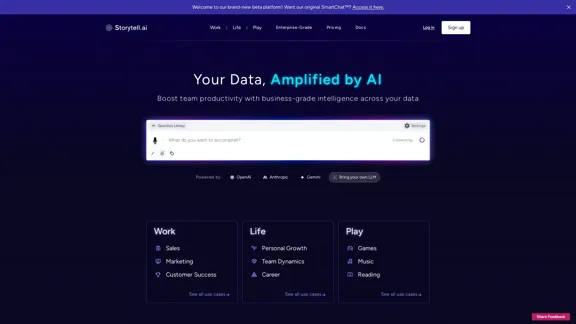
Storytell.ai SmartChat™

Enhance team efficiency with enterprise-level intelligence throughout your data. Empower employees to generate superior ideas and achieve quicker outcomes using top-tier AI models. Implement data security measures and LLM routing for businesses to maintain control.
Visit Website
Storytell.ai SmartChat™
Visit Website

Introduction

Storytell.ai is an advanced AI-powered platform designed to enhance team productivity and deliver business-grade intelligence across various data sources. It offers a wide range of features and applications for different industries and personal development, utilizing cutting-edge AI technologies to provide customizable and intelligent solutions.

Feature

SmartChat™ Technology

  • Brand-new beta platform available
  • Access to original SmartChat™ functionality
  • Leverages advanced AI models from OpenAI, Anthropic, and Gemini
  • Option to integrate custom Large Language Models (LLMs)

Customizable Intelligence

  • Personalized question library for quick access to relevant queries
  • Adjustable settings panel for tailored user experience
  • Adaptable to various work, life, and leisure scenarios

Versatile Use Cases

Professional Applications

  • Sales optimization
  • Marketing strategy enhancement
  • Customer success improvement

Personal Development

  • Individual growth tracking
  • Team dynamics analysis
  • Career advancement tools

Entertainment and Leisure

  • AI-enhanced gaming experiences
  • Music analysis and recommendations
  • Reading comprehension and literary exploration

Comprehensive Resources

  • Informative blog posts
  • Pro-level AI prompts
  • Webinars and workshops for skill development
  • Detailed documentation and privacy policy
  • Real-time system status updates

Enterprise Solutions

  • Scalable options for businesses of all sizes
  • Pricing information available on the website
  • Secure login and sign-up processes

FAQ

What is Storytell.ai?

Storytell.ai is a sophisticated AI platform that enhances team productivity and provides business-grade intelligence across various data sources. It offers features like SmartChat™, customizable settings, and applications for work, personal life, and entertainment.

How does Storytell.ai leverage AI technology?

Storytell.ai utilizes AI models from leading providers such as OpenAI, Anthropic, and Gemini. It also offers the flexibility to integrate custom Large Language Models (LLMs), allowing for tailored AI solutions to meet specific needs.

Can Storytell.ai be customized for different industries?

Yes, Storytell.ai is highly customizable. It offers a personalized question library and adjustable settings, making it adaptable to various industries including sales, marketing, customer success, and personal development.

Is Storytell.ai suitable for personal use as well as business applications?

Absolutely. While Storytell.ai offers robust business solutions, it also caters to personal growth, team dynamics, career development, and even leisure activities like gaming, music, and reading.

How can I get started with Storytell.ai?

To begin using Storytell.ai, you can visit their website to explore pricing options and sign up for an account. They also offer enterprise-grade solutions for larger organizations.

Latest Traffic Insights

  • Monthly Visits

    55.32 K

  • Bounce Rate

    43.97%

  • Pages Per Visit

    2.05

  • Time on Site(s)

    76.37

  • Global Rank

    583201

  • Country Rank

    Korea, Republic of 61050

Recent Visits

Traffic Sources

  • Social Media:
    3.78%
  • Paid Referrals:
    0.92%
  • Email:
    0.16%
  • Referrals:
    8.95%
  • Search Engines:
    40.92%
  • Direct:
    45.08%
More Data

Related Websites

HeroUI Chat
View Detail

HeroUI Chat

HeroUI Chat

Generate beautiful apps regardless of your design experience; AI turns your ideas into reality.

58.75 K
letterpal | Write Digest Newsletters, Fast.
View Detail

letterpal | Write Digest Newsletters, Fast.

letterpal | Write Digest Newsletters, Fast.

The first AI-powered assistant that helps you put your industry-focused newsletter on auto-pilot.

9.95 K
Accounting AI software for faster invoice processing
View Detail

Accounting AI software for faster invoice processing

Accounting AI software for faster invoice processing

Transform invoice processing and enhance PO matching with Vic.ai's autonomous accounting solutions. Our platform offers robust AI capabilities, ensuring accuracy and speed in your financial operations and elevating your accounts payable process.

79.80 K
Copilot for Microsoft 365 – Microsoft Adoption

Copilot for Microsoft 365 is a powerful AI assistant that helps you work smarter and faster across Microsoft 365 apps and services. It combines the power of large language models (LLMs) with your organization's data in the Microsoft Graph and Microsoft 365 apps to turn your words into the most powerful productivity tool on the planet.

Copilot is designed to help you:

• Unleash creativity
• Unlock productivity
• Uplevel skills

Copilot is built on Microsoft's comprehensive approach to security, compliance, and privacy. Copilot in Microsoft 365 apps and services:

• Does not use your data to train the underlying LLM
• Does not replace human ingenuity and judgment
• Is designed to keep humans in the loop

Copilot is currently available in Word, Excel, PowerPoint, Outlook, Teams, and more.

Getting Started with Copilot

To get started with Copilot, follow these steps:

1. Check availability: Ensure your organization has access to Copilot.
2. Learn the basics: Familiarize yourself with Copilot's capabilities and how to use it effectively.
3. Explore use cases: Discover how Copilot can help you in your specific role and tasks.
4. Practice and refine: Use Copilot regularly and refine your prompts for better results.
5. Share and collaborate: Collaborate with colleagues using Copilot and share best practices.

Best Practices for Using Copilot

1. Be specific in your prompts
2. Provide context for better results
3. Review and edit Copilot's output
4. Use Copilot as a starting point, not a final product
5. Experiment with different approaches
6. Stay informed about new features and updates

Copilot in Different Microsoft 365 Apps

• Word: Draft, edit, summarize, and rewrite content
• Excel: Analyze data, create formulas, and generate insights
• PowerPoint: Create presentations, design slides, and generate content
• Outlook: Compose emails, summarize threads, and manage your inbox
• Teams: Summarize meetings, generate action items, and create meeting notes

Responsible AI and Copilot

Microsoft is committed to developing AI systems responsibly. When using Copilot, keep in mind:

• AI-generated content may contain biases or inaccuracies
• Always review and verify Copilot's output
• Use your judgment and expertise alongside Copilot's suggestions
• Be aware of your organization's policies regarding AI use

Conclusion

Copilot for Microsoft 365 is a powerful tool that can significantly enhance your productivity and creativity. By understanding its capabilities, following best practices, and using it responsibly, you can make the most of this AI assistant in your daily work.
View Detail

Copilot for Microsoft 365 – Microsoft Adoption Copilot for Microsoft 365 is a powerful AI assistant that helps you work smarter and faster across Microsoft 365 apps and services. It combines the power of large language models (LLMs) with your organization's data in the Microsoft Graph and Microsoft 365 apps to turn your words into the most powerful productivity tool on the planet. Copilot is designed to help you: • Unleash creativity • Unlock productivity • Uplevel skills Copilot is built on Microsoft's comprehensive approach to security, compliance, and privacy. Copilot in Microsoft 365 apps and services: • Does not use your data to train the underlying LLM • Does not replace human ingenuity and judgment • Is designed to keep humans in the loop Copilot is currently available in Word, Excel, PowerPoint, Outlook, Teams, and more. Getting Started with Copilot To get started with Copilot, follow these steps: 1. Check availability: Ensure your organization has access to Copilot. 2. Learn the basics: Familiarize yourself with Copilot's capabilities and how to use it effectively. 3. Explore use cases: Discover how Copilot can help you in your specific role and tasks. 4. Practice and refine: Use Copilot regularly and refine your prompts for better results. 5. Share and collaborate: Collaborate with colleagues using Copilot and share best practices. Best Practices for Using Copilot 1. Be specific in your prompts 2. Provide context for better results 3. Review and edit Copilot's output 4. Use Copilot as a starting point, not a final product 5. Experiment with different approaches 6. Stay informed about new features and updates Copilot in Different Microsoft 365 Apps • Word: Draft, edit, summarize, and rewrite content • Excel: Analyze data, create formulas, and generate insights • PowerPoint: Create presentations, design slides, and generate content • Outlook: Compose emails, summarize threads, and manage your inbox • Teams: Summarize meetings, generate action items, and create meeting notes Responsible AI and Copilot Microsoft is committed to developing AI systems responsibly. When using Copilot, keep in mind: • AI-generated content may contain biases or inaccuracies • Always review and verify Copilot's output • Use your judgment and expertise alongside Copilot's suggestions • Be aware of your organization's policies regarding AI use Conclusion Copilot for Microsoft 365 is a powerful tool that can significantly enhance your productivity and creativity. By understanding its capabilities, following best practices, and using it responsibly, you can make the most of this AI assistant in your daily work.

Copilot for Microsoft 365 – Microsoft Adoption Copilot for Microsoft 365 is a powerful AI assistant that helps you work smarter and faster across Microsoft 365 apps and services. It combines the power of large language models (LLMs) with your organization's data in the Microsoft Graph and Microsoft 365 apps to turn your words into the most powerful productivity tool on the planet. Copilot is designed to help you: • Unleash creativity • Unlock productivity • Uplevel skills Copilot is built on Microsoft's comprehensive approach to security, compliance, and privacy. Copilot in Microsoft 365 apps and services: • Does not use your data to train the underlying LLM • Does not replace human ingenuity and judgment • Is designed to keep humans in the loop Copilot is currently available in Word, Excel, PowerPoint, Outlook, Teams, and more. Getting Started with Copilot To get started with Copilot, follow these steps: 1. Check availability: Ensure your organization has access to Copilot. 2. Learn the basics: Familiarize yourself with Copilot's capabilities and how to use it effectively. 3. Explore use cases: Discover how Copilot can help you in your specific role and tasks. 4. Practice and refine: Use Copilot regularly and refine your prompts for better results. 5. Share and collaborate: Collaborate with colleagues using Copilot and share best practices. Best Practices for Using Copilot 1. Be specific in your prompts 2. Provide context for better results 3. Review and edit Copilot's output 4. Use Copilot as a starting point, not a final product 5. Experiment with different approaches 6. Stay informed about new features and updates Copilot in Different Microsoft 365 Apps • Word: Draft, edit, summarize, and rewrite content • Excel: Analyze data, create formulas, and generate insights • PowerPoint: Create presentations, design slides, and generate content • Outlook: Compose emails, summarize threads, and manage your inbox • Teams: Summarize meetings, generate action items, and create meeting notes Responsible AI and Copilot Microsoft is committed to developing AI systems responsibly. When using Copilot, keep in mind: • AI-generated content may contain biases or inaccuracies • Always review and verify Copilot's output • Use your judgment and expertise alongside Copilot's suggestions • Be aware of your organization's policies regarding AI use Conclusion Copilot for Microsoft 365 is a powerful tool that can significantly enhance your productivity and creativity. By understanding its capabilities, following best practices, and using it responsibly, you can make the most of this AI assistant in your daily work.

Microsoft Copilot combines the power of large language models (LLMs) with your organization's data to turn your words into one of the most powerful productivity tools on the planet.

608.60 K
BeforeSunset AI - Home
View Detail

BeforeSunset AI - Home

BeforeSunset AI - Home

Focus on completing your tasks while BeforeSunset AI plans the ideal schedule for you. Daily planning has never been simpler.

76.01 K
Abyss Hub
View Detail

Abyss Hub

Abyss Hub

Generated by Abyss Team.

0
Pineapple Builder - AI Website Builder for Businesses
View Detail

Pineapple Builder - AI Website Builder for Businesses

Pineapple Builder - AI Website Builder for Businesses

Don't have the time or resources to build a website? With AI-driven tools, you can create a stunning website for your business with just one click! Our AI-Powered solutions include blog platforms, newsletter forms, payment processing and more - everything you need to take your business from idea to reality.

47.27 K
VibeTrack - Scheduling for Podcasters
View Detail

VibeTrack - Scheduling for Podcasters

VibeTrack - Scheduling for Podcasters

VibeTrack is a scheduling tool designed for location-flexible professionals and hobbyists who prefer in-person meetings.

0