Open-source RightAI Tools Directory
  • Discover AI
  • Submit
  • Startup
  • Blog
Open-source RightAI Tools Directory
Discover the best AI tools of 2025 with the RightAI Tools Directory!

Friend Links

AI Anime GeneratorToolsApp AI

Support

Tap4
Privacy policyTerms & ConditionsContact Us
Loading...
loading...

Xiaoqiu Search - Tab Page

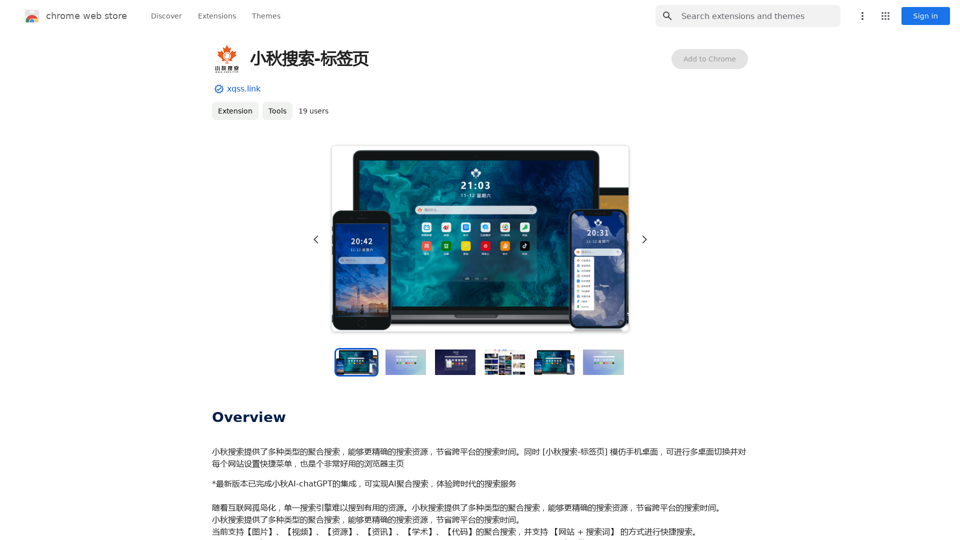
Xiaoqiu Search provides multiple types of aggregated searches, enabling more precise resource searching and saving cross-platform search time. Simultaneously, the [Xiaoqiu Search - Tab Page] mimics a mobile desktop, allowing for multi-desktop switching and setting quick menus for each website, making it a very useful browser homepage as well.
Visit Website
Xiaoqiu Search - Tab Page
Visit Website

Introduction

Xiaoqiu Search is a versatile search engine offering aggregated searches across various content types. It combines traditional search capabilities with AI-powered features, providing users with an efficient and comprehensive search experience. The platform is designed to help users find resources more accurately and save time by integrating multiple search types and advanced functionalities.

Feature

Aggregated Search Capabilities

Xiaoqiu Search offers a wide range of aggregated searches, including:

  • Images
  • Videos
  • Resources
  • News
  • Academic papers
  • Code

This feature allows users to access diverse content types from a single search interface.

Advanced Search Options

The search engine supports:

  • Keyword searches
  • Operator-based searches Enabling users to refine their queries for more precise results.

Customizable Shortcuts

Users can set shortcuts for their favorite websites, enhancing navigation efficiency and personalizing their search experience.

AI-powered Search

Integration with AI-chatGPT provides:

  • Advanced search capabilities
  • Intelligent result interpretation
  • Enhanced user assistance

User-Friendly Interface

The platform features an intuitive search bar for easy access to its powerful search capabilities.

Free Access

Xiaoqiu Search is available to users at no cost, providing unrestricted access to its features and functionalities.

FAQ

What types of content can I search for using Xiaoqiu Search?

Xiaoqiu Search allows you to search for various content types, including images, videos, resources, news, academic papers, and code through its aggregated search feature.

How does the AI integration enhance the search experience?

The integration with AI-chatGPT provides advanced search capabilities, offering more intelligent and context-aware results. It can help interpret complex queries and provide more relevant search outcomes.

Are there any tips for using Xiaoqiu Search effectively?

Here are some helpful tips:

  • Utilize the search bar for quick queries
  • Take advantage of the aggregated search for multi-resource results
  • Leverage the AI-chatGPT integration for advanced searches
  • Set up shortcuts to quickly access your frequently visited websites

Is there a cost associated with using Xiaoqiu Search?

No, Xiaoqiu Search is a completely free search engine. Users can access all its features and functionalities without any fees or charges.

Latest Traffic Insights

  • Monthly Visits

    193.90 M

  • Bounce Rate

    56.27%

  • Pages Per Visit

    2.71

  • Time on Site(s)

    115.91

  • Global Rank

    -

  • Country Rank

    -

Recent Visits

Traffic Sources

  • Social Media:
    0.48%
  • Paid Referrals:
    0.55%
  • Email:
    0.15%
  • Referrals:
    12.81%
  • Search Engines:
    16.21%
  • Direct:
    69.81%
More Data

Related Websites

Shinkai Visor: Supercharged AI for Tasks
View Detail

Shinkai Visor: Supercharged AI for Tasks

Shinkai Visor: Supercharged AI for Tasks

Shinkai enhances AI capabilities to better manage your daily tasks and keeps the AI current with worldwide information.

193.90 M
PodKit: Listen to Web Pages
View Detail

PodKit: Listen to Web Pages

PodKit: Listen to Web Pages

Turn webpages into engaging audio conversations.

193.90 M
Justdone: AI Writing & Copywriting Assistant
View Detail

Justdone: AI Writing & Copywriting Assistant

Justdone: AI Writing & Copywriting Assistant

Justdone AI Chrome Extension

193.90 M
WhatToTextAi
===============

WhatToTextAi is an AI-powered texting assistant that helps you come up with the perfect response to any situation.
View Detail

WhatToTextAi =============== WhatToTextAi is an AI-powered texting assistant that helps you come up with the perfect response to any situation.

WhatToTextAi =============== WhatToTextAi is an AI-powered texting assistant that helps you come up with the perfect response to any situation.

Overcome texting anxiety with WhatToText AI. Get personalized, human-like replies for any situation in seconds. Improve your English texting skills and build deeper connections. Perfect for non-native speakers and anyone looking to enhance their messaging game.

0
Horus
View Detail

Horus

Horus

Horus is your AI assistant for creating summaries, insights, and expanding knowledge.

193.90 M
Coursera Summary with ChatGPT and Take Notes
=====================================================

What is Coursera?

Coursera is an online learning platform that partners with top universities and organizations to offer courses and degree programs in a wide range of fields.

What is ChatGPT?

ChatGPT is a conversational AI tool that can understand and respond to human input in a human-like way. It can be used to generate text, answer questions, and even create content.

How to Use ChatGPT for Coursera Summary?

You can use ChatGPT to summarize Coursera courses by:

* Providing the course material or lecture notes to ChatGPT
* Asking ChatGPT to summarize the key points or main ideas
* Reviewing and editing the summary generated by ChatGPT

Benefits of Using ChatGPT for Coursera Summary

Using ChatGPT for Coursera summary can help you:

* Save time by automating the summarization process
* Improve understanding and retention of course material
* Focus on key concepts and ideas
* Enhance learning experience

How to Take Notes with ChatGPT?

You can use ChatGPT to take notes by:

* Providing the course material or lecture notes to ChatGPT
* Asking ChatGPT to generate notes or key points
* Reviewing and editing the notes generated by ChatGPT
* Organizing and structuring the notes for easy reference

Benefits of Using ChatGPT for Taking Notes

Using ChatGPT for taking notes can help you:

* Save time by automating the note-taking process
* Improve organization and structure of notes
* Enhance understanding and retention of course material
* Focus on key concepts and ideas
View Detail

Coursera Summary with ChatGPT and Take Notes ===================================================== What is Coursera? Coursera is an online learning platform that partners with top universities and organizations to offer courses and degree programs in a wide range of fields. What is ChatGPT? ChatGPT is a conversational AI tool that can understand and respond to human input in a human-like way. It can be used to generate text, answer questions, and even create content. How to Use ChatGPT for Coursera Summary? You can use ChatGPT to summarize Coursera courses by: * Providing the course material or lecture notes to ChatGPT * Asking ChatGPT to summarize the key points or main ideas * Reviewing and editing the summary generated by ChatGPT Benefits of Using ChatGPT for Coursera Summary Using ChatGPT for Coursera summary can help you: * Save time by automating the summarization process * Improve understanding and retention of course material * Focus on key concepts and ideas * Enhance learning experience How to Take Notes with ChatGPT? You can use ChatGPT to take notes by: * Providing the course material or lecture notes to ChatGPT * Asking ChatGPT to generate notes or key points * Reviewing and editing the notes generated by ChatGPT * Organizing and structuring the notes for easy reference Benefits of Using ChatGPT for Taking Notes Using ChatGPT for taking notes can help you: * Save time by automating the note-taking process * Improve organization and structure of notes * Enhance understanding and retention of course material * Focus on key concepts and ideas

Coursera Summary with ChatGPT and Take Notes ===================================================== What is Coursera? Coursera is an online learning platform that partners with top universities and organizations to offer courses and degree programs in a wide range of fields. What is ChatGPT? ChatGPT is a conversational AI tool that can understand and respond to human input in a human-like way. It can be used to generate text, answer questions, and even create content. How to Use ChatGPT for Coursera Summary? You can use ChatGPT to summarize Coursera courses by: * Providing the course material or lecture notes to ChatGPT * Asking ChatGPT to summarize the key points or main ideas * Reviewing and editing the summary generated by ChatGPT Benefits of Using ChatGPT for Coursera Summary Using ChatGPT for Coursera summary can help you: * Save time by automating the summarization process * Improve understanding and retention of course material * Focus on key concepts and ideas * Enhance learning experience How to Take Notes with ChatGPT? You can use ChatGPT to take notes by: * Providing the course material or lecture notes to ChatGPT * Asking ChatGPT to generate notes or key points * Reviewing and editing the notes generated by ChatGPT * Organizing and structuring the notes for easy reference Benefits of Using ChatGPT for Taking Notes Using ChatGPT for taking notes can help you: * Save time by automating the note-taking process * Improve organization and structure of notes * Enhance understanding and retention of course material * Focus on key concepts and ideas

Automate Your Learning: Coursera Videos Transcript and Summary with ChatGPT ============================================================ Are you tired of manually taking notes while watching Coursera videos? Do you wish you had a summary of the video to review later? Look no further! With the power of ChatGPT, you can now generate transcripts and summaries of Coursera videos with ease. How it Works --------------- 1. Transcribe the Video: Use a transcription tool to convert the audio from the Coursera video into text. 2. Feed it to ChatGPT: Input the transcript into ChatGPT, and it will generate a concise summary of the video. 3. Review and Refine: Review the summary, refine it as needed, and you're good to go! Benefits ------------ * Save Time: No more manual note-taking or re-watching videos to understand the content. * Improve Retention: A summary of the video helps you retain information better and review it quickly. * Enhance Learning: Focus on understanding the concepts rather than taking notes. Get Started -------------- Try it out today and take your learning to the next level!

193.90 M
MagicTranslate - AI-Powered Translation - MagicTranslate
View Detail

MagicTranslate - AI-Powered Translation - MagicTranslate

MagicTranslate - AI-Powered Translation - MagicTranslate

Experience seamless, intelligent translation powered by cutting-edge AI technology with MagicTranslate.

0
Find Inspiration for Your Next Design
View Detail

Find Inspiration for Your Next Design

Find Inspiration for Your Next Design

Get the latest and creative design inspiration and ideas from PromptDoDo.

0