Open-source RightAI Tools Directory
  • Discover AI
  • Submit
  • Startup
  • Blog
Open-source RightAI Tools Directory
Discover the best AI tools of 2025 with the RightAI Tools Directory!

Friend Links

AI Anime GeneratorToolsApp AI

Support

Tap4
Privacy policyTerms & ConditionsContact Us
Loading...
loading...

scale.jobs - AI Copilot

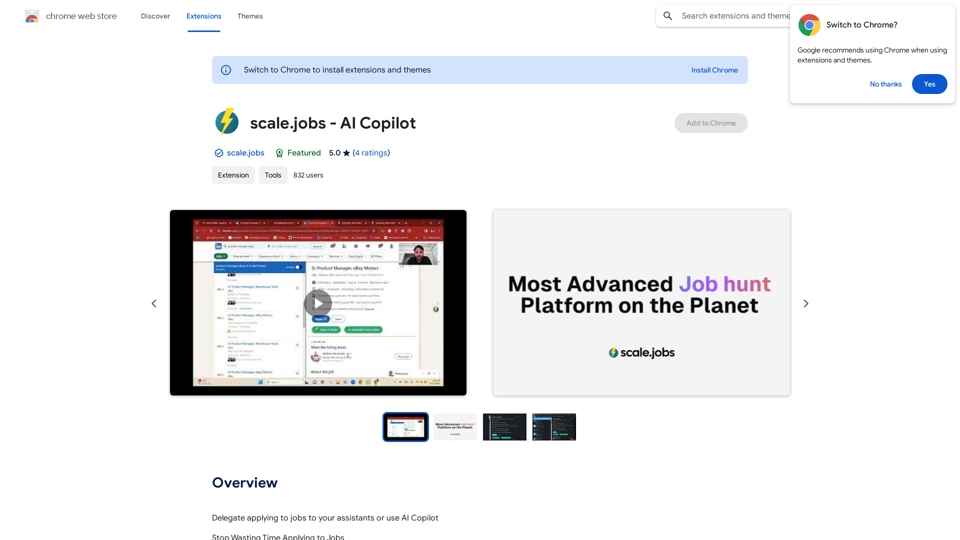
Delegate applying to jobs to your assistants or use AI Copilot Applying to jobs can be a tedious and time-consuming task. Delegate this task to your assistants and let them handle the initial application process, including resume submission and cover letter writing. Alternatively, utilize AI Copilot, an innovative tool that can automate the job application process, saving you time and energy. By delegating or automating this task, you can focus on more important things, such as preparing for interviews, networking, and building meaningful connections in your industry. This approach can also increase your chances of getting hired, as your assistants or AI Copilot can help you apply to more job openings, thereby increasing your visibility and reach. Remember, time is valuable, and by delegating or automating the job application process, you can make the most of your time and achieve your career goals more efficiently.
Visit Website
scale.jobs - AI Copilot
Visit Website

Introduction

scale.jobs - AI Copilot is a Chrome extension designed to revolutionize the job application process. It leverages AI technology to assist job seekers in streamlining their applications, generating cover letters, and even delegating tasks to AI-powered assistants. This tool aims to save time, increase productivity, and improve job prospects for users by automating various aspects of the job search and application process.

Feature

AI-Powered Job Application

  • One-click cover letter generation
  • Automated responses to job application questions
  • Instant cold emails/inmails to recruiters and hiring managers

Job Delegation

  • Assign job applications to AI-powered assistants
  • Free up time for other important tasks

AI-Powered Job Search

  • Find relevant job openings easily
  • Apply to jobs with minimal effort

Easy Installation and Usage

  1. Install the Chrome extension
  2. Navigate to LinkedIn
  3. Utilize new buttons for each job listing
  4. Access additional AI features on the scale.jobs website

Cost-Effective Solution

  • Free to use with basic features
  • Optional paid upgrades for advanced functionalities

FAQ

How does scale.jobs - AI Copilot work?

The extension utilizes AI technology to generate cover letters, respond to application questions, and create cold emails/inmails to recruiters and hiring managers. It also offers job delegation features and an AI-powered job search function.

What are the main benefits of using scale.jobs - AI Copilot?

  • Time-saving through task delegation
  • Increased job prospects by applying to more openings
  • Improved job search experience with AI-powered features

Is there a cost associated with using scale.jobs - AI Copilot?

The basic version of the extension is free to use. There are optional paid upgrades available for users who want access to additional features.

Related Websites
Bilibili Subtitle List
View Detail

Bilibili Subtitle List

Bilibili Subtitle List

Display a list of Bilibili video subtitles, allowing you to click to jump and download subtitles, and supporting translation and summary of subtitles!

193.90 M
AI Presentation Generator | GenPPT.com
View Detail

AI Presentation Generator | GenPPT.com

AI Presentation Generator | GenPPT.com

Generate beautiful presentations in minutes with GenPPT. Choose from a variety of themes and let GenPPT's PowerPoint presentation AI do the rest.

41.71 K
Sentence Rewriter
View Detail

Sentence Rewriter

Sentence Rewriter

AI sentence and paragraph rewriter. Supports 50+ languages including English, Spanish, French, German, Hindi, Chinese, and more.

193.90 M
The Free Alternative to ChatGPT Powered by 4o | AIChatOnline.org
View Detail

The Free Alternative to ChatGPT Powered by 4o | AIChatOnline.org

The Free Alternative to ChatGPT Powered by 4o | AIChatOnline.org

Discover AIChatOnline.org, your ultimate platform for free online access to ChatGPT. Enjoy ChatGPT 3.5 online for free and ChatGPT 4 online for free, with no registration required. Take advantage of OpenAI's free online ChatGPT for advanced AI capabilities, including ChatGPT memory and ChatGPT API integration.

70.11 K
Know all, speak all.
View Detail

Know all, speak all.

Know all, speak all.

Seller Smart AI Assistant - The Scientific World for Cross-Border E-commerce People!

193.90 M
ChatSearch: ChatGPT for Search Engine (GPT-4)
View Detail

ChatSearch: ChatGPT for Search Engine (GPT-4)

ChatSearch: ChatGPT for Search Engine (GPT-4)

ChatSearch is a free ChatGPT tool that makes search engines more efficient. It now has GPT4, Claude2, and access to the web!

193.90 M
PI Prompts for ChatGPT, Gemini, Claude, Mistral, Groq & PI

General Instructions:

* Be specific: Clearly state what you want the AI to do.
* Provide context: Give the AI enough information to understand your request.
* Experiment: Try different prompts and see what works best.

Creative Writing:

* ChatGPT: Write a short story about a robot who learns to feel emotions.
* Gemini: Compose a poem in the style of Emily Dickinson about the nature of time.
* Claude: Create a fictional news article about a discovery on Mars.
* Mistral: Generate a song lyric about the feeling of falling in love.
* Groq: Write a screenplay for a 5-minute film about a lost dog finding its way home.
* PI: Design a worldbuilding document for a fantasy novel, including its history, geography, and magic system.

Informative Tasks:

* ChatGPT: Summarize the main points of the article on climate change.
* Gemini: Explain the concept of quantum mechanics in simple terms.
* Claude: Compare and contrast the philosophies of Socrates and Plato.
* Mistral: Create a list of 10 interesting facts about the human brain.
* Groq: Write a code snippet to scrape data from a website.
* PI: Generate a research proposal on the impact of social media on mental health.

Code Generation:

* ChatGPT: Write a Python function to calculate the factorial of a number.
* Gemini: Generate HTML code for a simple webpage with a heading and a paragraph.
* Claude: Create a SQL query to retrieve all customers from a database.
* Mistral: Write a JavaScript function to validate an email address.
* Groq: Generate code to create a new user account in a web application.
* PI: Design a machine learning model to classify images of cats and dogs.
View Detail

PI Prompts for ChatGPT, Gemini, Claude, Mistral, Groq & PI General Instructions: * Be specific: Clearly state what you want the AI to do. * Provide context: Give the AI enough information to understand your request. * Experiment: Try different prompts and see what works best. Creative Writing: * ChatGPT: Write a short story about a robot who learns to feel emotions. * Gemini: Compose a poem in the style of Emily Dickinson about the nature of time. * Claude: Create a fictional news article about a discovery on Mars. * Mistral: Generate a song lyric about the feeling of falling in love. * Groq: Write a screenplay for a 5-minute film about a lost dog finding its way home. * PI: Design a worldbuilding document for a fantasy novel, including its history, geography, and magic system. Informative Tasks: * ChatGPT: Summarize the main points of the article on climate change. * Gemini: Explain the concept of quantum mechanics in simple terms. * Claude: Compare and contrast the philosophies of Socrates and Plato. * Mistral: Create a list of 10 interesting facts about the human brain. * Groq: Write a code snippet to scrape data from a website. * PI: Generate a research proposal on the impact of social media on mental health. Code Generation: * ChatGPT: Write a Python function to calculate the factorial of a number. * Gemini: Generate HTML code for a simple webpage with a heading and a paragraph. * Claude: Create a SQL query to retrieve all customers from a database. * Mistral: Write a JavaScript function to validate an email address. * Groq: Generate code to create a new user account in a web application. * PI: Design a machine learning model to classify images of cats and dogs.

PI Prompts for ChatGPT, Gemini, Claude, Mistral, Groq & PI General Instructions: * Be specific: Clearly state what you want the AI to do. * Provide context: Give the AI enough information to understand your request. * Experiment: Try different prompts and see what works best. Creative Writing: * ChatGPT: Write a short story about a robot who learns to feel emotions. * Gemini: Compose a poem in the style of Emily Dickinson about the nature of time. * Claude: Create a fictional news article about a discovery on Mars. * Mistral: Generate a song lyric about the feeling of falling in love. * Groq: Write a screenplay for a 5-minute film about a lost dog finding its way home. * PI: Design a worldbuilding document for a fantasy novel, including its history, geography, and magic system. Informative Tasks: * ChatGPT: Summarize the main points of the article on climate change. * Gemini: Explain the concept of quantum mechanics in simple terms. * Claude: Compare and contrast the philosophies of Socrates and Plato. * Mistral: Create a list of 10 interesting facts about the human brain. * Groq: Write a code snippet to scrape data from a website. * PI: Generate a research proposal on the impact of social media on mental health. Code Generation: * ChatGPT: Write a Python function to calculate the factorial of a number. * Gemini: Generate HTML code for a simple webpage with a heading and a paragraph. * Claude: Create a SQL query to retrieve all customers from a database. * Mistral: Write a JavaScript function to validate an email address. * Groq: Generate code to create a new user account in a web application. * PI: Design a machine learning model to classify images of cats and dogs.

An intuitive right-hand side panel for ChatGPT, Google Gemini, Claude.ai, Mistral, Groq, and Pi.ai. Reach your prompt library with a...

193.90 M
AI Voice Over for YouTube 

This is a guide to using AI voice over for your YouTube videos. 

Why Use AI Voice Over?

* Cost-Effective: AI voice over is much cheaper than hiring a professional voice actor.
* Time-Saving: You can generate voice over quickly and easily, without needing to schedule recording sessions.
* Variety of Voices: Choose from a wide range of AI voices, including male, female, and even robotic voices.
* Accessibility: Make your videos accessible to viewers who are deaf or hard of hearing by adding captions generated by AI.

How to Use AI Voice Over

1. Choose a Platform: There are many different platforms that offer AI voice over services, such as:
    * Google Cloud Text-to-Speech
    * Amazon Polly
    * Microsoft Azure Text to Speech
    * Murf.ai
    * NaturalReader
2. Write Your Script:  Write a clear and concise script for your video.
3. Upload Your Script:  Upload your script to the chosen platform.
4. Select a Voice: Choose the voice that best suits your video.
5. Adjust Settings:  Adjust settings such as speed, pitch, and volume.
6. Generate Voice Over:  Click the "Generate" button to create your voice over.
7. Download and Edit: Download the generated voice over file and edit it as needed.
8. Add to Your Video:  Add the voice over to your YouTube video.

Tips for Using AI Voice Over

* Use Natural Language:  Write your script as if you were speaking naturally.
* Vary Your Tone:  Use different tones of voice to keep your viewers engaged.
* Add Pauses:  Include pauses in your script to allow viewers to process information.
* Proofread Carefully:  Always proofread your script before generating the voice over.
* Experiment:  Try different voices, settings, and styles to find what works best for you.
View Detail

AI Voice Over for YouTube This is a guide to using AI voice over for your YouTube videos. Why Use AI Voice Over? * Cost-Effective: AI voice over is much cheaper than hiring a professional voice actor. * Time-Saving: You can generate voice over quickly and easily, without needing to schedule recording sessions. * Variety of Voices: Choose from a wide range of AI voices, including male, female, and even robotic voices. * Accessibility: Make your videos accessible to viewers who are deaf or hard of hearing by adding captions generated by AI. How to Use AI Voice Over 1. Choose a Platform: There are many different platforms that offer AI voice over services, such as: * Google Cloud Text-to-Speech * Amazon Polly * Microsoft Azure Text to Speech * Murf.ai * NaturalReader 2. Write Your Script: Write a clear and concise script for your video. 3. Upload Your Script: Upload your script to the chosen platform. 4. Select a Voice: Choose the voice that best suits your video. 5. Adjust Settings: Adjust settings such as speed, pitch, and volume. 6. Generate Voice Over: Click the "Generate" button to create your voice over. 7. Download and Edit: Download the generated voice over file and edit it as needed. 8. Add to Your Video: Add the voice over to your YouTube video. Tips for Using AI Voice Over * Use Natural Language: Write your script as if you were speaking naturally. * Vary Your Tone: Use different tones of voice to keep your viewers engaged. * Add Pauses: Include pauses in your script to allow viewers to process information. * Proofread Carefully: Always proofread your script before generating the voice over. * Experiment: Try different voices, settings, and styles to find what works best for you.

AI Voice Over for YouTube This is a guide to using AI voice over for your YouTube videos. Why Use AI Voice Over? * Cost-Effective: AI voice over is much cheaper than hiring a professional voice actor. * Time-Saving: You can generate voice over quickly and easily, without needing to schedule recording sessions. * Variety of Voices: Choose from a wide range of AI voices, including male, female, and even robotic voices. * Accessibility: Make your videos accessible to viewers who are deaf or hard of hearing by adding captions generated by AI. How to Use AI Voice Over 1. Choose a Platform: There are many different platforms that offer AI voice over services, such as: * Google Cloud Text-to-Speech * Amazon Polly * Microsoft Azure Text to Speech * Murf.ai * NaturalReader 2. Write Your Script: Write a clear and concise script for your video. 3. Upload Your Script: Upload your script to the chosen platform. 4. Select a Voice: Choose the voice that best suits your video. 5. Adjust Settings: Adjust settings such as speed, pitch, and volume. 6. Generate Voice Over: Click the "Generate" button to create your voice over. 7. Download and Edit: Download the generated voice over file and edit it as needed. 8. Add to Your Video: Add the voice over to your YouTube video. Tips for Using AI Voice Over * Use Natural Language: Write your script as if you were speaking naturally. * Vary Your Tone: Use different tones of voice to keep your viewers engaged. * Add Pauses: Include pauses in your script to allow viewers to process information. * Proofread Carefully: Always proofread your script before generating the voice over. * Experiment: Try different voices, settings, and styles to find what works best for you.

Watch foreign language YouTube videos in your own language.

193.90 M