Open-source RightAI Tools Directory
  • Discover AI
  • Submit
  • Startup
  • Blog
Open-source RightAI Tools Directory
Discover the best AI tools of 2025 with the RightAI Tools Directory!

Friend Links

AI Anime GeneratorToolsApp AI

Support

Tap4
Privacy policyTerms & ConditionsContact Us
Loading...
loading...

No Language

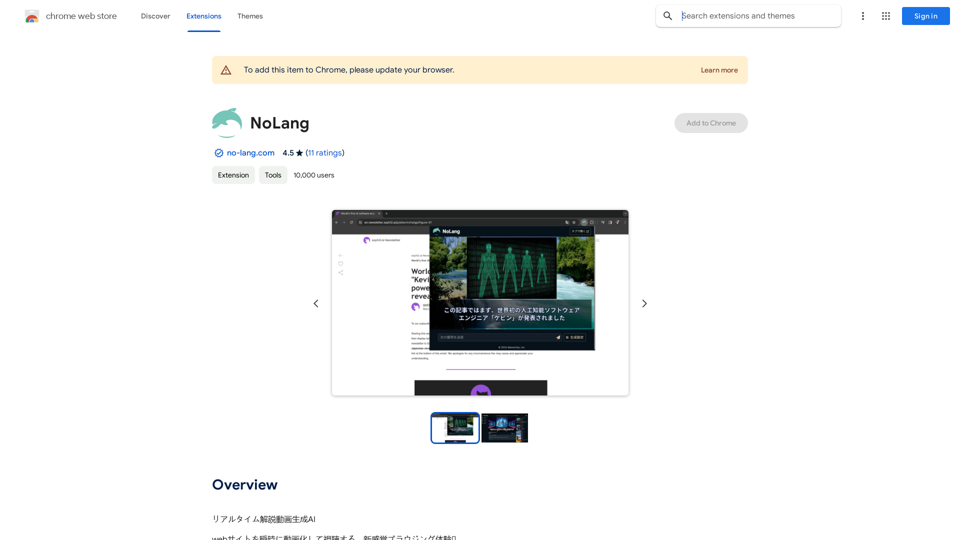
AI for Generating Real-Time Commentary Videos
Visit Website
No Language
Visit Website

Introduction

Real-time Video Generation AI is a Chrome extension that transforms web content into videos instantly. This innovative tool summarizes and translates web pages, YouTube videos, and even PDF files into video format, offering users a unique browsing experience. With support for multiple languages and customizable settings, it caters to a diverse user base and various content types.

Feature

Real-time Video Generation

Instantly create videos from web pages, providing quick and efficient content summarization and translation.

Multi-language Support

Supports multiple languages including English and Japanese, making it accessible to users worldwide.

PDF Compatibility

Extends functionality to PDF files, allowing for video generation from various document types.

YouTube Integration

Particularly useful for summarizing and translating YouTube video content efficiently.

Customizable Settings

Users can tailor the video generation process by adjusting language preferences and video format options.

Free Installation and Use

Available as a free Chrome extension with no additional costs for video generation.

FAQ

How do I start using Real-time Video Generation AI?

  1. Install the Chrome extension from the Chrome Web Store
  2. Select the desired web content (page, YouTube video, or PDF)
  3. Configure settings such as language and video format
  4. Click "Generate Video" to create your summarized video

What types of content can I generate videos from?

You can generate videos from web pages, YouTube videos, and PDF files.

Is there a cost associated with using this extension?

The extension is free to install and use, with no specified pricing for video generation.

Can I customize the generated videos?

Yes, you can customize settings such as language and video format to tailor the output to your needs.

Related Websites

NovaTexter - Chat GPT Chrome Extension
View Detail

NovaTexter - Chat GPT Chrome Extension

NovaTexter - Chat GPT Chrome Extension

Your AI assistant powered by the latest ChatGPT models, right inside any text box! For Twitter, LinkedIn, Gmail, WordPress, and many other platforms.

193.90 M
IntelliMark
View Detail

IntelliMark

IntelliMark

An intelligent bookmark finder! Just tell it what you're looking for in your own words, and it will find the most useful bookmarks for you!

193.90 M
Sloth Search
View Detail

Sloth Search

Sloth Search

A browser extension that uses artificial intelligence to perform a deeper understanding search of web pages.

193.90 M
Horus
View Detail

Horus

Horus

Horus is your AI assistant for creating summaries, insights, and expanding knowledge.

193.90 M
MagicReply - AI Replies for Twitter
View Detail

MagicReply - AI Replies for Twitter

MagicReply - AI Replies for Twitter

Grow Your Twitter Account by Replying Using AI Are you tired of manually responding to tweets and struggling to grow your Twitter account? Do you want to increase your online presence and engage with your audience more efficiently? Look no further! This article will show you how to grow your Twitter account by replying using AI. What is AI-powered Twitter reply? AI-powered Twitter reply is a technology that uses artificial intelligence to automatically respond to tweets. This innovative tool analyzes the content of incoming tweets and generates a relevant response based on the context. With AI-powered Twitter reply, you can save time and effort while increasing your online engagement. Benefits of using AI-powered Twitter reply 1. Increased efficiency Manually responding to tweets can be time-consuming, especially if you have a large following. AI-powered Twitter reply automates the process, allowing you to focus on other important tasks. 2. Improved engagement AI-powered Twitter reply helps you respond to tweets quickly, which increases the chances of starting a conversation and building relationships with your followers. 3. Personalized responses AI-powered Twitter reply can be customized to fit your brand's voice and tone, ensuring that your responses are personalized and consistent. 4. Scalability As your Twitter account grows, AI-powered Twitter reply can handle a large volume of tweets, ensuring that you never miss a response. How to use AI-powered Twitter reply 1. Choose an AI-powered Twitter reply tool There are several AI-powered Twitter reply tools available, such as [Tool 1], [Tool 2], and [Tool 3]. Research and choose the one that best fits your needs. 2. Set up your AI-powered Twitter reply Once you've chosen a tool, set it up by connecting your Twitter account and customizing your responses. 3. Monitor and adjust Monitor your AI-powered Twitter reply's performance and adjust the settings as needed to ensure that your responses are relevant and engaging. Conclusion Growing your Twitter account requires consistent engagement and timely responses. AI-powered Twitter reply is a game-changer that can help you achieve this goal. By automating your responses, you can increase efficiency, improve engagement, and personalize your interactions. Try AI-powered Twitter reply today and watch your Twitter account thrive!

193.90 M
PipeLaunch: Salesforce Integration
View Detail

PipeLaunch: Salesforce Integration

PipeLaunch: Salesforce Integration

Add New Prospects to Your Salesforce with One Click

193.90 M
Faster GPT
View Detail

Faster GPT

Faster GPT

Excellent GPT assistant with useful extensions and powerful prompts. Use ChatGPT, Claude, Bard, Bing on any website.

193.90 M
Influencer Tools for Amazon Influencers

This guide explores essential tools to help Amazon influencers succeed.

1. Content Creation Tools:

* Canva: Design eye-catching graphics, videos, and social media posts.
* Lumen5: Create engaging videos from blog posts or scripts.
* InShot: Edit and enhance videos for mobile devices.

2. Product Research Tools:

* Jungle Scout: Analyze product trends, competition, and sales data.
* Helium 10:  Discover profitable products, track keywords, and optimize listings.
* Viral Launch:  Identify trending products and conduct market research.

3. Social Media Management Tools:

* Buffer: Schedule and manage social media posts across multiple platforms.
* Hootsuite: Monitor brand mentions, engage with followers, and track social media performance.
* Later: Plan and visualize Instagram content.

4. Analytics and Tracking Tools:

* Amazon Influencer Program Dashboard: Track your performance, earnings, and audience engagement.
* Google Analytics: Monitor website traffic and user behavior.
* UTM Parameters: Track the effectiveness of your marketing campaigns.

5. Email Marketing Tools:

* Mailchimp: Create and send email newsletters to your subscribers.
* ConvertKit: Build an email list and automate your marketing workflows.
* Klaviyo:  Segment your audience and personalize email campaigns.
View Detail

Influencer Tools for Amazon Influencers This guide explores essential tools to help Amazon influencers succeed. 1. Content Creation Tools: * Canva: Design eye-catching graphics, videos, and social media posts. * Lumen5: Create engaging videos from blog posts or scripts. * InShot: Edit and enhance videos for mobile devices. 2. Product Research Tools: * Jungle Scout: Analyze product trends, competition, and sales data. * Helium 10: Discover profitable products, track keywords, and optimize listings. * Viral Launch: Identify trending products and conduct market research. 3. Social Media Management Tools: * Buffer: Schedule and manage social media posts across multiple platforms. * Hootsuite: Monitor brand mentions, engage with followers, and track social media performance. * Later: Plan and visualize Instagram content. 4. Analytics and Tracking Tools: * Amazon Influencer Program Dashboard: Track your performance, earnings, and audience engagement. * Google Analytics: Monitor website traffic and user behavior. * UTM Parameters: Track the effectiveness of your marketing campaigns. 5. Email Marketing Tools: * Mailchimp: Create and send email newsletters to your subscribers. * ConvertKit: Build an email list and automate your marketing workflows. * Klaviyo: Segment your audience and personalize email campaigns.

Influencer Tools for Amazon Influencers This guide explores essential tools to help Amazon influencers succeed. 1. Content Creation Tools: * Canva: Design eye-catching graphics, videos, and social media posts. * Lumen5: Create engaging videos from blog posts or scripts. * InShot: Edit and enhance videos for mobile devices. 2. Product Research Tools: * Jungle Scout: Analyze product trends, competition, and sales data. * Helium 10: Discover profitable products, track keywords, and optimize listings. * Viral Launch: Identify trending products and conduct market research. 3. Social Media Management Tools: * Buffer: Schedule and manage social media posts across multiple platforms. * Hootsuite: Monitor brand mentions, engage with followers, and track social media performance. * Later: Plan and visualize Instagram content. 4. Analytics and Tracking Tools: * Amazon Influencer Program Dashboard: Track your performance, earnings, and audience engagement. * Google Analytics: Monitor website traffic and user behavior. * UTM Parameters: Track the effectiveness of your marketing campaigns. 5. Email Marketing Tools: * Mailchimp: Create and send email newsletters to your subscribers. * ConvertKit: Build an email list and automate your marketing workflows. * Klaviyo: Segment your audience and personalize email campaigns.

Tools to help influencers grow their audience and influence.

193.90 M