Open-source RightAI Tools Directory
  • Discover AI
  • Submit
  • Startup
  • Blog
Open-source RightAI Tools Directory
Discover the best AI tools of 2025 with the RightAI Tools Directory!

Friend Links

AI Anime GeneratorToolsApp AI

Support

Tap4
Privacy policyTerms & ConditionsContact Us
Loading...
loading...

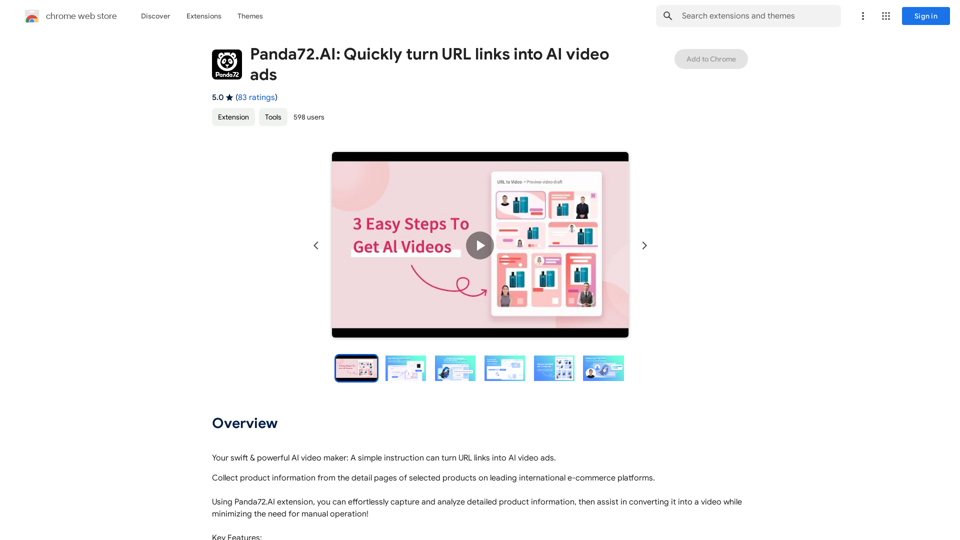
Panda72.AI: Quickly turn URL links into AI video ads

Your swift & powerful AI video maker: A simple instruction can turn URL links into AI video ads.
Visit Website
Panda72.AI: Quickly turn URL links into AI video ads
Visit Website

Introduction

Panda72.AI is an innovative AI-powered platform that transforms URL links into AI video ads. It offers advanced data capture and assisted video creation features, streamlining the process of generating high-quality product or service showcase videos. This tool is designed to enhance efficiency and simplify video ad creation for users across the globe.

Feature

Advanced Data Capture

Panda72.AI employs sophisticated data models to accurately identify and capture product information from URLs.

Assisted Video Creation

The platform streamlines the process of converting content into videos, minimizing manual intervention and saving time.

High Efficiency

Generate high-quality product or service showcase videos in just seconds, significantly speeding up the ad creation process.

Free Chrome Extension

Panda72.AI offers a completely free extension available for download from the Chrome Web Store, making it accessible to all users.

Strict Compliance

The platform adheres rigorously to regulations, ensuring user privacy protection and safeguarding rights.

Global Accessibility

Panda72.AI can be used in any country or region worldwide, making it a versatile tool for international users.

Search Engine Support

Currently supports Google, with plans to expand compatibility to more search engines in the future.

FAQ

How do I use Panda72.AI?

  1. Click "Add to Chrome" to add the extension to your browser toolbar.
  2. Open https://www.panda72.ai/
  3. Copy the product URL you want to analyze.
  4. Paste the URL into the feature bar on the website.
  5. Panda72.AI will automatically analyze the product information and generate a video.

Is Panda72.AI free to use?

Yes, the Panda72.AI extension is completely free to use.

Which search engines does Panda72.AI support?

Currently, Panda72.AI supports Google. There are plans to support more search engines in the future.

Why do link capture failures occur sometimes?

Link capture failures may happen on certain pages such as:

  • Gift card pages
  • Out-of-stock items
  • Products not available for international sales

If you encounter a failure, it's recommended to try again.

Related Websites
GPT-ChatDIY
View Detail

GPT-ChatDIY

GPT-ChatDIY

Use this extension to easily access ChatGPT and solve your questions or generate text.

193.90 M
xdata

xdata is a type of data that is used to extend or augment the functionality of a program or system. It is often used to provide additional information or context that is not available through traditional data sources. xdata can take many forms, including sensor data, log files, and social media posts. It is often unstructured or semi-structured, making it difficult to analyze and process using traditional data tools and techniques. However, xdata can provide valuable insights and competitive advantages when properly analyzed and utilized.
View Detail

xdata xdata is a type of data that is used to extend or augment the functionality of a program or system. It is often used to provide additional information or context that is not available through traditional data sources. xdata can take many forms, including sensor data, log files, and social media posts. It is often unstructured or semi-structured, making it difficult to analyze and process using traditional data tools and techniques. However, xdata can provide valuable insights and competitive advantages when properly analyzed and utilized.

xdata xdata is a type of data that is used to extend or augment the functionality of a program or system. It is often used to provide additional information or context that is not available through traditional data sources. xdata can take many forms, including sensor data, log files, and social media posts. It is often unstructured or semi-structured, making it difficult to analyze and process using traditional data tools and techniques. However, xdata can provide valuable insights and competitive advantages when properly analyzed and utilized.

Collect tweets and earn $Wafer tokens

193.90 M
Pulse App AI

Pulse App AI is an innovative artificial intelligence-powered healthcare platform that enables patients to take control of their health and wellness.
View Detail

Pulse App AI Pulse App AI is an innovative artificial intelligence-powered healthcare platform that enables patients to take control of their health and wellness.

Pulse App AI Pulse App AI is an innovative artificial intelligence-powered healthcare platform that enables patients to take control of their health and wellness.

The Power of Artificial Intelligence in Your Pocket

0
Youtube VideoSynth: Summarize Youtube Videos

This tool uses artificial intelligence to create short summaries of YouTube videos. 

Simply paste the YouTube video URL into the input field, and VideoSynth will generate a concise summary of the video's content.
View Detail

Youtube VideoSynth: Summarize Youtube Videos This tool uses artificial intelligence to create short summaries of YouTube videos. Simply paste the YouTube video URL into the input field, and VideoSynth will generate a concise summary of the video's content.

Youtube VideoSynth: Summarize Youtube Videos This tool uses artificial intelligence to create short summaries of YouTube videos. Simply paste the YouTube video URL into the input field, and VideoSynth will generate a concise summary of the video's content.

Summarize YouTube Video Transcripts Using AI This is a powerful tool for quickly understanding the main points of long videos. Here's how it works: 1. Get the Transcript: You'll need a text transcript of the YouTube video. Many videos have automatic captions, or you can use a transcription service. 2. Choose an AI Summarizer: There are many free and paid AI summarization tools available online. Some popular options include: * OpenAI's GPT-3: A powerful language model that can generate high-quality summaries. * Google Cloud AI Platform: Offers a variety of AI services, including text summarization. * Hugging Face Transformers: An open-source library with pre-trained summarization models. 3. Input the Transcript: Paste the transcript into the AI summarizer. 4. Generate the Summary: The AI will analyze the text and generate a concise summary of the video's main points. 5. Review and Edit: Read through the AI-generated summary and make any necessary edits to ensure accuracy and clarity. Let me know if you'd like more details on any of these steps!

193.90 M
Talkative
View Detail

Talkative

Talkative

Chat with Web-LLM Models in the Browser You can interact with Web-LLM models directly in your web browser without requiring any additional setup or installation. This allows you to easily experiment with and explore the capabilities of these models. Getting Started To get started, simply open a web browser and navigate to the Web-LLM model's website or platform. Once you're on the website, you can usually find a chat interface or text input field where you can enter your prompts or questions. How it Works When you enter a prompt or question, the Web-LLM model processes your input and generates a response. This response is then displayed in the chat interface or output field, allowing you to read and interact with the model's output. Benefits The benefits of chatting with Web-LLM models in the browser include: * Convenience: No need to install any software or set up any development environments. * Accessibility: Anyone with a web browser can interact with the model, regardless of their technical expertise. * Ease of use: The chat interface provides a user-friendly way to interact with the model, making it easy to experiment and explore its capabilities. Use Cases Some potential use cases for chatting with Web-LLM models in the browser include: * Research and development: Quickly experiment with different models and prompts to explore their capabilities and limitations. * Education and learning: Use the chat interface to teach students about AI and language models, or to provide interactive learning experiences. * Creative writing and ideation: Use the model as a tool to generate ideas, write stories, or create poetry. Overall, chatting with Web-LLM models in the browser provides a convenient and accessible way to interact with these powerful language models, and can be a valuable tool for a wide range of applications.

2.59 K
STAIRAZ 

Job Application Tracker, Resume Builder, Job Analysis
View Detail

STAIRAZ Job Application Tracker, Resume Builder, Job Analysis

STAIRAZ Job Application Tracker, Resume Builder, Job Analysis

STAIRAZ Job Application Tracker: A professional tool that simplifies your job search and increases your chances of getting hired.

193.90 M
MangoFlow: AI Chat Sidebar
View Detail

MangoFlow: AI Chat Sidebar

MangoFlow: AI Chat Sidebar

Smart Copilot for Internet Surfing, a smart assistant for browsing the web.

193.90 M
ScreenSnap - Record and Annotate Screens
View Detail

ScreenSnap - Record and Annotate Screens

ScreenSnap - Record and Annotate Screens

A free, privacy-friendly screen recorder with unlimited capabilities. Capture, annotate, edit videos, and more...

193.90 M