Open-source RightAI Tools Directory
  • Discover AI
  • Submit
  • Startup
  • Blog
Open-source RightAI Tools Directory
Discover the best AI tools of 2025 with the RightAI Tools Directory!

Friend Links

AI Anime GeneratorToolsApp AI

Support

Tap4
Privacy policyTerms & ConditionsContact Us
Loading...
loading...

Chatgpt PDF =============== Ask your PDF ----------------

Ask Your PDF AI Chapdf: Best AI Summarizer Plugin Powered by GPT Summarize Text and Have a Chat with Any PDF Pro Summary Generator
Visit Website
Chatgpt PDF
===============

Ask your PDF
----------------
Visit Website

Introduction

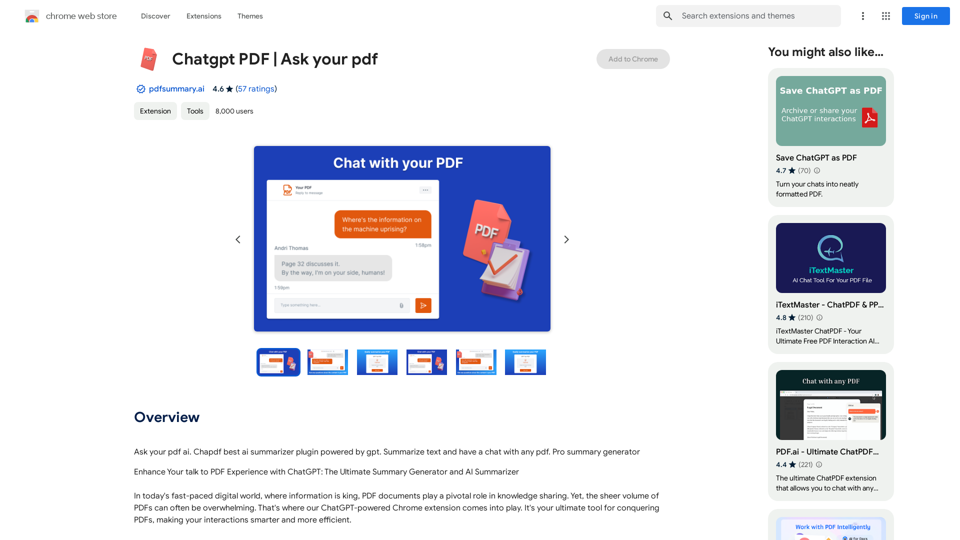
ChatGPT PDF is a Chrome extension that enhances PDF interactions using ChatGPT's AI capabilities. It offers features like document summarization, AI-assisted chat, and improved navigation, making it easier for users to extract key information from PDFs quickly and efficiently.

Feature

AI PDF Summarizer

Quickly distills critical insights from lengthy documents, eliminating the need for extensive scrolling and reading.

ChatGPT Integration

Seamlessly integrates ChatGPT's powerful capabilities, allowing users to query documents using natural language for instant and accurate answers.

Intelligent Annotation

Provides smart annotations of key points within documents, facilitating quicker comprehension of core concepts.

Seamless Document Navigation

Offers an intuitive interface for effortless navigation between sections, keyword searches, and AI-assisted information retrieval.

Simple Installation and Usage

Easy one-click installation process and straightforward usage steps:

  1. Install the extension
  2. Open a PDF in the browser
  3. Interact with the AI assistant
  4. Request summaries or ask questions
  5. Receive instant, precise information

Time-Saving

Significantly reduces the time needed to summarize various document types, including PDFs, webpages, and YouTube content.

Accuracy and Customization

Leverages ChatGPT's natural language understanding for precise summaries, with options to tailor summarization requests to specific needs.

Versatility

Handles various document formats, making it suitable for professionals, students, and researchers across different fields.

Intelligent Integration

Seamlessly connects with preferred PDF readers, enhancing workflow across different platforms.

FAQ

How to feed a document to the AI?

After installing the extension, click on the icon and select the option to upload or open a file.

How to use the 'Ask Your Document' feature?

Upload the document, click on the extension icon, and type your question in the provided chat interface.

How to upload a document for interaction?

Click on the extension icon after installation and select the option to upload a document.

How to get the AI to summarize a document?

Upload the document, click on the extension icon, and request a summary by typing "Summarize this document" or specifying sections in the chat interface.

Can the AI summarize a document?

Yes, the AI can effectively summarize documents once they are uploaded through the extension. Users can request summaries via the chat interface.

Latest Traffic Insights

  • Monthly Visits

    193.90 M

  • Bounce Rate

    56.27%

  • Pages Per Visit

    2.71

  • Time on Site(s)

    115.91

  • Global Rank

    -

  • Country Rank

    -

Recent Visits

Traffic Sources

  • Social Media:
    0.48%
  • Paid Referrals:
    0.55%
  • Email:
    0.15%
  • Referrals:
    12.81%
  • Search Engines:
    16.21%
  • Direct:
    69.81%
More Data

Related Websites

Text Summarizer 

This is a tool that can condense large amounts of text into shorter, more manageable summaries.
View Detail

Text Summarizer This is a tool that can condense large amounts of text into shorter, more manageable summaries.

Text Summarizer This is a tool that can condense large amounts of text into shorter, more manageable summaries.

Instantly summarize text with Text Summarizer: optimize your work using AI-powered text summarization with ChatGPT.

193.90 M
Talk GPT
View Detail

Talk GPT

Talk GPT

Use ChatGPT in a different way.

193.90 M
Eskritor AI Writer: Intelligent AI Content Creator
View Detail

Eskritor AI Writer: Intelligent AI Content Creator

Eskritor AI Writer: Intelligent AI Content Creator

Write 5x faster with Eskritor AI Writer's 20+ content tools. Start creating perfectly tailored content today - from articles to social posts. Try it free!

100.32 K
GPTSnow - Supercharge your ChatGPT
View Detail

GPTSnow - Supercharge your ChatGPT

GPTSnow - Supercharge your ChatGPT

Unlock Search, Conversation History, Image Gallery, and Bookmarks for your ChatGPT.

193.90 M
Free ChatGPT Sidebar Assistant (GPT-4, AIDraw)
View Detail

Free ChatGPT Sidebar Assistant (GPT-4, AIDraw)

Free ChatGPT Sidebar Assistant (GPT-4, AIDraw)

Free ChatGPT Sidebar Assistant is an AI chatbot developed based on OpenAI's ChatGPT 3.5 and 4 models.

193.90 M
MagicReply - AI Replies for Twitter
View Detail

MagicReply - AI Replies for Twitter

MagicReply - AI Replies for Twitter

Grow Your Twitter Account by Replying Using AI Are you tired of manually responding to tweets and struggling to grow your Twitter account? Do you want to increase your online presence and engage with your audience more efficiently? Look no further! This article will show you how to grow your Twitter account by replying using AI. What is AI-powered Twitter reply? AI-powered Twitter reply is a technology that uses artificial intelligence to automatically respond to tweets. This innovative tool analyzes the content of incoming tweets and generates a relevant response based on the context. With AI-powered Twitter reply, you can save time and effort while increasing your online engagement. Benefits of using AI-powered Twitter reply 1. Increased efficiency Manually responding to tweets can be time-consuming, especially if you have a large following. AI-powered Twitter reply automates the process, allowing you to focus on other important tasks. 2. Improved engagement AI-powered Twitter reply helps you respond to tweets quickly, which increases the chances of starting a conversation and building relationships with your followers. 3. Personalized responses AI-powered Twitter reply can be customized to fit your brand's voice and tone, ensuring that your responses are personalized and consistent. 4. Scalability As your Twitter account grows, AI-powered Twitter reply can handle a large volume of tweets, ensuring that you never miss a response. How to use AI-powered Twitter reply 1. Choose an AI-powered Twitter reply tool There are several AI-powered Twitter reply tools available, such as [Tool 1], [Tool 2], and [Tool 3]. Research and choose the one that best fits your needs. 2. Set up your AI-powered Twitter reply Once you've chosen a tool, set it up by connecting your Twitter account and customizing your responses. 3. Monitor and adjust Monitor your AI-powered Twitter reply's performance and adjust the settings as needed to ensure that your responses are relevant and engaging. Conclusion Growing your Twitter account requires consistent engagement and timely responses. AI-powered Twitter reply is a game-changer that can help you achieve this goal. By automating your responses, you can increase efficiency, improve engagement, and personalize your interactions. Try AI-powered Twitter reply today and watch your Twitter account thrive!

193.90 M
LinkedIn AI Result Booster
View Detail

LinkedIn AI Result Booster

LinkedIn AI Result Booster

Handle Objections. Smart Follow-ups. Personalized Invites. Boost your LinkedIn prospecting with Salee and get booked meetings!

193.90 M
What's his face
View Detail

What's his face

What's his face

This plugin works on Netflix pages to identify an actor on the screen.

193.90 M