Open-source RightAI Tools Directory
  • Discover AI
  • Submit
  • Startup
  • Blog
Open-source RightAI Tools Directory
Discover the best AI tools of 2025 with the RightAI Tools Directory!

Friend Links

AI Anime GeneratorToolsApp AI

Support

Tap4
Privacy policyTerms & ConditionsContact Us
Loading...
loading...

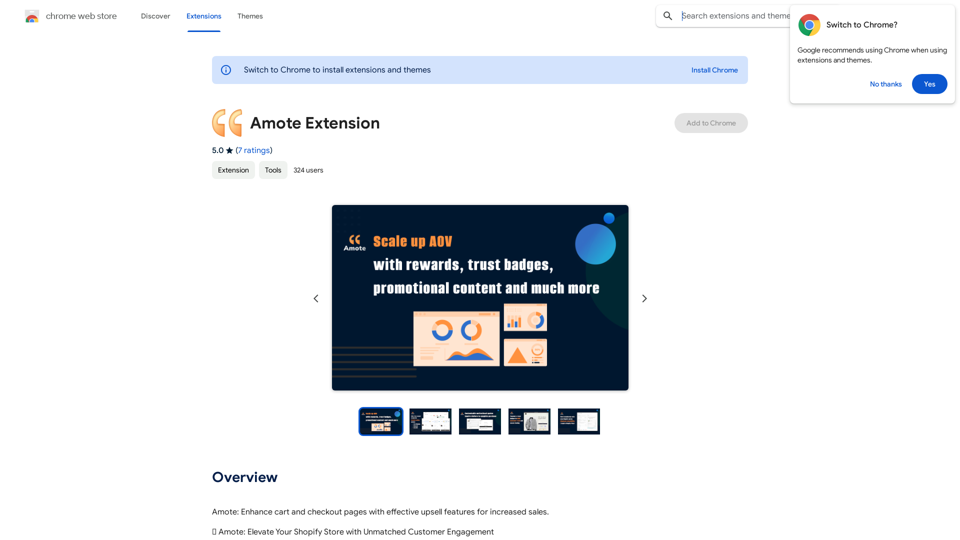
Amote Extension

Note: Improve the cart and checkout pages with effective upsell features to boost sales.
Visit Website
Amote Extension
Visit Website

Introduction

Amote is a Chrome extension designed to enhance cart and checkout pages for e-commerce websites. It offers effective upsell features that increase sales and customer engagement, transforming ordinary shopping experiences into extraordinary memories. This free tool seamlessly integrates with Shopify stores, providing a range of features to improve customer experience and boost sales.

Feature

Rewarding Customer Experience

Amote implements a captivating rewards system that turns customers into loyal advocates. This system offers enticing rewards that enhance the overall shopping journey, encouraging repeat purchases and customer loyalty.

AI-Generated Inspiration

The extension utilizes ChatGPT to generate inspirational quotes, infusing online stores with positivity. This feature creates an uplifting atmosphere that resonates with the audience, potentially improving customer mood and increasing the likelihood of purchases.

Trust-Building Information

Amote optimizes the presentation of shipping and refund details, providing clear and concise information. This feature helps build trust with customers, instilling confidence in their purchasing decisions.

Seamless Shopify Integration

The extension integrates smoothly with all Shopify themes, including:

  • Shopify Theme App Extension
  • Shopify Checkout Extensibility
  • Automatic Discounts

This ensures a consistent and polished appearance throughout Shopify stores, enhancing the overall user experience.

Free and Accessible

Amote is completely free to use, allowing store owners to elevate their performance without incurring additional costs. All powerful features are available at no charge, making it an accessible tool for businesses of all sizes.

FAQ

What are the main benefits of using Amote?

Amote enhances cart and checkout pages with effective upsell features, increasing sales and customer engagement. It also provides a positive and uplifting atmosphere in your online store, building trust with customers through optimized information presentation.

How do I get started with Amote?

To start using Amote, follow these steps:

  1. Install the extension from the Chrome Web Store
  2. Follow the provided setup instructions
  3. Once installed, Amote will automatically enhance your cart and checkout pages with its upsell features

Is Amote compatible with Shopify stores?

Yes, Amote seamlessly integrates with all Shopify themes, Shopify Theme App Extension, Shopify Checkout Extensibility, and Automatic Discounts, ensuring compatibility and consistent appearance across Shopify stores.

Are there any costs associated with using Amote?

No, Amote is completely free to use. There are no additional costs, subscription fees, or hidden charges. Users can enjoy all features and benefits without any financial commitment.

Latest Traffic Insights

  • Monthly Visits

    193.90 M

  • Bounce Rate

    56.27%

  • Pages Per Visit

    2.71

  • Time on Site(s)

    115.91

  • Global Rank

    -

  • Country Rank

    -

Recent Visits

Traffic Sources

  • Social Media:
    0.48%
  • Paid Referrals:
    0.55%
  • Email:
    0.15%
  • Referrals:
    12.81%
  • Search Engines:
    16.21%
  • Direct:
    69.81%
More Data

Related Websites

Opulli | AI Fashion Model Platform for Clothing Brands
View Detail

Opulli | AI Fashion Model Platform for Clothing Brands

Opulli | AI Fashion Model Platform for Clothing Brands

Create captivating AI-generated fashion models, cutting photoshoot costs dramatically. Enhance audience engagement, accelerate market debut, and lead fashion trends with unparalleled speed and precision.

0
Supportbot Pro - AI-powered customer support
View Detail

Supportbot Pro - AI-powered customer support

Supportbot Pro - AI-powered customer support

The AI-powered chatbot which leverages your company data to answer customer questions and generate leads.

0
AI Tattoo Generator | Tattoo AI Design
View Detail

AI Tattoo Generator | Tattoo AI Design

AI Tattoo Generator | Tattoo AI Design

Tattoo AI Design is a tool that offers a free AI Tattoo Generator and Design service. It provides inspiration through AI-generated Tattoo Designs. The goal of Tattoo AI Design is to spark amazing ideas for users and help them create their own unique tattoo designs.

601
Create Stunning Disney-Style Posters with Our Cartoon AI Generator
View Detail

Create Stunning Disney-Style Posters with Our Cartoon AI Generator

Create Stunning Disney-Style Posters with Our Cartoon AI Generator

Create stunning Disney Pixar movie posters effortlessly with AI technology. pixar ai generator allows you to generate professional pixar&disney posters with ease.

0
AI Image Generator Free: Create and Edit Images with AI
View Detail

AI Image Generator Free: Create and Edit Images with AI

AI Image Generator Free: Create and Edit Images with AI

With our free AI image generator, creating and editing images has never been easier. Harness the potential of AI to effortlessly generate and customize visuals according to your vision. Start creating today!

9.93 K
Transform Photos into Ghibli Style Images for Free.
View Detail

Transform Photos into Ghibli Style Images for Free.

Transform Photos into Ghibli Style Images for Free.

Experience AI Ghibli, the revolutionary photo transformation tool that converts your ordinary images into magical Ghibli-style artwork with just one click.

51
Text to Voice Generator
==========================

A text-to-voice generator, also known as a text-to-speech (TTS) system, is a software that converts written text into a spoken voice output. This technology has been widely used in various applications, including virtual assistants, audiobooks, and language learning platforms.

How it Works
---------------

The process of generating voice from text involves several steps:

1. Text Analysis: The input text is analyzed to identify the language, syntax, and semantics.
2. Phonetic Transcription: The text is converted into a phonetic transcription, which represents the sounds of the spoken language.
3. Prosody Generation: The phonetic transcription is then used to generate the prosody, or rhythm and intonation, of the spoken voice.
4. Waveform Generation: The prosody and phonetic transcription are combined to generate the audio waveform, which is the final spoken voice output.

Types of Text-to-Voice Generators
-----------------------------------

There are two main types of text-to-voice generators:

Rule-Based Systems

These systems use a set of predefined rules to generate the spoken voice output. They are often limited in their ability to produce natural-sounding voices and may sound robotic.

Machine Learning-Based Systems

These systems use machine learning algorithms to learn from large datasets of spoken voices and generate more natural-sounding voices. They are often more advanced and can produce high-quality voice outputs.

Applications of Text-to-Voice Generators
-----------------------------------------

Text-to-voice generators have a wide range of applications, including:

Virtual Assistants

Virtual assistants, such as Siri and Alexa, use text-to-voice generators to respond to user queries.

Audiobooks

Text-to-voice generators can be used to create audiobooks from written texts, making it easier for people to access written content.

Language Learning

Language learning platforms use text-to-voice generators to provide pronunciation guidance and practice exercises for learners.

Accessibility

Text-to-voice generators can be used to assist people with disabilities, such as visual impairments, by providing an auditory interface to written content.
View Detail

Text to Voice Generator ========================== A text-to-voice generator, also known as a text-to-speech (TTS) system, is a software that converts written text into a spoken voice output. This technology has been widely used in various applications, including virtual assistants, audiobooks, and language learning platforms. How it Works --------------- The process of generating voice from text involves several steps: 1. Text Analysis: The input text is analyzed to identify the language, syntax, and semantics. 2. Phonetic Transcription: The text is converted into a phonetic transcription, which represents the sounds of the spoken language. 3. Prosody Generation: The phonetic transcription is then used to generate the prosody, or rhythm and intonation, of the spoken voice. 4. Waveform Generation: The prosody and phonetic transcription are combined to generate the audio waveform, which is the final spoken voice output. Types of Text-to-Voice Generators ----------------------------------- There are two main types of text-to-voice generators: Rule-Based Systems These systems use a set of predefined rules to generate the spoken voice output. They are often limited in their ability to produce natural-sounding voices and may sound robotic. Machine Learning-Based Systems These systems use machine learning algorithms to learn from large datasets of spoken voices and generate more natural-sounding voices. They are often more advanced and can produce high-quality voice outputs. Applications of Text-to-Voice Generators ----------------------------------------- Text-to-voice generators have a wide range of applications, including: Virtual Assistants Virtual assistants, such as Siri and Alexa, use text-to-voice generators to respond to user queries. Audiobooks Text-to-voice generators can be used to create audiobooks from written texts, making it easier for people to access written content. Language Learning Language learning platforms use text-to-voice generators to provide pronunciation guidance and practice exercises for learners. Accessibility Text-to-voice generators can be used to assist people with disabilities, such as visual impairments, by providing an auditory interface to written content.

Text to Voice Generator ========================== A text-to-voice generator, also known as a text-to-speech (TTS) system, is a software that converts written text into a spoken voice output. This technology has been widely used in various applications, including virtual assistants, audiobooks, and language learning platforms. How it Works --------------- The process of generating voice from text involves several steps: 1. Text Analysis: The input text is analyzed to identify the language, syntax, and semantics. 2. Phonetic Transcription: The text is converted into a phonetic transcription, which represents the sounds of the spoken language. 3. Prosody Generation: The phonetic transcription is then used to generate the prosody, or rhythm and intonation, of the spoken voice. 4. Waveform Generation: The prosody and phonetic transcription are combined to generate the audio waveform, which is the final spoken voice output. Types of Text-to-Voice Generators ----------------------------------- There are two main types of text-to-voice generators: Rule-Based Systems These systems use a set of predefined rules to generate the spoken voice output. They are often limited in their ability to produce natural-sounding voices and may sound robotic. Machine Learning-Based Systems These systems use machine learning algorithms to learn from large datasets of spoken voices and generate more natural-sounding voices. They are often more advanced and can produce high-quality voice outputs. Applications of Text-to-Voice Generators ----------------------------------------- Text-to-voice generators have a wide range of applications, including: Virtual Assistants Virtual assistants, such as Siri and Alexa, use text-to-voice generators to respond to user queries. Audiobooks Text-to-voice generators can be used to create audiobooks from written texts, making it easier for people to access written content. Language Learning Language learning platforms use text-to-voice generators to provide pronunciation guidance and practice exercises for learners. Accessibility Text-to-voice generators can be used to assist people with disabilities, such as visual impairments, by providing an auditory interface to written content.

Generate Voice from Text on Any Web Page With the advancement of technology, it is now possible to generate voice from text on any web page. This feature is particularly useful for people who prefer listening to content rather than reading it. Here's how you can do it: #Method 1: Using Browser Extension You can use a browser extension like Read Aloud or SpeakIt! to generate voice from text on any web page. These extensions are available for both Google Chrome and Mozilla Firefox browsers. #Method 2: Using Online Tools There are several online tools available that can convert text to speech. Some popular tools include NaturalReader, Voice Dream Reader, and Google Text-to-Speech. You can copy and paste the text from any web page into these tools to generate voice. #Method 3: Using Screen Reader If you are using a Windows operating system, you can use the built-in Narrator screen reader to generate voice from text on any web page. For Mac users, you can use VoiceOver. By using any of these methods, you can easily generate voice from text on any web page and enjoy a more convenient and accessible reading experience.

193.90 M
Photoleap - Creative & powerful photo editing app by Lightricks
View Detail

Photoleap - Creative & powerful photo editing app by Lightricks

Photoleap - Creative & powerful photo editing app by Lightricks

Use the comprehensive photo editor Photoleap for incredible creations on your iPhone: Alter backgrounds, eliminate objects, design collages, and apply filters & effects. Start a 7-day free trial now.

196.20 K