Open-source RightAI Tools Directory
  • Discover AI
  • Submit
  • Startup
  • Blog
Open-source RightAI Tools Directory
Discover the best AI tools of 2025 with the RightAI Tools Directory!

Friend Links

AI Anime GeneratorToolsApp AI

Support

Tap4
Privacy policyTerms & ConditionsContact Us
Loading...
loading...

Skin Cancer Image Search

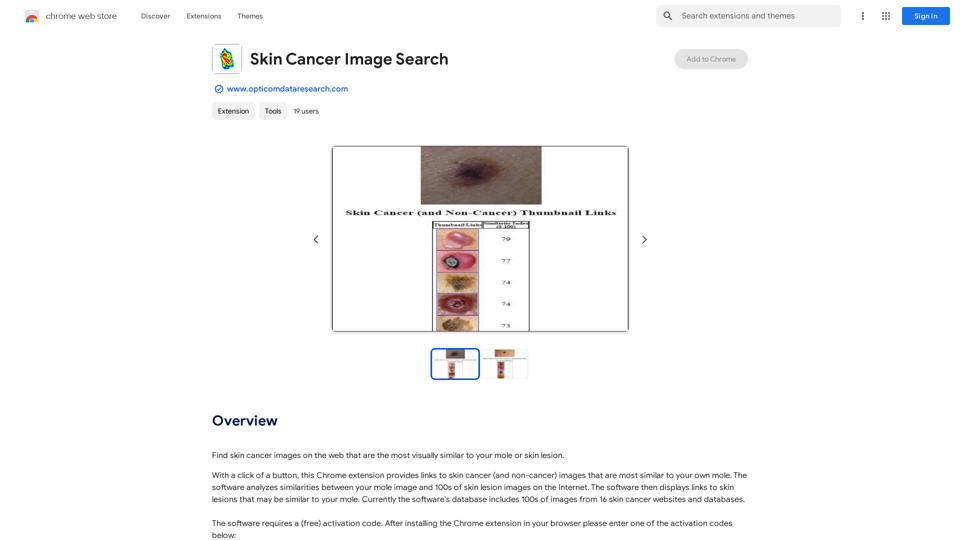
Find pictures of skin cancer online that look most like your mole or skin spot.
Visit Website
Skin Cancer Image Search
Visit Website

Introduction

Skin Cancer Image Search is a Chrome extension developed by Opticom Data Research. It allows users to find visually similar skin cancer images on the web by comparing them to their own moles or skin lesions. With a simple click, the extension provides links to skin cancer (and non-cancer) images that closely resemble the user's own mole, helping with visual comparison and potential early detection.

Feature

Advanced Image Analysis

The software uses sophisticated algorithms to analyze similarities between the user's mole image and hundreds of skin lesion images available on the Internet. This feature enables precise matching and comparison.

Extensive Database

Skin Cancer Image Search features a comprehensive database containing hundreds of images from 16 different skin cancer websites and databases. This extensive collection ensures a wide range of comparisons for users.

Free Activation Process

To access the software's features, users need to obtain a free activation code. This can be easily acquired by installing the Chrome extension and entering one of the provided activation codes.

User-Friendly Interface

The extension is designed for ease of use. Once activated, users can quickly find skin cancer images that visually match their own moles or skin lesions with just a few clicks.

Cost-Free Service

Skin Cancer Image Search is completely free to use. There are no subscriptions or payments required, making it accessible to all users.

Chrome Browser Compatibility

The extension is specifically designed for Chrome browsers, ensuring optimal performance and integration with this popular web browser.

Regular Database Updates

To maintain accuracy and relevance, the database of skin lesion images is continuously updated. This ensures users have access to the most current and comprehensive set of comparison images.

FAQ

What is the purpose of Skin Cancer Image Search?

Skin Cancer Image Search is a Chrome extension designed to help users find skin cancer images on the web that are visually similar to their own moles or skin lesions. It aids in visual comparison and potential early detection of skin cancer.

How does the image analysis work?

The software analyzes similarities between the user's mole image and hundreds of skin lesion images on the Internet using advanced algorithms. It then provides links to the most visually similar skin cancer (and non-cancer) images from its database.

Is there a cost associated with using Skin Cancer Image Search?

No, the Skin Cancer Image Search extension is completely free to use. There are no subscriptions or payments required.

How can I activate the Skin Cancer Image Search extension?

To activate the extension, you need to install it on your Chrome browser and then enter one of the provided free activation codes.

Can I use Skin Cancer Image Search on multiple devices?

Yes, you can use the extension on multiple devices. However, each device will require a separate activation code.

Is the extension available for browsers other than Chrome?

Currently, the Skin Cancer Image Search extension is only available for Chrome browsers.

How often is the image database updated?

The database of skin lesion images is constantly being updated to ensure the most accurate and current results for users.

Latest Traffic Insights

  • Monthly Visits

    193.90 M

  • Bounce Rate

    56.27%

  • Pages Per Visit

    2.71

  • Time on Site(s)

    115.91

  • Global Rank

    -

  • Country Rank

    -

Recent Visits

Traffic Sources

  • Social Media:
    0.48%
  • Paid Referrals:
    0.55%
  • Email:
    0.15%
  • Referrals:
    12.81%
  • Search Engines:
    16.21%
  • Direct:
    69.81%
More Data

Related Websites

Imagine Anything | Free AI Image Generator
View Detail

Imagine Anything | Free AI Image Generator

Imagine Anything | Free AI Image Generator

Generate Free AI Images with Imagine Anything. Easily create Photos, Clipart, Graphics and more with our AI Generator.

56.84 K
Midjourney API - Automate Midjourney AI Image Generation 

This document outlines how to use the Midjourney API to automate the generation of AI images. 

What is the Midjourney API?

The Midjourney API allows developers to programmatically interact with the powerful Midjourney AI model. This means you can generate images, control various parameters, and integrate Midjourney into your own applications and workflows.

Why Use the Midjourney API?

* Automation: Automate the creation of images for various purposes, such as marketing materials, website content, or research projects.
* Customization: Fine-tune image generation by controlling parameters like aspect ratio, style, and seed values.
* Integration: Seamlessly integrate Midjourney's capabilities into your existing tools and platforms.

Getting Started

1. Sign Up for a Midjourney Account: You'll need a Midjourney account to access the API.

2. Obtain an API Key: Once you have an account, you can generate an API key from your account settings.

3. Choose a Programming Language: The Midjourney API supports various programming languages, including Python, JavaScript, and Go.

4. Install the API Client: Install the appropriate API client library for your chosen language.

5. Start Generating Images: Use the API client to send image generation requests to the Midjourney server.

Example (Python):

```python
import midjourney

Replace with your actual API key
api_key = "YOUR_API_KEY"

Create a Midjourney client
client = midjourney.Client(api_key=api_key)

Generate an image
response = client.create_image(prompt="A cat wearing a hat", num_images=1)

Print the image URL
print(response.images[0].url)
```

Documentation and Resources

For detailed information about the Midjourney API, including available endpoints, parameters, and examples, please refer to the official documentation: [https://docs.midjourney.com/](https://docs.midjourney.com/)
View Detail

Midjourney API - Automate Midjourney AI Image Generation This document outlines how to use the Midjourney API to automate the generation of AI images. What is the Midjourney API? The Midjourney API allows developers to programmatically interact with the powerful Midjourney AI model. This means you can generate images, control various parameters, and integrate Midjourney into your own applications and workflows. Why Use the Midjourney API? * Automation: Automate the creation of images for various purposes, such as marketing materials, website content, or research projects. * Customization: Fine-tune image generation by controlling parameters like aspect ratio, style, and seed values. * Integration: Seamlessly integrate Midjourney's capabilities into your existing tools and platforms. Getting Started 1. Sign Up for a Midjourney Account: You'll need a Midjourney account to access the API. 2. Obtain an API Key: Once you have an account, you can generate an API key from your account settings. 3. Choose a Programming Language: The Midjourney API supports various programming languages, including Python, JavaScript, and Go. 4. Install the API Client: Install the appropriate API client library for your chosen language. 5. Start Generating Images: Use the API client to send image generation requests to the Midjourney server. Example (Python): ```python import midjourney Replace with your actual API key api_key = "YOUR_API_KEY" Create a Midjourney client client = midjourney.Client(api_key=api_key) Generate an image response = client.create_image(prompt="A cat wearing a hat", num_images=1) Print the image URL print(response.images[0].url) ``` Documentation and Resources For detailed information about the Midjourney API, including available endpoints, parameters, and examples, please refer to the official documentation: [https://docs.midjourney.com/](https://docs.midjourney.com/)

Midjourney API - Automate Midjourney AI Image Generation This document outlines how to use the Midjourney API to automate the generation of AI images. What is the Midjourney API? The Midjourney API allows developers to programmatically interact with the powerful Midjourney AI model. This means you can generate images, control various parameters, and integrate Midjourney into your own applications and workflows. Why Use the Midjourney API? * Automation: Automate the creation of images for various purposes, such as marketing materials, website content, or research projects. * Customization: Fine-tune image generation by controlling parameters like aspect ratio, style, and seed values. * Integration: Seamlessly integrate Midjourney's capabilities into your existing tools and platforms. Getting Started 1. Sign Up for a Midjourney Account: You'll need a Midjourney account to access the API. 2. Obtain an API Key: Once you have an account, you can generate an API key from your account settings. 3. Choose a Programming Language: The Midjourney API supports various programming languages, including Python, JavaScript, and Go. 4. Install the API Client: Install the appropriate API client library for your chosen language. 5. Start Generating Images: Use the API client to send image generation requests to the Midjourney server. Example (Python): ```python import midjourney Replace with your actual API key api_key = "YOUR_API_KEY" Create a Midjourney client client = midjourney.Client(api_key=api_key) Generate an image response = client.create_image(prompt="A cat wearing a hat", num_images=1) Print the image URL print(response.images[0].url) ``` Documentation and Resources For detailed information about the Midjourney API, including available endpoints, parameters, and examples, please refer to the official documentation: [https://docs.midjourney.com/](https://docs.midjourney.com/)

Easily integrate Midjourney AI into your apps using the Midjourney API. Start creating AI images automatically today!

0
Course Decode
View Detail

Course Decode

Course Decode

Here is the translation into English: See which degrees are actually used by their graduates. Based on analysis of 349,996 LinkedIn profiles.

0
Grab 'n Tag
View Detail

Grab 'n Tag

Grab 'n Tag

Download a group of images at once and give each one a name based on what's in the picture.

193.90 M
Veggie AI: Generate Controllable Videos Using AI
View Detail

Veggie AI: Generate Controllable Videos Using AI

Veggie AI: Generate Controllable Videos Using AI

Create fully controllable videos using Veggie AI by simply uploading your character photos, action videos, or inputting text prompts.

7.03 K
Musick.ai: Free AI Music Generator & AI Song Maker Online
View Detail

Musick.ai: Free AI Music Generator & AI Song Maker Online

Musick.ai: Free AI Music Generator & AI Song Maker Online

Explore Musick.ai as an innovative AI Music Generator, including music theory and music plaza. Create songs with AI and make AI music now!

57.04 K
Video Editor 2024 and Other Cool Programs from Movavi – Download for Free
View Detail

Video Editor 2024 and Other Cool Programs from Movavi – Download for Free

Video Editor 2024 and Other Cool Programs from Movavi – Download for Free

Movavi offers fast and easy-to-use photo and video editing software that is safe and trusted worldwide. Try it all out for free!

3.27 M
Machina
View Detail

Machina

Machina

2.41 K