Open-source RightAI Tools Directory
  • Discover AI
  • Submit
  • Startup
  • Blog
Open-source RightAI Tools Directory
Discover the best AI tools of 2025 with the RightAI Tools Directory!

Friend Links

AI Anime GeneratorToolsApp AI

Support

Tap4
Privacy policyTerms & ConditionsContact Us
Loading...
loading...

AI Interview Copilot: Cracking the Coding Interview for Real

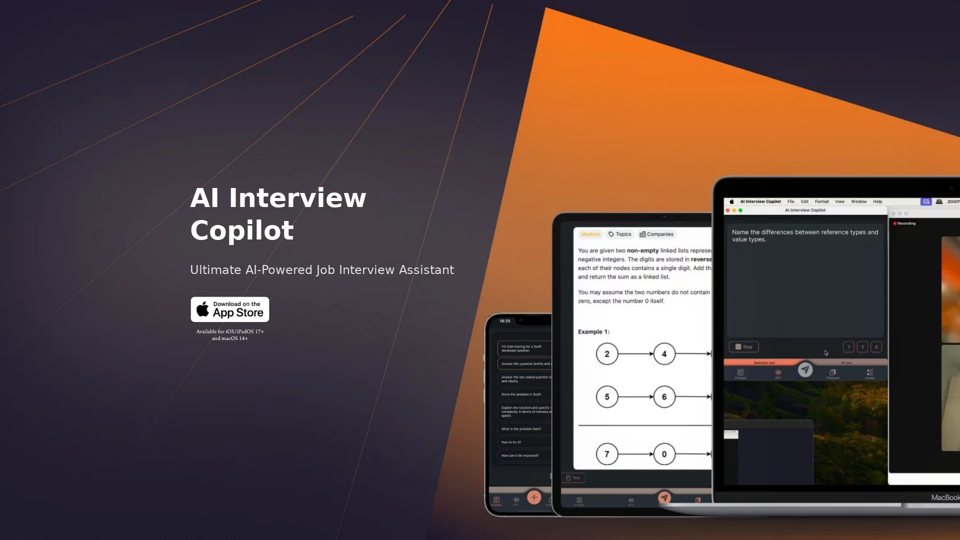
An application designed to generate real-time answers to job interview questions, solve algorithmic problems, assist with live coding, and offer advice
Visit Website
AI Interview Copilot: Cracking the Coding Interview for Real
Visit Website

Introduction

AI Interview Copilot is an advanced AI-powered job interview assistant designed to help candidates excel in coding interviews. This innovative tool offers real-time voice transcription, image recognition, and accurate answer generation using GPT-4o technology. Supporting 57 languages and available on iOS, iPadOS, and macOS platforms, AI Interview Copilot provides a comprehensive solution for interview preparation and performance.

Feature

Voice Transcription and Language Support

AI Interview Copilot offers real-time text transcription of interviews, supporting 57 languages. This feature allows users to review their responses and use the app in their native language, regardless of location.

Image and Screenshot Recognition

Users can save screenshots to the clipboard and send requests for AI-generated answers to visual tasks, enhancing the ability to tackle complex interview questions.

Intuitive User Interface

The app features simple and intuitive controls, eliminating the need for text input and allowing users to focus on the interview content.

AI-Powered Answer Generation

During interviews, AI Interview Copilot generates accurate answers using advanced GPT-4o technology, providing high-quality responses to interview questions.

One-Click Question Sending

Users can seamlessly switch between prompts with a single click or tap, streamlining the interview process and reducing cognitive load.

Algorithm Problem Solver

For technical roles, the tool includes an algorithm problem solver that generates code snippets in real-time, assisting users with complex technical interview questions.

Cross-Platform Availability

AI Interview Copilot is available for iOS/iPadOS 17+ and macOS 14+, ensuring compatibility across multiple Apple devices.

FAQ

How does AI Interview Copilot work?

AI Interview Copilot utilizes advanced GPT-4o technology to generate answers and provide a seamless interview experience. It combines voice transcription, image recognition, and AI-powered response generation to assist users throughout the interview process.

Is AI Interview Copilot available for free?

Yes, users can try AI Interview Copilot for free to experience the benefits of this AI-powered job interview assistant. However, specific pricing information for premium features or extended use is not provided in the given content.

What devices support AI Interview Copilot?

AI Interview Copilot is available for devices running iOS/iPadOS 17+ and macOS 14+, making it accessible on a range of Apple devices including iPhones, iPads, and Mac computers.

Latest Traffic Insights

  • Monthly Visits

    211

  • Bounce Rate

    34.85%

  • Pages Per Visit

    1.01

  • Time on Site(s)

    0.00

  • Global Rank

    -

  • Country Rank

    -

Recent Visits

Traffic Sources

  • Social Media:
    3.75%
  • Paid Referrals:
    1.93%
  • Email:
    0.18%
  • Referrals:
    14.08%
  • Search Engines:
    40.67%
  • Direct:
    38.71%
More Data

Related Websites

Home | Angel AI
View Detail

Home | Angel AI

Home | Angel AI

Angel AI is an innovative platform that offers a unique AI-driven experience, allowing users to interact with AI companions that feel real.

13.97 K
AI Character Generator (free, no sign-up, unlimited)―Perchance AI
View Detail

AI Character Generator (free, no sign-up, unlimited)―Perchance AI

AI Character Generator (free, no sign-up, unlimited)―Perchance AI

AI text to image generator. Generate AI art from text, completely free, online, no login or sign-up, no daily credit limits/restrictions/gimmicks, and it's fast. Other AI art generators often have annoying daily credit limits and require sign-up, or are slow - this one doesn't. Use this AI to generate high quality art, photos, cartoons, drawings, anime, thumbnails, profile pictures, and more. Create original characters, anime characters, AI villains, fanfiction artwork, and pretty much anything else. It's an AI-based image generator that uses the Stable Diffusion text-to-image model. No watermark, no signup/login, unlimited images. Type words, make pics.

199
PDNob Free AI Image Translator app with AI-OCR
View Detail

PDNob Free AI Image Translator app with AI-OCR

PDNob Free AI Image Translator app with AI-OCR

PDNob Image Translator is a powerful free image translator app that quickly extracts and translates text from images, screenshots, or scanned documents. It supports multiple languages and ensures high accuracy, making it ideal for students, professionals, and travelers.

4.18 M
ICLight Studio - Free and Easy AI Photo Relighting
View Detail

ICLight Studio - Free and Easy AI Photo Relighting

ICLight Studio - Free and Easy AI Photo Relighting

Transform your photos with ICLight's free AI-powered relighting technology. Create professional studio lighting effects with simple text prompts.

0
Flux Image AI Generator Online Free | FluxImage.co
View Detail

Flux Image AI Generator Online Free | FluxImage.co

Flux Image AI Generator Online Free | FluxImage.co

Create captivating images and videos with Flux Image AI Generator, the state-of-the-art AI image generation tool available for free online

2.35 K
Grok AI Image Generator
View Detail

Grok AI Image Generator

Grok AI Image Generator

Generate Grok AI Images Free Online with Flux. Free Online | No Credit Card or Login Required

1.92 K
AI Interview Copilot: Cracking the Coding Interview for Real
View Detail

AI Interview Copilot: Cracking the Coding Interview for Real

AI Interview Copilot: Cracking the Coding Interview for Real

An application designed to generate real-time answers to job interview questions, solve algorithmic problems, assist with live coding, and offer advice

211
Simplified Chrome Extension

This is a basic Chrome extension designed to be easy to understand and modify. 

Manifest File (manifest.json):

```json
{
  "manifest_version": 3,
  "name": "Simplified Extension",
  "version": "1.0",
  "description": "A simple Chrome extension example.",
  "permissions": [
    "activeTab"
  ],
  "action": {
    "default_popup": "popup.html"
  }
}
```

Popup HTML (popup.html):

```html
<!DOCTYPE html>
<html>
<head>
  <title>Simplified Extension</title>
</head>
<body>
  <h1>Hello from the extension!</h1>
  <p>This is a simple popup.</p>
</body>
</html>
```

Explanation:

* manifest.json: This file tells Chrome what your extension does.
    * `manifest_version`: Specifies the version of the manifest file format.
    * `name`: The name of your extension.
    * `version`: The current version of your extension.
    * `description`: A brief description of your extension.
    * `permissions`: Lists the permissions your extension needs to function. Here, it needs access to the active tab.
    * `action`: Defines the popup that appears when the extension icon is clicked.

* popup.html: This file contains the HTML code for the popup window.

How it works:

1. When you install the extension, Chrome reads the `manifest.json` file.
2. When you click the extension icon, Chrome opens the `popup.html` file in a new window.
3. The popup displays the "Hello from the extension!" message.
View Detail

Simplified Chrome Extension This is a basic Chrome extension designed to be easy to understand and modify. Manifest File (manifest.json): ```json { "manifest_version": 3, "name": "Simplified Extension", "version": "1.0", "description": "A simple Chrome extension example.", "permissions": [ "activeTab" ], "action": { "default_popup": "popup.html" } } ``` Popup HTML (popup.html): ```html <!DOCTYPE html> <html> <head> <title>Simplified Extension</title> </head> <body> <h1>Hello from the extension!</h1> <p>This is a simple popup.</p> </body> </html> ``` Explanation: * manifest.json: This file tells Chrome what your extension does. * `manifest_version`: Specifies the version of the manifest file format. * `name`: The name of your extension. * `version`: The current version of your extension. * `description`: A brief description of your extension. * `permissions`: Lists the permissions your extension needs to function. Here, it needs access to the active tab. * `action`: Defines the popup that appears when the extension icon is clicked. * popup.html: This file contains the HTML code for the popup window. How it works: 1. When you install the extension, Chrome reads the `manifest.json` file. 2. When you click the extension icon, Chrome opens the `popup.html` file in a new window. 3. The popup displays the "Hello from the extension!" message.

Simplified Chrome Extension This is a basic Chrome extension designed to be easy to understand and modify. Manifest File (manifest.json): ```json { "manifest_version": 3, "name": "Simplified Extension", "version": "1.0", "description": "A simple Chrome extension example.", "permissions": [ "activeTab" ], "action": { "default_popup": "popup.html" } } ``` Popup HTML (popup.html): ```html <!DOCTYPE html> <html> <head> <title>Simplified Extension</title> </head> <body> <h1>Hello from the extension!</h1> <p>This is a simple popup.</p> </body> </html> ``` Explanation: * manifest.json: This file tells Chrome what your extension does. * `manifest_version`: Specifies the version of the manifest file format. * `name`: The name of your extension. * `version`: The current version of your extension. * `description`: A brief description of your extension. * `permissions`: Lists the permissions your extension needs to function. Here, it needs access to the active tab. * `action`: Defines the popup that appears when the extension icon is clicked. * popup.html: This file contains the HTML code for the popup window. How it works: 1. When you install the extension, Chrome reads the `manifest.json` file. 2. When you click the extension icon, Chrome opens the `popup.html` file in a new window. 3. The popup displays the "Hello from the extension!" message.

Design & Collaborate Marketing made easy #Simplified

193.90 M