Open-source RightAI Tools Directory
  • Discover AI
  • Submit
  • Startup
  • Blog
Open-source RightAI Tools Directory
Discover the best AI tools of 2025 with the RightAI Tools Directory!

Friend Links

AI Anime GeneratorToolsApp AI

Support

Tap4
Privacy policyTerms & ConditionsContact Us
Loading...
loading...

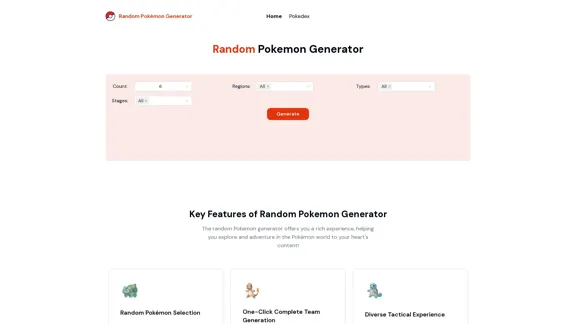
Random Pokemon Generator - Quickly customize and randomly generate Pokemon.

Discover the world of Pokémon with our interactive website! Unleash the excitement of random Pokémon generation, and delve into comprehensive Pokédex entries to learn about each creature's unique characteristics, abilities, and evolutions.
Visit Website
Random Pokemon Generator - Quickly customize and randomly generate Pokemon.
Visit Website

Introduction

The Random Pokemon Generator is a versatile tool designed to enhance the Pokemon gaming experience. It offers quick customization and random generation of Pokemon, catering to both novice and experienced players. This generator aims to add an element of surprise and challenge to Pokemon capturing and training journeys.

Feature

  1. Random Pokémon Selection

    • Quickly selects Pokémon for users
    • Adds fun and challenge to capturing and training journeys
    • Suitable for both novice and experienced players
  2. One-Click Complete Team Generation

    • Generates a full Pokémon team with a single click
    • Provides diverse options for flexible adaptation in battles
    • Enhances overall gaming experience
  3. Customizable Generation Parameters

    • Allows selection of specific:
      • Number of Pokémon (Count)
      • Regions
      • Types
      • Evolutionary stages
  4. Diverse Tactical Experience

    • Enables exploration of new battle strategies
    • Offers rich variety of tactical combinations
    • Eliminates reliance on fixed teams
  5. Creativity Inspiration

    • Sparks user creativity beyond mere generation
    • Encourages devising unique battle strategies
    • Facilitates creation of role-playing stories
  6. Social Interaction Enhancement

    • Useful for community events
    • Enables random battles with friends
    • Facilitates Pokémon trading among players
  7. Skill Development Tool

    • Aids in improving battle skills
    • Deepens understanding of Pokémon attributes and abilities
    • Supports player advancement in the game

FAQ

What is the Random Pokemon Generator?

The Random Pokemon Generator is a tool that quickly customizes and randomly generates Pokemon. It offers features like random Pokemon selection, complete team generation, and customizable parameters for regions, types, and evolutionary stages.

How does the generator enhance gameplay?

The generator enhances gameplay by adding surprise and challenge to Pokemon capturing and training. It allows players to explore diverse tactical combinations, inspire creativity in battle strategies, and improve their understanding of Pokemon attributes and abilities.

Can I customize the generation parameters?

Yes, the generator allows customization of parameters such as the number of Pokemon to generate, specific regions, types, and evolutionary stages to include in the randomization process.

Is the Random Pokemon Generator suitable for all player levels?

Yes, the tool is designed to cater to both novice and experienced players, offering features that can add excitement and challenge to the game regardless of skill level.

Evaluation

  1. The Random Pokemon Generator offers a unique and valuable tool for Pokemon enthusiasts, providing a fresh approach to team building and strategy development. Its ability to generate diverse teams quickly can significantly enhance the gameplay experience.

  2. The customization options, including the ability to filter by region, type, and evolutionary stage, add depth to the tool's functionality. This allows users to tailor their generated Pokemon to specific needs or challenges.

  3. While the generator excels in creating random teams, it could potentially benefit from additional features such as saving favorite team compositions or integrating with Pokemon game data to ensure generated teams are viable for competitive play.

  4. The tool's emphasis on social interaction and skill development is commendable, as it encourages players to engage with the broader Pokemon community and improve their gameplay strategies.

  5. One area for improvement could be the inclusion of a more detailed explanation of how the randomization process works, which could help users better understand and trust the results.

  6. Overall, the Random Pokemon Generator serves as an excellent supplement to the Pokemon gaming experience, offering both practical utility and entertainment value to its users.

Latest Traffic Insights

  • Monthly Visits

    94

  • Bounce Rate

    47.66%

  • Pages Per Visit

    1.01

  • Time on Site(s)

    0.00

  • Global Rank

    -

  • Country Rank

    -

Recent Visits

Traffic Sources

  • Social Media:
    4.52%
  • Paid Referrals:
    1.46%
  • Email:
    0.26%
  • Referrals:
    13.66%
  • Search Engines:
    44.90%
  • Direct:
    34.15%
More Data

Related Websites

Engage AI | Generative AI for LinkedIn Comments and Content
View Detail

Engage AI | Generative AI for LinkedIn Comments and Content

Engage AI | Generative AI for LinkedIn Comments and Content

Engage AI empowers LinkedIn power users with Generative AI. Craft meaningful LinkedIn comments and content that allow you to stand out, break the ice, and start conversations even with prospects who are usually unresponsive to calls, messages, and emails.

71.94 K
UCG - Chrome Web Store
View Detail

UCG - Chrome Web Store

UCG - Chrome Web Store

ChatGPT without leaving the tab or visible chat!

193.90 M
terrific.tools - Free Online Tools
View Detail

terrific.tools - Free Online Tools

terrific.tools - Free Online Tools

A modern collection of free, browser-based tools for everyone. Transform images, convert audio, format code, and much more.

52.91 K
Web Scraping Tool & Free Web Crawlers | Octoparse
View Detail

Web Scraping Tool & Free Web Crawlers | Octoparse

Web Scraping Tool & Free Web Crawlers | Octoparse

Web scraping simplified. Gather information from any website in minutes using our code-free web crawler. Obtain the essential data to propel your business forward. Begin at no cost today!

309.69 K
Copilot for Microsoft 365 – Microsoft Adoption

Copilot for Microsoft 365 is a powerful AI assistant that helps you work smarter and faster across Microsoft 365 apps and services. It combines the power of large language models (LLMs) with your organization's data in the Microsoft Graph and Microsoft 365 apps to turn your words into the most powerful productivity tool on the planet.

Copilot is designed to help you:

• Unleash creativity
• Unlock productivity
• Uplevel skills

Copilot is built on Microsoft's comprehensive approach to security, compliance, and privacy. Copilot in Microsoft 365 apps and services:

• Does not use your data to train the underlying LLM
• Does not replace human ingenuity and judgment
• Is designed to keep humans in the loop

Copilot is currently available in Word, Excel, PowerPoint, Outlook, Teams, and more.

Getting Started with Copilot

To get started with Copilot, follow these steps:

1. Check availability: Ensure your organization has access to Copilot.
2. Learn the basics: Familiarize yourself with Copilot's capabilities and how to use it effectively.
3. Explore use cases: Discover how Copilot can help you in your specific role and tasks.
4. Practice and refine: Use Copilot regularly and refine your prompts for better results.
5. Share and collaborate: Collaborate with colleagues using Copilot and share best practices.

Best Practices for Using Copilot

1. Be specific in your prompts
2. Provide context for better results
3. Review and edit Copilot's output
4. Use Copilot as a starting point, not a final product
5. Experiment with different approaches
6. Stay informed about new features and updates

Copilot in Different Microsoft 365 Apps

• Word: Draft, edit, summarize, and rewrite content
• Excel: Analyze data, create formulas, and generate insights
• PowerPoint: Create presentations, design slides, and generate content
• Outlook: Compose emails, summarize threads, and manage your inbox
• Teams: Summarize meetings, generate action items, and create meeting notes

Responsible AI and Copilot

Microsoft is committed to developing AI systems responsibly. When using Copilot, keep in mind:

• AI-generated content may contain biases or inaccuracies
• Always review and verify Copilot's output
• Use your judgment and expertise alongside Copilot's suggestions
• Be aware of your organization's policies regarding AI use

Conclusion

Copilot for Microsoft 365 is a powerful tool that can significantly enhance your productivity and creativity. By understanding its capabilities, following best practices, and using it responsibly, you can make the most of this AI assistant in your daily work.
View Detail

Copilot for Microsoft 365 – Microsoft Adoption Copilot for Microsoft 365 is a powerful AI assistant that helps you work smarter and faster across Microsoft 365 apps and services. It combines the power of large language models (LLMs) with your organization's data in the Microsoft Graph and Microsoft 365 apps to turn your words into the most powerful productivity tool on the planet. Copilot is designed to help you: • Unleash creativity • Unlock productivity • Uplevel skills Copilot is built on Microsoft's comprehensive approach to security, compliance, and privacy. Copilot in Microsoft 365 apps and services: • Does not use your data to train the underlying LLM • Does not replace human ingenuity and judgment • Is designed to keep humans in the loop Copilot is currently available in Word, Excel, PowerPoint, Outlook, Teams, and more. Getting Started with Copilot To get started with Copilot, follow these steps: 1. Check availability: Ensure your organization has access to Copilot. 2. Learn the basics: Familiarize yourself with Copilot's capabilities and how to use it effectively. 3. Explore use cases: Discover how Copilot can help you in your specific role and tasks. 4. Practice and refine: Use Copilot regularly and refine your prompts for better results. 5. Share and collaborate: Collaborate with colleagues using Copilot and share best practices. Best Practices for Using Copilot 1. Be specific in your prompts 2. Provide context for better results 3. Review and edit Copilot's output 4. Use Copilot as a starting point, not a final product 5. Experiment with different approaches 6. Stay informed about new features and updates Copilot in Different Microsoft 365 Apps • Word: Draft, edit, summarize, and rewrite content • Excel: Analyze data, create formulas, and generate insights • PowerPoint: Create presentations, design slides, and generate content • Outlook: Compose emails, summarize threads, and manage your inbox • Teams: Summarize meetings, generate action items, and create meeting notes Responsible AI and Copilot Microsoft is committed to developing AI systems responsibly. When using Copilot, keep in mind: • AI-generated content may contain biases or inaccuracies • Always review and verify Copilot's output • Use your judgment and expertise alongside Copilot's suggestions • Be aware of your organization's policies regarding AI use Conclusion Copilot for Microsoft 365 is a powerful tool that can significantly enhance your productivity and creativity. By understanding its capabilities, following best practices, and using it responsibly, you can make the most of this AI assistant in your daily work.

Copilot for Microsoft 365 – Microsoft Adoption Copilot for Microsoft 365 is a powerful AI assistant that helps you work smarter and faster across Microsoft 365 apps and services. It combines the power of large language models (LLMs) with your organization's data in the Microsoft Graph and Microsoft 365 apps to turn your words into the most powerful productivity tool on the planet. Copilot is designed to help you: • Unleash creativity • Unlock productivity • Uplevel skills Copilot is built on Microsoft's comprehensive approach to security, compliance, and privacy. Copilot in Microsoft 365 apps and services: • Does not use your data to train the underlying LLM • Does not replace human ingenuity and judgment • Is designed to keep humans in the loop Copilot is currently available in Word, Excel, PowerPoint, Outlook, Teams, and more. Getting Started with Copilot To get started with Copilot, follow these steps: 1. Check availability: Ensure your organization has access to Copilot. 2. Learn the basics: Familiarize yourself with Copilot's capabilities and how to use it effectively. 3. Explore use cases: Discover how Copilot can help you in your specific role and tasks. 4. Practice and refine: Use Copilot regularly and refine your prompts for better results. 5. Share and collaborate: Collaborate with colleagues using Copilot and share best practices. Best Practices for Using Copilot 1. Be specific in your prompts 2. Provide context for better results 3. Review and edit Copilot's output 4. Use Copilot as a starting point, not a final product 5. Experiment with different approaches 6. Stay informed about new features and updates Copilot in Different Microsoft 365 Apps • Word: Draft, edit, summarize, and rewrite content • Excel: Analyze data, create formulas, and generate insights • PowerPoint: Create presentations, design slides, and generate content • Outlook: Compose emails, summarize threads, and manage your inbox • Teams: Summarize meetings, generate action items, and create meeting notes Responsible AI and Copilot Microsoft is committed to developing AI systems responsibly. When using Copilot, keep in mind: • AI-generated content may contain biases or inaccuracies • Always review and verify Copilot's output • Use your judgment and expertise alongside Copilot's suggestions • Be aware of your organization's policies regarding AI use Conclusion Copilot for Microsoft 365 is a powerful tool that can significantly enhance your productivity and creativity. By understanding its capabilities, following best practices, and using it responsibly, you can make the most of this AI assistant in your daily work.

Microsoft Copilot combines the power of large language models (LLMs) with your organization's data to turn your words into one of the most powerful productivity tools on the planet.

608.60 K
Recap | AI-Driven Summaries and Visual Insights Instantly
View Detail

Recap | AI-Driven Summaries and Visual Insights Instantly

Recap | AI-Driven Summaries and Visual Insights Instantly

Recap, an AI platform, transforms complex information into concise summaries and intuitive visuals, such as mind maps, timelines, and tables, enhancing productivity and saving time by extracting key details from various sources. |Recap

2.37 K
ClickUp™ | One app to replace them all
View Detail

ClickUp™ | One app to replace them all

ClickUp™ | One app to replace them all

Our mission is to make the world more productive. To achieve this, we created a single app to replace all others - incorporating Tasks, Docs, Goals, and Chat.

33.03 M
Filo - AI Email Client & To-Do
View Detail

Filo - AI Email Client & To-Do

Filo - AI Email Client & To-Do

Turn overwhelming emails into clear summaries, quick replies, and AI-generated to-dos in one second.

6.31 K