Open-source RightAI Tools Directory
  • Discover AI
  • Submit
  • Startup
  • Blog
Open-source RightAI Tools Directory
Discover the best AI tools of 2025 with the RightAI Tools Directory!

Friend Links

AI Anime GeneratorToolsApp AI

Support

Tap4
Privacy policyTerms & ConditionsContact Us
Loading...
loading...

Arbi - Amazon FBA Analyser. ChatGPT Built-In

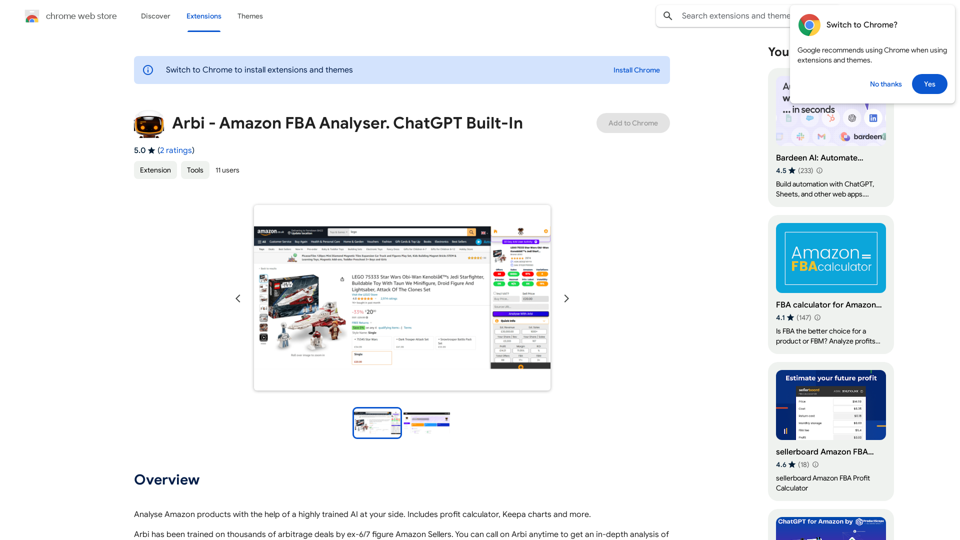
Analyze Amazon products with the help of a powerful AI assistant. Features include a profit calculator, Keepa charts, and more.
Visit Website
Arbi - Amazon FBA Analyser. ChatGPT Built-In
Visit Website

Introduction

Arbi - Amazon FBA Analyser is an innovative extension that leverages AI technology to assist users in analyzing Amazon products. This powerful tool combines the expertise of experienced Amazon sellers with advanced artificial intelligence to provide comprehensive insights for FBA (Fulfillment by Amazon) sellers. With features like a profit calculator and Keepa charts, Arbi aims to streamline the product analysis process and help sellers make informed decisions.

Feature

AI-Powered Product Analysis

Arbi utilizes a highly trained AI system to analyze Amazon products, offering insights that go beyond surface-level information. This AI is trained on thousands of arbitrage deals by former 6 and 7-figure Amazon sellers, enabling it to identify nuanced considerations such as seasonal demand and holiday trends.

Comprehensive Toolset

The extension includes a variety of useful tools for Amazon sellers:

  • Profit calculator
  • Keepa charts integration
  • AI-driven insights and recommendations

User-Friendly Interface

Arbi is designed for ease of use:

  • Simple installation process
  • Intuitive product analysis workflow
  • Customizable settings to suit individual needs

Free Access with Optional Upgrades

The extension offers a free base version with the option for in-app purchases, allowing users to access advanced features as needed.

Data Privacy and Security

Arbi handles user data, including personally identifiable information and authentication details, in compliance with its privacy policy, ensuring user trust and data protection.

FAQ

How does Arbi's AI technology work?

Arbi's AI is trained on a vast dataset of arbitrage deals curated by successful Amazon sellers. This training allows the AI to:

  • Identify non-obvious product considerations
  • Analyze seasonal demand patterns
  • Predict potential holiday season impacts on sales

What are the key benefits of using Arbi for Amazon FBA sellers?

Using Arbi can provide several advantages:

  • More informed decision-making through AI-driven insights
  • Time-saving product analysis with integrated tools
  • Potential for increased profitability through better product selection

Is Arbi suitable for both new and experienced Amazon sellers?

Yes, Arbi is designed to benefit sellers at various experience levels:

  • New sellers can leverage the AI insights to avoid common pitfalls
  • Experienced sellers can use the advanced features to refine their strategies
  • The customizable nature of the tool allows for adaptation to different skill levels

How frequently is Arbi updated?

While specific update information isn't provided, users should note:

  • The extension is currently in beta, suggesting ongoing development
  • Features may be limited or not fully functional
  • Regular updates are likely as the tool evolves based on user feedback

Can Arbi guarantee success in Amazon FBA selling?

No tool can guarantee success, but Arbi aims to improve decision-making:

  • It provides data-driven insights to inform product choices
  • The profit calculator helps estimate potential returns
  • Users should combine Arbi's insights with their own research and judgment

Related Websites

WriteText.ai
View Detail

WriteText.ai

WriteText.ai

WriteText.ai Page Review WriteText.ai is an AI-powered writing assistant that helps you generate different creative text formats, like poems, code, scripts, musical pieces, email, letters, etc. It's designed to be user-friendly and accessible to everyone, regardless of their writing experience. Here's a breakdown of its key features and benefits: * Multiple Text Formats: WriteText.ai can generate a variety of text formats, including poems, code, scripts, musical pieces, emails, letters, and more. This versatility makes it a valuable tool for writers, developers, and anyone who needs to create different types of content. * User-Friendly Interface: The platform boasts a clean and intuitive interface that is easy to navigate, even for beginners. * AI-Powered Generation: WriteText.ai leverages the power of artificial intelligence to generate high-quality text. The AI model is trained on a massive dataset of text and code, allowing it to produce creative and coherent outputs. * Customization Options: Users can customize their text generation by providing specific instructions, keywords, or examples. This level of control ensures that the generated text meets their exact needs. * Fast and Efficient: WriteText.ai is designed to be fast and efficient, generating text quickly and accurately. This saves users time and effort, allowing them to focus on other aspects of their work. Overall, WriteText.ai is a powerful and versatile AI writing assistant that can be a valuable tool for a wide range of users. Its user-friendly interface, multiple text format options, and AI-powered generation make it a compelling choice for anyone looking to enhance their writing process.

193.90 M
FluxImage | Free Flux AI Image Generator with Flux.1 Models
View Detail

FluxImage | Free Flux AI Image Generator with Flux.1 Models

FluxImage | Free Flux AI Image Generator with Flux.1 Models

Flux AI is a state-of-the-art text-to-image Flux.1 AI model created by Black Forest Labs. It includes Flux.1 Pro, Flux.1 Dev, and Flux.1 Schnell versions.

0
Free AI Photo Editor: Simplify Photo Editing Online - AI Ease
View Detail

Free AI Photo Editor: Simplify Photo Editing Online - AI Ease

Free AI Photo Editor: Simplify Photo Editing Online - AI Ease

Simplify and automate your photo editing with AI Ease. Experience a variety of AI photo editing tools to enhance every aspect of your images for free.

2.46 M
Torii Image Translator β€” Use GPT-4 & DeepL to Translate Any Image, Manga...
View Detail

Torii Image Translator β€” Use GPT-4 & DeepL to Translate Any Image, Manga...

Torii Image Translator β€” Use GPT-4 & DeepL to Translate Any Image, Manga...

Translate any image on any website into any language! Perfect for Manga, Manhwa, Manhua, Comics, ArtistCG, Memes, or any image at all!

193.90 M
ChatGPT on Google
View Detail

ChatGPT on Google

ChatGPT on Google

Use Google to access ChatGPT and see the AI chatbot's answers next to regular search results.

193.90 M
Simplified Chrome Extension

This is a basic Chrome extension designed to be easy to understand and modify. 

Manifest File (manifest.json):

```json
{
  "manifest_version": 3,
  "name": "Simplified Extension",
  "version": "1.0",
  "description": "A simple Chrome extension example.",
  "permissions": [
    "activeTab"
  ],
  "action": {
    "default_popup": "popup.html"
  }
}
```

Popup HTML (popup.html):

```html
<!DOCTYPE html>
<html>
<head>
  <title>Simplified Extension</title>
</head>
<body>
  <h1>Hello from the extension!</h1>
  <p>This is a simple popup.</p>
</body>
</html>
```

Explanation:

* manifest.json: This file tells Chrome what your extension does.
    * `manifest_version`: Specifies the version of the manifest file format.
    * `name`: The name of your extension.
    * `version`: The current version of your extension.
    * `description`: A brief description of your extension.
    * `permissions`: Lists the permissions your extension needs to function. Here, it needs access to the active tab.
    * `action`: Defines the popup that appears when the extension icon is clicked.

* popup.html: This file contains the HTML code for the popup window.

How it works:

1. When you install the extension, Chrome reads the `manifest.json` file.
2. When you click the extension icon, Chrome opens the `popup.html` file in a new window.
3. The popup displays the "Hello from the extension!" message.
View Detail

Simplified Chrome Extension This is a basic Chrome extension designed to be easy to understand and modify. Manifest File (manifest.json): ```json { "manifest_version": 3, "name": "Simplified Extension", "version": "1.0", "description": "A simple Chrome extension example.", "permissions": [ "activeTab" ], "action": { "default_popup": "popup.html" } } ``` Popup HTML (popup.html): ```html <!DOCTYPE html> <html> <head> <title>Simplified Extension</title> </head> <body> <h1>Hello from the extension!</h1> <p>This is a simple popup.</p> </body> </html> ``` Explanation: * manifest.json: This file tells Chrome what your extension does. * `manifest_version`: Specifies the version of the manifest file format. * `name`: The name of your extension. * `version`: The current version of your extension. * `description`: A brief description of your extension. * `permissions`: Lists the permissions your extension needs to function. Here, it needs access to the active tab. * `action`: Defines the popup that appears when the extension icon is clicked. * popup.html: This file contains the HTML code for the popup window. How it works: 1. When you install the extension, Chrome reads the `manifest.json` file. 2. When you click the extension icon, Chrome opens the `popup.html` file in a new window. 3. The popup displays the "Hello from the extension!" message.

Simplified Chrome Extension This is a basic Chrome extension designed to be easy to understand and modify. Manifest File (manifest.json): ```json { "manifest_version": 3, "name": "Simplified Extension", "version": "1.0", "description": "A simple Chrome extension example.", "permissions": [ "activeTab" ], "action": { "default_popup": "popup.html" } } ``` Popup HTML (popup.html): ```html <!DOCTYPE html> <html> <head> <title>Simplified Extension</title> </head> <body> <h1>Hello from the extension!</h1> <p>This is a simple popup.</p> </body> </html> ``` Explanation: * manifest.json: This file tells Chrome what your extension does. * `manifest_version`: Specifies the version of the manifest file format. * `name`: The name of your extension. * `version`: The current version of your extension. * `description`: A brief description of your extension. * `permissions`: Lists the permissions your extension needs to function. Here, it needs access to the active tab. * `action`: Defines the popup that appears when the extension icon is clicked. * popup.html: This file contains the HTML code for the popup window. How it works: 1. When you install the extension, Chrome reads the `manifest.json` file. 2. When you click the extension icon, Chrome opens the `popup.html` file in a new window. 3. The popup displays the "Hello from the extension!" message.

Design & Collaborate Marketing made easy #Simplified

193.90 M
FLUX Canny - Advanced AI Tool for Image Generation with Edge Guidance
View Detail

FLUX Canny - Advanced AI Tool for Image Generation with Edge Guidance

FLUX Canny - Advanced AI Tool for Image Generation with Edge Guidance

FLUX Canny - A professional edge-guided AI image generation tool. Transform sketches into stunning artwork with precise structural control.

0
YouTube Summary AI with Gemini

Gemini, Google's powerful new AI, is making waves in the world of YouTube. 

Imagine a future where YouTube videos automatically generate concise and informative summaries. That's exactly what Gemini aims to achieve.

By leveraging its advanced language understanding capabilities, Gemini can analyze video content and extract key points, creating summaries that capture the essence of the video. 

This means viewers can quickly grasp the main ideas without having to watch the entire video.

Gemini's potential applications extend beyond simple summaries. It could also be used to:

* Generate captions:  Automatically create accurate captions for videos, making them accessible to a wider audience.
* Translate videos:  Break down language barriers by translating videos into different languages.
* Create interactive experiences:  Enable viewers to engage with videos in new and innovative ways through interactive summaries and quizzes.


Gemini's arrival on YouTube promises to revolutionize the way we consume and interact with video content.
View Detail

YouTube Summary AI with Gemini Gemini, Google's powerful new AI, is making waves in the world of YouTube. Imagine a future where YouTube videos automatically generate concise and informative summaries. That's exactly what Gemini aims to achieve. By leveraging its advanced language understanding capabilities, Gemini can analyze video content and extract key points, creating summaries that capture the essence of the video. This means viewers can quickly grasp the main ideas without having to watch the entire video. Gemini's potential applications extend beyond simple summaries. It could also be used to: * Generate captions: Automatically create accurate captions for videos, making them accessible to a wider audience. * Translate videos: Break down language barriers by translating videos into different languages. * Create interactive experiences: Enable viewers to engage with videos in new and innovative ways through interactive summaries and quizzes. Gemini's arrival on YouTube promises to revolutionize the way we consume and interact with video content.

YouTube Summary AI with Gemini Gemini, Google's powerful new AI, is making waves in the world of YouTube. Imagine a future where YouTube videos automatically generate concise and informative summaries. That's exactly what Gemini aims to achieve. By leveraging its advanced language understanding capabilities, Gemini can analyze video content and extract key points, creating summaries that capture the essence of the video. This means viewers can quickly grasp the main ideas without having to watch the entire video. Gemini's potential applications extend beyond simple summaries. It could also be used to: * Generate captions: Automatically create accurate captions for videos, making them accessible to a wider audience. * Translate videos: Break down language barriers by translating videos into different languages. * Create interactive experiences: Enable viewers to engage with videos in new and innovative ways through interactive summaries and quizzes. Gemini's arrival on YouTube promises to revolutionize the way we consume and interact with video content.

AI tool powered by Gemini that summarizes YouTube videos.

193.90 M